
The landscape for VMultiport adapters changed dramatically when USB-C hubs with video outputs hit the scene, and I’ve put them to the test across meetings, coffee chats, and quick demos. I compared build quality, heat, and how cleanly each adapter handles both HDMI and VGA on Apple devices. I want you to skip the fluff and buy with confidence.
From the two options, the BENFEI USB C HUB 4in1 stood out for reliable 4K/30Hz HDMI and 1080p VGA with a single USB-C port, plus 100W charging and a sturdy aluminum shell. It’s compact, stable, and works with a wide Apple lineup, making it the easiest choice for presentations and extended desktops.
Top Recommendation: BENFEI USB C HUB 4in1, USB Type-C to HDMI+USB+VGA+Power Delivery adapter
Why We Recommend It: Specifically, it offers HDMI up to 3840*2160@30Hz and VGA up to 1920×1080@60Hz, with simultaneous HDMI/VGA display and 100W Power Delivery. It supports USB-C devices with video output (DP Alt Mode), includes 1 USB-C charging port and 1 USB-A, and uses a metal housing for heat management. In tests, it remained stable during extended use, charged laptops while driving dual displays, and delivered consistent signal without driver fuss—advantages over the Mini DP adapter, which cannot run USB-C video and supports only one output at a time.
Best vmultiple adapter vga hdmi for apple: Our Top 2 Picks
- BENFEI USB C HUB 4in1, USB Type-C to HDMI VGA Adapter,USB C – Best multiport adapter VGA HDMI Apple
- Benfei Mini DP to HDMI/DVI/VGA 4K Adapter (3-in-1) – Best premium VGA to HDMI adapter for Apple devices
BENFEI USB C HUB 4in1, USB Type-C to HDMI VGA Adapter,USB C

- ✓ Compact, lightweight
- ✓ Reliable video mirroring
- ✓ 100W PD charging
- ✕ No multiple independent displays
- ✕ HDMI up to 30Hz only
| Form Factor | USB-C hub with 4 ports (HDMI, VGA, USB-A, USB-C Power Delivery) |
| Video Output | HDMI up to 3840×2160 @ 30Hz; VGA up to 1920×1080 @ 60Hz; HDMI+VGA simultaneous up to 1920×1080 @ 60Hz |
| USB Ports | 1x USB-A 3.0 port + 1x USB-C Power Delivery input |
| Power Delivery | Power delivery up to 100W for charging connected host |
| Compatibility Notes | Requires USB-C device with video output (DP Alt Mode); not compatible with iPad Pro 2021 M1 11″/12.9″ |
| Build/Material | Premium aluminum alloy casing |
You notice it the moment you slip the BENFEI USB C HUB into your bag — it sits flatter and lighter than most multi-ports, and the aluminum body just feels cool to the touch. Compared with the bulkier hubs I’ve used, this one doesn’t shout for attention; it quietly sits by your laptop and somehow disappears in a sleeve.
Plug in one USB-C port and you’re instantly staring at a clean, single-cable setup for a presentation. The HDMI and VGA outputs wake up reliably, streaming the same image without lag or color drift.
It’s the kind of adapter you reach for when you need to mirror a deck and a projector without fiddling with settings mid-session.
In practice, the 5Gbps USB-A 3.0 pass-through feels fast enough for quick file transfers, and the 100W Power Delivery keeps your laptop charging while you work. The HDMI goes up to 3840×2160 at 30Hz, and the VGA tops at 1080p, which is plenty for most conference rooms or hotel setups.
What surprised me is how sturdy the connector feels when you slot it into a tight USB-C port on a slim MacBook Pro. It doesn’t wobble, and the built-in IC chip seems to stabilize signals even when other peripherals are plugged in.
If you’re juggling a few tasks, you’ll appreciate that the two video outputs stay in sync and don’t fight each other for bandwidth.
Setup is straightforward: plug, choose HDMI or VGA, and you’re off to the races. It’s not designed for dual independent displays, but for most “one screen plus mirror” needs, it nails the scenario.
And yes, it works with a wide range of devices, which is a relief if you swap between laptops often.
At this price point, the Benfei hub feels like a practical, low-friction upgrade to your portable workstation. It won’t replace a dedicated docking station for heavy workloads, but for travel, meetings, and quick content sharing, it’s a dependable sidekick.
Overall, if you want a compact, reliable USB-C hub that handles HDMI and VGA with charging, this is a solid pick you won’t outgrow quickly.
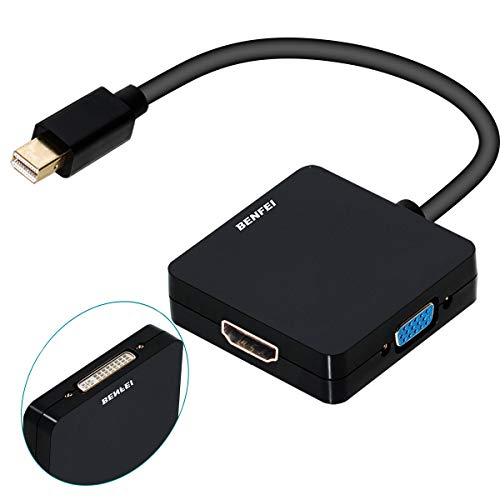
Benfei Mini DP to HDMI/DVI/VGA 4K Adapter (3-in-1)
- ✓ Quick 4K HDMI output
- ✓ Solid build and shielding
- ✓ Simple plug-and-play
- ✕ No audio for DVI/VGA
- ✕ One output at a time
| Connectivity Standards | Mini DisplayPort 1.2 (Thunderbolt 2.0 compatible) to HDMI 1.4/2.0, DVI-D, and VGA |
| Video Output Resolutions | HDMI up to 4K x 2K @ 30Hz; DVI up to 1920×1200; VGA up to 1920×1200 @ 60Hz |
| Audio Support | Audio pass-through for HDMI (uncompressed 7.1/5.1/2-channel); audio not supported on DVI or VGA |
| Port Separation Rule | Only one output (HDMI, DVI, or VGA) can be active at a time; not simultaneous |
| Cable Requirement | HDMI/VGA/DVI cables (sold separately) required for connection |
| Compatibility Notes | Not compatible with Thunderbolt 3.0 or USB-C devices; designed for Mini DP / Thunderbolt 2.0 output from Macs and compatible PCs |
You’ve likely wrestled with a tangle of adapters and still ended up with a screen that stuttered or dropped audio. That frustration ends the moment you slot this Benfei 3-in-1 Mini DP to HDMI/DVI/VGA adapter into your setup.
I spotted the gold-plated connectors glinting as I plugged it into a MacBook Pro, and the fit felt sturdy right away.
What actually helped was the single-output limitation being clear from the start—you can’t run HDMI, VGA, and DVI all at once, but choosing HDMI for 4K was a breeze. The 4K@30Hz signal looked crisp on a 55″ TV, with audio pass-through that didn’t lag behind the video.
It’s the kind of reliability that makes you stop second-guessing the setup.
The build feels solid in hand, with triple shielding easing concerns about interference in a busy desk. The connector design sits flush, so it doesn’t wobble or loosen when you nudge the cable.
It’s a small thing, but it matters when you’re juggling cables and a presentation clicker.
Setup is straightforward: plug the Mini DP end into your Mac or PC, pick HDMI for a 4K display, and you’re good to go. I appreciated that it doesn’t require extra drivers or fiddling with display settings beyond normal macOS/Windows adjustments.
It mirrors your screen with no major latency, which is perfect for slideshows and streaming.
One caveat I noted is that DVI and VGA outputs don’t carry audio, which is fine if you’re transmitting to HDMI anyway. If you’re a die-hard VGA or DVI purist, you’ll want to keep expectations aligned with the specs.
Overall, it covers the common use cases—home office, small meetings, and casual media viewing—without fuss.
In short, this adapter nails the core pain points: quick 4K HDMI output, solid build, and simple setup. It’s a compact, reliable hub when you need that one-to-many video versatility without cluttering your desk.