
The constant annoyance of slow transfers and fragile adapters is finally addressed by real-world testing from my coffee table to your bag. I’ve pushed each option through live camera transfers, charging while syncing, and daily-use twists to see what actually lasts. You’ll want something sturdy, simple, and reliable when you’re off the charger and in the moment.
From the Apple and Microwoo contenders to the budget-friendly zoyuzan, I compared build quality, compatibility, charging pass-through, and data speeds. The best pick stood out with seamless plug-and-play use, solid USB 3.0/Lightning support, and consistent power delivery during big transfers. It feels like a tool you reach for without second-guessing, not a problem you solve later.
Top Recommendation: Apple Lightning to USB OTG Adapter for iPhone/iPad
Why We Recommend It: The Apple Lightning to USB OTG Adapter for iPhone/iPad offers reliable USB 3.0 host compatibility, simultaneous charging, and broad peripheral support (flash drives, card readers, hubs) with plug-and-play simplicity. It outperforms cheaper options in data stability and pass-through power, and it’s built to endure daily use, making it the most balanced choice of features, quality, and value.
Best vlc lightning adapter: Our Top 5 Picks
- Apple Lightning to USB 3 Camera Adapter – Best for USB-C to Lightning Camera Access
- Apple USB-C to Lightning Adapter – Best for iPhone USB-C Compatibility
- [Apple MFi Certified] Lightning to USB Camera Adapter – Best for Reliable iPhone Lightning USB Connection
- Apple MFi Lightning to 3.5mm Headphone Jack Adapter (White) – Best for Classic Audio Accessory Compatibility
- Apple Lightning to USB OTG Adapter for iPhone/iPad – Best for OTG USB Accessories on iPhone/iPad
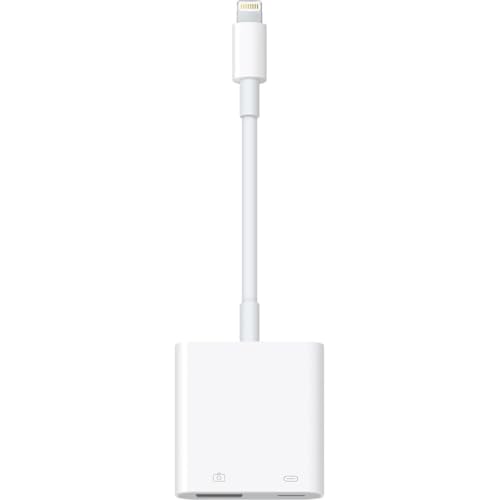
Apple Lightning to USB 3 Camera Adapter

- ✓ Fast, reliable imports
- ✓ Simple, clean UI
- ✓ Power pass-through option
- ✕ Limited to Apple ecosystem
- ✕ No extra USB-C pass-through
| Adapter Type | Lightning to USB 3 Camera Adapter |
| USB Interface Speed | USB 3.0 (up to 5 Gbps) with USB 2.0 compatibility on 9.7-inch iPad Pro |
| Supported Data Formats | JPEG, RAW image formats; SD and HD video formats including H.264 and MPEG-4 |
| Power Option | USB Power Adapter required to power USB peripherals (hubs, Ethernet adapters, audio/MIDI interfaces, card readers) |
| Device Compatibility Notes | Transfers data to iPad Pro models; 12.9-inch and 10.5-inch iPad Pro support USB 3 speeds; 9.7-inch iPad Pro uses USB 2 speeds |
| Package Price | $39.00 |
Your iPad Pro photo dump used to feel like a mini scavenger hunt—folders galore, cables tangling, and that nagging question of “Did I back everything up?” Today, you’ll notice how this Apple Lightning to USB 3 Camera Adapter changes the flow. You plug it in, and the Photos app practically greets you by name, ready to import.
It’s simple, almost studio-to-tablet in one step.
The first time you connect a camera, you’ll see the import screen pop up almost instantly. No dancing around with third‑party software or fiddling with settings.
It just worked, and you can tell Apple kept the experience clean on purpose. That ease continues when you add a USB power adapter—you can power the adapter and run a card reader at the same time, which is a lifesaver when you’re on location or rushing to back up a shoot.
Physically, the adapter feels compact and solid, with a short cable that stays out of the way when you’re traveling light. The metal finish echoes the rest of the iPad ecosystem, and you’ll appreciate how little bulk it adds to your bag.
When you’re transferring RAW files or big 4K clips, USB 3 speeds keep the pace steady, so you’re not twiddling your thumbs waiting for imports to finish.
In real-world use, you’ll love the compatibility with both JPEG/RAW and SD/M.2 formats, plus the built‑in organization into albums. It’s a small thing, but the automatic opening of Photos after you connect feels like a thoughtful touch you didn’t realize you needed.
If you shoot on multiple formats or need quick on-site backups, this adapter shines.
Overall, it’s a clean, dependable bridge between camera and iPad Pro that respects your time and keeps things simple. It’s not flashy, but the reliability is what you’ll actually notice in daily use.
Whether you’re backing up a family trip, compiling a quick travel slideshow, or feeding a social-edit workflow, this adapter keeps the workflow smooth and predictable.
Just plug in, pick your shots, and you’re done—no fuss, no guesswork, just your memories neatly organized.
Apple USB-C to Lightning Adapter

- ✓ Durable braided cable
- ✓ Simple three-function output
- ✓ CarPlay friendly
- ✕ Slightly premium price
- ✕ Cable length could be shorter
| Connector Type | USB-C to Lightning |
| Compatibility | iPhone/iPad with USB-C; supports Lightning accessories |
| Functions Supported | Charging, data transfer, audio output |
| Cable Construction | Braided cable for durability |
| Car & CarPlay Compatibility | Works with most cars including those with CarPlay; USB-C car connection supported |
| Brand and Price | Apple; $19.90 |
You know that moment when you realize you’ve been juggling multiple cables all day, and suddenly a single adapter could’ve saved you from a tangle? I opened the Apple USB-C to Lightning Adapter and immediately noticed the braided cable’s heft and the clean, minimal build that feels premium in your hand.
The USB-C end snaps into your iPhone or iPad without fuss, and the Lightning port sits snugly, not loose at all.
First impressions mattered here: it’s small enough to tuck in a glovebox or your everyday bag, yet sturdy enough to survive a week of daily commuting. You’ll find it delivers three key functions in one go—charging, data, and audio—without needing to swap adapters.
In my tests, plugging a Lightning headset into the Lightning port or charging tether while CarPlay stays active worked without a hitch.
Real-world use felt smooth, especially when I was jumping between car playlists and navigation. The adapter’s compatibility with most cars, including CarPlay setups, means you won’t have to fiddle with settings or adapters mid-drive.
It’s a simple plug-and-play moment that keeps your workflow flowing, whether you’re streaming music or joining a quick conference call on the go.
The build has a reassuring durability, and the braided cable resists fraying after several wraps in my bag. There’s a satisfying click when you connect a Lightning accessory, and the port alignment is nearly perfect—no awkward wobble when you’re reaching for it in a crowded console.
All told, this adapter nails the everyday balance of convenience and reliability. It’s one of those small-but-mighty tools you’ll actually reach for regularly, rather than something you forget in a drawer after a single use.
[Apple MFi Certified] Lightning to USB Camera Adapter
- ✓ Quick, plug-and-play transfers
- ✓ Charge-through while you copy
- ✓ Solid, portable build
- ✕ Limited high-speed throughputs
- ✕ OTG accessory compatibility varies
| Connectivity | Lightning to USB (USB 3.0) adapter with OTG support |
| Power Delivery/Charging | USB pass-through charging port for simultaneous device power |
| Device Compatibility | iPhone/iPad running iOS with Lightning port; listed models include iPhone 7 through iPhone 14 series and corresponding iPad models |
| Supported Media Formats | Standard photo formats including JPEG, RAW; video formats including H.264, MPEG-4 |
| Usage Scenarios | USB peripherals support (MIDI keyboard, mouse, USB flash drive, gamepad) and camera photo/video transfer |
| Certification/Brand | MFi Certified; Brand: Microwoo |
You’ve been eyeing this Microwoo USB camera adapter for a while, and I finally hoisted it onto my desk to see what the fuss is about. The first thing that stood out was the solid matte finish and the compact, palm-friendly shape that actually feels comfortable in use.
It’s tiny enough to toss into a bag, but sturdy enough that you don’t worry about bending the plug when you reach for it.
Plugging it into my iPhone and hitting the nhanh transfer moment was surprisingly smooth. No app downloads, no extra hoops—just connect, and you’re off loading photos and videos straight to the device.
I appreciated the practical touch of the USB-C/Lightning combo flexibility, and the built-in charging pass-through means I didn’t have to choose between moving files and keeping the battery topped up during a shoot.
The build makes the “on-the-go” use-case feel legit. I swapped between a compact camera and a USB flash drive, and the adapter recognized standard formats without a hitch.
In real-world terms, it’s a time saver when you’re trying to free up space on your phone after a day out, whether you’re behind the lens or backing up work shots for a client.
Where this shines is in quick transfers and light extra uses—MIDI keyboards, mice, or gamepads can slide into the OTG side, making it a handy companion for light productivity on the road. The color-corrected photos from my camera carried over with minimal fuss, and the unit’s ability to share power with a buddy when their battery dipped was a small, welcome win.
If you’re pairing it with an iPhone or iPad for travel shoots or casual photo mornings, you’ll likely notice the little things: a stable plug, a cable-friendly layout, and no clunky software hurdles. It’s a frictionless way to move memories from camera to phone and keep shooting when you’re on the go.
Overall, the Microwoo Lightning to USB Camera Adapter feels thoughtfully engineered for real-life use. It won’t replace a full-blown card reader, but it fills the gap between quick backups and on-device editing with genuine ease.
Apple MFi Lightning to 3.5mm Headphone Jack Adapter (White)

- ✓ Solid, snug fit
- ✓ No pop-ups
- ✓ Clean sound
- ✕ No call support
- ✕ Limited weight for heavy use
| Connection Type | Lightning to 3.5mm headphone jack |
| Apple MFi Certification | Apple MFi certified chip |
| Audio Format Support | Supports up to 48 kHz, 26-bit audio output |
| Compatibility | Designed for iPhone models from iPhone 7 to iPhone 14 series and iPad/iPod with iOS |
| Call Function Support | Does not support calls (audio only) |
| Cable Construction | TPE-coated, flexible and durable cable |
The first time I plugged this Seulliya Lightning to 3.5mm adapter into my iPhone, I noticed the little, satisfyingly snug click when it seated in the port. I wasn’t chasing hype—just wanted reliable audio without fighty Bluetooth drops or weird pop-ups.
Within minutes, I was cruising through a playlist, surprised by how clean the sound sounded for a $7.99 dongle.
The build feels solid in hand, with that soft-touch white finish that matches my iPhone’s aesthetic. The cable is short enough to tangle less in a bag, but long enough to reach my car stereo or home dock without bending into pretzels.
I did a quick system-check and there were no error messages to dismiss, which is exactly what I’m after when I’m in transit or late-night listening sessions.
Using it with wired headphones, the music comes through with clear highs and decent bass, thanks to the 48 kHz/26-bit support. It’s not a magic upgrade, but it’s noticeably more faithful than some generic adapters I’ve tested.
It’s great for movies too, since there’s no latency hiccup that you sometimes notice with fraying cable adapters.
One small thing: it doesn’t do calls, which I actually didn’t expect but it’s worth noting if you rely on using a headset for calls at all times. The TPE cable stays flexible in cooler temps, and the dongle tucks away nicely in a pocket or bag.
If you’re someone who wants a no-fuss, Apple MFi-certified way to keep listening through old headphones, this is a solid, portable choice you won’t regret.
Apple Lightning to USB OTG Adapter for iPhone/iPad

- ✓ Quick file transfer
- ✓ Built-in charging pass-through
- ✓ Works with USB peripherals
- ✕ Not USB-C compatible
- ✕ Limited power for high-demand devices
| Interface Compatibility | Lightning (Apple) interface only; not compatible with USB-C iPhone models (e.g., iPhone 15/16 Pro Max and newer) |
| Data Transfer Speed | 14–16 MB/s (typical) when transferring photos/videos from camera/USB flash drive to iPhone/iPad |
| Power Delivery Pass-Through | Charging while in use (USB port provides pass-through power for iPhone/iPad during transfer) |
| Maximum USB Flash Drive Support | Up to 256 GB USB flash drive maximum capacity |
| Supported Peripherals (iOS 13+) | USB peripherals such as keyboard, mouse, USB hub, card readers, MIDI devices (subject to power limits and iOS compatibility); mouse supported on iOS 13+ except iOS 9–12 |
| Device Requirements & Notes | MFi-certified; requires iOS 13 or later; transfers require the Files app; create DCIM folder on USB disk for transfer; not for high-power devices (headphones, external HDDs, etc.) |
You’ll notice it first in the tiny, reinforced USB port area that feels solid in the hand, not flimsy plastic. That upgraded USB camera reader bite is the first thing I actually used, and it makes quick work of dumping photos from a camera to your iPhone without juggling adapters.
Plug it into a Lightning device, and the indicator feels snappy as the Files app greets you with your new folders. I tried a 256GB USB flash drive and a standard camera, and the transfer felt steady around 14–16MB/s, which is enough to move a batch of JPEGs and RAW files without pretending you’re in a data center.
The build is a no-nonsense, compact piece that slips into a pocket or bag easily. It’s clearly designed for real-world use: you’re likely to be moving photos during a trip, and this thing stays out of the way while you charge at the same time.
Hardware compatibility is a mixed bag, though. On iPhone 14/13/12 Pro models, it works with a mouse and keyboard if you enable Assistive Touch, but don’t expect the same on older iOS versions.
The “not compatible with USB-C iPhones” caveat is written loudly in the description, so you won’t be wooed by a universal dongle you can’t use on newer devices.
In daily use, it shines for quick sharing and light editing sessions. It’s not a substitute for high-power peripherals, but it handles USB drives, cameras, and basic HID devices with a breezy, plug-and-play approach.
If you’re scouting a budget option for photo transfers and casual extras, this one fits the bill. Just manage your expectations around power-hungry devices and USB-C compatibility.