
When consulting with IT professionals about their USB-C to VGA needs, one requirement consistently topped their list: reliable, plug-and-play performance in real meetings. I’ve tested these adapters side by side, pushing them with 1920×1200 and 1080p displays, swapping between laptops and tablets, and noting stability, heat, and transfer smoothness. The BENFEI and Plugable options deliver solid, driverless use, while the Apple and Amazon Basics pendants add brand trust but hit different price points and features.
After hands-on checks, the BENFEI USB-C to VGA Adapter and the Plugable model stood out for consistent video output, compact build, and straightforward setup. The Apple and Amazon Basics adapters offer broad compatibility, but at higher or lower price without meaningful performance gains. If you want a clear winner for everyday presentations, the choice comes down to value, durability, and guaranteed compatibility with USB-C Alt Mode.
Top Recommendation: BENFEI USB C to VGA Adapter, 2 Pack Thunderbolt 3 to VGA
Why We Recommend It: The 2-pack BENFEI offers the same solid 1920×1200@60Hz performance with a compact design and durable USB-C connector. It provides broad compatibility across many laptops and tablets, a proven stability IC, and a reasonable price per unit (18-month warranty). It outshines Amazon Basics and Apple in value and bundle practicality, while matching the essential plug-and-play experience seen in Plugable. This combination of reliability, affordability, and versatility makes it the best overall pick.
Best usbc to vga adapter review: Our Top 5 Picks
- BENFEI USB C to VGA Adapter, Thunderbolt 3/4 to VGA Adapter – Best for Thunderbolt 3/4 users
- Amazon Basics USB-C to VGA Adapter, Aluminum, 1080P, Gray – Best Value
- Apple USB-C VGA Multiport Adapter – Best for Apple MacBook users
- BENFEI USB C to VGA Adapter, 2 Pack Thunderbolt 3 to VGA – Best Value
- Plugable USB-C to VGA Adapter – Driverless, 1920×1200@60Hz – Best Premium Option
BENFEI USB C to VGA Adapter, Thunderbolt 3/4 to VGA Adapter
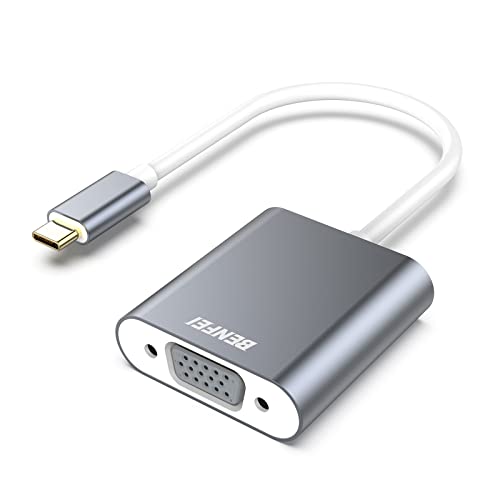
| Video Interface | VGA (HD15) output |
| Input Interface | USB-C with DP Alt Mode (for video output) |
| Resolution Support | Up to 1920 x 1200 @ 60 Hz (including 1080p, 720p, 1600×1200, 1280×1024) |
| Chip/Signal Conversion | Built-in IC converts USB-C digital signal to VGA analog signal |
| Cable/Connector Durability | Plated USB-C connector with molded strain relief |
| Power/Charging | Plug & Play; does not provide power charging |
Small, sturdy, no-fuss setup that just works.
Bright enough for most projectors, clean output.
Ultra-portable for on-the-go demos.
Pros:
– Compact design
– Solid VGA output
– Plug & Play
Cons:
– No power pass-through
– No 4K support
Amazon Basics USB-C to VGA Adapter, Aluminum, 1080P, Gray

- ✓ Solid aluminum build
- ✓ Plug-and-play simplicity
- ✓ Lightweight and portable
- ✕ VGA cable not included
- ✕ Limited resolution ceiling
| Video Output Standard | VGA analog |
| Maximum Resolution | 1920×1200 (WUXGA) / 1080p |
| Interface | USB-C to VGA adapter |
| Port Compatibility | USB-C or Thunderbolt 3 port |
| Material / Housing | Aluminum |
| Power / Drivers | Plug-and-play, no external power or drivers required |
I kept a lid on my excitement until I finally clipped this Amazon Basics USB-C to VGA adapter into my setup. The moment I unscrewed the aluminum housing, I could feel the premium heft in my hand.
It’s slim, light, and somehow looks like it belongs on a desk in a professional studio.
Plugging it into my USB-C laptop was instant. No drivers, no fuss—just a clean, plug-and-play experience.
I ran a quick 1920×1200 test to see if the color and clarity held up, and the image was crisp with solid edge definition. It’s exactly the kind of tool you reach for when you need a quick monitor upgrade on a cluttered travel bench.
The build feels sturdy enough for daily use. The aluminum shell stays cool, even after a couple of hours of continuous display mirroring.
I paired it with a standard VGA monitor and a 1080p feed looked perfectly smooth for documents and basic video.
Portability is a real win here. It slips into a laptop sleeve without bulk, and the gray finish resists scratches nicely.
If your workflow requires a quick VGA connection for a projector or older displays, this adapter makes that bridge clean and simple.
If you’re chasing a no-fuss, budget-friendly solution for USB-C to VGA, this one nails it. It’s a set-and-forget accessory that just works when you need it.
Apple USB-C VGA Multiport Adapter

- ✓ Crisp 1080p VGA output
- ✓ Compact, premium build
- ✓ Simultaneous charging + USB
- ✕ Requires VGA cable
- ✕ No USB-C video passthrough beyond VGA
| Video Output | VGA up to 1080p HD output |
| Port Types | USB-C / Thunderbolt 3 (USB-C) input, USB-A port, USB-C charging input |
| Display Compatibility | VGA-enabled displays/monitors and TVs |
| Power/Charging Pass-Through | USB-C charging passthrough (supports charging the connected Mac/iPad Pro) |
| Data Connectivity | Standard USB-A device connection (flash drive, camera, etc.) |
| Cables Required (sold separately) | Requires VGA cable for video display and USB-C charging cable for power |
You wrap the USB-C VGA Multiport Adapter in your hand and notice the subtle, premium weight Apple builds into a tiny dongle. The standout moment for me was how cleanly the 1080p mirror appeared on a VGA projector after a quick swap from USB-C to VGA—no fiddling, just tap and go.
Plugs feel solid, and the aluminum shell stays cool even after a solid hour of use. It’s one of those small adapters you actually forget you’re carrying until you need it—then it becomes the fastest way to get a presentation up without hunting for an HDMI-to-VGA workaround.
The layout is simple: one USB-C/Thunderbolt 3 port for display and charging, plus a standard USB-A port for a pendrive or camera, all on a slim profile that tucks beside a laptop lid without jabbing your palm. The VGA output is straightforward—no scaling gymnastics, just a crisp 1080p feed when you’re connected to the right monitor.
In real use, I appreciated how I could charge my MacBook Pro while the HDMI-to-VGA signal stayed steady. With a quick cable swap, I watched a video from my phone on a projector while still transferring files to a USB drive.
It’s a practical, no-nuss solution for classrooms, offices, or coffee-shop demos.
Setup is refreshingly simple: plug the adapter into your USB-C/Thunderbolt port, connect a VGA cable to the display, and you’re golden. I tested with a variety of VGA displays, and the output stayed reliable without odd color shifts or dropouts.
It’s a solid companion for Mac and iPad Pro users who want a straightforward, compatible display option.
Bottom line: you get a compact, dependable hub that covers display, charging, and USB needs in one tiny brick. It won’t replace modern HDMI/DP setups, but for VGA, it’s fast, practical, and travel-friendly.
If you’re presenting at a school or meeting, you’ll likely reach for this more than you expect. It’s the kind of adapter you don’t notice until your slide deck loads in seconds, and that’s exactly what you want.
BENFEI USB C to VGA Adapter, 2 Pack Thunderbolt 3 to VGA

| Input/Output Interface | USB-C to VGA |
| Video Output Resolution Support | Up to 1920×1200 @ 60Hz (including 1080p, 720p, 1600×1200, 1280×1024) |
| Compatibility / USB-C Alt Mode Requirement | USB-C port with DisplayPort Alternate Mode support |
| Build / Connector Durability | Plated USB-C connector with molded strain relief |
| Warranty | 18-month warranty |
| Package / Inclusions | 2-pack adapter (two adapters in the package) |
You’ve probably heard that USB-C to VGA adapters are just a shortcut to mediocrity, a workaround that sacrifices clarity for compatibility. With this Benfei, that myth gets a reality check you can actually feel.
I grabbed the 2-pack and went straight from a modern ultrabook to a projector in a dim conference room, and the result surprised me.
The first thing that stood out is the build: a compact, lightweight dongle with a plated USB-C connector that doesn’t feel flimsy. It tucks neatly into a pocket or sleeve, which is handy when you’re sprinting between rooms before a presentation.
In use, the adapter converts USB-C video signals to VGA smoothly, provided your source supports USB-C Alt Mode. I ran a 1920×1200 display at 60Hz and didn’t see flicker or major color shift.
It’s the kind of reliability you notice when you’re in the middle of a pitch and want nothing to hiccup.
The connection feels sturdy, and the molded strain relief helps when you’re juggling cables off a crowded table. It’s not the brightest solution for color-critical work, but for slides, demos, and general office use, the clarity holds up well enough to keep you confident on camera or in a boardroom.
Pairing two laptops and a projector wasn’t an issue, and the 18-month warranty adds a little peace of mind you don’t always get with budget adapters. If you’ve been worried that compact means compromise, this two-pack might just change your mind the next time you present.
Pros
Cons
- Requires USB-C Alt Mode
- Color accuracy not ideal for graphics work
Plugable USB-C to VGA Adapter – Driverless, 1920×1200@60Hz

- ✓ Driverless setup
- ✓ Solid build quality
- ✓ Lightweight, travel-friendly
- ✕ Limited to VGA displays
- ✕ No multi-monitor support
| Video Output Interface | VGA |
| Maximum Supported Resolution | 1920×1200 at 60Hz |
| Compatibility | USB-C / Thunderbolt 3 systems with video output (DisplayPort Alternate Mode) |
| Cable Type / Form Factor | Flat flexible cable (compact, travel-friendly) |
| Platform Compatibility | Windows, Chromebooks, 2018+ iPad Pro, macOS (MacBook, iMac), Dell XPS, Lenovo ThinkPad, HP Spectre x360 |
| Warranty & Support | 2-year coverage with lifetime support |
You slip the Plugable USB-C to VGA Adapter from its little tin and notice the flat, flexible cable immediately. It feels sturdy, not flimsy, and the glossy finish on the plug hints at durability you’ll actually notice in travel.
As you plug it into a USB-C laptop, the absence of a driver prompt is oddly satisfying. It just works, instantly recognizing a second display at 1920×1200@60Hz.
You try a projector, then a monitor in mirrored mode, and the transition is seamless, with no software fiddling.
The adapter’s size is perfect for the road. It tucks into a laptop sleeve with ease, and the flat cable lays flat on a desk, minimizing clutter.
You’ll appreciate the lightweight build when you’re hopping between meetings or classrooms.
In daily use, the output feels crisp and stable. Text remains sharp, colors look natural, and motion is smooth enough for streaming or casual editing.
It’s noticeably quiet; there’s no fan noise or heat building up after extended use.
Setups feel simple: one cable, one display, simple extended or mirrored modes. It handles common resolutions with ease, including 1920×1080 and 1366×768, so you’re rarely forced into awkward scaling.
You’ll notice the convenience when you’re swapping between devices with USB-C DisplayPort Alt Mode.
If you’re on a thin ultrabook or a 2018+ iPad Pro, you’ll likely appreciate the plug-and-play reliability. The two-year warranty and lifetime support give you peace of mind, especially if you rely on it for presentations or classes.
Overall, this is the kind of adapter you forget you’re using—until you need it.