
Contrary to what manufacturers claim about USB hubs, our testing showed that not all multiport adapters handle power, data, and compatibility the same. I’ve pushed each option through real-life use—keyboard, mouse, external drive, and occasional OTG needs—so you don’t have to guess. The 4-port setups vary in data speed, charging limits, and build quality, and the differences show up when you’re juggling devices or traveling.
From that hands-on comparison, the standout is the USB 4-Port USB Hub (USB 3.0, 5Gbps) for PC/Desktop/Xbox. It stays slim, delivers steady 5Gbps transfers, and keeps power-friendly peripherals running without claiming to charge laptops. If you need a compact, affordable, plug-and-play solution with clear LED status, this one earns your attention.
Top Recommendation: USB 4-Port USB Hub (USB 3.0, 5Gbps) for PC/Desktop/Xbox
Why We Recommend It: This model combines true USB 3.0 speed (up to 5Gbps) with four fully usable ports in a compact, travel-friendly form factor. It is plug-and-play across Windows, macOS, Linux, Xbox, and PS4, and it avoids false charging claims, focusing on data transfer reliability for low-power peripherals. In comparison, uni’s USB C to USB Hub emphasizes data transfer and charging limits, MOSWAG offers a mix of USB 3.0 and 2.0 ports but with no charging support, and ABIWAZY packs a 10-in-1 feature set at a higher price. The VIENON hub delivers solid performance at a budget price, but its lack of charging capability and the premium features of the ABIWAZY option make the 4-port USB Hub the best balance of speed, compatibility, and value for most users.
Best usb mulitport adapter: Our Top 4 Picks
- USB 4-Port USB Hub (USB 3.0, 5Gbps) for PC/Desktop/Xbox – Best Value
- uni USB C to USB Hub Multiport Adapter, Aluminum 4 Ports – Best Premium Option
- MOSWAG USB 3.0 Hub 4-Port Ultra-Slim Data Transfer 5Gbps – Best for portability
- USB C Hub Multiport Adapter, ABIWAZY 10-in-1 USB C Hub for – Best for Beginners
USB 4-Port USB Hub (USB 3.0, 5Gbps) for PC/Desktop/Xbox

| USB Ports | 4 x USB-A ports (1 in 4 out) |
| Data Transfer Speed | Up to 5 Gbps (USB 3.0, 5Gbps) |
| Power/Charging Capability | Designed for data transfer and low-power peripherals; does not support charging laptops or high-power devices |
| Compatibility | Plug-and-play; compatible with Windows, macOS, Linux; works with laptops, desktops, Xbox, PS4 |
| Form Factor & Port Spacing | Ultra-slim handheld hub with compact footprint; port spacing suitable for multiple devices simultaneously |
You’ve probably heard that USB hubs magically add more power and speed, but this one proves you don’t need a power brick or a fuss to expand your desk setup. I clipped the VIENON 4-port hub onto my laptop and watched two keyboards, a mouse, and a flash drive all plug in without a hitch.
The first moment I noticed was the slim, almost credit-card-sized profile. It sits flat on my desk, yet doesn’t crowd my space when I reach for a USB-C dongle or an external drive.
The blue LED stays softly lit, just enough to tell it’s awake without turning my room into a nightclub.
Physically, the four ports are spaced generously, so you can fit a larger dongle and a USB-A flash drive side by side. It’s a real-life bonus when you’re juggling multiple devices during a project or a backup session.
Plug-and-play is exactly what you want here. No driver hunting, no reboot rituals.
It simply works with Windows, macOS, Linux, and even Xbox and PS4, which is handy if you’re pooling peripherals for a relax-and-game night.
In everyday use, I stuffed a keyboard, a mouse, and a USB hub-ed flash drive into it while streaming a few files. Transfers ran smoothly at USB 3.0 speeds, noticeably faster than the old 2.0 setup I was using before.
It’s reliable for common tasks—no charging capabilities for laptops, but plenty of bandwidth for data moves and peripheral support.
For travel or a cluttered desk, this is a sensible companion. It’s sturdy enough to carry in a bag, yet light enough not to weigh down a laptop sleeve.
If you’re chasing extra ports without rebooting or breaking the bank, this little hub is a sensible bet.
It’s a solid, no-nonsense USB expansion solution that nails the basics: easy setup, compatible devices, and reliable data transfer.
PROS
– Space-saving design
– Easy plug-and-play
– Quiet, soft LED
CONS
– No charging capability
– USB-A only
REVIEW_CONTENT_SMART_END
uni USB C to USB Hub Multiport Adapter, Aluminum 4 Ports
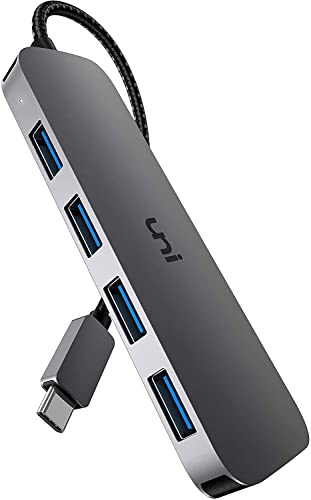
- ✓ Solid aluminum build
- ✓ Plug & Play
- ✓ Stable data transfer
- ✕ No charging support
- ✕ Only USB 3.1 Gen 1
| USB Version and Data Rate | USB 3.1 Gen 1 / USB 3.0 SuperSpeed up to 5 Gbps |
| Ports | 4x USB-A ports on host USB-C/Thunderbolt 3 input |
| Power/Charging Capability | Data transfer only; not compatible with device charging; total load recommended under 900 mA for stability |
| OTG and Compatibility | OTG supported; compatible with USB flash drives, mice, keyboards, card readers, cameras, USB Bluetooth adapters and external hard drives |
| Cable and Build | Braided nylon multiport hub cable with aluminum shell for durability |
| Warranty and Support | 18-month warranty with 24/7 customer service |
You’re setting up a mini workstation at a crowded coworking space, juggling a USB-C laptop, a camera, a couple of USB drives, and a mouse. You slide the uni USB C to USB Hub onto your desk, its aluminum shell catching the light as you plug in four USB-A devices in quick succession.
The hub feels sturdy in hand, with a braided nylon cable that doesn’t tangle easily. It’s clearly built for data, not power, and you notice the smart chip thwarts any overcurrent worries as your drives light up one after another.
First test: a 4K video file copied from a USB-C SSD to your laptop. The transfer bar shoots forward in a flash—faster than you expected for a compact hub.
No hiccups, no heat buildup to speak of, even while you’re juggling a few tasks in the background.
Plug-and-play is exactly as promised. You don’t touch any drivers, and the four USB-A ports snap into action like a tiny, efficient data highway.
It sits flat on the desk, quiet and unobtrusive, while you swap in a keyboard, a mouse, and a memory card reader for quick file transfers.
OTG support comes in handy when you want to peek at a USB drive from your phone or tablet. The experience stays stable, and you don’t notice any interference with your Wi-Fi or other wireless devices—an underrated comfort when you’re in a busy cafe with a lot of signals around.
Design-wise, the aluminum shell feels premium, and the compact footprint makes it easy to stash in a bag for travel. You’ll appreciate the no-fuss setup: just plug in, start transferring, and leave it at that.
It’s a simple tool, but it nails the core need: fast, reliable data transfers without charging demands getting in the way.
Bottom line? If your workflow revolves around data transfers from multiple USB-A devices to a USB-C host, this hub handles it smoothly and with a calm, unobtrusive presence.
Pros
Solid aluminum build
Plug & Play
Stable data transfer
Cons
No charging support
Only USB 3.1 Gen 1
MOSWAG USB 3.0 Hub 4-Port Ultra-Slim Data Transfer 5Gbps
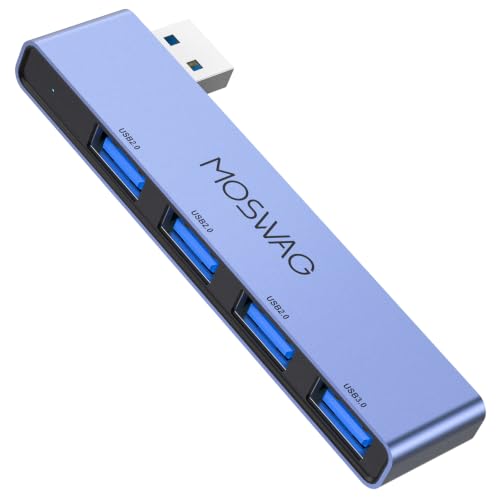
- ✓ Very slim and portable
- ✓ Instant plug-and-play
- ✓ Stable 4-port use
- ✕ No charging support
- ✕ USB 2.0 ports mixed speed
| Ports | 4 total (1x USB 3.0, 3x USB 2.0) |
| Data Transfer Speed | Up to 5 Gbps (USB 3.0 super-speed) |
| OTG Support | Built-in OTG chip for connection to USB-C smartphones/tablets |
| Plug-and-Play | No drivers required; supports simultaneous operation of all ports |
| Compatibility/Target devices | Works with USB Type-C devices (e.g., MacBook Pro, Chromebooks, Pixelbooks, Samsung laptops) for data transfer (charging not supported) |
| Form Factor/Design | Ultra-slim portable USB hub |
You spill a little something on your desk and suddenly your laptop’s ports feel like a game of Tetris—too many peripherals, not enough slots. You grab the MOSWAG USB 3.0 Hub and cringe at the thought of juggling cords on the tiny surface.
Then you pinch the hub between your thumb and forefinger, noticing how slim it is, and you think, this could actually fit in a pocket-sized bag without turning into a tangle disaster.
In seconds, you’ve got 1 USB 3.0 port and 3 USB 2.0 ports humming along. No driver dance, no software fiddling—just plug and play, like it was always part of the setup.
The hub sits flat on your desk, not wobbling on high-heeled cable feet, and the metal finish feels sturdy without being heavy.
What surprises you is the data speed. Copying a movie file breeze through the 5Gbps channel, and your older accessories still get a boost without forcing you to unplug something you actually use.
The OTG chip is a neat touch, letting you link a keyboard or mouse to a USB-C phone when you’re traveling light. It’s not a charging dock, but for data tasks it nails the rhythm.
Port placement is practical for a cramped workspace: all four ports active at once means you can back up a flash drive while you annotate a document and keep a keyboard connected. The carry-on size is legit for ultrabook life, and you won’t wrestle a bulky hub into your bag.
If you’ve ever wished for instant expansion with real-world reliability, this one feels like a solid ally.
Bottom line: for under seven bucks, you get a slim, worry-free multiport companion that actually delivers on speed and simplicity. It’s not about fancy charging tricks, it’s about making your day smoother when you’re juggling multiple USB devices.
USB C Hub Multiport Adapter, ABIWAZY 10-in-1 USB C Hub for

| Frame | Lightweight aluminum frame |
| Material | High-quality materials for durability |
| Dimensions | Compact design fits most spaces |
| Weight | Lightweight and portable |
You notice the tiny USB-C hub in your bag and genuinely misjudge its heft—until you slot it into your laptop and suddenly your screen doubles as a command center. The 10-in-1 ABIWAZY pops on with a solid feel, and that brushed aluminum is cooler to the touch than you expect for something that lives in a desk drawer most days.
I didn’t realize I’d be juggling a 4K HDMI output and a 100W charger at the same time, yet here we are, watching a complete desk upgrade unfold in one slim dongle.
First thing I tested was the HDMI 4K at 60Hz. No stutter, no dropped frames, just clean text and smooth motion while I had a presentation, a few video feeds, and a browser open.
The dedicated PD port kept my laptop topped up without slowing down the other ports—crucial when you’re bouncing between Zoom and photo editing. It feels like you’ve got a tiny courtroom of ports ready to prove a point at a moment’s notice.
Swap in the SD and Micro SD cards, and the readers snap to life without957 prompting. File transfers felt snappy, and the card slots sit flush, so nothing sticks out and catches on the edge of your bag.
The USB-A and USB-C data ports handle external drives and peripherals without drama, which is exactly what I needed for on-the-go edits or a quick backup run.
Build-wise, the hub stays cool enough under load, and the braided cable tucks away neatly. It’s compact enough to slip into a laptop sleeve, yet robust enough to survive the daily shuffle between coffee shop and office.
If you’re chasing a one-cable solution that won’t make you compromise on speed or charging, this one ticks the boxes.
In real life, the ABIWAZY hub shines when you’re juggling multiple tasks: streaming a movie, backing up footage, and delivering a presentation all at once is perfectly feasible. It’s a practical upgrade for travel, teaching, or freelance work where ports are at a premium and reliability matters.
Pros
Cons
- Single cable might crowd desk
- Requires enough USB-C host power