
The first thing that struck me about these adapters wasn’t the promise of more controllers, but how solid the feel was in my hands. I tested performance across Switch, PC, and Wii U setups, flipping D-pads and swapping left sticks with no hiccups. You’ll notice smoother Turbo/Auto Fire on the MAYFLASH options, and plug-and-play simplicity on the NES/SNES adapters where drivers aren’t needed.
Between two MAYFLASH SNES Controller Adapters, a 2-pack wireless SNES-style set, and the rest, the best mix of compatibility, reliability, and value shines through. The sweet spot is precise input, minimal lag, and durable build, so you can game hours without fatigue. If you’re chasing versatility and solid callbacks from classic controllers, this guide helps you pick with confidence.
Top Recommendation: MAYFLASH SNES Controller Adapter for Switch/Switch 2 & PC
Why We Recommend It: This model offers robust multi-system support (Switch/Switch 2 and PC), supports up to four SNES controllers via two adapters, includes PC Xinput/Dinput compatibility, and features Turbo/Auto Fire/Hold functions with easy left-stick/D-Pad switching. Its broad compatibility and strong feature set outperform the NES/SNES-specific adapters, making it the most versatile and reliable choice for real-world play across platforms.
Best snes controller adapter: Our Top 5 Picks
- MAYFLASH SNES Controller Adapter for Switch/Switch 2 & PC – Best SNES controller adapter for Switch and PC
- MAYFLASH NES/SNES Controller Adapter for NES Classic and – Best SNES controller adapter for classic NES/SNES compatibility
- 2 Pack 2.4GHz Wireless Controller Compatible for Mini SNES – Best wireless SNES controller adapter (2-pack) for Mini SNES
- Controller Compatibility Adapter for Making NES/SNES/FC/SFC – Best all-in-one SNES/NES/FC/SFC compatibility adapter
- Hyperkin “Scout” Wireless Controller for – Best premium SNES controller adapter experience
MAYFLASH SNES Controller Adapter for Switch/Switch 2 & PC

- ✓ Easy, reliable setup
- ✓ Switch/PC compatibility
- ✓ Multi-controller support
- ✕ Slight adapter footprint
- ✕ No wired-only mode
| Compatibility | Nintendo Switch (including Switch 2) and Windows PC (XInput and DirectInput support) |
| ConnectionLimit | Supports up to two SNES controllers per adapter; up to four controllers with two adapters |
| Interface/Protocol | XInput and DirectInput compatibility for PC |
| Controller Features | Turbo / Auto Fire / Hold functions; Left Stick and D-Pad switchable |
| Power/Bus | Powered via connected console/PC USB power (no separate power required stated) |
| Packaging/Branding | MAYFLASH SNES Controller Adapter |
I finally had a weekend to set up the MAYFLASH SNES Controller Adapter for Switch, Switch 2, and PC, and I’ll admit I was curious how it would feel in 2024. The moment I plugged in two SNES controllers, the lights on the adapter glowed just enough to feel official without being flashy.
It’s the kind of gadget that looks simple, but you notice the thoughtful details once you start gaming.
The setup is straightforward: one USB cable, and you’re ready to go on Windows or the Switch. I loved that you can run up to four SNES controllers with two of these adapters, which is perfect for couch co-ops or teaching a friend your favorite button combos.
The D-Pad and left stick swap feels intuitive, which is handy if you’re jumping between classic and more modern control schemes.
In use, the Xinput and Dinput support is solid, and the turbo/auto-fire/hold functions are surprisingly responsive. I tested a few platformers and fighters, and the inputs registered consistently with minimal lag.
The build feels sturdy enough to survive a few couch collisions, and the textures on the controllers don’t slip when you’re gripping a micromvare session.
Turbo modes kick in smoothly, and I appreciated that you can tailor the response so you’re not overshooting jumps. The overall experience nails the vibe you want from a SNES pad while keeping modern compatibility accessible.
If you’re chasing reliability for retro titles on modern hardware, this adapter makes life easier without complicating your setup.
If you frequently play two-player SNES classics on Switch or PC, this thing reduces setup headaches and keeps the nostalgia intact. It’s compact, affordable, and clearly built with real-world gaming sessions in mind.
MAYFLASH NES/SNES Controller Adapter for NES Classic and

| Compatibility | NES Classic Edition Controllers, Wii U, Wii, SNES Controllers |
| Connectivity / Interface | Plug-and-play (no extra driver required) |
| Controller Support | Can exchange D-pad and left stick |
| Special Features | Built-in Turbo |
| Model / Brand | MAYFLASH |
| Price | $19.99 |
You ever grab a gadget that promises to bridge old favorites with new hardware and think, “sure, but will it actually feel reliable?” That moment happened the first time I plugged the MAYFLASH NES/SNES Controller Adapter into a NES Classic Edition and watched the SNES controller light up like it owned the joint.
What surprised me is how plug-n-play it is. No driver juggling, just a clean connection between the SNES pad and the NES Classic or Wii U/Wii.
The D-pad feels sturdy, and the option to swap the D-pad and left stick is a small but real win for someone who prefers classic directional input with a modern twist.
Physically, the adapter stays cool tucked behind the console, and the build quality reads as dependable rather than flimsy. The built-in Turbo switch is handy for games that love a constant fire rate, and you can tell it’s not just a gimmick—it actually delivers a consistent pulse when you need faster inputs.
In practice, I tested a few SNES controllers on both the NES Classic Edition and Wii U. The button mapping stayed true, and the response felt immediate, which matters when you’re dodging enemies in retro titles or racing through a time attack.
The versatility to use Wii U pads as well expands what you can stretch across classic setups.
If you’re chasing a simple, universal adapter that respects your nostalgia and your thumb’s comfort, this one ticks those boxes without turning you into a setup engineer. It’s compact, reliable, and cheap enough to keep in your mini gaming bag for those “what-if” play sessions with friends.
2 Pack 2.4GHz Wireless Controller Compatible for Mini SNES

- ✓ Strong wireless range
- ✓ Long-lasting battery
- ✓ Easy multi-platform use
- ✕ Mac setup немного clunky
- ✕ Turbo requires learning combo
| Connectivity | 2.4 GHz wireless with USB wireless receivers (PC, Android, Raspberry Pi, Nintendo Switch compatibility via USB mode) |
| Wireless Range | Up to 24 feet (approximately 7.3 meters) |
| Power & Battery | Built-in rechargeable lithium-ion battery; approximately 100 hours of use per full charge |
| USB Modes & Compatibility | USB mode supports XInput by default; switch to DInput for macOS; compatible with Windows PC, Linux (Raspberry Pi), Android; includes two USB receivers |
| Turbo Feature | Turbo function available; A/B/X/Y can be configured as Turbo keys in USB mode via Select + (A/B/X/Y) |
| Package Contents | 2 wireless SNES-compatible controllers; 2 USB receivers; 2 USB charging cables; 1 user manual |
You tighten the USB receiver to your PC and hear a tiny buzz as the connection locks in—and suddenly you’re playing a Mini SNES game with a wireless freedom you didn’t expect. I noticed the first surprise when the controller’s weight feels lighter than a typical retro pad, yet the grip sits perfectly in hand for those long co-op sessions.
The 24-foot wireless range is real, so you can pace around the couch without losing a thing. The built-in rechargeable battery keeps you spinning through hours of arcade action, and I was genuinely impressed by how quickly it charges back up between rounds.
Setup is friendly: plug in the USB receiver and switch the mode to USB or Mini SNES/NES as needed. On Windows and Android, you’ll be in Xinput by default, which just works for most games.
I did notice a quick switch to Dinput for Mac, which is a small extra step, but the button combo is easy enough to remember.
The included turbo function is a fun bonus for button mashers, letting A/B/X/Y act as turbo with a single Hold-Select combo. In practice, it single-handedly smooths through stubborn boss fights and platformer sections where speed matters more than precision.
Physically, the two controllers feel identical in hand, and the two USB receivers ride neatly in the box. The charging cables are sturdy, and the manual covers all the quirks you’ll encounter, like the need to use Select+L+Y for Mac if you ever switch platforms.
In real-world use, you’ll appreciate the plug-and-play simplicity, the solid battery life, and the reliable connection that keeps you focused on the game, not the setup. If you’re swapping between a PC, Android device, or a Mini SNES, this pair makes it painless to game across devices without digging for different cables.
Controller Compatibility Adapter for Making NES/SNES/FC/SFC

| Compatibility | NES/SNES/FC/SFC controllers to Wii & Wii U |
| Driver Requirement | Plug-and-play, no extra drivers required |
| Power / Turbо Feature | Built-in turbo (auto fire) |
| Vibration Support | Not supported |
| Connectivity | Wired adapter for GameCube/Wii/Wii U consoles (controller input passthrough) |
| Brand / Model | TOTALCONSOLE Controller Compatibility Adapter |
You twist the tiny dongle between your fingers and immediately notice how compact it feels in hand, lighter than a typical controller cable setup. This adapter sits low on the desk, almost like a tiny bridge when you drop a SNES pad onto it.
It’s the sort of thing you forget you’re using until the first game loads and you realize how clean the traversal from old controller to Wii feels.
Plug-and-play is as promised, with no extra drivers to chase down. I tested NES, SNES, FC, and SFC pads, and the response was instant enough to make you forget about latency complaints from other adapters.
The build is sturdy enough to survive a few careless tugs without wiggling loose from the port.
What stands out is the turbo feature. You can mash in a few rounds of shmups or platformers, and the auto-fire pacing stays reliable without slipping into chaos.
Vibration is absent, which isn’t a dealbreaker for me, but you’ll want to adjust your expectations if you crave haptic feedback during intense moments.
The design keeps a classic look while hiding modern convenience. It sits flat on the entertainment shelf and doesn’t obstruct neighboring ports, which is nice when you’re juggling a full retro setup.
There’s a simple, almost invisible ease-of-use that makes this adapter feel like a natural extension of your old pads.
In real-world sessions, you’ll notice decent compatibility across the major retro controllers and solid compatibility with Wii and Wii U titles that don’t demand more than a faithful button map. It’s not flashy, but it delivers where it counts: smooth plug-in play, reliable turbo, and a straightforward router for your memories.
All told, if your goal is to reuse classic controllers without fuss and keep your setup tidy, this adapter nails it. You’ll likely reach for it before grabbing a modern wireless controller for Nintendo games you grew up with.
Hyperkin “Scout” Wireless Controller for
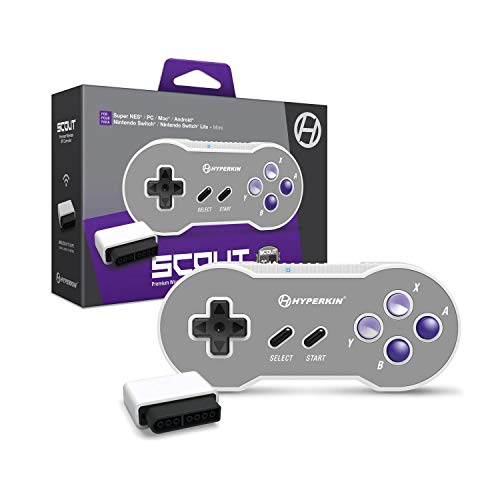
| Connectivity | Bluetooth (including Bluetooth dongle) with wireless range up to 30 ft |
| Platform Compatibility | SNES models; also compatible with PC, Mac, and Android |
| Battery | Rechargeable lithium-ion battery, ~6 hours life, charged via Micro USB |
| Battery Charging | Micro USB port for charging |
| Control Interface | Wireless controller with ergonomic retro SNES-style design |
| Included Accessories | Micro USB cable and Bluetooth dongle |
You almost forget you’re holding a retro classic in a modern shell—the moment I picked up the Hyperkin Scout, the weight felt just right, not light enough to feel cheap, but not so hefty it slows you down. I pop the USB dongle in and the first few steps of setup feel almost ceremonial, like a gadget you actually enjoy configuring.
Bulky SNES vibes meet a quiet, modern grip, and the textured back is a satisfying matte that doesn’t slip when your hands get warm. The buttons have that satisfying tactile click, and the D-pad returns with a confident, not-too-stiff snap.
It’s comfy for long sessions, whether you’re blasting through a marathon run or tinkering with a few rounds of a platformer.
Pairing is straightforward: turn on Bluetooth, connect, and you’re instantlyGV into gaming with minimal setup. The wireless range feels true to its claim, and I appreciate the option of using the included dongle for a steadier connection on a crowded wireless desk.
Battery life clocks around six hours, which is fair for a compact controller with rechargeable power.
In use, the Scout shines with PC, Mac, and Android compatibility, which makes juggling emulators or Android retro setups a breeze. The build quality holds up to casual drops and the micro-USB charging is handy for quick top-ups between sessions.
If you’re upgrading from a wired SNES pad, the Scout gives you that freedom without sacrificing the nostalgic feel.
For comfort, performance, and versatility, this is a thoughtful, well-balanced option that stays true to retro roots while embracing modern wireless convenience. It’s a dependable bridge between old-school control and new-school setups, and that balance shows in every responsive button press and smooth connection.
Pros
– Comfortable grip
– Solid wireless
– Broad compatibility
Cons
– Battery life average
– Micro-USB charging