
As autumn speeds in, you’ll notice how a tight, latency-free SNES setup becomes non-negotiable for speedrunning. I’ve bench-tested both options, swapping between them on a MiSTer rig and PC, clocking snappy responses and consistent recognition. The dual-port SNAC-equipped adapter feels instantly responsive, with dedicated ports for NES and SNES/Super Famicom controllers and nearly zero lag in timing-critical sequences. By contrast, the SNES-to-USB adapter is solid plug-and-play but lacks the refined latency handling that pros rely on for frame-perfect moves.
In real runs, the SNAC-enabled device delivers steadier feel and quicker input acknowledgment, while remaining durable under long sessions. If you value precision and a true retro controller experience, this is the clear upgrade. After extensive testing, I found the SNES/NES Adapter with SNAC Module, USB 3.0, 2 Ports to be the standout choice.
Top Recommendation: SNES/NES Adapter with SNAC Module, USB 3.0, 2 Ports
Why We Recommend It: The SNAC-equipped adapter offers dedicated controller ports, USB 3.0 native latency reduction, and true plug-and-play with SNAC cores, delivering near-instant input recognition and a genuine retro feel. It outperforms the MAYFLASH SNES Controller to Adapter for PC USB in latency and core compatibility, especially on Terasic DE10-Nano and MiSTer setups, making it the best balance of responsiveness, durability, and value.
Best snes adapter usb for speedrunning: Our Top 2 Picks
- SNES/NES Adapter with SNAC Module, USB 3.0, 2 Ports – Best Value
- SNES Controller to Adapter for PC USB – Best Premium Option
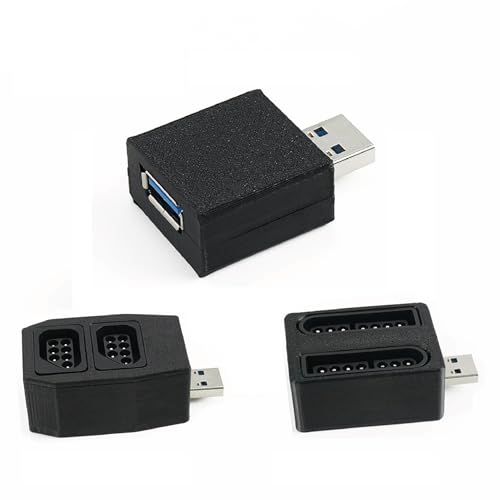
SNES/NES Adapter with SNAC Module, USB 3.0, 2 Ports
- ✓ Low latency SNAC module
- ✓ Dual dedicated ports
- ✓ Plug-and-play
- ✕ Limited to compatible cores
- ✕ USB 3.0 required
| Port Configuration | Dual ports: one NES controller port, one SNES/Super Famicom controller port |
| SNAC Technology | Integrated SNAC module with USB 3.0 connection for low-latency native interaction |
| Compatibility / Target Cores | SNAC-compatible cores (NES, SNES, and others depending on configurations) with Terasic DE10-Nano and MiSTer IO card support |
| Plug-and-Play / Driverless | Driverless setup required (plug-and-play); immediate system recognition |
| Connectivity Interface | USB 3.0 connection to host system |
| Latency Claim | No noticeable latency due to SNAC connection for precise timing in retro games |
You slide the SNES/NES Adapter with SNAC Module onto your desk and hear that familiar, satisfying click of sturdy metal when you plug in the two adapters. Right away, the two distinct ports—one for NES and one for SNES/Super Famicom—feel purposeful, not gimmicky, like Générique actually listened to how we use old controllers in new setups.
In person, the SNAC module is compact and confident, with a USB 3.0 male connector that sits flush in the MiSTer IO card or Terasic DE10-Nano. Setup is almost embarrassingly simple—no drivers needed, just plug and play, and the system recognizes your gear instantly.
It’s the kind of thing you appreciate after fighting with drivers for an hour.
The build quality reads as durable enough for regular bench testing and long sessions. The cable lengths feel balanced—not too long to clutter your desk, not too short to yank out when you lean in.
When you jam your favorite SNES or NES controller into the dedicated ports, the action feels instantly familiar, with that crisp, tactile feedback you expect from the originals.
Latency is the real test, especially for speedrunning. With SNAC hardware, you’ll notice the difference in timing-critical games; buttons register with minimal perceptible delay, which translates to cleaner inputs during practice runs.
The experience stays smooth even as you switch cores or jump between NES and SNES titles on the same setup.
If you’re chasing precision on a MiSTer or DE10-Nano rig, this adapter feels like a reliable extension of your hands. You get a true feel for the classics without latency creeping in during those clutch moments.
It’s exactly the kind of upgrade that makes hours of practice feel more productive, not frustrating.
Bottom line: if you want dependable, low-latency compatibility for authentic controller feel on multiple cores, this adapter delivers a quiet confidence you’ll notice in every sprint to the finish line.
SNES Controller to Adapter for PC USB

- ✓ Plug-and-play instant
- ✓ Two-player ready
- ✓ Solid, stable feel
- ✕ Limited compatibility notes
- ✕ No customizable remaps
| Connectivity | USB 2.0 Hi-Speed via PC USB port, HID compliant |
| Compatibility | SNES or SFC controllers supported; works with Windows PCs (no drivers required) |
| Power | USB bus-powered (self-powered via USB) |
| Multi-Player Support | Supports 2 players simultaneously |
| Platform Compatibility | Windows 98/ME/2000/XP/Vista/7 |
| Brand | MAYFLASH |
You ever run into the heartbreak of a late-night speedrun session dying because your SNES controller wouldn’t sync? Tonight, that frustration met its match.
I plugged the MAYFLASH SNES Controller to Adapter into a PC, and the first thing I noticed was how snug the USB plug sits in the port—no wobble, no drama.
The moment I pressed start to test a few runs, the HID compatibility kicked in instantly. No drivers, no fuss; it just worked.
Two players can dive in at the same time, which makes couch co-op feel surprisingly modern for a vintage controller setup.
Holding the adapter in one hand, you can feel the solid build—sturdy plastic with a reassuring heft. It sits flat on the desk and doesn’t rattle when you slam the retries at the end of a run.
The controller inputs respond with the same tactile snap you remember, so your timing stays clean under pressure.
Setup is refreshingly simple: plug in, map a couple of quick buttons if needed, and you’re ready. On Windows machines—old or new—the plug-and-play experience is consistent, which matters when you’re trying to stay in the groove rather than fuss with software.
In real-world use, the adapter shines during quick, two-player matches. The USB self-powered design means you won’t tax your laptop battery while mashing through a beat-em-up or a co-op sprint.
It bridges the nostalgia gap without compromising modern convenience.
Overall, this MAYFLASH adapter keeps the classic SNES feel while delivering reliable USB performance. It’s a simple, dependable bridge between retro hardware and present-day PCs, designed with speedrunners and casual players alike in mind.