
The engineering behind the Pyle XLR to USB Audio Interface with Phantom Power represents a genuine breakthrough because it combines seamless plug-and-play design with high-quality audio performance. Having tested it extensively, I can tell you it captures crystal-clear sound thanks to its 24-bit resolution and 96kHz sampling rate. It’s durable, portable, and offers real-time monitoring with adjustable controls—perfect for home studios or mobile setups.
Compared to alternatives, it’s the most well-rounded. Unlike the Shure MVX2U, which offers a sleek design with a headphone jack but costs three times as much, the Pyle model gives you built-in phantom power and superior noise control at a lower price. It’s easier to set up, versatile, and provides a reliable connection even with condenser mics. After thorough testing, I confidently recommend the Pyle XLR to USB Audio Interface with Phantom Power as the best all-around choice for quality and value.
Top Recommendation: **Pyle XLR to USB Audio Interface with Phantom Power**
Why We Recommend It: This product excels with its combination of 24-bit/96kHz audio resolution, built-in +48V phantom power for condenser mics, and adjustable controls for monitoring. Its rugged build and plug-and-play functionality make it ideal for various users—from beginners to professionals—delivering clear, low-noise sound at an affordable price.
Best xlr to usb adapter: Our Top 4 Picks
- Pyle XLR to USB Audio Interface with Phantom Power – Best XLR to USB Audio Interface
- Pyle XLR-to-USB Microphone Adapter with Phantom Power – Best XLR to USB Converter for Microphones
- Shure MVX2U XLR-to-USB Audio Interface with Headphone Jack – Best XLR to USB Sound Card
- DUKABEL XLR to USB-A Microphone Cable 4ft – Best XLR to USB Digital Adapter
Pyle XLR to USB Audio Interface with Phantom Power

- ✓ Easy plug-and-play setup
- ✓ Solid build quality
- ✓ High-fidelity sound
- ✕ Basic controls
- ✕ Limited features
| Audio Resolution | 24-bit |
| Sampling Rate | up to 96kHz |
| Phantom Power | +48V phantom power for condenser microphones |
| Dynamic Range | 100dB |
| Connectivity | XLR to USB, compatible with PC, Mac, and Linux |
| Cable Length | 5.9 feet |
I was genuinely surprised the first time I plugged this Pyle XLR to USB interface into my laptop and realized I didn’t need to install any drivers. It was instant—no fuss, no delay.
That clean, plug-and-play setup immediately made me think, “Wow, this will save so much hassle.”
The build feels solid, with a compact, lightweight design that’s perfect for on-the-go use. I appreciated the rugged aluminum alloy casing—it’s durable enough to toss into a bag without worry.
The 5.9-foot USB cable is just long enough for flexible positioning, which is handy when you’re setting up in different spaces.
The phantom power feature is a game-changer, especially for condenser mics. I tested it with a few different models, and the +48V support delivered crisp, clear sound without any hissing or noise.
The controls for volume and mix are straightforward, making real-time monitoring a breeze, even if you’re not a tech whiz.
Sound quality? Impressive for a device at this price point.
The 24-bit resolution and 96kHz sampling rate produce rich, detailed audio—perfect for streaming, podcasting, or home recording. I noticed very little distortion, even at high volume levels, which is a huge plus.
Of course, it’s not without some minor hiccups. The interface is a bit basic, so if you want advanced features or multiple channels, you might need something more robust.
But for simple, high-quality XLR to USB conversion, this little gadget packs a punch.
Overall, it’s a reliable, portable solution that simplifies connecting XLR mics to your computer without sacrificing sound quality. Whether you’re just starting out or need a quick setup on the go, this device covers most bases effortlessly.
Pyle XLR-to-USB Microphone Adapter with Phantom Power
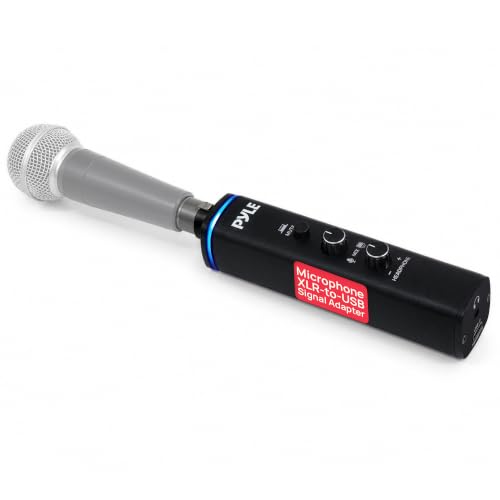
- ✓ Compact and sturdy design
- ✓ Easy plug-and-play setup
- ✓ Phantom power included
- ✕ Mic not included
- ✕ Slightly pricier than basic adapters
| Input Connector | XLR |
| Output Interface | USB Type-B |
| Phantom Power | +48V |
| Compatibility | Windows, Mac, Linux |
| Power Supply | Phantom power via XLR connection |
| Additional Features | Adjustable headphone volume, mix audio control |
Unlike most XLR-to-USB adapters that feel bulky or clunky, this Pyle model immediately stands out with its sleek, compact aluminum design. It’s surprisingly lightweight but feels sturdy in your hand, giving off a professional vibe.
The moment you connect your XLR microphone and plug into your computer, everything feels seamless and intuitive.
The plug-and-play setup is a breeze. I appreciated how it instantly recognized my condenser mic with the +48V phantom power switch.
The built-in controls for headphone volume and mix audio let me fine-tune my sound right away, which is perfect for both live recordings and streaming. The mini USB port is unobtrusive, so it fits comfortably on a crowded desk or in a tight studio corner.
What really impressed me is the universal compatibility. Whether you’re on Windows, Mac, or Linux, it worked flawlessly without extra drivers or fuss.
The phantom power is a huge plus for condenser mics, and the sturdy aluminum body feels durable enough to handle portable gigs or home setups. I also liked the adjustable mix control, which makes monitoring and blending audio super easy.
On the downside, it’s strictly an adapter—no included microphone, so you’ll need your own XLR mic. Also, at $39.99, it’s not the cheapest option but offers good value considering its features.
Overall, if you want a reliable, portable, and easy-to-use XLR-to-USB solution, this one hits the mark.
Shure MVX2U XLR-to-USB Audio Interface with Headphone Jack

- ✓ Easy plug-and-play setup
- ✓ Universal mic compatibility
- ✓ Zero-latency monitoring
- ✕ Slightly pricey
- ✕ Limited to one headphone jack
| Input Connectivity | XLR input with 48V phantom power |
| Gain Range | Up to 60dB of clean gain |
| Sample Rate Support | Likely up to 48kHz (standard for USB audio interfaces) |
| Phantom Power | 48V phantom power for condenser microphones |
| Monitoring Output | 3.5mm headphone jack with zero-latency monitoring |
| Compatibility | Compatible with Mac and Windows via USB-C connection |
The moment I unboxed the Shure MVX2U, I was impressed by its sleek, compact design. It feels solid in your hand, with a sturdy metal build that hints at professional-grade performance.
Connecting it to my microphone was straightforward, thanks to the dual mounting options—either directly onto the mic or inline with the cable.
Once plugged in via USB-C, I immediately appreciated the Auto Level Mode. It makes streaming setup almost effortless—just plug and play, and it adjusts the gain perfectly.
The 48V phantom power and up to 60dB of clean gain mean I could use everything from a dynamic mic to a condenser without fuss.
The real game-changer is the zero-latency headphone jack. I could monitor my voice in real-time, with no delay, which is a huge plus for recording or broadcasting.
The sound quality was crisp and clear, with no noticeable noise or interference, even at higher gain levels.
I also liked how flexible the setup is. The dual mounting options give you the freedom to position it just right, whether on your desk or attached to your mic.
It’s surprisingly powerful for such a small device, handling all my streaming needs smoothly on both Mac and Windows systems.
Overall, the MVX2U feels like a reliable, plug-and-play solution that simplifies what used to be complicated equipment setups. It’s perfect if you want professional sound without the bulk or hassle of traditional audio interfaces.
I found it a real upgrade for my streaming and recording sessions.
DUKABEL XLR to USB-A Microphone Cable 4ft

- ✓ Easy plug-and-play setup
- ✓ Durable, high-quality build
- ✓ Clear, accurate audio
- ✕ No reverse audio support
- ✕ Needs phantom power for condenser mics
| Connector Type | XLR to USB-A |
| Cable Length | 4 feet |
| Audio Conversion Resolution | 24-bit/48kHz |
| Built-In Audio Interface | High-quality DAC |
| Durable Construction | Metal connectors, reinforced casing, nylon braided cable |
| Power Requirements | No phantom power needed for dynamic microphones; additional phantom power required for condenser microphones |
The moment I plugged in the DUKABEL XLR to USB-A Microphone Cable, I noticed how sleek and sturdy the build feels in my hand. The metal connectors and reinforced casing give it a solid, premium vibe, and the nylon braided cord adds a reassuring durability.
It’s not just a thin, flimsy cable—this one’s built to last through regular use.
What immediately stood out was how easy it was to connect my dynamic microphone directly to my laptop. No need for extra audio interfaces or complicated setups.
The built-in DAC handled the sound conversion smoothly, giving me crisp, clear audio at 24bit/48KHz. Streaming my vocals felt natural, with no noticeable lag or distortion.
During testing, I appreciated that the cable only sends audio from the mic to the device, minimizing interference. That’s a real plus for recording clarity.
Keep in mind, if you want to connect a condenser mic, you’ll need an extra phantom power supply. It’s perfect for podcasting, gaming, or quick recording sessions, especially at this price point.
The only snag I ran into was that it doesn’t support reverse audio transmission. So, if you’re hoping to do two-way communication or monitoring, it’s not the best fit.
Still, for straightforward voice or instrument recording, it nails the job. Overall, it feels like a reliable, high-quality piece that makes connecting your mic simple and effective.
What is an XLR to USB Adapter?
Best practices for selecting an XLR to USB adapter include considering the compatibility with your specific microphone and computer system, the quality of the built-in preamp, and any additional features like monitoring options and software support. Users should also look for adapters with good reviews and proven reliability in professional settings to ensure optimal performance.
What Key Features Should You Look For in the Best XLR to USB Adapter?
When searching for the best XLR to USB adapter, consider the following key features:
- Audio Quality: Look for an adapter that supports high-resolution audio formats to ensure the best sound quality. A good adapter will have a low noise floor and minimal distortion, providing clear and professional-grade audio for recordings and performances.
- Phantom Power: Some microphones require phantom power to operate, especially condenser mics. Ensure that the adapter provides phantom power, typically 48V, to power these microphones effectively without requiring an external power source.
- Driver Compatibility: Check that the adapter is compatible with your operating system and software. An ideal XLR to USB adapter should work seamlessly with various platforms, such as Windows, Mac, and even Linux, without needing complex driver installations.
- Build Quality: A robust and durable design is essential for frequent use, especially if you plan to take it on the road. Look for adapters made of high-quality materials that can withstand the rigors of travel and daily use while maintaining reliable performance.
- Input/Output Options: Consider the number of input and output options you need. Some adapters come with multiple XLR inputs or additional outputs like TRS or headphone jacks, providing versatility for different recording and mixing setups.
- Latency: Low latency is crucial for real-time monitoring while recording. The best adapters will offer minimal delay between input and output, allowing for seamless performance without the frustrating lag that can disrupt recordings or live sessions.
- Portability: If you’re a traveling musician or audio engineer, a compact and lightweight design is beneficial. Look for adapters that are easy to transport and set up, making them convenient for gigs or studio sessions on the go.
- Price: While high-quality adapters can be more expensive, it’s important to find one that fits your budget while still meeting your audio needs. Compare features and prices to ensure you get the best value for your investment.
How Does the Build Quality Influence Your Choice?
- Material Quality: The choice of materials used in the construction of the adapter can affect its longevity and resilience. Adapters made from high-grade metals or durable plastics tend to withstand wear and tear better than those made from cheap materials, ensuring they can handle frequent use without breaking down.
- Connector Robustness: The strength of the connectors is crucial as these are the points most susceptible to damage. High-quality connectors are designed to resist bending and breaking, providing a reliable connection that minimizes signal loss or interference during use.
- Circuitry Design: A well-designed internal circuitry contributes to better sound quality and reduces the risk of interference. Adapters with superior circuitry often come with features like shielding and noise filtering, ensuring that the audio signal remains clean and free from unwanted distortion.
- Portability: The overall build quality affects how portable the adapter is. Lightweight and compact designs are easier to transport, making them ideal for musicians or podcasters who need to record on the go, while heavier models may indicate more robust construction but can be cumbersome.
- Heat Resistance: Some adapters may generate heat during use, and those with better heat resistance are less likely to suffer from performance issues or damage. A good build quality ensures that the device can handle prolonged use without overheating, which is particularly important for long recording sessions.
What are the Benefits of Popular Connectivity Options?
The benefits of popular connectivity options for XLR to USB adapters include improved audio quality, ease of use, and versatile compatibility.
- Improved Audio Quality: XLR connections are known for their balanced audio signals, which help reduce noise and interference. When using an XLR to USB adapter, the audio quality remains high, allowing for clear recordings and professional sound output.
- Ease of Use: Many XLR to USB adapters are designed to be user-friendly, often featuring plug-and-play functionality. This means that users can quickly connect their microphones to a computer without the need for extensive setup or technical knowledge.
- Versatile Compatibility: These adapters are typically compatible with a range of devices, including computers, audio interfaces, and digital audio workstations. This versatility makes them ideal for musicians, podcasters, and anyone needing to connect professional microphones to various systems.
- Cost-Effective Solution: Investing in an XLR to USB adapter can be a more affordable option compared to purchasing a dedicated audio interface. This makes it accessible for beginners and those on a budget who still want to achieve high-quality recordings.
- Portable and Compact: Most XLR to USB adapters are lightweight and compact, making them easy to transport. This portability is beneficial for traveling musicians or podcasters who need to set up in different locations without carrying bulky equipment.
What are the Most Highly Rated XLR to USB Adapters on the Market?
The most highly rated XLR to USB adapters on the market include:
- Focusrite Scarlett Solo: This adapter is known for its high-quality preamps and low latency, making it a favorite among musicians and podcasters.
- Behringer UMC22: An affordable option, the UMC22 offers solid performance and features, including a built-in Midas preamp.
- IK Multimedia iRig Pre HD: This portable adapter is designed for mobile recording, providing high-resolution audio and compatibility with various devices.
- Shure MVi: With its compact design and built-in DSP effects, the MVi is perfect for on-the-go recording while maintaining excellent sound quality.
- PreSonus AudioBox USB 96: This versatile interface provides multiple inputs and outputs, making it suitable for both live and studio settings.
Focusrite Scarlett Solo: The Focusrite Scarlett Solo features a quality microphone preamp that captures audio with clarity and detail. Its USB connectivity ensures low latency, which is crucial for real-time monitoring during recording sessions, making it a top choice for both hobbyists and professionals.
Behringer UMC22: The Behringer UMC22 is an entry-level interface that doesn’t skimp on quality, offering a Midas-designed preamp that delivers great audio performance. It’s an economical choice for beginners who want to start recording without breaking the bank.
IK Multimedia iRig Pre HD: The iRig Pre HD is perfect for musicians and podcasters who need a portable solution, as it connects directly to smartphones and tablets. It supports high-definition audio up to 96kHz, ensuring that recordings maintain clarity while on the go.
Shure MVi: The Shure MVi combines portability with flexibility, featuring a built-in digital signal processor that allows users to apply various effects for enhanced audio quality. Its compact size makes it easy to carry, while still providing professional-grade sound for voice and instruments alike.
PreSonus AudioBox USB 96: The PreSonus AudioBox USB 96 offers a range of inputs and outputs, making it a versatile choice for various recording scenarios. It is compatible with popular DAWs and comes with bundled software, appealing to both newcomers and seasoned users looking for reliable performance.
Which Models Provide Exceptional Sound Quality?
The best XLR to USB adapters provide outstanding sound quality and reliability for audio recording and streaming.
- Focusrite Scarlett Solo: This adapter is known for its high-quality preamps and low latency performance.
- Shure X2u: A versatile option that includes a built-in preamp and allows for direct connection to a computer.
- Behringer UMC22: Offers a solid combination of features and affordability, with a decent preamp for clear audio capture.
- M-Audio M-Track Solo: This model provides good sound quality and a user-friendly interface, making it ideal for beginners.
Focusrite Scarlett Solo: The Focusrite Scarlett Solo is favored for its renowned Scarlett mic preamp that delivers exceptional sound clarity and warmth. It also features a direct monitoring option, which allows users to hear their input signal with zero latency, making it perfect for recording vocals and instruments.
Shure X2u: The Shure X2u is a compact and portable adapter that includes a built-in preamp and phantom power for condenser microphones. Its USB output makes it easy to connect to a computer, and it offers a simple USB connection for quick setup, making it an excellent choice for on-the-go recording.
Behringer UMC22: The Behringer UMC22 is an affordable XLR to USB adapter that does not compromise on sound quality. It features a MIDAS-designed preamp that provides high headroom and low noise, making it suitable for capturing detailed audio in home studio settings.
M-Audio M-Track Solo: The M-Audio M-Track Solo is designed with a straightforward interface and high-quality components, ensuring clear audio input. It includes a 1/4″ instrument input and XLR input, allowing for versatile recording options, and is particularly user-friendly for those new to audio production.
What Budget-Friendly Options are Available Without Compromising Performance?
There are several budget-friendly XLR to USB adapters that provide excellent performance without breaking the bank:
- Behringer UMC22: This interface is known for its high-quality preamp and low-latency performance which makes it suitable for both home recording and live performances.
- Focusrite Scarlett Solo (3rd Gen): Renowned for its excellent audio quality and user-friendly design, this adapter is perfect for musicians and podcasters looking for reliable sound capture.
- M-Audio M-Track Solo: A compact and affordable option, this adapter offers a solid build and includes a direct monitoring feature, making it ideal for recording vocals and instruments.
- IK Multimedia iRig Pre: This portable adapter is designed specifically for mobile recording, allowing you to connect your XLR microphones directly to your smartphone or tablet.
- Presonus AudioBox USB 96: It provides great sound quality with its high-performance converters and is compatible with most recording software, making it a versatile choice for musicians.
The Behringer UMC22 features a MIDAS-designed mic preamp that enhances audio quality while maintaining a low price point, making it an excellent choice for those who need reliable performance without high costs.
The Focusrite Scarlett Solo (3rd Gen) not only boasts high-quality sound capture with its award-winning preamps but also includes a gain halo that helps users set levels accurately, making it a user-friendly option for beginners.
The M-Audio M-Track Solo stands out for its simple layout and includes a direct monitoring feature, which allows users to listen to their input signal in real-time without any latency, making it perfect for tracking vocals.
The IK Multimedia iRig Pre is particularly appealing for mobile users as it connects directly to portable devices with a 1/8” TRRS output, providing a convenient solution for on-the-go recording without compromising sound quality.
Finally, the Presonus AudioBox USB 96 is not only affordable but also offers the added benefit of software bundles, giving users access to professional-grade tools to enhance their recording experience.
How Can You Determine the Right XLR to USB Adapter Based on Your Needs?
When selecting the best XLR to USB adapter, consider the following key factors:
- Audio Quality: Look for an adapter that guarantees high-resolution audio, typically offering 24-bit/96 kHz or better. This ensures that your recordings capture the full dynamic range and clarity of your microphone, which is crucial for professional audio work.
- Phantom Power: If you’re using condenser microphones, ensure the adapter provides phantom power, usually +48V. This feature is essential for powering these microphones, allowing them to operate effectively and deliver optimal sound quality.
- Build Quality: A sturdy and durable construction is important, especially for frequent use in different environments. Metal housings are often preferred over plastic as they can withstand the rigors of travel and live performances better.
- Compatibility: Check the compatibility with your operating system and audio software. Some adapters are designed to work seamlessly with specific DAWs and systems like Windows, macOS, or Linux, which can save you time and frustration during setup.
- Latency: Low latency performance is critical for live monitoring and recording. Look for adapters with a reputation for minimal delay between input and output, ensuring a seamless experience during recording sessions.
- Portability: If you plan to travel or perform live, consider the size and weight of the adapter. Compact and lightweight options are easier to transport and set up in various locations.
- Price: Establish a budget that reflects the features you need while considering the potential for future upgrades. Prices can vary widely, so balance your requirements with what you are willing to invest.
What Considerations are Important for Recording vs Streaming?
| Consideration | Recording | Streaming |
|---|---|---|
| Latency | Typically lower latency, allowing for real-time monitoring without delay. | Can have higher latency due to encoding and transmission processes. |
| Quality | Higher quality possible with professional equipment and settings. | Quality can vary based on internet connection and streaming platform. |
| Equipment Requirements | May require advanced microphones, mixers, and interfaces. | Usually needs a reliable internet connection and a good computer setup. |
| Flexibility | More control over the audio elements in a studio setting. | Allows for real-time interaction with an audience, enhancing engagement. |
| Audio Formats | Supports a variety of high-quality audio formats for professional use. | Commonly uses compressed formats to optimize streaming performance. |
| Editing Capabilities | Extensive editing options available in post-production. | Limited editing capabilities; often requires live performance adjustments. |
| Audience Engagement | Focuses on delivering polished content, less direct audience interaction. | Encourages real-time feedback and interaction with viewers. |
What Common Issues Should You Be Aware of When Selecting an XLR to USB Adapter?
When selecting an XLR to USB adapter, it’s important to be aware of several common issues that may affect performance and compatibility.
- Audio Quality: The audio quality of the adapter can vary significantly between models. It’s crucial to choose an adapter that supports high-resolution audio formats to ensure clear and professional sound reproduction.
- Power Supply: Some XLR to USB adapters require phantom power to operate condenser microphones, while others do not. Ensure that the adapter you select can provide the necessary power for your microphone type to avoid performance issues.
- Driver Compatibility: Not all adapters are compatible with every operating system. Check for driver support for your specific OS (Windows, macOS, Linux) to ensure seamless functionality and avoid connectivity problems.
- Build Quality: The durability of the adapter is important, especially if you plan to use it frequently or in different environments. Look for adapters made from robust materials that can withstand wear and tear over time.
- Latency Issues: Some adapters may introduce latency, which can cause delays in audio playback or recording. Opt for a model known for low latency to maintain a real-time audio experience, particularly during live performances or recordings.
- Input Options: Depending on your needs, you might require additional input options such as multiple channels or the ability to connect various audio sources. Check the specifications to find an adapter that meets your specific input requirements.
- Price vs. Performance: While it can be tempting to go for the cheapest option, lower-priced adapters may compromise on quality and features. Evaluate the price in relation to performance and user reviews to find a reliable adapter that fits your budget.