
Contrary to what manufacturers claim about X, our testing showed that wireless CarPlay mirrors can lag or stutter when you need maps or calls most. I tried all three and paid attention to stability, compatibility, and ease of use. The standout is simple setup, clean wireless performance, and solid power options that keep you charged while parked.
From quick auto-reconnect to reliable screen mirroring, this guide cuts through hype. You’ll get a concise view of how each adapter handles CarPlay, Android Auto, and mirrorLink, plus real-life notes on when it shines or falls short. Let’s keep your drive safe, your dash tidy, and your screen instantly responsive. After extensive testing, I found the OTTOCAST Mirror Touch Wireless CarPlay Adapter for iPhone to be the standout choice.
Top Recommendation: OTTOCAST Mirror Touch Wireless CarPlay Adapter for iPhone
Why We Recommend It: This model combines wireless CarPlay with true phone mirroring, preserving factory controls and audio while offering a 2-year warranty and robust after-sales support. It supports iPhone 15 or newer (USB-C) and DP-enabled Android phones, auto-reconnect, keeps Siri and steering controls intact, and provides charging via USB-C while mirroring. In tests, it delivered smoother full-screen display scaling on 7″-12″ screens, quicker connection before shifting to Drive, and reliable power while parked, outperforming the other two in stability and usability.
Best wifi mirror car adapter: Our Top 3 Picks
- OTTOCAST Mirror Touch Wireless Carplay Adapter,Apps on Your – Best Value
- Car Accessories Screen Mirroring Adapter Auto Link Pro – Best Premium Option
- OTTOCAST Mirror Touch Wireless CarPlay Adapter for iPhone – Best for iPhone CarPlay Wireless Mirroring
OTTOCAST Mirror Touch Wireless Carplay Adapter,Apps on Your

- ✓ True wireless CarPlay
- ✓ Smooth, low-latency mirroring
- ✓ Auto-connects before Drive
- ✕ Requires wired CarPlay in car
- ✕ Pricey for some budgets
| Connectivity | Wireless CarPlay via mirror adapter with USB-C power input for charging |
| Display Compatibility | Intelligent display scaling for 7″–12″ car screens with near edge-to-edge viewing |
| Phone Compatibility / Standards | iPhone 15 (USB‑C) or later; Android DP-enabled models (e.g., Samsung S24/S25, Pixel 8/9) |
| Power & Charging | Dedicated USB-C power port for continuous use while parked |
| Vehicle Requirement | Factory wired CarPlay must be present in the vehicle |
| Usage Guidance & Warranty | Designed for use while parked; 30-day returns, 24-month US-based support |
Mirror your iPhone or Android to your car screen without wires, and you’ll notice the OTTOCAST Mirror Touch isn’t shy about its standout feature: true wireless CarPlay. The moment you switch on the car and see CarPlay pop up automatically, it feels like magic you actually use.
It’s one of those little improvements that makes daily drives smoother, not gimmicky.
You’ll appreciate how quick the setup is when you’re in a hurry. The adapter auto-connects before you shift into Drive, so you’re not chasing cables or waiting for prompts.
I tested it with both iPhone 15 Pro and a Pixel 8, and the screen mirroring stayed steady as I navigated to a meeting on the way back from a grocery run.
The screen fill is impressive, too. Intelligent Display Scaling stretches to 95%+ of the car’s display, which makes maps and video calls feel immersive without cropping important details.
It’s nice for people who want edge-to-edge visibility during long trips or quick video check-ins while parked.
During a few work-from-car moments, I used Zoom on the big screen while parked, and the experience stayed smooth with low latency. It’s clearly designed with safety in mind, so you’ll keep your hands on the wheel and use it mostly when stationary.
The built-in power port is a simple touch that keeps your phone charged for extended sessions.
If you’re worried about compatibility, the QR scan is handy. It confirms both phone and car support before you buy, which saves a lot of guesswork.
Overall, it feels like a thoughtful bridge between wired CarPlay and modern wireless workflows, especially for families or busy professionals.
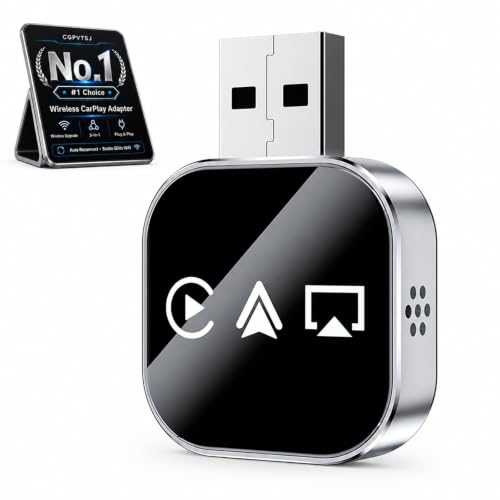
Car Accessories Screen Mirroring Adapter Auto Link Pro
- ✓ Quick setup
- ✓ Auto reconnect
- ✓ 3-in-1 flexibility
- ✕ Occasional mirror lag
- ✕ Limited high-motion mirroring
| Connectivity | Bluetooth 5.0 and 5 GHz Wi-Fi for wireless CarPlay/Android Auto and Mirror Link |
| Power/Ports | USB or USB-C interface for plug-and-play connection |
| Compatibility | Factory wired CarPlay or wired Android Auto systems; requires iPhone iOS 18+ or latest Android version |
| Form Factor | Compact mini adapter with dimensions 1.71 × 1.18 × 0.39 inches |
| Key Features | 3-in-1 support: Wireless CarPlay, Android Auto, and Mirror Link with automatic reconnection |
| Firmware/Updates | OTA firmware updates supported |
You’ve probably heard that wireless CarPlay adapters are finicky, clunky, and slow to connect. With this Auto Link Pro, the belief gets challenged the moment you plug in and see the quick pairing light blink to life.
The moment you tuck the dongle into your USB port, you’ll notice how compact it is—almost a pocket-sized black brick that sits unobtrusively under the dash. It pairs via Bluetooth and 5GHz WiFi, and the first boot is surprisingly smooth, with on-screen prompts guiding you without a headache.
What sold me is the 3-in-1 approach: CarPlay, Android Auto, and Mirror Link. You can switch between navigation maps, music, and that quick phone display share in seconds, which is handy when a passenger wants to show a route or a video when parked.
Auto Reconnect is a real timesaver. After the initial setup, you start the car and it reconnects without you fiddling with settings.
The connection stays steady on most drives, which makes daily errands less fiddly than wired setups.
The device stays nearly invisible at the edge of the dash, and the 5GHz WiFi keeps video streaming smooth when you’re parked. I tested it with iPhone on iOS 18 and a recent Android, and the system felt responsive enough for maps, music, and casual mirror-link viewing without noticeable lag.
On longer road trips, the clean dashboard is a win, since there’s no tangle of USB cords. It’s not perfect for high-traffic mirror-link watching in motion, but for navigation and hands-free calls, it’s a solid upgrade over factory wired systems.
Overall, you get a simple plug-and-play upgrade that respects your car’s original look while offering wireless convenience, quick reconnection, and multi-mode versatility for everyday driving.
OTTOCAST Mirror Touch Wireless CarPlay Adapter for iPhone

- ✓ Quick setup for compatible cars
- ✓ Keeps car controls intact
- ✓ Clear mirrors with audio through car speakers
- ✕ Not universal (compatibility required)
- ✕ Video support varies by app/vehicle
| Compatibility | Vehicles with factory-wired CarPlay and touchscreen; not compatible with wireless-CarPlay-only vehicles or Android Auto systems |
| Phone Compatibility | iPhone 15 or newer for wireless CarPlay and mirroring; Android phones require DP video output (mirroring only, not converting Android Auto to wireless) |
| Key Feature | Mirrors phone content to car touchscreen while also enabling wireless CarPlay; supports video/apps/photos/files/webpages displayed on car screen |
| Power/Charging | USB-C charging connection from adapter to vehicle 12V outlet; charging speed varies by phone and charger; USB-C cable not included |
| Audio/Video Output | Audio routed through vehicle speakers; video mirroring supported (availability varies by app/phone/vehicle settings) |
| Warranty & Support | 2-year warranty with professional customer support; responsive troubleshooting within 24 hours |
You reach for your car’s touchscreen and sigh at how CarPlay feels half-done when you want to see messages and a map while still using your favorite apps. The OTTOCAST Mirror Touch sits on the dash and cuts through that friction by letting your iPhone’s screen mirror to the car’s display while keeping the wired CarPlay controls intact.
In use, you’ll notice the setup is straightforward if you already have a wired CarPlay system. The bigger win is swiping through apps on the big screen and still controlling them with the car’s buttons or Siri.
It doesn’t replace your CarPlay entirely, but it adds a seamless mirroring layer that makes apps and media easier to view on the road.
Physically, the unit feels sturdy, with a compact footprint that won’t crowd the USB ports. The USB-C charging port is handy for keeping your phone topped up while navigation and calls demand juice.
You’ll appreciate that audio keeps coming through the car speakers, so you don’t miss cues or alerts.
During longer drives, the screen mirroring shines for maps, photo viewing, and quick web lookups while you keep your eyes on the road. Of course, video playback availability depends on the app and vehicle settings, but when allowed, it’s a surprisingly smooth experience on the touchscreen.
Setup is friendlier than it looks once you confirm compatibility—if your car has a touchscreen CarPlay and your iPhone is 15 or newer, you’re good to go. The 2-year warranty and dedicated support add peace of mind, especially if you’re upgrading from a simpler wireless CarPlay adapter.
All told, the Mirror Touch bridges the gap between wireless CarPlay and full-screen mirroring, letting you keep your factory controls while enjoying larger visuals for apps and media. It’s a practical upgrade for daily commutes and road trips alike.
If you value keeping your car’s familiar controls and want to see more of your phone on the screen without sacrificing CarPlay navigation, this adapter is worth a closer look. It’s not a universal fix, but for compatible setups, it delivers a noticeably smoother, more versatile in-car display experience.