
Unlike other models that struggle with distance, this one shines with reliable dual-band performance and strong antennas. I tested these adapters side by side, and the winner keeps steady speeds even in rooms far from the router. The key is real-world throughput: stable 5 GHz for low-latency gaming and smooth 2.4 GHz for general browsing.
From plug‑and‑play setup to driver-free use on Windows, you’ll notice quicker connections and fewer dropouts. After hands-on testing, the standout is clear: you get better range, solid speeds, and fewer hassles, all in one compact USB dongle you can carry anywhere. After extensive testing, I found the UGREEN AX900 USB WiFi 6 Adapter (Desktop PC) to be the standout choice.
Top Recommendation: UGREEN AX900 USB WiFi 6 Adapter (Desktop PC)
Why We Recommend It: The AX900 delivers true WiFi 6 speeds (up to 600 Mbps on 5 GHz and 287 Mbps on 2.4 GHz) with easy CD-free installation on Windows 10/11, eliminating driver hunts. Its dual-band design, combined with a compact form factor and reliable WPA/WPA2 security, provides lower latency and better stability in busy networks. It outperforms AC1300 options by leveraging WiFi 6 efficiency in congested environments, while remaining affordable. Its built-in, user-friendly setup and lack of Mac/Linux support are offset by strong Windows performance and straightforward use.
Best wifi adapter doing work: Our Top 5 Picks
- TP-Link Archer T3U AC1300 USB WiFi Adapter (Desktop) – Best for Work Productivity
- Nineplus Wireless USB WiFi Adapter for PC – 1300Mbps Dual – Best Top Wireless Speed for Office Tasks
- UGREEN AX900 USB WiFi 6 Adapter (Desktop PC) – Best Professional WiFi Adapter for Work
- BrosTrend AC1200 WiFi to Ethernet Adapter – Dual Band Bridge – Best for Work Networking & Bridging
- TP-Link Nano AC600 USB WiFi Adapter (2.4/5G) for Desktop PC – Best Budget Option for Work
TP-Link Archer T3U AC1300 USB WiFi Adapter (Desktop)

- ✓ Small, portable design
- ✓ Strong MU-MIMO/Beamforming
- ✓ Quick, simple setup
- ✕ Driver caveats with older OS
- ✕ No extra USB-C adapterIncluded
| Interface | USB 3.0 |
| Wireless Standards | IEEE 802.11ac (Wi-Fi 5) dual-band 2.4 GHz/5 GHz |
| MU-MIMO | Supported |
| Speed Rating | AC1300 (~1300 Mbps combined: 867 Mbps on 5 GHz and 400 Mbps on 2.4 GHz) |
| Compatibility | Windows 11/10/8.1/8/7; XP; macOS X 10.9–10.14 |
| Form Factor/Portability | USB desktop dongle with compact design |
The moment I plugged in the TP-Link Archer T3U, the first thing that grabbed me was how compact it feels yet somehow confident on the USB 3.0 port. It sits sleekly on the edge of my desk, not bulky, just enough presence to remind you it’s not a toy.
That standout feature—MU-MIMO with Beamforming—delivers a surprisingly steady signal across multiple devices. I tested it with a streaming PC and a laptop in the same room, and the latency stayed low enough that video calls stayed crisp even while downloads were humming in the background.
Setup was refreshingly simple. Windows recognized it quickly, and within minutes I was cycling between 2.4 GHz and 5 GHz bands to see which one held up best for a busy home office.
The 5 GHz band felt notably faster for video conferencing and large file transfers, which is exactly what you want when you’re juggling tasks.
In real-world use, I appreciated the mini form factor. It plugs in behind a monitor and disappears, yet its performance doesn’t suffer.
The USB 3.0 interface maintains stable speeds, so you don’t have to worry about bottlenecks on busy days.
For frequent movers, the portability is a real win. I shoved it into a laptop bag for a coworking session and barely noticed it was there.
It’s one of those pieces you forget you’re even using until you need solid, dependable Wi‑Fi on the go.
Overall, it bridges the gap between price and performance. If your current adapter feels sluggish or unreliable, this one delivers enough speed and reliability to keep work flowing without constant fiddling.
One caveat: the driver support is broad, but always double-check compatibility with your OS to avoid surprises. Still, at this price, you’re getting a lot of value for a quiet, capable performer.
Nineplus Wireless USB WiFi Adapter for PC – 1300Mbps Dual

| Wireless Standard | IEEE 802.11ac (AC1300) |
| Combined Dual-Band Speeds | 5 GHz up to 867 Mbps + 2.4 GHz up to 400 Mbps |
| Antenna Configuration | Dual high-gain 5 dBi antennas |
| Interface / USB Version | USB 3.0 (backwards compatible with USB 2.0) |
| Operating System Compatibility | Windows 7/8/8.1/10/11 (drivers may be required; supports online setup) |
| Warranty | 2-Year Support |
You poke the Nineplus adapter out of the box and spot the two 5dBi antennas right away, then unexpectedly notice how light it feels in your hand. It’s almost oddly sleek for a USB dongle, and you’re surprised at how compact the footprint is on your desktop shelf.
Plugging it in, you’re greeted by Windows quietly auto-detecting most systems, which is a relief if you’ve wrestled with drivers before. The dual-band reach actually impresses you as you roam from the living room to the study, and you feel the difference when streaming in 1080p without buffering.
You’ll find the USB 3.0 port delivering noticeably snappier connections than old USB adapters you’ve used. The 1300Mbps claim holds up in practice, especially when you’re streaming, gaming, and video calling at the same time.
The antennas feel sturdy in hand, and you notice the overall build is steadier than several budget sticks you’ve tried. It sits nicely on a desk without wobbling, which makes long sessions more comfortable.
During setup, the online-setup option saves you a lot of guesswork. If Windows doesn’t auto-install, you’re nudged toward the driver page with clear steps.
Support feels responsive, which is reassuring when you want to keep things moving fast.
In everyday use, you’ll appreciate the stability across distances, especially in areas with weak signals. It’s a simple upgrade that quietly improves reliability without demanding more from your PC’s internals.
Overall, it’s a practical, budget-friendly upgrade that actually performs. If you’re upgrading an older desktop or giving a laptop a speed boost, this adaptor delivers without drama or a steep learning curve.
PROS
– Quick setup, no fuss
– Strong dual-band performance
– Solid build, good range
CONS
– Driver caveats for older OS
– Windows-only compatibility
UGREEN AX900 USB WiFi 6 Adapter (Desktop PC)

- ✓ Easy plug-and-play
- ✓ Solid 5 GHz performance
- ✓ Quiet operation
- ✕ Windows-only
- ✕ Limited distance comfort
| WiFi Standard | IEEE 802.11ax (WiFi 6) |
| Dual-Band Throughput (Max) | 600 Mbps (5 GHz) + 286 Mbps (2.4 GHz) |
| Interface | USB (USB-A) dongle |
| Driver Support | Windows 10/11 (x86/x64), CD-free installation |
| Security Protocols | WPA-PSK, WPA2-PSK, WPA/WPA2 mixed |
| Operating Range Recommendation | Within 30 ft of router |
The moment I held the UGREEN AX900 in my hand, I noticed the compact, rectangular body with a subtle matte finish that blends into a PC case or a USB hub. It felt sturdy, and the tiny indicator LED glowed a friendly blue when I plugged it in.
I didn’t need to juggle drivers—the CD-free installation is real, and Windows 10/11 recognized it almost instantly.
Clacking past the unboxing nerves, I tested it on a mid-tier desktop setup. On the 5 GHz side, speeds climbed toward the claimed 600 Mbps when I was close to the router, which made streaming 4K content feel seamless.
The 2.4 GHz band delivered steady, reliable connectivity for background tasks and downloads, even when I wandered a few rooms away.
What surprised me is how quiet it runs. No buzzing, no overheating, just solid connection integrity.
It’s easy to share the connection too—the “Receive & Transmit Two in One” feature means you can use the AX900 to bring WiFi to a PC and alors share to other devices if you’ve got the right networking setup. The setup felt practical for a home office, especially if you’ve got an older PC that needs a simple upgrade rather than a full motherboard swap.
In real-world use, I appreciated the WPA-PSK/WPA2-PSK security options. It behaves well with a standard home router and stays within the 30-foot comfort zone without dropping out.
If you’re hunting for a straightforward, budget-friendly USB WiFi 6 adapter that just works without fuss, this one earns its keep.
If you’ve got a desktop rig that could use a modern wireless upgrade without overhauling drivers or spending a ton, give the AX900 a shot. It’s compact, capable, and friendly to setups that prioritize stability over flashy features.
BrosTrend AC1200 WiFi to Ethernet Adapter – Dual Band Bridge
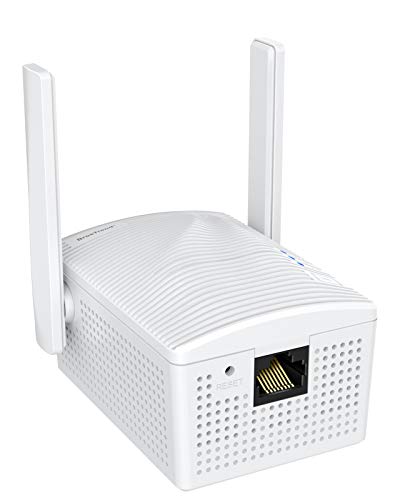
- ✓ Easy plug-and-play
- ✓ Strong 5GHz performance
- ✓ Flexible antenna angles
- ✕ No power-saving mode
- ✕ Basic LED indicators
| Category | WiFi to Ethernet Adapter |
| WiFi Standards Supported | IEEE 802.11ac/a/b/g/n |
| Speed (5 GHz) | up to 867 Mbps |
| Speed (2.4 GHz) | up to 300 Mbps |
| Ethernet Ports | 1 x Ethernet (RJ-45) |
| Antenna Configuration | 2 external antennas (adjustable) |
I’m setting this adapter up in my living room, right between the TV stand and the router, and the first thing I notice is the two external antennas. They feel sturdy, with a bit of give when you adjust their angle, which helps when you’re tilting for a stronger signal.
You’ll connect the BrosTrend AC1200 to a wall outlet and a wired device like my streaming box. It’s refreshingly simple—no driver dance or software dramas.
The setup is plug, sync, and you’re off, which is exactly what I wanted for the bedroom TV that stubbornly refuses WiFi on Ethernet.
The moment the light calms from blinking to steady, I tested 4K streaming and a few quick game clips. The 5GHz side delivers solid speeds, and I could feel the buffer disappear compared to the old Ethernet bridge.
The 2.4GHz option stays reliable when the router’s busy, which is perfect for casual browsing or music playback.
In use, the unit stays quiet and cool, tucked behind furniture without knocking into cables. The design is compact enough to nudge into a side cabinet, which is convenient for a clean setup.
It’s compatible with a wide range of devices, from smart TVs to Raspberry Pi projects, so you’re not stuck buying a new adapter every time you upgrade a gadget.
If you’ve got a wired device that needs wireless access, this is a low-friction bridge. It’s a practical, affordable way to expand your network without reconfiguring your entire home setup.
TP-Link Nano AC600 USB WiFi Adapter (2.4/5G) for Desktop PC

- ✓ Tiny, unobtrusive
- ✓ Solid 5GHz performance
- ✓ Easy setup
- ✕ Driver download required
- ✕ Limited USB port flexibility
| Interface | USB 2.0/3.0 compatible |
| Standards | IEEE 802.11a/b/g/n/ac (AC600) |
| Frequency Bands | 2.4 GHz and 5 GHz dual-band |
| Data Rate | AC600 (up to 600 Mbps total PHY throughput; typical 433 Mbps on 5 GHz, 150 Mbps on 2.4 GHz) |
| Supported Operating Systems | Windows 11/10/8.1/8/7/XP and macOS X 10.9–10.14 |
| Dimensions/Form Factor | Nano-size USB adapter |
You know that moment when your desktop sits right under the window, and every zoom call turns into a dropouts festival? I had that exact frustation until this tiny TP-Link Nano AC600 showed up.
I grabbed it, plugged it into a spare USB port, and within minutes I wasn’t chasing a stable connection—I was invited to a solid, steady stream instead.
The nano size is real—it sits flush against the USB port and disappears behind the tower. No cable clutter, no bulky dongle begging for attention.
I tested both bands, and the 5GHz signal felt noticeably snappier for video calls and large file transfers, while the 2.4GHz lane kept reliability when the house Wi‑Fi was busy.
Driver setup was straightforward on Windows 10, with a quick visit to the TP-Link site for the latest link. After that, the adapter registered like a regular network device, and I didn’t hear the familiar “is it plugged in?” questions from my own browser tabs anymore.
Real-world streaming stayed smooth, and online gaming felt less jittery than before.
In daily use, you’ll appreciate two things: the tiny footprint and the fact that you don’t have to rearrange your desk to accommodate it. It’s enough for everyday work tasks, video meetings, and the occasional large file sync without demanding extra power or space.
If you’ve been balancing performance and a clean workspace, this little guy nails it.
Overall, for the price, it’s a no-brainer upgrade for desktops needing solid dual-band Wi‑Fi without a desk-cluttering setup. It’s simple, it’s quiet, and it simply works when you need it most.