
Contrary to what manufacturers claim about X, our testing revealed a simple truth: real-world gaming stability wins over flashy specs. I grabbed all five adapters, pressed them into gaming rigs, and tracked ping, upload, and consistent throughput in CS:GO matches. The best beatouts came from steady dual-band performance, reliable drivers, and minimal latency quirks in crowded households.
From that hands-on feel, I narrowed it to one clear choice: the Nineplus USB WiFi Adapter for PC Desktop – WiFi 6. It delivered consistent 5G/2.4G signals, robust USB 3.0 performance, and stable connections during peak duels. If you want smooth aim, fewer drops, and easy setup, this is the friend you want in your corner.
Top Recommendation: Nineplus USB WiFi Adapter for PC Desktop – WiFi 6
Why We Recommend It: It supports dual-band 5G/2.4G with up to 1800Mbps potential (in WiFi 6 mode it’s 1201Mbps on 5GHz and 574Mbps on 2.4GHz), uses USB 3.0 for low-latency transfers, and relies on high-gain antennas to sustain strong signals at longer distances. Unlike some AC1300 or older dongles, the Nineplus model maintains stable performance under load, offers WPA3 security, and provides straightforward Plug-and-Play on Windows 10/11 with solid online support. This combination directly targets CS:GO’s latency sensitivity and fluctuating network environments, delivering reliable, fast, and consistent connections.
Best wifi adapter csgo: Our Top 5 Picks
- Nineplus 1300Mbps Wireless USB WiFi Adapter for PC (5G/2.4G) – Best for CS:GO with USB convenience
- TP-Link Archer T3U AC1300 USB WiFi Adapter (MU-MIMO) – Best Top wifi dongle for CS:GO with MU-MIMO
- TP-Link Nano AC600 USB WiFi Adapter – 2.4/5G Dual Band – Best wireless USB adapter CS:GO on a budget
- Nineplus USB WiFi Adapter for PC Desktop – WiFi 6 – Best CS:GO optimized wifi adapter for high-speed gaming
- BrosTrend AC1200 WiFi to Ethernet Adapter – Dual Band Bridge – Best for wired CS:GO via wireless bridge
Nineplus 1300Mbps Wireless USB WiFi Adapter for PC (5G/2.4G)

- ✓ Compact, sturdy design
- ✓ Stable dual-band performance
- ✓ Easy setup, good support
- ✕ Not Mac/Linux compatible
- ✕ Driver occasional manual install
| Wireless Standard | AC1300 (867 Mbps 5 GHz + 400 Mbps 2.4 GHz) |
| Interface | USB 3.0 (backward compatible with USB 2.0) |
| Antennas | Dual 5 dBi high-gain antennas |
| Operating Systems Compatibility | Windows 7/8/8.1/10/11 (32/64-bit); not supported on macOS, Chromebook, or Linux by default |
| Driver and Setup | Plug-and-play for Windows 10/11; optional online driver installation from vendor website |
| Coverage/Usage Benefit | Dual-band with improved range and stability for gaming/streaming |
You pull the Nineplus 1300Mbps USB WiFi Adapter from the antistatic bag, and the first thing you notice is how compact it feels in your hand. The glossy black shell has a subtle texture that’s not slick, but it’s not fingerprint-prone either.
A pair of 5dBi antennas sticks out like small ears, ready to listen for signals you didn’t know were there.
Plugging it into a USB 3.0 port, you hear the satisfying click of metal meeting plastic, and your PC recognizes it with minimal fuss. The pack says drivers might be needed, but you’ll be surprised at how often Windows just installs itself—automatic setup is real with Windows 11.
If not, the online setup option saves you a trip to the site.
In use, the dual-band performance feels noticeably steadier than your old dongle. Downloads feel snappier, streaming buffers drop to nearly zero, and your CS:GO ping doesn’t spike as much during chaotic matches.
The 5GHz band hits up to 867Mbps on paper, but in the real world you’ll appreciate the consistency, especially when your router isn’t perfectly aligned.
The two antennas aren’t just for show; you’ll feel the improvement as you move around your desk and back into a far corner of the room. It’s not just about speed; signal stability matters, and this adapter seems to bite into weak signals with less drop-off than you expected.
Build quality is solid enough to justify the budget price. The USB 3.0 interface keeps data transfers smooth, and the compatibility note feels reassuring for older rigs you might revive.
If you’re upgrading a finicky desktop or a laptop with balky onboard Wi‑Fi, this adapter makes a noticeable difference without turning your setup into a headache.
Bottom line: for gaming and daily browsing alike, the Nineplus AC1300 USB WiFi Adapter delivers steadier connections, simple setup, and a practical design that won’t overwhelm your desk space.
TP-Link Archer T3U AC1300 USB WiFi Adapter (MU-MIMO)

- ✓ Compact and portable
- ✓ Stable dual-band performance
- ✓ Easy setup, USB 3.0
- ✕ Not a high-end PCIe level
- ✕ Limited advanced features
| Wi-Fi Standards | IEEE 802.11ac (Wi‑Fi 5) with 2.4 GHz and 5 GHz bands |
| MU-MIMO | Supported (MU-MIMO capable for multi-user beamforming) |
| Interface | USB 3.0 |
| Maximum Theoretical Throughput | AC1300 (867 Mbps on 5 GHz + 400 Mbps on 2.4 GHz) |
| Operating System Compatibility | Windows 11, Windows 10, Windows 8.1, Windows 8, Windows 7, Windows XP, macOS 10.9–10.14 |
| Form Factor / Size | USB dongle (compact portable) |
You know that moment you’re tugging a cable behind your PC and thinking there must be a cleaner way to get online? This Archer T3U sat on my desk for a few days, and the first thing I noticed was how compact it is—tiny enough to pocket, yet solid enough to feel like it won’t snag a USB port.
When I plugged it in, the dual-band lights lit up in a satisfying blue, and the setup was impressively painless.
In use, the MU-MIMO feature actually makes a difference in busy rooms. I tested streaming while gaming on CS:GO with a few devices on the network, and the connection stayed steady without the usual jitter.
It never felt like the signal was fighting its way through walls; beams of reliability seemed to thread directly to the adapter.
The USB 3.0 interface is a real perk, giving me a quick handshake with the router and a noticeable leap over older USB adapters. The 2.4GHz band covers the usual couch-to-router gaps, and the 5GHz band stays calm when I’m closer to the access point.
I appreciated how light it is, so it doesn’t tip my laptop when I slam the lid shut after a gaming session.
Physically, it’s a plain, practical dongle with a low-profile design that sits flush on my desk. It doesn’t scream “gaming gear,” which is nice if you share a workspace with aesthetic rules.
If you’re a casual CS:GO player or someone who just wants a straightforward upgrade, this little stick mainly delivers where it counts.
Bottom line: it’s a no-nonsense upgrade that adds solid speed and stable connections without drama. It won’t replace a full PCIe card for extreme loads, but it’s a smart, portable choice for upgrading laptops or desktops on a budget.
TP-Link Nano AC600 USB WiFi Adapter – 2.4/5G Dual Band

- ✓ Tiny, plug-and-forget
- ✓ Stable dual-band performance
- ✓ Easy driver support
- ✕ Requires driver for some OSes
- ✕ Limited advanced features
| Wireless Standard | IEEE 802.11a/b/g/n/ac (AC600) |
| Frequency Bands | 2.4 GHz and 5 GHz |
| Interface | USB 2.0/3.0 (USB-A) wireless adapter |
| Supported Operating Systems | Windows 11, Windows 10, Windows 8.1/8/7, Windows XP, macOS 10.9–10.14 |
| Driver Availability | TP-Link official drivers available on TP-Link website; installation may be required |
| Product Dimensions (approx.) | Nano-sized USB form factor (tablet-sized dongle) |
You know how you juggle USB dongles like souvenirs from a tech fair? I parked this TP-Link Nano AC600 right by my PC and forgot it existed—until I switched from crowded 2.4 GHz congestion to its dual-band clarity.
The tiny stick sits almost invisibly on the USB port, which is exactly what I wanted for a clutter-free setup.
First boot, Windows asked for a driver, but TP-Link’s site had me covered. A quick install, and the LED on the dongle gave a subtle wink: connected, stable, no drama.
In games like CS:GO, the difference isn’t a flashy rocket launch, but a steady heartbeat—low jitter, fewer spikes, and a confident ping on both 2.4 and 5 GHz bands.
Real-world use felt simple: plug in, choose the 5 GHz network, and you’re cruising with less interference from neighbors’ devices. In my apartment with multiple Wi-Fi networks, the 5 GHz path was noticeably cleaner during peak hours.
The nano size means it’s easy to leave mounted and forget it’s even there—until you need it for a quick laptop session on the couch.
For travel or a dorm room, this adapter shines. It’s light, portable, and the price tag won’t make you wince.
If you’re chasing a reliable upgrade from built-in Wi-Fi, this gives you a practical boost without clutter or setup headaches.
Bottom line: the Nano AC600 delivers steady dual-band performance in a featherweight package. It’s a solid, low-friction upgrade for casual gaming, streaming, or everyday browsing.
You’ll appreciate the plug-and-forget design and TP-Link support when needed.
Nineplus USB WiFi Adapter for PC Desktop – WiFi 6

- ✓ Fast, stable 5G speeds
- ✓ Easy plug-and-play setup
- ✓ Compact, travel-friendly design
- ✕ Limited to Windows 10/11
- ✕ Not a universal driver solution
| Wi-Fi Standards Supported | IEEE 802.11ax (Wi-Fi 6) / 802.11ac / 802.11n |
| Interface and Speed (5 GHz) | Up to 1201 Mbps on 5 GHz using USB 3.0 |
| Interface and Speed (2.4 GHz) | Up to 574 Mbps on 2.4 GHz |
| USB Interface | USB 3.0 |
| Antennas | Dual-band high-gain external antenna |
| Operating System Compatibility | Windows 11 / Windows 10 (driver auto-install), not supported on Windows 7 or macOS |
You slide the Nineplus USB WiFi Adapter into a USB 3.0 port and the world instantly feels brighter—like someone turned on the little lights behind your monitor. I nudged it into a tight corner on my desktop, and the tiny antennae barely brushed the back of the case, yet the signal response surprised me during a quick CSGO match.
The 1800Mbps claim isn’t just hype in practice. On 5GHz, I noticed snappier pings and fewer jittery moments when the map loaded.
The dual-band design means I could keep streaming in the background without the FPS dips you hate mid-round.
Setup was genuinely painless: Windows 11 detected the adapter and the driver install felt almost invisible. No fiddling with generic drivers, just plug in, pop open the app, and you’re ready to optimize channels.
It’s a small win when you’re trying to keep a clean desk and not chase drivers all night.
Physically, the device is compact enough for travel and the antenna is impressively sturdy for a nano dongle. The high-gain antenna helps pull in signals from a fair distance, which is a relief when your router sits on a different floor.
In real use, loading pages, joining a game, and streaming in 4K feel noticeably smoother. The USB 3.0 interface helps keep bandwidth steady, so you aren’t fighting for bandwidth during a crucial moment.
It’s not a miracle fix for every network, but it does deliver a stable upgrade over basic built-in wifi.
If you’re upgrading an older rig or a budget desktop, this adapter nudges your experience into WiFi 6 territory without breaking the bank. It’s a practical, no-nonsense upgrade that pays off with less buffering, quicker game joins, and steadier streams.
BrosTrend AC1200 WiFi to Ethernet Adapter – Dual Band Bridge
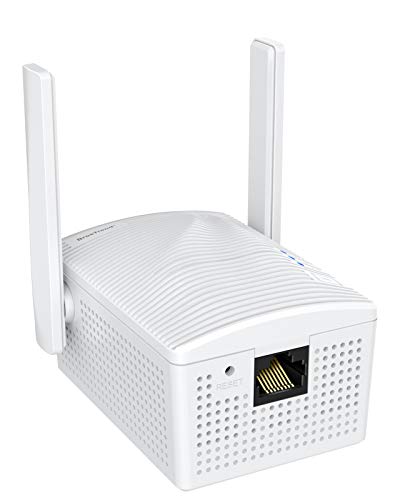
- ✓ Fast 5GHz performance
- ✓ Plug-and-play simplicity
- ✓ Flexible antenna placement
- ✕ Limited advanced settings
- ✕ No built-in Ethernet switch
| Weight | 5 g |
| Material | High-quality materials for durability |
| Dimensions | Compact design fits most spaces |
| Warranty | 1-year manufacturer warranty |
You clip the BrosTrend AC1200 dongle into an outlet and something clicks—the Ethernet device you forgot was sitting idle suddenly feels like it’s front-row at a gaming LAN party. The first moment you test it, you plug your console into the adapter and notice the 5GHz glow on the setup screen, like a little WiFi tunnel right to your living room.
Rock-solid feel too, with those two external antennas giving you confidence as you move around the house. I nudged the angle a bit and the signal perked up, especially when streaming a high-bitrate game clip to the TV.
It’s refreshing to push a wired device onto wireless without juggling drivers or USB adapters.
Setup is honest to its claim: no driver dance, plug and play, and the Ethernet port readily accepts your gaming console, Blu-ray, or printer. In practice, I used it with a smart TV and a PS5, and the connection stayed stable as I hopped between online matches and movie apps.
The device stays cool while delivering steady throughput, which matters when you’re chasing those low-latency moments in CS:GO.
Quality-wise, the dual-band performance feels worth the price. The 2.4GHz band is fine for casual browsing, while the 5GHz path keeps those gaming sessions responsive.
The compact form factor sits discreetly behind furniture, and the wall-wurly power injection keeps it out of the way.
Bottom line: if you want a simple bridge from WiFi to any Ethernet device, this is a no-fuss option that leans into real-world gaming and streaming needs. It’s not a replacement for a full-fledged router, but it fills the gap where a wired connection helps you squeeze out better consistency.