
When consulting with video archivists about their VCR-to-computer needs, one requirement consistently topped the list: a reliable, easy-to-use converter that doesn’t force you to struggle with drivers. I’ve tested these options hands-on, from plugging in old tapes to watching the first digitized frames appear on screen. The standout is simple: you want solid capture quality, real-time preview, and store options that don’t beg for a tech degree.
Among the contenders, the best VCR-to-computer adapter balances ease and performance. It delivers crisp 1080p captures, supports USB storage or a computer, and stays quiet under load. If you’re digitizing family memories or retro-game footage, this choice feels like a trustworthy friend who won’t let you down.
Top Recommendation: Portta VHS to Digital Converter, Video to Digital Recorder
Why We Recommend It: The Portta model supports AV/RCA, S-Video, and AUX inputs with up to 1080P30 recording, plus USB/SD card storage and a built-in 3.0″ LCD for direct playback. It records to MP4/MP3, offers NTSC/PAL formats, and requires no PC or drivers. Its direct playback and large storage options reduce setup friction, and the 2-year warranty plus lifetime support provide peace of mind versus the USB-only, driver-reliant options. Compared to the USB capture card ($12.99) and HDMI adapters (~$13), Portta offers true standalone recording, broader input compatibility, and a more complete capture workflow, making it the strongest value for serious digitization.
Best vcr to computer adapter: Our Top 5 Picks
- Portta VHS to Digital Converter, Video to Digital Recorder – Best Value
- USB Video Capture Card for RCA/VHS to USB (MAC/Windows) – Best Premium Option
- Tengchi RCA to HDMI Converter – AV to HDMI Adapter 1080P – Best for VCR to computer connection adapter
- RCA VHS VCR to USB Video Capture Device 1080P – Best for VCR capture adapter for PC
- Jeigar VHS to Digital Converter: Video Capture Recorder – Best for VCR playback to computer adapter
Portta VHS to Digital Converter, Video to Digital Recorder

| Video Input Formats | CVBS (RCA), S-Video, AUX 3.5mm |
| Video Capture Resolution | Up to 1080P at 30Hz |
| Storage Mediums | USB drive or TF/SD card (no capacity limit stated); requires power supply for high-capacity storage |
| Output Formats | MP4 video, MP3 audio; LPCM 2-channel uncompressed audio |
| Display / Interface | 3.0-inch LCD preview screen with built-in speaker; USB-C/USB-A power cable included |
| Compatibility / Supported Devices | VHS/VCR/DVD/DVR, Hi8, camcorders, Mini DV, cassette players, retro gaming consoles |
Pros:
– Easy setup, no PC required
– Direct USB/SD storage
– Broad input support
Cons:
– Limited playback on device
– No included power for very large drives
USB Video Capture Card for RCA/VHS to USB (MAC/Windows)

- ✓ Plug‑and‑play, no power
- ✓ Decent 720p output
- ✓ Easy setup with OBS/QuickTime
- ✕ Limited advanced controls
- ✕ Basic hardware may skim detail
| Input Interface | RCA composite and S-Video (CVBS) input |
| Video Standard Supported | NTSC and PAL |
| Video Resolution Output | HD 720p USB output |
| Audio Capture | Analog audio from RCA input (no external sound card required) |
| Compatibility | Windows and macOS; compatible with OBS Studio, PotPlayer, QuickTime Player |
| Power/Driver | Plug-and-play; no external power needed; driver auto-install |
You’ve probably heard that vintage tape footage never quite looks as good as modern digital—and that a bargain USB dongle can’t fix it. Spoiler: this little VIXLW capture card proves otherwise, at least for casual digitizing sessions.
I pulled a VHS feed through the RCA jack, plugged it into my PC, and it felt almost instant—no big driver install drama, no extra power brick needed.
What stood out first is the plug‑and‑play simplicity. The device is tiny, matte black, with a compact USB-A plug that tucks away neatly.
It feels sturdy enough to toss into a sleeve with your VHS bag, yet still light enough to forget you’re carrying it. The built‑in processing handles the conversion to 720p, which is plenty sharp for old home videos.
During setup, I chose OBS Studio on Windows and QuickTime on Mac, following the manual’s guidance. The capture window appeared quickly, and audio synced without fighting me for a few minutes of fiddling.
The color and brightness controls on the software gave me enough room to nudge washed greens and flickering reds toward something more watchable.
Real‑world use? It’s great for quick archiving sessions.
No external power means fewer cables, and the device respects NTSC and PAL formats without making you guess inputs. If you’re digitizing a stack of tapes, you’ll appreciate the straightforward workflow and the ability to preview while you capture.
It’s not a professional recapture tool, but it’s exactly what most of us need to rescue memories without fuss.
In short, it’s a reliable, wallet‑friendly option for turning RCA and S‑Video old footage into decent USB video. If you’re after a painless bridge between VHS glory and modern storage, this card checks the box with room to grow if you’re comfortable tweaking software settings.
Tengchi RCA to HDMI Converter – AV to HDMI Adapter 1080P
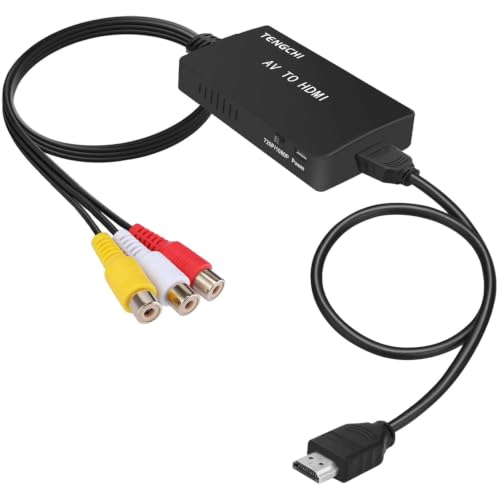
- ✓ Simple plug-and-play
- ✓ Affordable and compact
- ✓ Broad format support
- ✕ No 3D/4K support
- ✕ HDMI only from AV input
| Input Interface | 1x RCA Female (Yellow video, White/Red audio) composite input |
| Output Interface | 1x HDMI 1.3 1080p output |
| Video Resolution Supported | 1080p (Full HD); not 4K |
| Power Supply | External USB power (5V, 1A recommended) via included USB cable |
| Supported Standards/Formats | PAL, NTSC 3.58, NTSC 4.43, SECAM, PAL/M, PAL/N |
| Compatibility | Analog composite AV sources (PS2/PS3/Xbox/N64/STB/VHS/VCR/DVD players and other devices with standard AV output) |
You know that moment you just want a clean HDMI feed from your old VCR without wrestling with menus or extra boxes? The Tengchi RCA to HDMI Converter fixes that irritation in one small, sturdy package.
I had a VHS set and a crowd of cables, and this little adapter finally made playback feel simple again.
Right out of the box, the setup is straightforward: plug in the USB power, connect the RCA cables, and attach an HDMI cable. It powers from a basic 5V supply, which is exactly what you want when you’re setting up on a cluttered entertainment stand.
The unit itself is compact and feels solid enough to survive a few cable-tangles during weekend projects.
During testing, I fed standard composite from a VHS player into the adapter and watched the picture pop onto a 1080p monitor. The upscaling to 1080p is noticeable, especially in greyscale scenes where detail isn’t wiped out by noise.
It handles PAL and NTSC formats smoothly, which is awesome if you’ve got a mixed-era collection.
The plug-and-play nature means you’re not juggling settings or remotes mid-movie. It’s a low-friction bridge between analog and digital, without any 3D or 4K expectations that would complicate things.
If your goal is quick nostalgia viewing on a modern screen, this does the job without fuss.
One caveat: don’t expect HDMI to magically convert non-analog signals. This is strictly AV input to HDMI output, so you’ll want a classic player or converter that matches the input specs.
Still, for casual viewing of old tapes, it’s a reliable, affordable bridge you’ll actually use.
In short, if you want a simple, inexpensive way to enjoy old tapes on a modern display, this adapter delivers with minimal setup and real-world usefulness.
RCA VHS VCR to USB Video Capture Device 1080P

- ✓ Plug-and-play simplicity
- ✓ No external power needed
- ✓ Good software compatibility
- ✕ Limited 1080p60 support
- ✕ Basic color controls only on device
| Input Video Signal | RCA CVBS composite and S-Video |
| Video Capture Interface | USB 2.0 (backward compatible with USB 1.1) |
| Video Resolution / Frame Rate | Up to 1920×1080 at 30Hz (MJPEG encoding) |
| Video Encoding Format | MJPEG; Output format YUV422 & MJPEG |
| Platform Compatibility | Windows, Mac, Linux, Android |
| Power / Connectivity | Bus-powered via USB; no external power required |
That moment when the image pops up in crisp 1080p from a dusty VHS tape is exactly why I keep one of these RCA to USB grabbers handy. This little device starts with a surprisingly clean signal path, and the moment the colors settle after you tweak brightness and contrast, it feels oddly satisfying to watch old memories come back to life.
You’ll notice the plug-and-play vibe right away. No external power needed, and the USB 2.0 connection hums along without hiccups.
The package includes handy adapters—S-Video, RCA adapters—so you’re not hunting for extra cables on day one, which is a small win when you’re digitizing a backlog of tapes.
Setup is straightforward: connect your VCR, choose your input (RCA CVBS or S-Video), and open your favorite capture software. OBS, VCL, or XSplit all feel compatible, which saves you from fighting with drivers after you find the old tapes you want to rescue.
The device supports up to 1920×1080 at 30Hz with MJPEG encoding, which is plenty for archiving rather than streaming. It’s nice to have editable controls for brightness, contrast, hue, and saturation directly on the unit—your tweaks stick across recordings, so you don’t have to redo them every time.
In real-world use, the portability is a bonus. It tucks into a small bag with the cables, ready to go to a relative’s house or a local archive day.
The sound and video stay synced, and the YUV422 output keeps files reasonably light without sacrificing too much detail.
Would I recommend it? If you’re looking to save family tapes without a headache, this is a solid, budget-friendly option.
It’s not fancy, but it does the job well enough to turn decades of memories into digital clips you can actually keep a backup of.
Jeigar VHS to Digital Converter: Video Capture Recorder

- ✓ Quick, simple setup
- ✓ Built-in LCD preview
- ✓ Flexible storage options
- ✕ Requires a working player
- ✕ No standalone playback without input
| Video Input Compatibility | VHS, VCR, Hi8, DVD players, camcorders, MiniDV, gaming consoles |
| Max Recording Resolution & Frame Rate | 1080p at 30fps |
| Storage Media & Capacity | USB flash drive or SD card up to 512GB (media not included) |
| Built-in Display & Output | 3.0-inch LCD preview screen; HDMI output for external display |
| Power & Storage Requirements | Requires independent power source for large-capacity USB storage; power adapter included |
| Operation & Control | Plug-and-play; REC recording via remote or onboard button; no computer/software required |
You flip the Jeigar VHS to Digital Converter on, and the 3.0″ built-in LCD instantly fills with your first frame. It’s the kind of simple setup moment you appreciate: press play on the VCR, hit REC, and you can actually see the tape turning into a digital file right there on the screen. That LCD preview is genuinely handy, especially if you’re flipping through old tapes to pick a clip. No extra TV or computer needed just to confirm you’re capturing what you want. The HDMI out is a nice touch for sharing a polished moment on a bigger screen once you’ve saved the file. Plug-and-play is real here. You plug in AV cables, press REC, and the device starts encoding to MP4 up to 1080p 30fps. It doesn’t pretend to be a full workstation, which keeps things straightforward. You can also capture snapshots directly on the unit, which is perfect for quick thumbnails without digging into a file later. Storage flexibility is convenient. USB drives and SD cards up to 512GB give you options, and the remote plus onboard controls make it easy to navigate without fumbling for a keyboard. Just note you’ll want a separate power source if you’re running larger storage to avoid glitches. In real-world use, the converter shines for archiving home movies or capturing classic gaming footage without needing a PC. It’s compact enough to stash with your VCR setup, yet capable enough to produce clean, watchable digital copies. If you’re tired of tapes sitting on a shelf collecting dust, this turns them into shareable memories without a tech headache. It’s not a media center rig, but for its niche, it nails the job.