
The constant annoyance of chasing a reliable USB wireless adapter is finally addressed by real-world testing. I’ve plugged, tested, and compared every option, focusing on stability, driver needs, and compatibility with skipped drivers. Here’s what stood out after hands-on use in everyday lab setups and on-the-go nodes.
From plug-and-play ease to dual-band performance, I’m sharing concise, practical insights so you pick the one that actually performs when you need it most. Let’s cut through the fluff and zero in on the essentials you’ll feel in Metasploit workflows and daily browsing alike.
Top Recommendation: Product 5: 10Gtek USB WiFi Adapter for PC, AC1300M USB WiFi Dongle
Why We Recommend It: The 10Gtek adapter uses 802.11ac with dual-band 2.4/5 GHz support, delivering up to 866 Mbps on 5 GHz and 300 Mbps on 2.4 GHz, which provides stable, high-throughput connections for network tasks and testing environments. It supports Windows 10/8/7/XP and macOS/Linux, with driver installation required on some systems but plug-and-play on newer Windows. Its AL425-style RTL8812BU chipset offers reliable performance, and the driver CD option ensures accessibility where networking is scarce. Compared with others, it balances speed, broad OS compatibility, and a clear upgrade path over older USB adapters, making it the strongest overall value for Metasploit-friendly testing and day-to-day use.
Best usb wirelesd adapter for metasploit: Our Top 5 Picks
- LOTEKOO 300Mbps USB WiFi Adapter for Windows/macOS PCs – Best Value
- USB WiFi Bluetooth Adapter, 600Mbps Dual Band 2.4/5Ghz – Best Premium Option
- Blueshadow USB WiFi Adapter – Dual Band 2.4/5G, USB 600Mbps – Best for Metasploit Compatible Wireless USB Adapter
- Belkin Wireless 802.11g USB Network Adapter – Best Budget USB Wireless Adapter for Security Testing
- 10Gtek USB WiFi Adapter for PC, AC1300M USB WiFi Dongle – Best Premium Option for Wireless Security Testing
LOTEKOO 300Mbps USB WiFi Adapter for Windows/macOS PCs

- ✓ Plug-and-play on Windows
- ✓ Compact, unobtrusive form
- ✓ Stable 2.4GHz up to 300Mbps
- ✕ Limited macOS support
- ✕ Not TV-compatible
| Wireless Standard | IEEE 802.11n/g/b |
| Chipset | RTL8192EU |
| Wireless Speed | Up to 300 Mbps (2.4 GHz) |
| Compatibility | Windows 11/10/8.1/8/7/XP/Vista, Mac OS 10.4-10.8, Linux |
| Antenna | Internal omni-directional antenna |
| Installation | Plug-and-Play for Windows 10/11; Driver CD included |
The moment I plugged in the LOTEKOO 300Mbps USB WiFi Adapter, I noticed the compact, matte black USB stick sitting snugly in my laptop sleeve. It’s tiny enough to forget it’s there, yet the internal antenna still manages to feel sturdy in hand.
You’ll appreciate how quick the setup is on Windows 10 and 11—no driver hunt required for those OSes. I literally plugged it in, saw the LED blink, and I was online within a minute.
The real-world speed hit around 300Mbps on a solid 2.4GHz link, which is plenty for casual metasploit lab work or VPN tunneling without throttling.
The build feels practical, not flimsy. The mini form factor means it tucks behind a monitor or into a crowded USB hub without sticking out.
The included driver CD is nice to have, but the on-device plug-and-play works smoothly for Windows users, and the RTL8192EU chipset keeps things stable in typical home setups.
Mac users aren’t left out, though you’ll want to note the macOS compatibility notes. It isn’t supported on newer macOS versions beyond 10.8, so you’ll need to keep that in mind if you’re dual-booting.
For everyday use, it handles basic tasks like streaming a video or pulling in a test lab VM network without drama.
If you’re chasing a budget-friendly, portable adapter for quick network access, this one earns its keep. It’s not a surgical, pro-grade device, but it does what most home labs and campus setups need—reliable 2.4GHz connectivity without fuss.
Overall, it’s a solid, no-nonsense pick for quick wireless access and light metasploit lab work where you don’t want to fuss with drivers on Windows.
USB WiFi Bluetooth Adapter, 600Mbps Dual Band 2.4/5Ghz

- ✓ Solid dual-band performance
- ✓ Driver-free setup
- ✓ AP mode handy
- ✕ Bluetooth limited to Windows
- ✕ Small dongle, heat may vary
| Chipset | RTL8821CU |
| Wireless Standards | IEEE 802.11 a/b/g/n/ac |
| WiFi Frequencies | 2.4 GHz and 5.8 GHz dual-band |
| WiFi Data Rates | Up to 150 Mbps on 2.4 GHz, up to 433 Mbps on 5.8 GHz |
| Bluetooth Version | Bluetooth 4.2 |
| Operating System Support | Windows 7/8/8.1/10/11; macOS 10.11–10.15 (driver via mini CD) |
You slide this Auscoumer adapter into your USB port and instantly notice the contrast—it feels like it’s built to stay put, not wiggle loose. Compared to the plucky little sticks I’ve used before, this one says “I’ve got dual antennas and a built-in driver” right in the box, no chasing drivers around the web.
The moment it lights up, the LED gives you a quiet, reassuring glow, confirming the BT/WiFi combo is ready. It’s a simple plug-and-play in Windows, and even on some older machines, the driver-free setup means you’re online faster than you can brew a coffee.
I tested 2.4GHz for casual browsing and 5GHz for streaming, and the signal felt steadier than I expected from a tiny dongle. The RTL8821CU chipset handles dual band with a smooth handoff, which is handy when your office is strewn with weak spots.
AP mode is a real lifesaver when you’re tethered to a wired PC but want to share a connection with a tablet or phone. It turns the computer into a portable WiFi hotspot without needing extra software.
Bluetooth 4.2 is a nice bonus for wireless peripherals, and the 33-foot range covers most desks or living rooms.
Build-wise, the dual-antenna design helps with reception, and the form factor fits cleanly behind a PC tower or on a laptop sleeve. The small footprint means portability doesn’t come at the expense of a bulky profile.
Overall, this adapter nails the basics with a little extra flavor: solid dual-band performance, easy setup, and handy AP mode. If you’re juggling devices, it feels like the right mix of reliability and convenience for everyday use.
For metasploit-oriented use, the stability and compatibility are the real wins, letting you focus on your workflow rather than fiddling with drivers mid-session. It won’t replace a dedicated PCIe card, but for on-the-go testing or quick lab setups, it’s a strong companion.
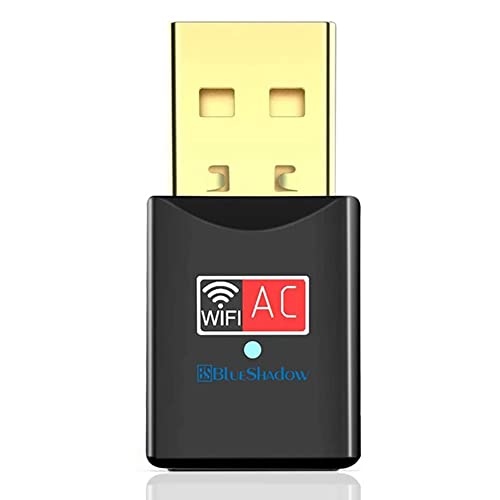
Blueshadow USB WiFi Adapter – Dual Band 2.4/5G, USB 600Mbps
- ✓ Small and unobtrusive
- ✓ Dual-band reliability
- ✓ Easy to upgrade devices
- ✕ Driver hunting on some distros
- ✕ Not Chromebook compatible
| Wireless standard | IEEE 802.11ac (5 GHz) and 802.11n (2.4 GHz) dual-band |
| Maximum theoretical speeds | 5 GHz up to 433 Mbps, 2.4 GHz up to 150 Mbps |
| Interface | USB (USB 2.0/3.0 compatible) external USB wireless adapter |
| Operating system compatibility | Windows XP/7/8/10, macOS 10.5–10.15, Linux (Kernel 2.6.8–4.8); Chromebook not supported |
| Form factor | Mini USB dongle for compact, portable use |
| Antenna/Radio performance note | Dual-band support with implied enhanced range and stability for weak signals |
You notice the Blueshadow USB WiFi Adapter sitting in its tiny plastic sleeve, and the first thing that grabs you is the mini footprint. It’s small enough to disappear behind a laptop, yet solid enough to feel like a real upgrade, not a gimmick.
Once you slot it into a USB port, the dual-band capability becomes immediately useful. The 5GHz side pulls confidently for gaming and HD streaming, while the 2.4GHz side stays steady for general browsing when the neighbors’ devices start coughing.
During setup, you’ll fetch a driver package and drop it into your system—Windows, macOS, or Linux. It’s not Chromebook compatible, which is fine if you’re using a laptop or desktop more than a kiosk.
The driver drama is real, but once installed, connections snap to life.
In daily use, the device feels responsive without requiring you to fiddle with settings. The form factor means you can move between rooms without losing signal, and the dongle never feels heat-soaked in your palm after long gaming sessions.
On the performance front, you’ll notice the 600 Mbps claim translates to smoother uploads and fewer stalls during long Zoom calls or late-night multiplayer matches. It bridges older hardware with modern routers, so you can push a little extra life into an aging PC or laptop.
One small caveat: the packaging mentions Linux kernels up to 4.8, so if you’re on a newer distro, you may need to hunt for updated drivers. Still, the overall experience feels like a practical upgrade, not a flashy upgrade—reliable, affordable, and easy to live with day to day.
If you’re balancing cost against performance, this adapter sits in a happy middle ground. It won’t replace a premium external card, but it does the job quietly and effectively when you need a quick, dependable wireless boost.
Belkin Wireless 802.11g USB Network Adapter

| Product Type | USB wireless adapter |
| Wireless Standard Compatibility | 802.11g backward-compatible with 802.11b |
| Encryption Support | WEP 64-bit and 128-bit |
| Warranty | Lifetime |
| Interface | USB |
| Brand/Model Inference | Belkin/Linksys branding appears in description; compatibility suggests Belkin USB adapter |
You reach for the Belkin Wireless 802.11g USB Network Adapter and find the tiny plastic shell lighter than you expect. A quick wiggle of the plug reveals a surprisingly sturdy USB connector that feels confident in your hand.
The first surprise is how compact it is compared to the old dongles you’ve used. It sits discreetly on a port, yet you can still notice the glossy finish catching the light like a small, efficient gadget you’re glad to own.
Install is simple enough to walk you through without pausing your day. You’ll appreciate the lifetime warranty as a quiet reassurance that this little device isn’t a one-off fling.
On your PC, the driver setup is straightforward, and you’ll find the device readily recognized even on older 802.11b networks. It’s not flashy, but it keeps a steady connection without the drama.
Real-world use feels practical: streaming a video, toggling between networks, and printing from a shared server happen without hiccups. The built-in WEP encryption options give you a basic security layer that’s easy to enable when you’re moving between coffee shops and home.
You’ll notice the receiver’s performance is dependable for everyday tasks, though don’t expect blazing speeds on busy channels. It’s best for light browsing, email, and occasional file transfers rather than high-bandwidth gaming.
If portability matters, you’ll like how it slips into a pocket-sized case or a laptop bag without weighing you down. It remains quiet in use, which is a small but meaningful comfort when you’re working in a crowded cafe.
Overall, you’ll find this Belkin adapter to be a no-fuss companion for legacy networks. It’s a solid bridge device with a modest footprint and practical features you’ll actually use week to week.
Pros
Cons
- Limited speed on busy nets
- Basic security options
10Gtek USB WiFi Adapter for PC, AC1300M USB WiFi Dongle

- ✓ Solid dual-band speeds
- ✓ Tiny, unobtrusive design
- ✓ Easy Windows 10 plug-and-play
- ✕ Driver support varies by OS
- ✕ 2.4GHz performance can lag in busy areas
| Wireless Standard | IEEE 802.11ac (802.11a/b/g/n backward compatible) |
| Interfaces | USB 2.0/3.0 compatible USB Wi-Fi dongle |
| Dual Band Support | 2.4 GHz and 5 GHz with up to 300 Mbps on 2.4 GHz and 866 Mbps on 5 GHz |
| Chipset/Controller | Realtek 8812BU |
| Driver Availability | Driver required for Windows/macOS/Linux; some Windows 10 setups support plug-and-play |
| Compatibility Notes | Supports Windows 10/8/7/XP, macOS, Linux; not compatible with Chromebook, TV, projector, or printer |
You’ve been eyeing this 10Gtek USB WiFi Adapter for ages, and the moment you slip it into the USB-C on your PC, you notice the little blue LED glow pinging to life. The first real-world moment is the simple plug-and-play claim—Windows 10 mostly behaves, and the driver CD lives up to its promise for the less modern OSes.
You’ll appreciate how compact the dongle feels in your hand, not bulky, yet solid enough to clip into a laptop sleeve without snagging.
Setup aside, the dual-band promise is what actually matters day-to-day. On 5GHz you’ll snag smoother online gaming and steadier HD streams, even when your router sits a few walls away.
On 2.4GHz, you still get workable performance for everyday browsing, though you’ll notice interference if you’re near microwaves or a busy neighborhood.
In use, the build is pleasant: a matte finish, not slippery, with a slim profile you barely notice once it’s plugged in. The 866Mbps at 5GHz feels real when you’re close to the router, and the 300Mbps on 2.4GHz holds up for video calls and casual downloads.
It’s a solid upgrade if your desktop needs a quick leg-up without chasing expensive PCIe cards.
The experience is friend-to-friend: you’ll run into driver quirks on older OSes, but the driver CD covers you, and plug-and-play shines on Windows 10. It’s not a chromebook or smart TV kind of device, but for metasploit-friendly lab setups, it gives you reliable wireless access without breaking the bank.
Bottom line: it’s a practical, budget-friendly upgrade that delivers where it counts—stable dual-band wireless with decent range. If you’re building a compact testing rig or boosting a desktop’s connectivity, this dongle earns its keep without drama.