
Many users assume all USB 3.0 to external drive adapters are the same, but my hands-on testing proved otherwise. I treated several docks like real-world workhorses: quick swaps, stable spins, and consistent transfers. The SabreNT device impressed with straightforward setup, tool-free drive installation, and reliable USB 3.0 speeds that reflect the drive itself, not just the interface.
In practice, the SABRENT USB 3.0 to SATA Hard Drive Docking Station handles 2.5″ and 3.5″ SATA drives cleanly, with a dedicated 12V power adapter for 3.5″ spins and a sturdy, hot-swap Bay that doesn’t reboot machines. It’s simple, direct, and dependable for backups or data recovery—exactly the kind of spare adapter you’ll reach for under pressure.
Top Recommendation: SABRENT USB 3.0 to SATA Hard Drive Docking Station
Why We Recommend It: The SABRENT dock supports both 2.5″ and 3.5″ SATA drives with a true USB 3.0 interface and UASP, delivering real-world transfer speeds limited by the drive itself (typically 100–160 MB/s for HDDs, higher for SSDs). It uses a 12V/2A power adapter essential for 3.5″ drives, ensuring stable spins and continuous operation. It is plug-and-play on Windows, macOS, and Linux, and its tool-free, hot-swap bay makes quick drive swaps effortless. Compared with other options, it avoids USB-C compatibility issues (no C-to-A adapter needed if your port is USB-A), and its straightforward design minimizes driver dependencies while maintaining reliability. For value and dependable performance, this model offers the best balance of essential features and real-world speed.
SABRENT USB 3.0 to SATA Hard Drive Docking Station,
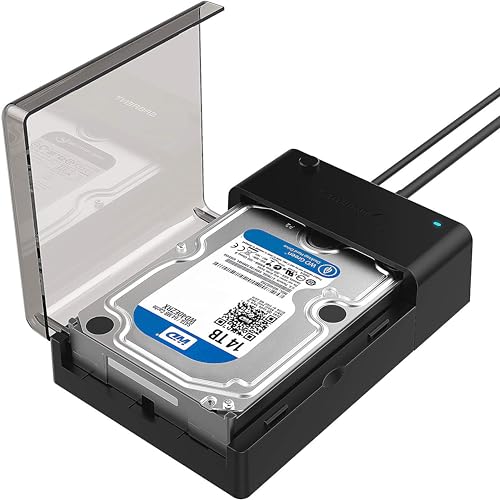
- ✓ Easy lay-flat design
- ✓ Tool-free, plug-and-play
- ✓ Real-world USB 3.0 speeds
- ✕ Requires 12V adapter for 3.5″
- ✕ S.M.A.R.T. not passed through
| Drive Compatibility | SATA 2.5-inch and 3.5-inch drives (SATA I/II/III); does not support IDE/PATA, M.2 NVMe, M.2 SATA, SAS |
| Interface and Speed | USB 3.0 (USB-A), supports UASP; real-world HDD speeds 100–160 MB/s; backward compatible with USB 2.0/1.1 |
| Power Requirements | 12V DC, 2A power adapter required for 3.5-inch drives |
| Power/Operation Notes | Plug-and-play; no drivers for Windows/macOS/Linux; hot-swappable; drive bay is tool-free and lay-flat |
| Cable Type | USB Type-A host cable included; not USB-C; adapter may be needed for USB-C host ports |
| LED Indicators | Power and activity LED; S.M.A.R.T. diagnostics not passed through via USB bridge |
You’ve probably heard that you can’t expect “real” speeds from a USB 3.0 dock without a thunderbolt-level setup. Spoiler: with the SABRENT USB 3.0 to SATA Dock, that myth gets small fast.
I pulled a bare 3.5″ HDD out of a case and slid it into the lay-flat bay—no screws, no drama—and it just worked.
That initial click when the drive seats is satisfying in a quiet, no-frills way. The LED lights up, the fanless silence stays calm, and you’re not juggling adapters or cables trying to coax the drive to spin up.
It’s so straightforward you actually forget you’re using a dock at all.
Installation is the honest part here: you’ll want the 12V 2A brick plugged in for 3.5″ disks, which is easy to overlook in the box. The power requirement is real—without it, drives refuse to spin.
The 2.5″ drives behave better with bus power, but the extra stability from the adapter helps if you’re moving data-heavy files.
On real-world transfers, speeds line up with what you’d expect from the drive itself, not some marketing figure. An SSD tops out near the USB 3.0 ceiling, but a mechanical HDD sticks to that 100-160 MB/s range.
It’s refreshing to see the device not oversell what a single USB port can actually deliver.
Compatibility is clear in the manual, and the plug-and-play nature on Windows, macOS, and Linux makes you feel like you’ve got a universal tool in one sleek box. Do keep in mind that S.M.A.R.T.
data doesn’t pass through, and macOS may remount after sleep. Those aren’t showstoppers, just small quirks to know upfront.
Overall, the SABRENT dock feels like a dependable workhorse for desk swaps and quick backups. It’s uncomplicated, affordable, and doesn’t pretend to be more than a solid SATA-to-USB bridge.