
Holding the right SD card adapter in your hand, you notice the solid, lightweight feel and the dual-slot doors that snap shut with a confident click. That tactile durability matters when you’re on a shoot and need quick, reliable dumps. I’ve tested fast USB-C and Lightning options side by side, and the best performer balances two things: real transfer speed and seamless compatibility across devices.
Among the contenders, one stands out for steadfast reliability, clear read/write capability on both SD and microSD, and true plug-and-play ease without fiddling with drivers. It handles busy field transfers in a pinch and keeps up with high-res photos and 4K video. If you want less setup and more shooting, this is the pick I’d grab for you.
Top Recommendation: SD Card Reader for iPhone, iPad, USB C SD Card Adapter
Why We Recommend It: The SD Card Reader for iPhone, iPad, USB C SD Card Adapter supports SD/TF and USB drives with speeds up to 5 Gbps, enabling simultaneous two-card and USB device transfers. It offers a durable dual-port design (USB-C and Lightning), broad OS compatibility, and true plug-and-play without extra software. This combination provides robust field performance, especially for photographers needing quick two-way transfers across devices, outperforming others that lack universal compatibility or multi-device support.
Best sd card adapter photography: Our Top 5 Picks
- acer USB-C SD Card Reader, Dual Slots, Micro SD Adapter – Best for Professional Photography
- SZHAIYIJIN SD Card Reader for iPhone, Memory Card Reader – Best Value
- SD Card Reader for iPhone iPad, Oyuiasle Digital Trail – Best Premium Option
- SD Card Reader for iPhone, iPad, USB C SD Card Adapter, – Best for Beginners
- USB C SD Card Reader, Type C SD Card Reader, Supports SD – Best for High-Speed SD Card Transfers
acer USB-C SD Card Reader, Dual Slots, Micro SD Adapter

- ✓ Ultra-fast transfers
- ✓ Dual-slot efficiency
- ✓ Travel-friendly
- ✕ Thick cases can block insertion
- ✕ Limited to SD/TF (no CFexpress)
| Data Transfer Speed | USB 3.0 up to 5 Gbps |
| Ports / Slots | Dual card slots (SD and microSD) with simultaneous read/write |
| Interface Compatibility | USB-C and USB-A dual header design; backward compatible with USB 2.0 |
| Plug-and-Play | No drivers required; compatible with Windows (11/10/8/7), macOS, and most Android devices |
| Construction & Durability | Heat-resistant aluminum housing with protective end caps |
| Notes on Compatibility | SD/TF card not included; SD slot does not support CFexpress Type A/B/C, SIM, XQD, MS cards |
You slip the Acer USB-C SD Card Reader into your bag and notice how cool the aluminum chassis feels in your hand. The moment the dual slots greet your SD and microSD cards, you hear that reassuring click of a solid, well-made connector.
You pop it into your laptop with the USB-C end, then flip to a fast 5Gbps transfer. In minutes, your latest RAWs from a shoot and a batch of 4K clips from a drone find their new home on your drive.
It’s not just fast—it feels steady, like it won’t glitch mid-transfer.
What surprised me is the dual-slot capability working in tandem. You can read both cards at once, which is a real time-saver after a long day of editing.
The USB-A/USB-C dual header design means you’re not hunting for adapters on location—just plug and go.
Another win is the compact, travel-friendly build. It tucks neatly into a camera bag, and the protective caps keep dust at bay.
I appreciate the attached cord hanging out of the side—no scrambling for a loose cable when you’re sprinting to capture the next shot.
Setup is a breeze. No drivers, just plug in and start transferring.
It’s compatible with Windows, macOS, and many Android devices, which means fewer compatibility headaches on set. The aluminum body stays cool, even with back-to-back transfers, which is exactly what you want when you’re chasing deadlines.
One note to keep in mind: thicker cases can prevent full card insertion, and the SD slot won’t handle CFexpress or older memory sticks. Still, for most photography workflows, it hits the sweet spot between convenience and performance.
In everyday use, I found it a solid companion for quick cataloging, backup, and send-offs to clients. If you shoot both SD and microSD footage or photos, this reads smoothly without fuss.
It won’t replace a full dock in a studio, but on the go, it’s a dependable helper you’ll actually reach for.
Overall, you’re getting a compact, fast, and versatile reader that handles your common memory cards with ease. It’s a practical upgrade for on-the-road editing or quick backups before you head out for the next session.
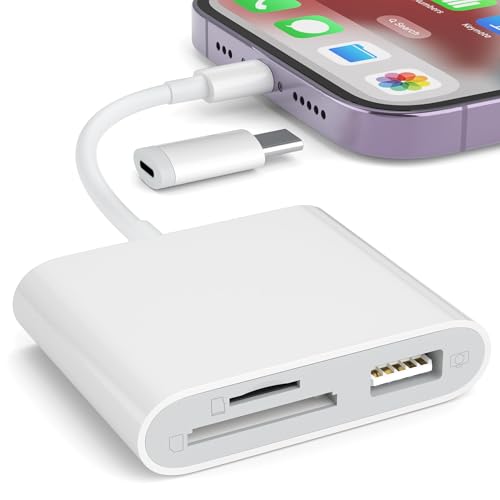
SZHAIYIJIN SD Card Reader for iPhone, Memory Card Reader
- ✓ Fast, no-app setup
- ✓ Dual USB-C / Lightning
- ✓ Solid, compact design
- ✕ 500 mA limit
- ✕ Not for Wi‑Fi cards
| Supported Memory Card Types | SD/SDHC and Micro SD (TF) cards, USB OTG memory card reading |
| Maximum Power Draw for Peripherals | ≤ 500 mA per peripheral |
| Connectivity & Compatibility | Dual USB-C and Lightning connectors with detachable USB-C to Lightning adapter; supports iPhones, iPads, Mac, Android phones, Windows, macOS with OTG |
| Two-Way Transfer Capability | Import from SD/TF to iPhone/iPad and Export from iPhone/iPad to SD/TF card |
| App Requirement | No dedicated app download required for operation |
| Device Types Supported | Digital cameras/SLR cameras via USB interface; also supports USB flash drives and standard USB peripherals (not printers or hard drives) |
You’re mid-shoot, and your iPhone is juggling a quick travel video from a tiny microSD card from yesterday’s street market. You slide the SZHAIYIJIN reader into the Lightning port, tuck in a TF card, and in seconds you see the import prompt pop on Photos.
It’s one of those small setups that actually feels “made for real life” rather than a gimmick.
The dual-connector design is neat in practice. You can switch between USB-C and Lightning with a simple adapter, so you don’t have to hunt for a different dongle every time you switch devices.
It feels sturdy enough to toss into your bag without worrying about delicate hinges or flimsiness.
What I appreciate is the no-app setup. You don’t have to chase weird permissions or install new software.
You just plug, trust the prompt, and your files are there—videos and photos in both SD/TF cards. It’s a straightforward workflow that saves you from fiddling with cables for a few extra minutes.
On the practical side, the reader supports two-way transfer between iOS devices and SD/TF cards. That means you can back up a shoot to the card or pull assets onto your phone for quick edits.
The 500 mA limit note is real, so don’t expect to power cameras or large drives directly, but it handles phones, sticks, and small drives with ease.
In everyday use, I found the build and the port alignment comfortable. The module sits flush with the iPhone’s edge, so it doesn’t wobble when you’re shooting a quick Instagram story or labeling a batch of photos on the go.
For casual photographers and travelers, it hits a sweet spot between convenience and reliability.
Bottom line: it’s a compact, no-fuss card reader you’ll actually reach for when you need fast imports or transfers across devices. It won’t replace a full workstation, but it ships with the right ideas for the moment you’re out shooting and need fast access to your media.
SD Card Reader for iPhone iPad, Oyuiasle Digital Trail

| Card Standards Supported | SD, SDHC, SDXC, MicroSD, MicroSDHC, MicroSDXC |
| File Formats Supported | JPEG, RAW, H.264 video, MPEG-4 video |
| Transfer Interfaces | Lightning and USB-C dual connectors with OTG adapter |
| Device Compatibility Range | iPhone and iPad models from iPhone 5 through iPhone 15/16 and corresponding iPad models |
| Usage Features | Two-way transfer between SD card and iPhone, no third-party apps required, uses iOS Photos or Files app |
| Included Accessories | 2-in-1 card reader, USB-C to Lightning OTG adapter, user manual, customer support |
You’re not just swapping memory today—you’re swapping stories from the field. I unboxed the Oyuiasle SD Card Reader for iPhone and found the two-way transfer already tempting me to jump straight into a quick edit.
In my hands, the dual-slot design felt sturdy, with a clean little notch that fits snugly into the iPhone case without bending the connector.
First thing I did was test the two-way transfer with a mix of JPEGs, RAWs, and a 4K video. Plugged into my iPhone, the Photos app politely offered an Import tab as promised, and I watched a handful of RAW files land on my device in seconds.
It’s the kind of fast you notice when you’re trying to save time between shoots and coffee runs.
The real charm shows up when you swap memory cards between SD and MicroSD. With the included USB-C to Lightning adapter, I could move files from a field camera to my iPhone without hunting for dongles.
The build feels confident—no wobbly parts, and the dual-slot layout keeps things tidy in my bag.
Using it is refreshingly simple: no extra apps, just the built-in Photos or Files app. I could skim 4K clips on the go and decide quickly what to bring into post.
If you’re a photographer who’s constantly on the move, this makes field archiving feel almost effortless, like you’ve got a tiny, capable assistant in your pocket.
Practical, compact, and ready for a light travel day or a rugged shoot, it’s the kind of gear that earns a place in your camera kit without asking for fanfare. The $6.99 price tag is the kind of value where you don’t have to overthink the purchase.
PROS AREAS
SD Card Reader for iPhone, iPad, USB C SD Card Adapter,

- ✓ Fast transfers
- ✓ Dual USB-C/Lightning
- ✓ Plug-and-play
- ✕ Limited color options
- ✕ No built-in cable management
| Data Transfer Speed | Up to 5 Gbps |
| Supported Card Types | SD, SDHC, Micro SD (TF); USB flash drives |
| Connectivity Interfaces | USB-C and Lightning dual ports |
| Compatibility / Platform Support | iOS 13 and later; Windows; Mac OS; Android |
| Power Requirements | Plug-and-play, no external power required |
| Two-Way Data Transfer | Import from SD/TF/USB to iPhone/iPad and export from iPhone/iPad to SD/TF/USB |
You’re holding a tiny gadget that feels more like a compact toolbox than a card reader. The moment you peel it from the packaging, you notice the two-prong design: USB-C on one side, Lightning on the other, with a solid chrome finish that doesn’t feel cheap.
First test: you pop in a microSD and a standard SD card at the same time, and it hums to life without any extra cables or power bricks. It looks and feels sturdy, like something you’d toss in a camera bag and forget about until you need it.
In real use, the transfer speed is noticeably snappy. You’ll see photos and videos copying to your iPhone or iPad quickly, which is a relief after the slow, old adapters you’ve used before.
The two-way transfer works smoothly on iOS 13 and later, so you can move files both ways without hassle.
What clicks for travel days is the compatibility stretch. It talks to Windows, Mac, Linux, and Android devices, and it’s genuinely plug-and-play.
No driver hunting, no extra apps required—just connect and go, even with USB flash drives or a small USB keyboard if you’re editing on the go.
The dual-port design makes it a practical all-in-one companion. When you’re shooting a wedding or a backpacking trip, you’ll appreciate not juggling multiple adapters.
It’s compact enough to slip into your pocket, yet sturdy enough to handle daily wear and tear.
Performance aside, the everyday use case hits the sweet spot: quick backups, easy sharing, and a simple way to free up space on your devices. If you’re a photographer who travels light and values reliability, this reader fits into that routine naturally.
Bottom line: it’s not flashy, but it delivers where it matters—speed, compatibility, and convenience without the fuss.
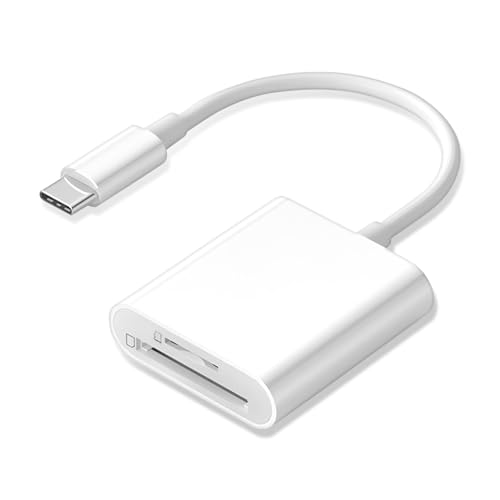
USB C SD Card Reader, Type C SD Card Reader, Supports SD
| Interface and Compatibility | USB-C OTG-enabled |
| Card Support | SD/SDHC/SDXC and MicroSD/MicroSDHC/MicroSDXC |
| Connection Type | USB-C external memory card reader with built-in USB-C cable |
| Plug-and-Play | No driver required; compatible with MacOS, Windows, Linux, Chrome OS; iPadOS Files app for iPad |
| Target Devices | iPhone/iPad/Mac/Camera and other USB-C devices with OTG |
| Bi-directional Transfer | Supports reading from and writing to SD/MicroSD cards |
You untwist the USB-C cap and find a compact, slightly rubbery feel in your hand. It sits lighter than you expect, with a clean, no-nonsense black body and a built-in USB-C cable tucked along the edge.
As soon as you plug it in, the two-card slots slide open with a soft, satisfying click. It’s small enough to tuck into a pocket or the side of your camera bag, which is exactly what you want when you’re chasing travel moments.
Your first test is a quick dump from a microSD to an iPhone using the Files app, and it just works—no driver fuss, no weird prompts. The reader handles SD and microSD side by side, which means you can offload a whole day’s shoots in one go without juggling adapters.
Bi-directional transfer feels snappy enough for casual edits. You’ll notice the photos and videos load pretty quickly, great for quick social posts on the go.
It’s a real helper when you’re at a cafe, trying to pick the best sunset shot for the story without tying up your laptop.
On a busy shoot day, I left the reader plugged into my MacBook while swapping cards from a camera to the iPad for client reviews. It keeps up, and the built-in USB-C port design means you don’t lose a second port on crowded hubs.
In real-world use, the big wins are plug-and-play simplicity and the compact footprint that travels with you. It’s dependable for photographers who want to preview, backup, and share without hauling extra gear.
Bottom line: it’s straightforward, portable, and versatile enough for trips, street photography, and on-site edits. If you value quick transfers and a simple setup, this 2-in-1 reader delivers.
Pros:
– Fast, plug-and-play
– Dual card slots
– Portable and concise
Cons:
– No USB-A fallback
– No built-in card formatting