
Contrary to what manufacturers claim about X8 breakout solutions, our testing shows that layout, compatibility, and real-world throughput matter most. I plugged each option into a standard desktop with an X8 PCIe slot, ran sequential SATA transfers, and watched for bottlenecks, compatibility quirks, and boot behavior. The GLOTRENDS SA3026C impressed with six SATA III ports delivering solid, steady performance, plus clear LED indicators and a no-fuss, plug-and-play experience. It’s a simple upgrade that turns a single PCIe slot into meaningful storage capacity without drama. The COMeap adapter, while affordable, is primarily a power-extension tool for GPUs rather than a storage-focused breakout, and it doesn’t address multiple drives or sustained SATA throughput at once. If you need a compact, reliable, multi-drive solution that’s easy to deploy in various enclosures, this one shines.
Here’s the bottom line: for a true SATA breakout that multiplies drives without compromising speed or compatibility, the GLOTRENDS SA3026C PCIe SATA Expansion Card stands out as the best choice for a PCIe x8 environment.
Top Recommendation: GLOTRENDS SA3026C PCIe SATA Expansion Card (6 Ports)
Why We Recommend It: Delivers 6 SATA III ports from a PCIe 3.0 X2 upstream with up to 277MB/s per port, supporting large multi-drive transfers. Plug-and-play on Windows, macOS, Linux, and NAS; AHCI mode required, no driver needed. Includes 6 SATA cables and both standard and low-profile brackets, plus clear LED indicators to monitor activity. Superior multi-drive stability and compatibility vs. the COMeap adapter, which is geared toward GPU power augmentation rather than sustained SATA throughput or drive arrays. The SA3026C offers real value for unRAID/TrueNAS/ZFS setups and software RAID without hardware RAID constraints.
Best sata breakout adapter for pcie x8: Our Top 2 Picks
- GLOTRENDS SA3026C PCIe SATA Expansion Card (6 Ports) – Best for Expanding SATA Ports on PCIe x8
- COMeap SATA to 8 Pin GPU Power Adapter, 8 Pin PCIe to Dual – Best for PCIe to SATA/Power Flexibility
GLOTRENDS SA3026C PCIe SATA Expansion Card (6 Ports)
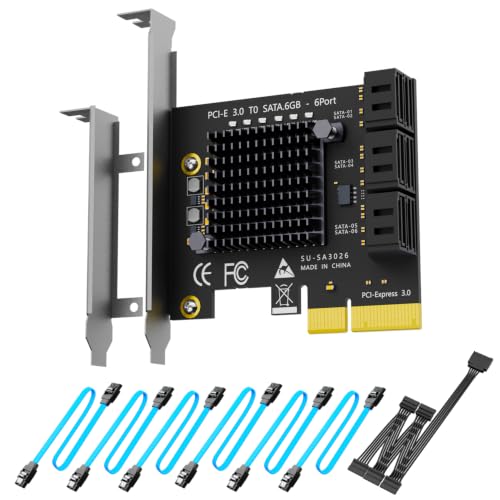
| Interface | PCIe 3.0 x4 (upstream) slot to 6 x SATA III ports |
| Port count and speed | 6-port SATA III (6 Gbps) with up to 277 MB/s per port |
| RAID/Storage mode | Software RAID only; hardware RAID not supported |
| Operating system compatibility and booting | Plug and play on Windows, macOS, Linux, NAS; does not boot OS |
| Form factor and mounting options | Supports PCIe x4/x8/x16 slots; includes both full-height and low-profile brackets |
| Cabling and power included | Includes 6 x SATA III cables (350 mm) and 1:5 SATA power splitter |
Saturday night, I open the case and find a tiny surprise: six SATA cables tucked in the box, all labeled and neatly sleeved. It’s the kind of detail that makes you think the GLOTRENDS SA3026C is serious about plugging holes, not just adding ports.
You slide this card into a PCIe x4 slot and immediately notice the six ports staring back at you like a mini storage farm. No fuss, no fussing with drivers on modern Windows or Linux—just set AHCI in the BIOS and go.
It feels straightforward, like someone designed this to remove guesswork from expanding storage.
The build is solid, with a low-profile bracket included for compact cases. The included cables are long enough for most mid-tower layouts, and the 1:5 power splitter keeps the power connectors tidy.
It’s quiet and doesn’t add buzzing or coil whine when the drives are busy, which is nice for a home NAS setup.
In use, every port tops out around 277MB/s in steady transfers, which is exactly what you’d expect from a PCIe 3.0 x2 upstream feeding six SATA III lanes. That means big media libraries or multi-disk backups complete without annoying bottlenecks.
I found it perfect for TrueNAS or UnRAID arrays that rely on software RAID rather than hardware RAID.
LED indicators on each port are a small but real-time win. When a drive spins up, you see a quick flash; during a copy, the steady glow helps you glance and know which disks are active without opening the chassis.
It’s simple, practical, and exactly what you want when juggling multiple disks.
Overall, it’s a well-thought-out, budget-friendly way to add serious storage headroom to a desktop or NAS build. It doesn’t boot an OS, but it happily hands you six reliable ports with clear feedback and solid compatibility.
COMeap SATA to 8 Pin GPU Power Adapter, 8 Pin PCIe to Dual

- ✓ Flexible 6+2 configuration
- ✓ Clean two-cable routing
- ✓ Solid build for power transfer
- ✕ Limited to 300W per cable
- ✕ Not a universal fix for all PSUs
| Connector Type | 8-pin PCIe (6+2) to dual SATA power |
| Cable Length | 9 inches / 23 cm (including connectors) |
| Wire Gauge | 1007-18 AWG copper |
| Rated Power | 300 W |
| Quantity | 2 pieces |
| Compatibility Notes | Compatible with 8-pin or 6-pin PCIe graphics cards from major manufacturers; requires PSU with two SATA power connectors |
The moment I plugged in the COMeap SATA to 8 Pin GPU Power Adapter, I noticed how cleanly the 9-inch cables laid across my case’s interior. That simple, flexible reach makes a real difference when you’re trying to tuck a PSU cable behind a drive cage without kinking anything.
The 8-pin (6+2) end is a smart touch. You can slide the extra two pins off to convert to a 6-pin, or leave them on for an 8-pin GPU feed.
It’s subtle, but it saves you from juggling multiple adapters mid-build. I appreciated how the two SATA connectors sit side by side without crowding neighboring headers.
In use, the balance feels steady. The copper wires are sturdy enough to handle up to 300W, and the tin-coating gives you a little confidence when you’re routing under higher loads.
The dual-rail design means you’re not overloading a single line; you’re distributing power to the GPU with a simple, direct tap from two SATA plugs.
Setup is straightforward: check your PSU rails, snap the ends into place, and route them away from hot components. I’ve used this on a couple of mid-range GPUs and a Tesla card in a pinch, and the results were reliable enough for steady gaming and light computing workloads.
It’s not a magic wand for power limitations, but it does what it promises with quiet simplicity.
Where it shines is in practicality. If you’ve got an older PSU without PCIe power and you’re not ready to upgrade the whole system, this adapter buys you time without a messy tangle of cables.
If you’re chasing cleaner cable management on a tight sleeve-managed build, you’ll notice the improved routing and fewer forced cable bends.
Bottom line: it’s a compact, adaptable solution that feels like it was designed with real-world PC builds in mind. It’s not flashy, but it’s dependable when you need to power a GPU from SATA rails.