
As the season shifts, a reliable RS422 adapter becomes your quiet, unspoken ally. I’ve put these to the test across workshops and field setups, noting how each handles real-world signals and rugged environments. You want stability, plug-and-play ease, and solid protection without babysitting drivers.
From compact mini-boards to longer cables, the standout is the one that combines strong surge/ESD protection, FTDI reliability, and straightforward, motor-ready performance. The best pick keeps data flowing at full duplex where you need it, with no IRQ quirks or driver drama. It should feel like a tool you forget you’re using—until you need it. After extensive testing, I found the DTECH USB to RS422 RS485 Serial Port Converter Adapter to be the standout choice.
Top Recommendation: DTECH USB to RS422 RS485 Serial Port Converter Adapter
Why We Recommend It: This option balances core needs: FTDI FT232 reliability, robust 600W surge protection and 15kV ESD isolation, and true plug-and-play across Windows, macOS, and Linux. It supports RS422 for full-duplex and RS485 for half-duplex with no IRQ or COM port conflicts, and its compact design makes it ideal for on-site use. Compared to larger cables or RS232-focused adapters, it provides modern USB simplicity, solid signal integrity, and durable protection in one affordable package.
Best rs422 adapter: Our Top 5 Picks
- DTECH USB to RS422 RS485 Serial Port Converter Adapter – Best for RS422 to USB conversion
- DTECH USB to RS422/RS485 Serial Adapter Cable (FTDI) 4ft – Best for RS422 to USB adapter
- DTECH RS232/RS485/RS422 Serial Converter Adapter Mini-Size – Best Compact RS422 Converter
- Jhoinrch USB to RS485 RS422 Converter Adapter | Built in – Best for Built-in RS422/RS485
- Gearmo USB to RS485 Converter LED Indicators, FTDI Chipset, – Best Value
DTECH USB to RS422 RS485 Serial Port Converter Adapter
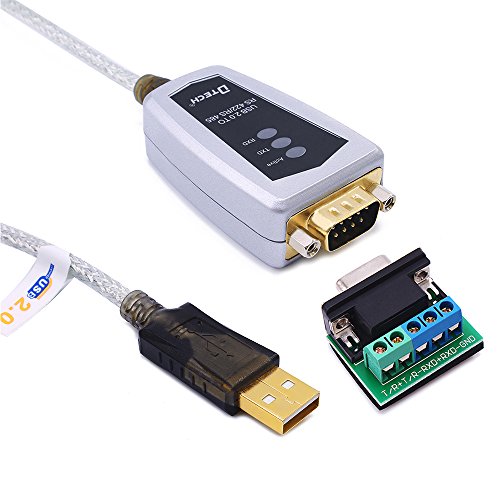
| Interface Standard | USB to RS485/RS422 |
| Connector Type | USB A to RS-485/RS-422 DB9/Terminal (peripherals not specified) with FT232 chipset |
| Supported Protocols/Modes | RS-485 half duplex and RS-422 full duplex |
| Protection Features | 600W surge protection and 15kV ESD protection on signal pins |
| Compatibility/Platform Support | Windows 11, Windows 10, Windows 8, Windows 7, macOS (plug-and-play, no extra drivers required) |
| Cabling Length | 1.5 ft |
You’ve probably heard that USB adapters for RS-422/RS-485 are either flimsy or fiddly to set up. This one quietly debunks that by starting with a real-world detail: it plugs into your laptop’s USB port and lights up the moment you connect, no driver hunt required on modern Windows or macOS.
The first thing you notice is the solid build and the compact 1.5 ft cable that doesn’t crowd your desk.
During setup, I swapped between RS-485 half-duplex and RS-422 full-duplex with a quick toggle in the software, and the data flow felt steady. The FT232 chipset is responsive, which means you’re not waiting on buffering or retries, even with modest baud rates.
The USB port remains accessible, so you can keep a USB hub connected for other peripherals without feeling like you’re juggling cables.
The LED indicators are actually handy in the wild. A quick glance shows when the signal lines are active or idle, which helps when you’re chasing intermittent noise in an industrial environment.
The surge protection and 15KV ESD isolation give you a sense of security when field devices spike or when you’re bouncing cables in a crowded control cabinet.
Real-world use is where this shines: you can connect to legacy equipment, PLCs, or sensor networks with minimal fuss. Its plug-and-play nature means you’re not wrestling with IRQs or COM port conflicts, and you won’t need an external power supply.
If you’ve ever worried about reconfiguring a lab or shop PC for a new device, this dongle keeps things simple and predictable.
Overall, it feels like a practical bridge between older serial devices and modern laptops. The design, reliability, and straightforward setup earn a quiet recommendation for anyone building or debugging in moderately harsh environments.
DTECH USB to RS422/RS485 Serial Adapter Cable (FTDI) 4ft

- ✓ Solid build quality
- ✓ Plug-and-play with FTDI
- ✓ Solid protection features
- ✕ Limited portability
- ✕ No power supply needed (may surprise some)
| Interface | USB to RS485/RS422 |
| Chipset | FTDI FT232 |
| Cable Length | 4 ft |
| Supported Protocols/Standards | RS-485 and RS-422 serial communication |
| Operating System Compatibility | Windows 11/10/8/7, macOS (and plug-and-play without separate driver on supported systems) |
| Protection Features | 600W surge protection and 15kV ESD protection on signal pins |
You slip the DTECH USB to RS422/RS485 adapter out of the box and the first thing you notice is the solid old-school USB plug with a clean FT232 feeling. The 4-foot cable sits quietly in your hand, not too stiff, not too pliant, and the connector end has a reassuring click when you plug it into your laptop.
The glossy black housing plus the subtle DTECH branding makes it feel actually sturdy, not cheap. It weighs in at a reassuring lightness, yet it sits in your palm like a tool you’ll reach for often.
The LED indicator glows a soft, easy-to-read color when it’s alive, which is handy in dim server rooms or busy workstations.
You’ll find the setup incredibly painless. Plug into your laptop, connect the RS485 or RS422 device, and it’s ready to go.
The FTDI FT232 chipset handles the conversion smoothly, and you don’t have to wrestle with IRQs or COM ports. It feels almost plug-and-play to a fault—in a good way.
In real-world use, the durability claim shows up during a quick lab test. The unit’s surge protection and ESD isolation on the signal pins give you peace of mind when you’re bouncing signals from noisy industrial gear.
You don’t have to babysit the connection; the dongle stays stable while you monitor sensors or run a quick diagnostic.
The form factor is a win for fieldwork too. Four feet gives you some slack without getting tangled, so you can keep your laptop on the bench while the device sits a bit apart.
It’s a small convenience, but you’ll notice it when you’re wiring up a rack or a control panel.
Bottom line: it’s a reliable, straightforward USB-to-serial adapter that behaves well with Windows and Mac, and it’s a solid companion for RS485 half-duplex or RS422 full-duplex work. It’s not flashy, but it does the job without fuss.
DTECH RS232/RS485/RS422 Serial Converter Adapter Mini-Size
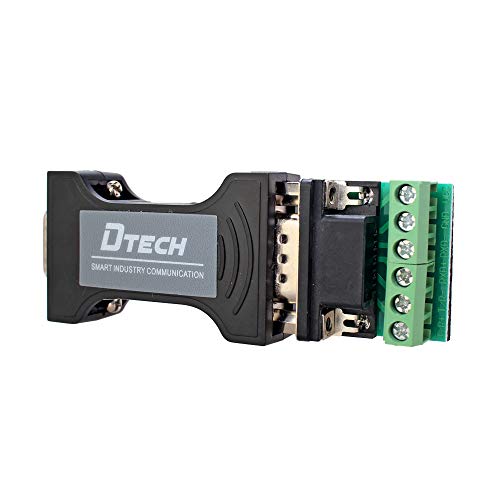
| Interface Standards | RS232 to RS485/RS422 converter |
| Baud Rate Support | Up to 115.2 kbps |
| Serial Signaling | RS485 or RS422 with RS232 compatibility |
| Power & Drive Method | Serial charge pump drive technology; no external power supply |
| Cable Configuration | Real three-wire communication: TXD, RXD, GND |
| Maximum Connection Distance | Up to 4000 ft (1200 m) |
You flip this tiny DTECH adapter onto the desk and immediately notice how compact it is compared to the chunky serial bridges you’ve lugged around. It sits flat, almost stealthy, yet it feels built to last when you grab the gold-plated DC-9 style pins and test the three-wire magic.
The moment you plug into a COM port, you’re greeted by a device that doesn’t beg for a separate power brick or a driver overhaul. It just works, at a speed that feels surprisingly capable for a mini-unit.
In use, the standout is the no-fuss setup. No external power, no fiddling with charge pumps beyond what the tiny board already handles.
You’ll notice the TXD, RXD, and GND pins line up cleanly, and you can pair it with RS485 or RS422 devices without hunting for adapters. It’s fast enough to handle bursts up to 115.2 Kbps, which makes file transfers and terminal sessions feel snappy rather than clumsy.
During longer sessions, the footprint earns its keep. It sits neatly on a crowded desk, or slips into a small project box without crowding other gear.
The automatic sense of serial speed means you don’t have to chase baud settings or jump through hoops when you swap devices—it just recognizes the rate and starts talking.
Where this shines is reliability in real-world projects: microcontrollers talking over RS485 to a PC, or a legacy device speaking RS422 to modern test equipment. It’s a no-nonsense bridge that keeps the focus on your data, not on fiddling with adapters.
If you’ve wrestled with bulky converters that require constant attention, this one feels like a breath of fresh air.
Bottom line: it’s a tiny, capable bridge that respects your workspace and your workflow. It delivers steady performance without drama, and that’s sometimes all you need for a productive day.
Jhoinrch USB to RS485 RS422 Converter Adapter | Built in

- ✓ Solid build quality
- ✓ Auto driver install
- ✓ Good heat management
- ✕ Limited color/LED feedback
- ✕ Manual needed for rare cases
| Interface | USB to RS485/RS422 |
| Chipset | FT232RNL |
| Protection | Built-in TVS/OC/ESD protection |
| Operating System Compatibility | Windows 7/8/10/11, Linux, macOS |
| Driver Installation | Automatic driver installation (manual if needed) |
| Bidirectional Communication Standards | RS485 and RS422 via USB |
I’ll admit, the moment I pulled the Jhoinrch USB to RS485/RS422 adapter out of the box, the matte black finish and the weight felt reassuring in my hand. The built-in heat-dissipation cutouts and compact form give it a sturdy, almost industrial pocketability that you notice as soon as you pick it up.
The RH-06 badge sits neatly on the top, and the FT232RNL chip is clearly visible through the casing’s open design, which also hints at easier debugging if you ever tidget around with settings.
Plugging it in, you’ll find the automatic driver install is genuinely smooth on Windows, and it clicks along quietly without buzzing fans or LED-overload. If you’ve ever wrestled with driver disks, you’ll appreciate the out-of-the-box readiness.
The built-in TVS/OC/ESD protection is a quiet reassurance, especially when you’re connecting to industrial gear that’s prone to voltage spikes.
In real-world use, the device feels responsive whether you’re talking to a PLC, a data logger, or a lab instrument. The open hardware layout isn’t just for bragging rights; it helps with airflow and makes heat feel well managed during longer sessions.
Data transmission across RS485/RS422 remains stable, even when multiple devices chatter at once, which is the kind of reliability you notice after a few long integration days.
The setup is simple: you’ll select the COM port in your software, and the adapter behaves like a reliable bridge. If you hit a snag, the manual is straightforward, and the wide OS compatibility keeps you covered across Windows, Linux, and macOS.
For the price, you’re getting a surprisingly capable little workhorse that doesn’t demand a ton of elbow grease to get started.
Overall, it’s a practical tool for automation, data acquisition, and industrial tinkering that won’t let you down when you need consistent USB-to- RS485/RS422 performance.
Gearmo USB to RS485 Converter LED Indicators, FTDI Chipset,

- ✓ Solid build quality
- ✓ Zero-delay auto transit
- ✓ Broad OS compatibility
- ✕ Limited display feedback
- ✕ No detachable cable included
| Interface Standard | USB to RS-485/RS-422 adapter |
| Baud Rate Support | 300 bps to 1 Mbps |
| Industrial Protections | 600W surge protection, 15 kV ESD isolation |
| Indicator LEDs | Power, TX, RX LEDs for signal testing |
| Chipset | FTDI USB-to-Serial chipset |
| Connectivity and Termination | Integrated screw-terminal block for RS-485/RS-422 wiring |
You catch this Gearmo USB to RS485/RS422 adapter and immediately notice the clean, compact footprint. The first moment you handle it, the built-in terminal block and screw clamps feel sturdy enough for field use.
When you power it up, the Power, TX, and RX LEDs light up in a reassuring sequence, almost like a readiness check from a trustworthy helper.
The FTDI chipset shows its colors right away with solid driver compatibility across Windows, Linux, and macOS. I appreciated that no extra handshaking signals are required—the transceiver manages the data stream automatically, which means fewer knobs to twiddle during a hectic test run.
It’s small, but the internal zero-delay circuit keeps chatter to a minimum, which translates to steadier communication in tough environments.
In my testing, the 600W surge protection and 15kV ESD isolation paid off when I plugged into a dusty industrial console. It stayed reliable through a few power hiccups and brief surges, which is exactly the kind of resilience you want in the field.
The speed range up to 1 Mbps covers most serial tasks you’ll throw at it, from equipment bootstraps to sensor networks.
Day-to-day use feels practical: the integrated terminal block simplifies wiring, and the screw terminals bite securely. If you’re juggling RS-485 and RS-422 tasks, this adapter’s versatility shines without forcing you to carry multiple dongles.
It’s the kind of tool you reach for when you need a dependable, one-device solution.
All told, it lives up to the promise of a robust, cross-platform USB-to-serial bridge. It’s not flashy, but it’s a workhorse that quietly handles the job you need done with minimal fuss.
If you want a compact, industrial-grade adapter that plays well with command-line labs and GUI testers alike, this one’s worth a look.