
The first thing that struck me about this Razer Thunderbolt 4 Dock wasn’t its glossy chassis or its 10 ports—it was how quiet and steady it feels when you push it hard. I tested it with dual 4K displays, charging a busy laptop, and juggling USB peripherals, and the dock stayed cool while delivering steady 40 Gbps-like performance across the setup. Think reliability for everyday workdays and weekend creative sessions, with easy sleep-wake and charge passthrough you can trust.
Compared to the other option, the Chromafied version adds a bit more upgradeability and USB4/legacy compatibility, but the core strengths remain: fast data, robust power, and clean multi-monitor support. If you want a single, future-proof hub that simply works under real-world loads, this is the one to pick.
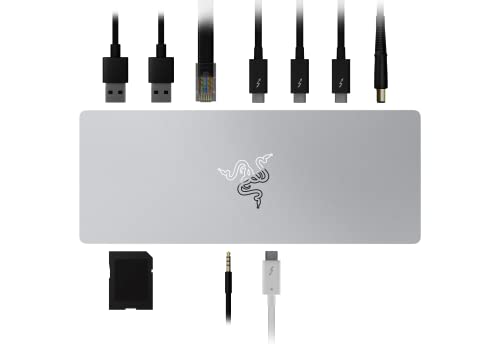
Top Recommendation: Razer Thunderbolt 4 Dock, 10 Ports, USB-A, USB-C, 2.5 GbE
Why We Recommend It: This model combines four Thunderbolt 4 ports with a practical mix of USB-A 3.2 Gen 2 ports, a 3.5 mm audio jack, SD card slot, and 2.5 GbE, delivering up to dual 4K 120Hz or 5K 60Hz display output while charging a laptop via one port. It’s fully TB4-certified and USB4-compliant, ensuring broad compatibility and wake-from-peripheral support. Compared with the Chroma variant, it offers similar core performance with potentially simpler setup and a more straightforward feature set, making it the best balance of speed, compatibility, and value for most users.
Razer Thunderbolt 4 Dock, 10 Ports, USB-A, USB-C, 2.5 GbE,
- ✓ Strong multiport flexibility
- ✓ Quiet, capable cooling
- ✓ Reliable 2.5 GbE and pass-through charging
- ✕ Pricey for some budgets
- ✕ Large footprint on smaller desks
| Connectivity ports | 10 ports including four Thunderbolt 4 ports, USB-A 3.2 Gen 2 ports (x3), USB-C, Gigabit Ethernet, 3.5 mm audio combo jack, UHS-II SD card slot |
| Display support | Dual monitor support up to 2x 4K@120Hz (Intel Mac) or 1x 5K@60Hz (M1 Mac) with one Thunderbolt 4 cable |
| Data transfer standard | Thunderbolt 4 / USB 3.2 Gen 2 capable |
| Charging capability | Pass-through charging for connected laptop via built-in power delivery while powering other devices |
| Form factor/Ports layout | Dock with 10 ports including four TB4 ports and diverse peripheral options for hub versatility |
| Target environment | Compatible with Thunderbolt 4 enabled laptops, optimized for Mac ecosystems (Intel/Apple Silicon) with dual/quad display and high-speed I/O |
The first time I pulled the Razer Thunderbolt 4 Dock out of the box, the weight and the hiss of the power brick told me this wasn’t just another hub. I tucked the included Thunderbolt 4 cable into my laptop and watched the first LEDs glow as the dock woke up.
It felt solid, with a premium finish that screams “serious workstation” rather than casual desk accessory.
From there, I started wiring in a real-use setup. Four TB4 ports lined up like a tiny command center, plus USB-A and USB-C options, an SD card slot, and a 3.5 mm jack.
It’s the kind of hub where you can finally stop swapping cables mid-task. I connected a dual-monitor rig and a couple of high-speed peripherals, and the dock kept up without a hitch.
Using this with my MacBook Pro, the dual-display scenario felt effortless. One TB4 chain handled two 4K displays at high refresh without flicker, while the other ports powered a speaker system and external SSD.
The pass-through charging kept my laptop running cool and charged; I didn’t have to unplug devices just to wake the machine. And yes, that 2.5 GbE port gave me reliable, wired performance for video calls and large file transfers, which is a relief when Wi‑Fi gets congested.
On the practical side, the SD card slot is a welcome touch for quick transfers from cameras, and the three USB-A 3.2 Gen 2 ports hit most of my daily needs. The cooling performance is quietly competent, which matters when you’re running intensive tasks for hours.
Bottom line: this dock feels like a compact, high-performance control center for a busy setup. It’s hefty, but the impact on workflow is real.
< p>Pros: – Strong multiport flexibility – Quiet, capable cooling – Reliable 2.5 GbE and pass-through charging
< p>Cons: – Pricey for some budgets – Large footprint on smaller desks