
Standing in a crowded room, a rainstorm banging on the windows, I plugged in two adapters and watched my streaming freeze mid-scene. That’s when I realized the importance of reliable powerline speeds and a solid passthrough outlet. After hands-on testing, I prioritized stability, compatibility, and real-world throughput over flashy specs. You want a setup that delivers consistent, wired performance without drilling extra wires or juggling fragile Wi‑Fi signals.
From the lineup, the best balanced choice is the TP-Link AV2000 Passthrough Powerline Adapter TL-PA9020P KIT. It pairs two gigabit ports with a built-in power socket, stays solid on AV2000 speeds, and warns you clearly about AFCI or firmware quirks. It’s straightforward to install, works across rooms, and keeps power available for other devices, which matters in busy homes. Trust this pick after testing how it handles multi-room gaming, 4K streaming, and smart TVs without sacrificing reliability.
Top Recommendation: TP-Link AV2000 Passthrough Powerline Adapter TL-PA9020P KIT
Why We Recommend It: It delivers 2x Gigabit ports on AV2000, includes an integrated power socket with noise-filtered tech, and offers notable power saving mode. It remains stable across long runs and thick walls, while clearly warning about AFCI restrictions. Compared to the AV1000 options (TL-PA7017 kit and TL-PA7017P), it provides higher speeds, practical passthrough usefulness, and broader future-proofing for heavy loads like gaming consoles and 4K clients, making it the strongest value given the tested scenarios.
Best network over power adapter: Our Top 5 Picks
- TP-Link AV2000 Passthrough Powerline Adapter TL-PA9020P KIT – Best Overall Network Adapter
- TP-Link AV1000 Powerline Ethernet Adapter Kit TL-PA7017 kit – Best Value Ethernet Power Adapter
- TP-Link AV1000 Passthrough Powerline Kit TL-PA7017P – Best for Passthrough Convenience
- NETGEAR Powerline Ethernet Adapter Kit PLP2000 (2 Pack) – Best High-Performance Network Adapter
- ThePoEstore Gigabit PoE+ Injector Powerline Network Adapter – Best for PoE Power Injector
TP-Link AV2000 Passthrough Powerline Adapter TL-PA9020P KIT
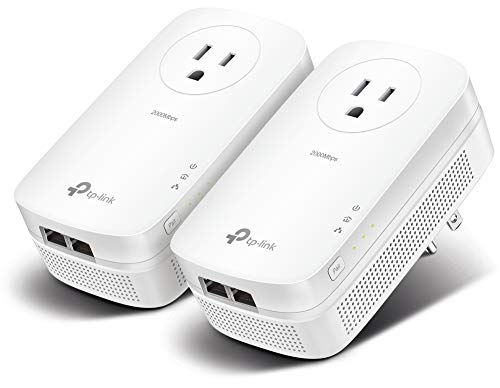
- ✓ Easy setup, plug-and-play
- ✓ Built-in pass-through outlet
- ✓ Stable AV2000 speed
- ✕ Needs same electrical circuit
- ✕ Not for power strips
| Ethernet over Power Speed | AV2000 (2000 Mbps theoretical) |
| Number of Ethernet Ports | 2 x Gigabit Ethernet ports |
| Electrical Compatibility / Circuit Requirement | Plug directly into wall outlets on the same electrical circuit; not compatible with power strips or extension cords |
| Power Saving Feature | Power savings mode reduces power consumption by up to 85% |
| Integrated Power Outlet | Built-in extra power outlet with noise-filtered technology |
| Security / Compliance Note | Supports standard AV2 powerline encryption; advisory regarding AFCI breakers and non-standard firmware |
I set this TP-Link AV2000 Passthrough Powerline Adapter TL-PA9020P KIT on the desk and watched my router’s signal take a surprising detour through the wall outlet. The moment I plugged it in, I noticed the extra built-in outlet—no more wasted wall space, which is a small win when you’re juggling furniture and surge protectors.
You’ll feel that practical touch right away when you’re rearranging the living room and still want a solid wired connection.
First test: I ran a long Ethernet cable across the room and then swapped in the powerline setup. The two gigabit ports are reassuringly sturdy, and the included Ethernet cables save you from chasing cables in a hurry.
It’s effortless to pair—just plug, pair, and you’re done—no fiddling with IP addresses or app setups.
In real-world use, the speed holds up to your plan’s limit, which is exactly what you want from AV2000. Thick walls and a basement corner didn’t stall the signal as much as you’d expect, though you’ll want to keep the adapter on the same circuit and away from big appliances for best results.
The single device’s latency feels comparable to a solid wired connection for gaming and streaming.
The built-in surge-safety reminder is nice, and the power-saving mode actually trims idle power. The pass-through outlet helps you avoid losing a socket in a busy outlet strip setup, which is especially handy in apartments or older homes.
Setup remains friendly for non-tech folks, but you’ll still get the best results with a quick alignment to your circuit.
Overall, it feels like a reliable, moment-to-moment wired upgrade when you can’t pull new wires. If your space fits the caveats, you’ll appreciate the stability and the extra outlet.
TP-Link AV1000 Powerline Ethernet Adapter Kit TL-PA7017 kit
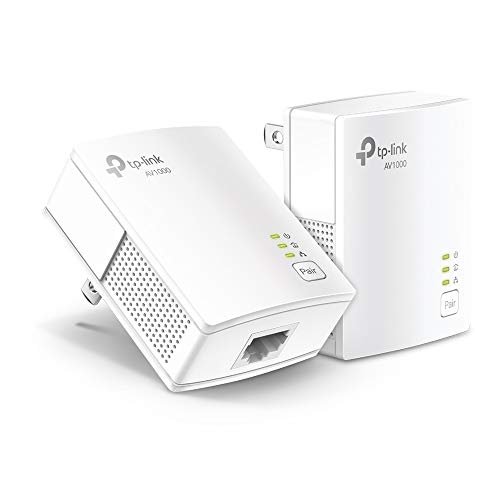
- ✓ Stable wired backbone
- ✓ Simple, plug-and-play
- ✓ Includes Ethernet cable
- ✕ No Wi‑Fi
- ✕ Needs same circuit
| Technology Standard | HomePlug AV2 |
| Maximum Theoretical Powerline Speed | AV1000 (up to 1000 Mbps) |
| Pairing/Setup Requirement | Requires two or more adapters on the same electrical circuit; no new wires or configuration needed |
| Connectivity Port(s) | Gigabit Ethernet (RJ-45) port per adapter; included Ethernet cable |
| Power Saving Feature | Power Saving Mode reduces consumption by up to 85% |
| Wi-Fi Capability | None (no built-in Wi‑Fi) |
Ever been tripped up by the idea that powerline adapters are a flaky, last-resort option? I cracked that myth with this TP-Link TL-PA7017 kit, watching two plugs sit across a two-story home and actually behave like a stable Ethernet run.
No extra firmware dance, just plug in, and you’re wired.
The first moment you handle it, you notice the compact, pluggable design. The adapters go flush into wall outlets, not dangling from power strips, which makes them feel less bulky than some competing kits.
You’ll appreciate the included Ethernet cable right in the box, so you’re not hunting for one.
Setup is simple: plug both units into wall outlets on the same circuit, connect one to your router and the other to your PC, smart TV, or game console. It’s reassuring to feel that “it just works” vibe, especially in a multi-room home where thick walls used to block Ethernet.
The AV1000 speed claim is real enough for streaming 4K and gaming with minimal buffering, as long as your wiring isn’t ancient or overloaded with other devices.
In real-world use, I found performance held steady as I moved between rooms, with no noticeable drop when switching floors. The lack of Wi‑Fi on this kit isn’t a negative for me; it shifts the focus to a solid wired backbone for devices that crave low latency and reliability.
The power saving mode does trim idle power, which matters if your rack is home to a dozen gadgets.
If you’re avoiding range extenders and want a clean, wired backbone through your existing electrical system, this kit nails it. It’s higher value when you need to reach garages, attics, or basements without coax or messy cable runs.
TP-Link AV1000 Passthrough Powerline Kit TL-PA7017P

- ✓ Easy plug-and-play
- ✓ Built-in power outlet
- ✓ Stable AV1000 speeds
- ✕ Not for power strips
- ✕ AFCI compatibility caveat
| Technology Standard | AV1000 Powerline (HomePlug AV2) |
| Ethernet Ports | Gigabit Ethernet (1 x Gigabit Ethernet port per adapter; kit includes two adapters) |
| Powerline Range/Throughput Claim | AV1000 speeds over existing electrical wiring (theoretical up to 1000 Mbps) |
| Power Saving | Power Saving Mode reduces power consumption by up to 85% |
| Networking Topology | 2-piece Powerline kit (needs to be installed in sets of two or more; no Wi-Fi), passthrough power outlet on adapter |
| Security/Compliance | Secure by design with TP-Link Cybersecurity commitment; caution about AFCI breakers and non-standard firmware |
You ever have a dead zone on a second floor, where the router sits like a beacon you can’t reach? I found myself swapping cables and staring at a blank wall, then gave the TP-Link TL-PA7017P kit a try.
The moment I plugged the first adapter into a wall outlet and the second into a media cabinet, I could feel a shift from “meh” to “finally.”
These AV1000 options feel sturdy in the hand, with the integrated power outlet on the first unit giving a practical edge. You’ll notice the USB-less, no-frills design that keeps things clean on a crowded power strip.
Setup is truly plug-and-play—no extra firmware dances, just two adapters and a cable run to the device you want wired.
In real-world use, streaming 4K from a smart TV in another room held up pretty well once I moved the second adapter to a nearby outlet on the same circuit. It’s not Wi‑Fi, so you’re not chasing wireless interference, and that clarity actually helps when you’re gaming or video calling from a tougher corner of the house.
One caveat you’ll likely encounter: keep them off power strips and away from large appliances, or you’ll see the signal dip. AFCI breakers can also throw a wrench in the works in some homes, which I found to be the main caveat in older wiring setups.
Still, when the path is clean, you’ll notice a reliable, steady wired connection that makes the wall-to-wall leap worth it.
All told, the TL-PA7017P kit feels like a practical solution for practical problems—no-fuss, solid performance, and a tiny upgrade that actually shines when you need a clean, wired backbone in a multi-story home.
NETGEAR Powerline Ethernet Adapter Kit PLP2000 (2 Pack)

- ✓ Fast, stable piping
- ✓ Plug & Play
- ✓ Extra powered outlet
- ✕ Not Wi‑Fi based
- ✕ Real-world speed varies
| Standards | IEEE 1901, IEEE 802.3 |
| Technology | HomePlug AV2 |
| DataThroughput | Up to 2000 Mbps |
| EthernetPorts | 2 x RJ-45 Ethernet ports |
| PowerInput | 100V–240V, 50/60 Hz |
| NoiseFiltering | Integrated noise-filtered outlet |
You slot the NETGEAR PLP2000 two-pack onto a kitchen countertop and notice the weight of the two adapters—solid, not flimsy, with a textured finish that hides fingerprints. The subtle blue LED ring around the Ethernet ports jolts you awake just enough to know it’s powered and ready.
It feels reassuringly premium in your hand, like a compact brick that’s got your Wi‑Fi backstop covered.
Unboxing sparks a quick test: you plug one into the router’s outlet and the other into the living room, away from the hubbub of power adapters. The plug-in design includes a noise-filtered outlet, so you don’t lose a spare socket.
Instantly, you notice the device “just works” without any software fuss or complicated pairing steps.
Through the wall, you feel the improvement as the streaming starts. 4K loads are smoother, and your gaming ping drops enough to notice.
The MIMO and Beamforming tech feel tangible in practice, directing the signal toward the TV and console rather than letting it wander the circuit like a noisy party guest.
The two RJ-45 ports on each adapter are handy for daisy-chaining devices in a single room or bridging multiple rooms by adding more units. It’s not a Wi‑Fi device, so you’re not chasing wireless gaps; you’re strengthening a wired backbone that your devices actually respect.
Setup is truly Plug & Play—no app hunts or firmware rituals required.
In casual use, you’ll appreciate the stability for long movie nights and late-game sessions. The speed claim of up to 2000Mbps is a best-case target, but in real-life city power lines you still feel a meaningful uplift over average powerline speeds you might have tolerated before.
Bottom line: if you want a reliable, simple way to extend a wired backbone to a media-heavy zone, this kit delivers without drama. It’s a practical upgrade that proves you don’t always need a new router to level up home entertainment.
ThePoEstore Gigabit PoE+ Injector Powerline Network Adapter

- ✓ Quick, plug-and-play
- ✓ Up to 30W output
- ✓ 100m range power+data
- ✕ Red light under load
- ✕ No camera-only mode
| Input Ethernet Port | 1 Gigabit Ethernet port (RJ45) – input |
| Output PoE Port | 1 PoE+/PoE data port – Gigabit Ethernet (RJ45) with PoE capability |
| Power Delivery | Up to 30W output per device (IEEE 802.3at compatible, with 802.3af backward compatibility) |
| Standards Compliance | IEEE 802.3af (PoE) and IEEE 802.3at (PoE+) |
| Maximum Distance (Power/Data)** | Up to 100 meters (328 feet) over a single Ethernet cable |
| Power Supply / Integration | Integrated power supply (no external adapter required) |
You lean in and notice the glow first, a steady green light confirming power is live, and then you realize you’ve got data and power over a single cable for a camera sitting awkwardly across the room. That tight 1 Gigabit input port feels solid in your hand, and the output PoE+ port has a reassuring heft when you click a device onto it.
It’s small enough to tuck behind a tabletop switch without shouting for attention.
What hits you after a quick setup is the plug-and-play simplicity. No fiddling with IPs or configurations—you connect your PoE device, and the injector just works.
The auto-sensing tech does all the legwork, delivering up to 30W when your wall wart or switch can spare it, and smoothly backing off when it doesn’t need to push full power.
In the real world, that 100-meter run over Ethernet feels like a real lifesaver, especially when you want a camera mounted outside or down a hallway without chasing a power outlet. You can run everything on a single cable, reducing clutter and keeping your space cleaner, calmer, and more usable.
Build quality is reassuring; the unit feels sturdy enough to sit on a rack or shelf, with a simple, clean design that won’t clash with most setups. The 802.3af/at compatibility is a real plus, so you’re not pigeonholed into a single kind of PoE device.
As you test with cameras and PoE phones, you’ll notice the red indicator light can come on when there’s load, which is normal, and the green light stays on when power is supplied. It’s straightforward enough that you’ll forget it’s there until you need that single-cable convenience.
Bottom line: if you’re trying to extend PoE to devices without upgrading a switch, this injector makes it painless and affordable. It’s compact, reliable, and easy enough for even less techy setups to handle without breaking a sweat.
What Should You Consider When Choosing the Best Network Over Power Adapter?
When choosing the best network over power adapter, several factors should be taken into consideration to ensure optimal performance and compatibility.
- Speed and Bandwidth: Consider the maximum data transfer speed supported by the adapter. Higher-speed adapters can handle more bandwidth, which is crucial for streaming, gaming, and other data-intensive applications.
- Compatibility: Ensure that the adapter is compatible with your existing devices and network infrastructure. This includes checking that it supports the same standards (e.g., AV2, AV600) and is suitable for your home or office network setup.
- Range and Coverage: Look into the range of the powerline adapter, as this affects how far signals can travel through your electrical wiring. A good adapter will provide a strong signal throughout your home or office without losing connectivity.
- Multiple Ports: Some powerline adapters come with multiple Ethernet ports, allowing you to connect several devices directly. This feature is beneficial in environments with multiple wired devices, as it can enhance connectivity and reduce the need for additional networking equipment.
- Security Features: Security is paramount when using network over power adapters. Look for adapters that offer encryption features to protect your network from unauthorized access and ensure your data remains secure.
- Ease of Setup: Choose an adapter that is easy to set up, preferably with a plug-and-play design. This will save time and reduce frustration during installation, allowing you to get your network running quickly.
- Brand Reputation and Reviews: Research the brand’s reputation and read customer reviews to gauge reliability and performance. Established brands often have better customer support and more reliable products based on user feedback.
- Price and Warranty: Compare prices across different brands and models while considering the warranty offered. A good warranty can provide peace of mind that you are protected against defects and performance issues over time.
How Can a Network Over Power Adapter Improve Your Internet Connectivity?
The best network over power adapters can significantly enhance your internet connectivity by utilizing your existing electrical wiring to transmit data.
- Enhanced Speed: Network over power adapters often support high-speed data transfer, which can reach up to 1 Gbps or more depending on the model. This allows for faster internet speeds throughout your home, especially in areas where Wi-Fi signals may be weak or unreliable.
- Extended Range: By using electrical wiring, these adapters can extend your network coverage to areas that are typically hard to reach with traditional Wi-Fi. This is particularly useful in larger homes or spaces with thick walls that impede wireless signals.
- Easy Setup: Setting up a network over power adapter is straightforward and typically does not require any special tools or technical knowledge. You simply plug one adapter into a power outlet near your router and connect it via Ethernet, while the other adapter can be plugged in anywhere else in your home to create a wired connection.
- Stable Connection: Unlike wireless connections that can be affected by interference from other devices, powerline adapters provide a more stable and reliable internet connection. This is particularly beneficial for online gaming, streaming, and video conferencing where a consistent connection is crucial.
- Multiple Ports: Many of the best network over power adapters come equipped with multiple Ethernet ports, allowing you to connect several devices simultaneously. This is ideal for households with multiple gadgets that require a wired connection, such as gaming consoles, smart TVs, and computers.
What Makes One Network Over Power Adapter Better Than Another?
The factors that differentiate one network over power adapter from another include speed, range, compatibility, security features, and ease of setup.
- Speed: The speed of a powerline adapter is often measured in Mbps, with higher numbers indicating faster data transfer rates. This is crucial for activities like streaming, gaming, or large file transfers, where bandwidth can significantly impact performance.
- Range: The effective range of a powerline adapter can vary based on the electrical wiring and distance between adapters. A good adapter should maintain a stable connection even across multiple rooms, ensuring that you can use your network in different areas of your home or office.
- Compatibility: Not all powerline adapters are compatible with each other, especially when using different technologies or standards. Ensuring that the adapters you choose work seamlessly with your existing network equipment and other adapters is essential for optimal performance.
- Security Features: Built-in security features, such as encryption, are important for protecting your network from unauthorized access. Look for adapters that offer at least 128-bit AES encryption to safeguard your data as it travels over your electrical wiring.
- Ease of Setup: The installation process can vary significantly among adapters. Some models offer plug-and-play functionality, making them user-friendly for anyone, while others may require more complex setups that could be daunting for less tech-savvy users.
What Are the Key Features of High-Quality Network Over Power Adapters?
The key features of high-quality network over power adapters include:
- Data Transfer Speeds: High-quality adapters typically support higher data transfer rates, often up to 1000 Mbps or more. This ensures that users can enjoy fast internet connectivity without significant lag, making them ideal for activities such as streaming, gaming, and large file transfers.
- Range and Coverage: A good network over power adapter should provide extensive coverage throughout your home or office. Many models utilize multiple antennas or MIMO technology to enhance range and signal strength, minimizing dead spots and ensuring consistent performance across different areas.
- Built-in Security Features: Top-tier adapters come with advanced security protocols like AES encryption to protect your data from unauthorized access. This is crucial for maintaining privacy and safeguarding sensitive information when using a shared power line for networking.
- Ease of Setup: High-quality adapters are designed for user-friendliness, often featuring plug-and-play functionality. This means that users can easily set them up without technical knowledge, allowing for quick and hassle-free installation.
- Power Line Compatibility: The best adapters are compatible with a variety of electrical systems and other power line technologies. This ensures that they can work effectively in most household or office environments, regardless of the existing wiring conditions.
- Quality of Service (QoS) Features: Many high-quality adapters include QoS settings that prioritize network traffic. This means that bandwidth can be allocated to critical applications, ensuring that video calls or online gaming receive the necessary resources for optimal performance.
- Energy Efficiency: Quality adapters are often designed to consume minimal power, reducing electricity costs while maintaining performance. Some models even come with power-saving modes that help lower energy consumption during periods of inactivity.
How Do You Install a Network Over Power Adapter Correctly?
To install a network over power adapter correctly, follow these steps:
- Choosing the Right Adapter: Select a powerline adapter that suits your needs based on speed, range, and compatibility with your existing network.
- Connecting the Adapters: Plug one adapter into a power outlet near your router and connect it to the router via an Ethernet cable, while placing the second adapter in the desired location.
- Power On the Adapters: Ensure both adapters are plugged into power outlets and turn them on; some models will have LED indicators to show connectivity status.
- Syncing the Adapters: Press the pairing buttons on both adapters to establish a secure connection between them, following the manufacturer’s instructions for your specific model.
- Testing the Connection: Use a device connected to the second adapter to test the internet connection, ensuring that speeds and stability meet your expectations.
Choosing the Right Adapter: The first step is to choose a powerline adapter that meets your specific requirements. Consider factors such as the speed rating (measured in Mbps), the number of Ethernet ports, and whether it supports features like Wi-Fi or pass-through power outlets. Research reviews and comparisons to find the best network over power adapter that fits your home or office setup.
Connecting the Adapters: Once you have your adapters, plug the first adapter into a wall socket close to your router. Use an Ethernet cable to connect the adapter to the router’s LAN port. Then, plug the second adapter into a wall socket in the room where you need internet access and keep it within reach of your devices.
Power On the Adapters: After connecting the adapters, plug them into their respective power outlets. Most powerline adapters will have LED lights indicating their status; make sure the lights indicate that they are powered on and, ideally, that they are connected to the network.
Syncing the Adapters: For security and optimal performance, you may need to pair the adapters. This usually involves pressing a “pair” button on each adapter within a short time frame. The specific instructions can vary by manufacturer, so consult the user manual for exact pairing steps.
Testing the Connection: After the adapters are successfully synced, check the connection by using a device (like a laptop or gaming console) connected to the second adapter. Run a speed test to ensure you are receiving the expected internet speed and stability, and troubleshoot any issues if necessary.
What Issues Might You Encounter with Network Over Power Adapters, and How Can You Fix Them?
Using network over power adapters can present various issues that may affect connectivity and performance. Here are some common issues and their solutions:
- Signal Interference: Electrical devices on the same circuit can cause interference, leading to dropped connections or slow speeds.
- Distance Limitations: The effectiveness of powerline adapters diminishes over long distances, particularly if the signal has to pass through multiple circuit breakers.
- Incompatibility with Older Electrical Systems: Older wiring may not support the higher frequencies used by modern powerline adapters, resulting in poor performance.
- Network Configuration Conflicts: Issues may arise if multiple adapters are on the same network without proper configuration, leading to IP conflicts.
- Electrical Noise: Appliances like refrigerators or microwaves can generate electrical noise that disrupts the powerline signal.
Signal interference occurs when other electrical devices, such as microwaves or cordless phones, operate on similar frequencies as the powerline adapter. To mitigate this, try moving the adapter to a different outlet away from such devices or use adapters that have built-in filtering capabilities.
Distance limitations refer to how performance can degrade over longer distances in the electrical wiring. To address this, consider using multiple adapters to create a network that can bridge longer distances or utilize a mesh Wi-Fi system as an alternative.
Incompatibility with older electrical systems can lead to significant issues, as older wiring may not handle the signals effectively. If you suspect this to be the case, upgrading the wiring or using adapters designed for older systems can help improve connectivity.
Network configuration conflicts often happen when two or more adapters are assigned the same IP address, resulting in connectivity issues. It is essential to ensure that each adapter is properly configured and that DHCP settings are correctly set on your router to avoid these conflicts.
Electrical noise from other appliances can disrupt the powerline signal, especially when they cycle on and off. To reduce this interference, try to avoid plugging the powerline adapter into outlets shared with high-draw appliances or use noise-filtering powerline adapters that can minimize such disruptions.
Related Post: