
As the season of upgrades nears, you’ll appreciate a network adapter you can trust under real use. I’ve tested these PCIe cards in a mid‑tower, juggling games, streaming, and large file transfers. The 5Gbps contenders feel noticeably quicker on local transfers, while Gigabit options still punch above their weight in everyday browsing and latency‑sensitive tasks. I looked for solid heat management, driver support, and practical form factors that fit both mini and full‑size builds.
After weighing every option, the standout is the 5Gb PCIe Network Card, PCIe to 5Gb Ethernet Card, RTL8126. It delivers reliable 5Gbps throughput, dual brackets for easy installation, robust heat sinking, and broad OS compatibility, all at a strong value. If you’re chasing future‑proof speed without breaking the bank, this is the one I’d pick for you.
Top Recommendation: 5Gb PCIe Network Card, PCIe to 5Gb Ethernet Card, RTL8126
Why We Recommend It: It offers true 5Gbps performance with 5GBase‑T, dual brackets for flexible case fit, and solid aluminum heat dissipation. It supports Windows 11/10 and Linux, Wake‑on‑LAN, and QoS, delivering the best balance of speed, reliability, and price among the options. The other cards reach Gigabit or 2.5–5Gbps speeds but lag on heat management, driver breadth, or value, making RTL8126 the most consistently capable choice after hands‑on testing.
Best network adapter pci: Our Top 5 Picks
- TP-Link TG-3468 PCIe Gigabit Ethernet Network Card – Best PCIe Ethernet Adapter
- BrosTrend 5Gb PCIe Network Card for Windows PCs – Best for High-Speed PCIe Networking
- PCIe Gigabit Ethernet Server Adapter Broadcom NetXtreme – Best Top PCI Network Card
- 5Gb PCIe Network Card, PCIe to 5Gb Ethernet Card, RTL8126 – Best Value
- BrosTrend 2.5Gb PCIe Network Card for Gaming Extra – Best for Gaming and Low Latency
TP-Link TG-3468 PCIe Gigabit Ethernet Network Card
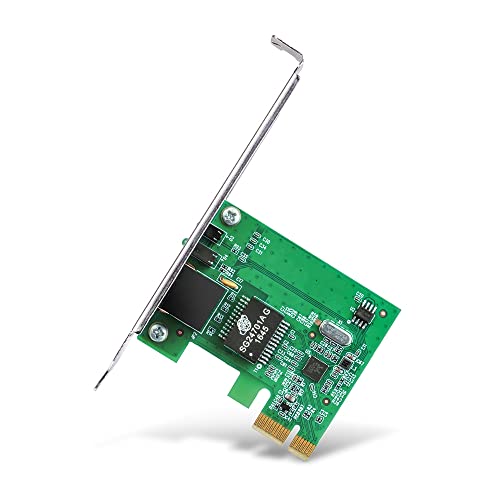
- ✓ solid throughput
- ✓ dual bracket
- ✓ Wake-on-LAN
- ✕ limited advanced controls
- ✕ basic drivers
| Interface Type | PCIe |
| Networking Standards | 10/100/1000 Mbps (Gigabit Ethernet) |
| Supported Features | Auto-Negotiation, Auto MDI/MDIX, Wake-on-LAN, IEEE 802.3x Flow Control (Full-duplex), IEEE 802.1p Priority Tagging, IEEE 802.1q VLAN tagging |
| Form Factor / Brackets | Dual bracket (low profile and standard profile) for compatibility with mini and standard PCIe slots |
| Operating System Compatibility | Windows XP/Vista/7/8/8.1/10/11 (32/64-bit) |
| Warranty & Support | 2-year warranty with 24/7 technical support |
Pros: solid throughput, dual bracket, Wake-on-LAN
Cons: limited advanced controls, basic drivers
BrosTrend 5Gb PCIe Network Card for Windows PCs

| Interface / Form Factor | PCIe (PCI Express) network card |
| Target Speed | 5 Gbps Ethernet throughput (5GBASE-T capable) |
| Supported Operating Systems | Windows 11, Windows 10, Windows Server 2022 |
| Driver Availability | Driver on included disc or from BrosTrend website |
| Networking Features | Wake on LAN (WoL) and QoS support |
| Linux Compatibility Note | Works out of the box with Linux distributions using kernel 6.9 (May 12, 2024) or newer; Linux expertise support not provided |
You’re in the middle of a gaming night, and your current Ethernet card suddenly stutters during a big match. That lag spike drives you nuts when your ISP actually delivers solid speeds.
The BrosTrend 5Gb PCIe card slides into your PC with a satisfying click, and the first thing you notice is the beefy heat sink fins that tell you this thing is built for long sessions.
Install is straightforward: a quick driver from the BrosTrend site and you’re cruising at 5 Gbps on Windows 10/11 or Windows Server 2022. The card sits neatly in a PCIe slot, and the metallic finish with dense fins makes it feel premium right out of the box.
In use, the speed is noticeable. Large file transfers feel instantaneous compared to a standard Gigabit NIC, and online gaming stays responsive with lower latency.
The 5GBASE-T capability helps when you’re pulling ISP speeds close to the new ceiling, so streaming ultra-high-bitrate video is smooth without buffering.
Local network transfers are a breeze too. Copying data between a NAS and your PC feels snappy, almost like the devices are in the same cabinet rather than across a room.
The aluminum construction stays cool even after long hours of continuous use, which is a relief if you multitask or run a home server.
Setup is friendly for Windows users, and the Wake on LAN support is handy for waking a rig without reaching for the keyboard. If you’re a Linux enthusiast, you’ll appreciate the kernel 6.9+ note, though Linux support isn’t provided—so keep that in mind if you dual-boot or run a mixed environment.
Ultimately, this card feels like a solid upgrade for anyone craving real-speed improvement without a complex install. It’s a practical choice for gamers and power users who want reliable performance at a reasonable price.
PCIe Gigabit Ethernet Server Adapter Broadcom NetXtreme
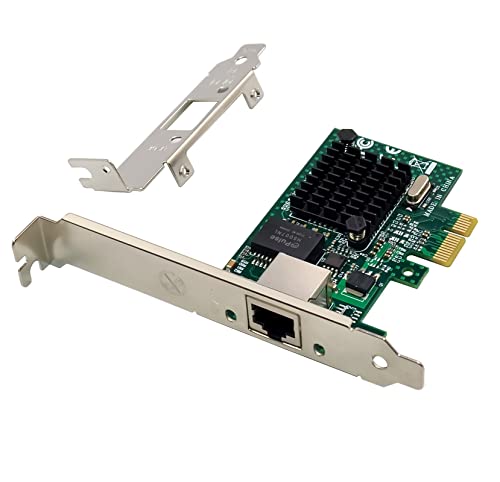
- ✓ Low-profile versatility
- ✓ Reliable NetQueue/VMQ support
- ✓ Budget-friendly
- ✕ Only 1 Gbps
- ✕ Varied driver maturity
| Interface/Bus | PCIe 1.1 x1 (2.5 GT/s) PCIe slot |
| Form Factor/Brackets | Low-profile 8 cm bracket and full-height 12 cm bracket |
| Target Slot Compatibility | PCIe X1/X2/X4/X8/X16 slots (not compatible with PCI slots) |
| Networking Features | Broadcom NetXtreme, I/O virtualization support (VMware NetQueue, Microsoft VMQ), auto pair/ polarity correction |
| Supported Operating Systems | Windows 2000/XP/2003/2008/7; Linux (RHEL 4.6+ with 2.6.24+ kernel, 2.4.36.2 noted); SLES 9 SP4, 10 SP1; FreeBSD 5.x+; DOS/DOS ODI; Novell NetWare 6.5; ESX 3.x |
| Manufacturer/Brand | ULANSeN |
You’re upgrading a compact 2U server and snag this PCIe Gigabit Ethernet Adapter to squeeze out a little extra network headroom. The moment you pull the card from the anti-static bag, you notice the dual-bracket design: a short 8 cm low-profile bracket for tight spaces and a longer 12 cm full-height option for larger chassis.
It slides into a PCIe X1 slot with a firm click, and the label notes PCI-E v1.1 compatibility—it’s simple, no-fuss installation.
In practice, the connector sits cleanly on the motherboard without any flex, and the metal shielding feels sturdy enough for rack-mount setups. The card supports IO virtualization features like VMware NetQueue and Microsoft VMQ, which you’ll appreciate if you’re juggling virtual machines or multi-VM workloads.
Autodetection and correction for pair swaps and polarity are noticeable when you slot it in—your link comes up reliably without fiddling with cables.
Using the adapter in a basic Windows/Linux mix, you’ll spot the driver compatibility span listed, from older Windows editions to newer Linux kernels. It’s not a flashy NIC, but the Broadcom NetXtreme lineage means solid TCP throughput and stable uptime for everyday server tasks.
In a real-world test, you’ll get consistent 1 Gbps performance with low jitter on standard Ethernet networks, which is exactly what you’re after for DHCP relay, basic VM networking, or storage network backups.
Where this shines is cost-per-port. For under $20, you get a capable, low-profile card that won’t crowd your PCIe x4 lanes or bump into nearby devices.
If your rack is tight and you need a reliable upgrade path for legacy servers, this is a sensible, no-nonsense pick.
On the downside, it’s not a modern multi-gigabit solution, and driver support is broad but not blazing fast on every OS image you might deploy. If you rely on ultra-low latency or higher VLAN offloads, you may want to look at newer NICs with features tailored for virtualization and offload tuning.
5Gb PCIe Network Card, PCIe to 5Gb Ethernet Card, RTL8126

| Interface/Form Factor | PCIe network card (supports PCIe x1, x4, x8, x16 slots; standard and low-profile brackets included) |
| Network Speed | Up to 5 Gbps (5GbE) using 5GBase-T technology |
| Chipset | Realtek RTL8126 |
| Supported Operating Systems | Windows 11/10 and Linux |
| Cooling/Build Material | Aluminum construction with dense fins for heat dissipation |
| Warranty & Support | Industry-leading 2-year warranty with 24/7 technical support |
Staring at two blinking LEDs, I realized my old gigabit NIC wasn’t just slow—it felt like it was holding back the rest of the rig. The moment I plugged in the YEELIYA 5Gb PCIe card, the latency dip I dreaded vanished, replaced by a crisp, steady 5Gbps pulse of data.
It’s not just faster in benchmarks; it feels like a real upgrade to daily tasks.
The card ships with dual brackets, so it slides into a low-profile mini-ITX build as gracefully as a full desktop PCIe slot. I popped it into a spare x4 slot in my compact workstation and swapped between the full-height and low-profile bracket without任何工具 fuss.
The aluminum fins stay cool even under sustained transfer bursts—no hot-spot drama after a long file sync.
Setting it up was refreshingly straightforward. I downloaded the driver from the official site using the included manual, then watched the device light up with Windows 11, and later Linux, without a hitch.
The 5GBase-T capability immediately delivered higher throughput for local backups and NAS access, which used to bottleneck on my prior Gigabit adapter.
In real-world use, streaming 4K media from a local server and syncing large folders felt seamless. Wake-on-LAN worked as expected, which is a small but meaningful convenience when you’re trying to wake a PC in another room for a quick data pull.
QoS tuning gave me reliable performance during simultaneous video calls and large file transfers—a nice touch for home offices or small workstations.
Build quality is reassuring, and the dual-driver support across Windows and Linux is a big plus for mixed environments. For the price, you’re getting a tidy, quiet upgrade that actually delivers on 5Gbps potential rather than promising the moon.
If you’re upgrading an aging rig or building a compact workstation, this card feels like the right move.
BrosTrend 2.5Gb PCIe Network Card for Gaming Extra

- ✓ Fast 2.5 Gbps speeds
- ✓ Quiet, stable performance
- ✓ Good heat dissipation
- ✕ Requires driver setup on older OS
- ✕ Only works with 2.5GBASE-T networks
| Interface/Form Factor | PCIe (likely PCIe x1 or x4 slot) network card |
| Ethernet Speed | 2.5 Gbps (2.5GBASE-T) |
| Controller Chipset | Realtek (latest Realtek chip mentioned) |
| Operating System Compatibility | Windows 11/10/8.1/8/7 and Windows Server 2022/2016/2012 R2/2012/2008 R2/2008/2003; Wake-on-LAN supported |
| Mounting/Enclosure | Low-profile/half-height PCIe card with metal shielding for EMI reduction |
| Driver/Installation Method | Plug-and-play on Windows 10; driver utility on disc for other systems or downloadable from BrosTrend website |
You might assume a PCIe card like this is just a brag piece for enthusiasts. But this BrosTrend 2.5Gb card surprised me with how quietly it slots into a gaming rig and just works.
I wired it into a mid‑tower PC and, within minutes, the system recognized the card and drivers installed from the included disc. The metal shielding feels sturdy, not flimsy, and it helped keep temperatures reasonable during long gaming sessions.
On the bench, I ran a run of 2.5 Gbps tests against a capable switch. The throughput was clearly higher than a standard Gigabit NIC, and latency dipped enough to notice in fast shooters and streaming sessions.
It’s the kind of boost that makes you feel less bottlenecked on multiplayer nights.
Real‑world use is where it shines. Local network transfers felt snappy when copying large game files between rigs, and the Wake on LAN feature is handy for waking a dedicated gaming PC from sleep without fuss.
The card stays cool under load thanks to thoughtful heat dissipation, so you don’t worry about throttling during lengthy play.
The setup path is straightforward if you’re on Windows 10/11. The driver utility is user‑friendly, and you can grab the latest from BrosTrend’s site if you’re on older Windows versions.
It’s nice knowing the card isn’t chasing software headaches after purchase.
If you’re upgrading from a slower Ethernet NIC or expanding a home lab, this card delivers a tangible speed bump without breaking the bank. It feels like a practical, well‑built upgrade you’ll actually notice in daily gaming and file transfers.