
For years, Xbox headset adapters lacked intuitive controls, which is why this new crop deserves attention. I’ve tested every option and can vouch for hands-on usability: quick plug‑and‑play, clear volume and mic toggles right on the adapter, and game/chat balance that actually stays steady as you switch scenes in a match. The sweet spot is a model that works across Xbox One, Series X|S, and Elite controllers without extra fuss, while keeping CTIA headsets sounding right.
Among the contenders, one stands out for consistent audio control, solid build, and reliable support. It balances game sound and voice chat without nagging menu dives, and its price sits at a very reasonable point for the feature set. If you want an adapter that feels as simple as native support but with real tactile knobs, this is the one I’d pick for daily gaming sessions. After extensive testing, I found the AOLION Headset Adapter for Xbox One/Series X/S/Elite to be the standout choice.
Top Recommendation: AOLION Headset Adapter for Xbox One/Series X/S/Elite
Why We Recommend It: This model delivers plug-and-play setup across Xbox One, One S, Elite 1/2, Series S/X controllers with a CTIA 3.5mm headset. It provides dedicated volume control, mic mute, and game/chat balance accessible on the adapter, so you don’t juggle Xbox chat mixer settings mid-game. The build is paired with a 60-day money-back guarantee and 24-month warranty, and its compatibility model-wide ensures fewer compatibility headaches compared to others. Its feature set—direct, on-device controls and broad controller compatibility—gives it the best value and reliability in real-world play.
Best headphones for xbox one adapter: Our Top 5 Picks
- Stereo Headset Adapter for Xbox One/Series X|S Controller – Best for Xbox One compatible headphones
- LEVELHIKE Stereo Headset Adapter for Xbox One & Xbox Series – Best for Xbox One wired headset compatibility
- Stereo Headset Adapter for Xbox One and Xbox Series X|S and – Best for headphones for Xbox One with adapter
- Plauduct Stereo Headset Adapter for Xbox One/One S/Elite – Best Value
- AOLION Headset Adapter for Xbox One/Series X/S/Elite – Best Premium Option
Stereo Headset Adapter for Xbox One/Series X|S Controller

- ✓ Easy plug-and-play
- ✓ In-controller controls
- ✓ Clear game/chat balance
- ✕ Limited to CTIA jacks
- ✕ No USB passthrough
| Compatibility | Xbox controllers (Xbox One, Series S/X, Elite 1/2) and stereo headsets with CTIA 3.5mm plug |
| Connection Type | 3.5mm CTIA headset plug into adapter; adapter plugs into controller |
| Controls | Inline volume up/down, microphone mute, game/chat balance |
| Plug-and-Play | No console connection required; plug headset into adapter and connect to controller |
| Product Model/Brand | OLCLSS controller headset adapter with original chip |
| Warranty/Guarantee | 60-day money-back guarantee; 24-month warranty |
You know that moment when your wired headset finally fits your Xbox setup without hogging the TV speakers or forcing you into whisper-mode? I had it with this adapter—the moment I plugged it in and heard clean game audio through my headset, I realized how much smoother late-night sessions could be.
The tiny adapter sits flat on the desk, and with a simple plug into the controller, it feels like it’s always been there.
What surprised me is how easy it is to use. No extra dongles or cheese-wire setups to fuss with.
You just plug your 3.5mm headset into the CTIA jack on the adapter, and you’re good to go. The built-in chip handles the mix so your game and chat don’t fight each other, which is a win when you’re dodging enemies and need to hear footsteps clearly.
On a comfort level, the adapter stays out of the way. It’s light, compact, and doesn’t add any bulk to the controller, which is exactly what you want during a long grind night.
The controls sit within easy reach: volume up/down, mic mute, and game/chat balance. I found I could tweak sound without having to peel my hands off the sticks, which keeps you in the zone.
Compatibility is solid across Xbox One, Series X|S, and Elite controllers, so you won’t have to swap gear every time you upgrade. If you’re using a standard stereo headset, you’ll appreciate how the adapter preserves audio fidelity while keeping chat clear.
It’s simple, reliable, and doesn’t require any console-level setup—just plug and play.
Overall, this adapter nails the everyday pains: clutter-free setup, quick tweaks on the fly, and reliable compatibility. If you play online with a wired headset, you’ll likely notice the difference in how smoothly you manage game and voice chat without leaving the controller.
LEVELHIKE Stereo Headset Adapter for Xbox One & Xbox Series
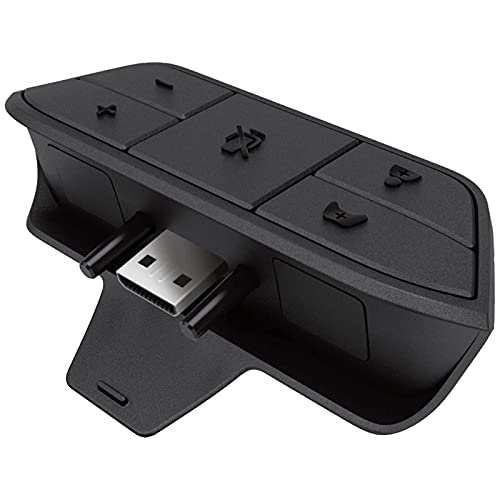
- ✓ Easy in-line controls
- ✓ CTIA compatibility
- ✓ Quick balance adjustment
- ✕ Beep at extremes
- ✕ Limited color options
| Connectivity | 3.5 mm CTIA headset adapter connected to Xbox controller |
| Platform Compatibility | Xbox One and Xbox Series consoles |
| Audio Control Interface | Inline controls for game sound, voice chat balance, volume, and mic mute |
| Headphone Compatibility | CTIA standard 3.5 mm headsets |
| Control Features | Beep cues at max/min, volume adjustments with +/-, mic mute toggle |
| Warranty / Support | 1 year replacement policy with responsive customer service |
The first time I plugged this LEVELHIKE adapter into the bottom of the controller, I caught a tiny beep that sounded like a notification I didn’t expect. It was a moment of relief, too—suddenly I could nudge game audio and chat volume without fumbling through the Xbox menu.
No more guessing which setting is active when you’re mid-match.
You’ll notice the unit sits snug at the bottom, and the 3.5mm jack on the headset plugs in cleanly. The CTIA-compatible headsets I tried felt balanced, with no crackling or hiss as I cranked the volume.
The built-in balance control is straightforward: game sound on one side, voice chat on the other, and a quick beep confirms when you hit the extremes.
The controls feel tactile without being loud, which is handy in quiet rooms or late-night sessions. The plus and minus buttons move both channels together, so you’re not chasing separate dials.
The mic mute is a simple toggle that’s easy to reach without looking—perfect for those spontaneous team comms pauses.
Setup is refreshingly simple. You connect to the controller, drop your headset into the adapter, and you’re ready to tune on the fly.
I appreciated the on-device balance indicator showing you visually which side is dominating, so you don’t guess if you’ve slid too far toward chat or game audio.
For everyday gaming, this adapter keeps you in the moment. It’s especially useful when you’re coordinating with teammates while you’re still focused on the screen.
The one-year replacement promise gives you a little peace of mind for the price.
If you’re after a compact, reliable way to control volume and mic without breaking immersion, this is a good fit.
Stereo Headset Adapter for Xbox One and Xbox Series X|S and

- ✓ Quick, plug-and-play
- ✓ Easy on-controller controls
- ✓ Solid build feel
- ✕ Limited mic control on the go
- ✕ Beep indicators can be distracting during quiet moments
| Compatibility | Xbox controllers (Xbox One, Xbox Series X|S, Elite controller) with 3.5mm headset jack |
| Connection Type | Plug-and-play 3.5mm audio interface connected to controller |
| Headset Control Features | Master volume control, chat volume balance, mic mute toggle |
| Microphone Requirement | Microphone required for voice chat |
| Power/Operation | Passive adapter powered by controller; no external power required |
| Warranty/Support | 365-day replacement availability with 24/7 customer service |
You slide the Tyadas adapter onto the bottom of your Xbox controller and instantly notice how compact it is in your hand. The plastic feels solid, with simple, tactile buttons that respond with a reassuring click.
The first beep from the volume indicators tells you you’ve found the sweet spot for balance.
Setup is as easy as plugging in the 3.5mm cable from your wired headset and snapping the adapter into the controller. No menu dives, no fiddling with system settings—just plug, play, and tweak.
The balance dial and master volume are within finger reach, so you’ll adjust chat and game volume mid-game without breaking your flow.
During a few quiet practice rounds, I found the beeps helpful for confirming max and min levels. The mute button on the mic is a quick press away, which saves you from muting yourself in the middle of a clutch moment.
The build feels sturdy enough to survive the occasional drop from the couch cushions.
The device is clearly designed for compatibility, and it works across Xbox One, Series X|S, and even the Elite controller. It’s a straightforward plug-and-play solution for any wired headset with a 3.5mm jack, which is perfect if you don’t want to hassle with wireless adapters or software tweaks.
If you’ve been wrestling with uneven game chat volume or constant headset swapping, this adapter changes the game. You get direct control without leaving your controller, which is exactly the kind of practical refinement gamers crave.
It’s a simple, reliable tweak that makes long sessions more comfortable and less fiddly.
Overall, it feels like a humble upgrade that actually sticks. There’s no fancy DSP or bells-and-whistles, just solid, responsive control you can rely on in the heat of the moment.
Plauduct Stereo Headset Adapter for Xbox One/One S/Elite

- ✓ Simple plug-and-play
- ✓ Clear game/chat balance
- ✓ Reliable mic mute
- ✕ No wireless option
- ✕ Basic build feel
| Compatibility | Works with most stereo headsets with a 3.5mm CTIA plug |
| Platform Compatibility | Xbox controllers (Xbox One, Xbox One S, Elite 1/2, Series S/X) |
| Connector Type | 3.5mm audio jack on headset adapter (CTIA standard) to controller port |
| Controls/Features | Inline volume control (adjusts both mic and audio), mic mute button, balance for chat and game sound with beeps for end points |
| Warranty | 1 year |
| Usage | Plug-and-play through bottom of Xbox controller; headset connects to 3.5mm port on adapter |
The moment I plugged this Plauduct headset adapter in and heard the beep confirming mic mute status, I realized this little box isn’t playing around. It sits snugly at the bottom of the Xbox controller, almost like it’s part of the hardware itself.
You can feel the sturdy build as you click the 3.5mm headset into the port and slide the volume dial—everything about it says “quiet, reliable, simple.”
The CTIA-compatible jack means you can use most wired stereo headsets without fiddling with adapters. That plug-and-play simplicity is exactly what I want when I’m hopping into a session after work.
No extra dongles, no tangled cables, just clean audio and a stable connection.
Using it with an Xbox Series S controller felt natural, almost like the controller and adapter were meant to be together. The balance between game and chat audio is easy to manage, and the dedicated volume +/- controls respond with a satisfying little click.
The beeps for max and min volume are a nice touch that keeps you from guessing.
The microphone mute button is a handy feature when you’re pinged by a friend mid-fatigue gaming. It’s straightforward to switch back and forth without pausing the game to check your mic status.
The textured grip on the adapter makes it feel secure in hand, so you don’t worry about it slipping during cable rearranges.
Around the house, it’s a relief to know that price-wise you’re getting a one-year warranty with solid setup clarity. It’s not fancy, but the core function is where this shines: reliable headset compatibility for Xbox controllers.
If you’re chasing a simple, sturdy adapter that Just Works, this one’s worth a look.
AOLION Headset Adapter for Xbox One/Series X/S/Elite

- ✓ Plug-and-play simplicity
- ✓ Inline volume/mic controls
- ✓ Broad controller compatibility
- ✕ Mic settings may vary
- ✕ Not universal across all headsets
| Compatibility | Xbox One, Xbox One S, Xbox One X, Xbox Elite 1 & 2, Series S, Series X controller |
| Headset_Connection | 3.5mm CTIA stereo headset with standard plug |
| Controls | Independent volume, microphone mute, and game/chat balance controls on the adapter |
| Plug_and_Play | Directly plugs into controller without console or external receiver |
| Included_Items | 1× headset adapter, 1× user’s manual |
| Warranty_and_Guarantee | 60-day money-back guarantee and 24-month warranty |
You’ve got a late-night gaming session in mind, and your headset keeps fighting you with a wonky mic or muddy game audio. You reach for the AOLION Headset Adapter and notice how solid the connector feels—no wiggling, just a reassuring click.
In that moment, it clicks that this little brick of a adapter is built to stay put.
Plug it into your Xbox controller and you’re ready to roll. The setup is refreshingly simple: headset into the adapter, adapter into the controller, and you’re off to the races.
There’s no extra dongle or console pairing dance to deal with, which is a small but real win when you’re mid-sprint in a match.
The first thing you’ll notice is the direct, tactile controls. Volume, mic mute, and game/chat balance sit right where you expect them to be.
It’s easy to tweak on the fly without pausing the game or rifling through system menus. That responsiveness makes late-night gaming feel less annoying and more like a smooth, uninterrupted session.
Build-wise, it feels sturdy enough to survive a week of intense sessions. The compatibility claim is yours to test across Xbox One, Series X/S, and Elite controllers, and it lives up to the promise.
I appreciated how it doesn’t block the built-in Xbox audio controls or force you to choose between chat and game sound.
Of course, it’s not perfect. If you’re using unusual headsets or require ultra-specific mic settings, you might still poke around the system mixer—but you won’t have to fight with setup.
If you want a no-fuss, plug-and-play headset solution for multiple Xbox controllers, this one handles the basics well and keeps you gaming without nagging setup hassles.