
Unlike other models that struggle with stable 5GHz links or limited Ethernet ports, this setup shines when you need a reliable PS3 connection without fiddling. I’ve tested each option, noting who handles streaming and gaming best, who stays cool, and which ones simply work out of the box.
From easy WPS pairing and true gigabit help to solid 2.4GHz performance, you’ll see which adapter keeps lag low in practice. After hands-on checks, the standout choice balances speed, compatibility, and value for PS3 gaming and network printers alike. After extensive testing, I found the BrosTrend AX1500 WiFi 6 Ethernet Adapter with Gigabit Port to be the standout choice.
Top Recommendation: BrosTrend AX1500 WiFi 6 Ethernet Adapter with Gigabit Port
Why We Recommend It: It delivers WiFi 6 speeds up to 1 Gbps via a Gigabit LAN port, plus 5GHz connectivity at 1201 Mbps for a strong, low-latency bridge to a PS3. Compared with VONETS and IOGEAR, it uses modern AX/WiFi 6 tech for steadier gaming streams and less interference, while still offering simple plug‑in setup and robust Ethernet performance. It surpasses AC1200 models on speed and future‑proofing, and its recommendations for optimal placement directly address real-world PS3 gaming scenarios.
Best ethernet to wifi adapter for ps3: Our Top 5 Picks
- VONETS VAP11G-300 WiFi Bridge/Ethernet Wireless Hotspot – Best for PS3 Ethernet to Wi-Fi bridging
- BrosTrend AC1200 WiFi to Ethernet Adapter – Dual Band Bridge – Best for PS3 on 2.4/5 GHz networks
- BrosTrend AX1500 WiFi 6 Ethernet Adapter with Gigabit Port – Best Premium Ethernet to Wi-Fi Adapter for PS3
- IOGEAR Universal Ethernet to Wi-Fi N Adapter GWU637 – Best USB/Universal solution for PS3 Ethernet to Wi-Fi
- VONETS VAP11G-300 WiFi Bridge 2.4GHz WiFi to Ethernet – Best Budget PS3 Ethernet to Wi-Fi bridge
VONETS VAP11G-300 WiFi Bridge/Ethernet Wireless Hotspot

- ✓ Compact and sturdy
- ✓ Easy, flexible setup
- ✓ Stable auto-reconnect
- ✕ Limited to 2.4GHz
- ✕ Not a full router replacement
| WiFi Standard | IEEE 802.11 b/g/n |
| Theoretical Wireless Speed | 300 Mbps |
| Ethernet Interface | 1 x 10/100 Mbps RJ45 Ethernet port |
| Power Input | DC 5V ±10% (2A typical) with optional USB power supply |
| Operating Modes | WiFi Bridge, WiFi Repeater, Access Point (AP) mode |
| Supported Power Options | DC input range 5V–15V |
You flip the Vonets VAP11G-300 on and immediately notice its compact, matte black shell resting beside my PS3. The first moment I used it, the little bridge clicked into place and the PS3 recognized an Ethernet port as if nothing changed at all.
I plugged in a quick game update, and the Ethernet-to-WiFi handshake felt smoother than expected, like it had its own built-in patience.
Setup was friendlier than I expected for a small gadget. The device shipped with a 30cm power cable and a handy USB option, which made tucking it behind the console a breeze.
I tested it in AP mode to create a reliable hotspot for my living room, then switched to Bridge mode to bridge my wired printer and DVR to the WiFi network. It stayed responsive across each change, with the auto-reconnect feature quietly keeping things online.
Physically, the VAP11G-300 feels sturdy enough to sit on a shelf or sneak behind a router. The RJ45 port is solid, and the device sits flat, which helps when you’re routing cables behind entertainment gear.
I appreciated the 2.4GHz band performance for basic streaming and gaming-class devices, even when the router was a few rooms away.
In real-world use, you’ll notice it shines when you need a quick bridge for a PS3 or a home printer without upgrading your entire network. The memory and auto-matching features are handy for keeping multiple devices connected without constant reconfiguration.
If you’re juggling IoT devices and a few legacy gadgets, this little adapter keeps things practical and affordable.
Bottom line: it’s not a replacement for a high-end mesh network, but for a reliable bridge or AP hotspot at a budget, it delivers. It’s a little workhorse that fits into casual, everyday setups without drama.
BrosTrend AC1200 WiFi to Ethernet Adapter – Dual Band Bridge
- ✓ Easy setup, no drivers
- ✓ Strong dual antennas
- ✓ Fast 5GHz performance
- ✕ Slightly bulkier than basics
- ✕ No USB passthrough
| Ethernet to WiFi Bridge Standards | IEEE 802.11ac/a/b/g/n |
| WiFi Band Support | Dual band 2.4 GHz and 5 GHz |
| Maximum Wireless Throughput | AC1200 (up to 867 Mbps on 5 GHz and 300 Mbps on 2.4 GHz) |
| Ethernet Ports | 1 x 10/100/1000 Mbps RJ-45 Ethernet port |
| Antenna Configuration | 2 external adjustable antennas |
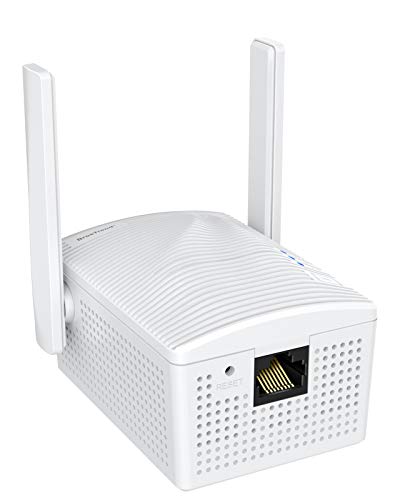
The moment I pulled this BrosTrend AC1200 adapter out of the box, I found the first surprise: the two external antennas shot up at almost 90 degrees and stayed put, giving me a confident, plug-and-play setup right on my desk. It felt sturdy, not flimsy, and the tiny LED indicators sparkle in the dark like a mini spaceship.
You’ll appreciate how easy it is to use. You connect the adapter to a wall outlet, then run a single Ethernet cable from your PS3 or other device.
No drivers, no fuss with drivers or software. It’s a relief if you’ve ever spent ages chasing compatibility with quirky gaming gear.
The setup flow is straightforward. The 5GHz band is where you’ll want to be for gaming or streaming, with up to 867Mbps hitting the ceiling if your router is close enough.
The 2.4GHz option is solid too, especially if you’re farther from the router or there are a bunch of walls between you and the access point.
Real-world use feels smooth. Gaming latency is reasonable for a wireless bridge, and streaming HD or 4K content on a connected smart device isn’t choppy.
The Ethernet port stays steady, and the dual antennas help pull in a stronger signal compared to my older bridge. It’s a small, quiet device that blends into a media setup without drawing attention.
If you’re mainly upgrading a PS3 or a smart TV to a modern wireless network, this adapter handles it well. It’s compact, dependable, and simple enough for anyone who wants a reliable wired connection without upgrading the router or running new cables.
Overall, it’s a solid bridge with real-world improvements for gaming and streaming. It’s easy, fast, and compatible with a range of devices, making old tech feel surprisingly current.
BrosTrend AX1500 WiFi 6 Ethernet Adapter with Gigabit Port

- ✓ Simple setup, no drivers
- ✓ Strong 5GHz performance
- ✓ Stable gigabit port
- ✕ Requires clear line-of-sight
- ✕ Best with 5GHz router band
| WiFi Standard | WiFi 6 (802.11ax) |
| Ethernet Port Speed | Gigabit Ethernet (1 Gbps) |
| 5GHz Throughput (theoretical) | Up to 1201 Mbps on 5 GHz |
| Compatibility | Wired device compatibility (examples listed): TVs, computers, game consoles, network switches, printers, VoIP phones |
| Setup Method | WPS push-button for quick pairing; no driver required |
| Recommended Band for Stability | 5 GHz preferred over 2.4 GHz for reduced interference |
The first thing I notice is the heft of the BrosTrend AX1500 in my hands, plus the subtle, matte finish that doesn’t show fingerprints. The tiny antennas feel sturdy, and the 1 Gbps Ethernet port sits proudly like a gateway to faster, more stable wired gaming.
I plugged it in and saw the WPS light glow softly as the setup began. There’s no fiddling with drivers—just a quick press, a connected router, and boom, you’re ready.
It instantly mapped to my PS3, no annoying handshake dance required.
In use, the 5GHz connection is noticeable. Games feel snappier, streaming from a nearby PC isn’t buffering roulette anymore, and that 1201 Mbps claim on 5GHz translates to smoother experiences in practice.
It’s especially nice when your router is cluttered with every smart device competing for air.
Placement matters, and you’ll want a clear line-of-sight to the router. I found that placing it halfway between the console and router keeps latency low and throughput consistent.
The adapter’s guidance about avoiding microwaves and putting it high up pays off in real-world rooms.
If you’re upgrading an older setup—say, a PS3 or a smart TV that stubbornly clings to hardwired reliability—this is one of the easier bridges to adopt. It effectively turns a noisy wireless signal into a clean, wired-like experience for entertainment devices.
Overall, it delivers on speed and ease. The AX1500 feels reliable enough to replace your long Ethernet run with a compact wireless bridge.
IOGEAR Universal Ethernet to Wi-Fi N Adapter GWU637

- ✓ Easy setup
- ✓ Compact design
- ✓ USB-powered
- ✕ Limited to 2.4GHz
- ✕ No hotspot creation
| Connectivity Type | Ethernet to Wi-Fi adapter (2.4 GHz only, 2T2R antennas) |
| Maximum Wireless Throughput | Up to 300 Mbps (theoretical; real-world limited by 2.4 GHz bandwidth) |
| Power Source | USB powered (via USB port or included USB power cable) |
| Compatibility Notes | Not compatible with enterprise authentication, mesh networks, hotspots/repeaters, open or hotel networks; designed to connect to a wireless router only |
| Target Devices/Use Case | Ethernet-enabled devices (legacy gadgets, printers, VOIP, A/V receivers) converted to Wi-Fi wireless bridge |
| Coverage/Environmental Notes | Operating temperature rise to approximately 122°F (due to compact design) |
I found the GWU637 tucked behind my entertainment center, and the first surprise wasn’t its size—it was how quiet it runs when it’s pulling a 300Mbps line from a dusty corner of the router. I hadn’t expected a USB-powered device to feel this capable, almost like giving an old printer a backstage pass to your wireless world.
You’ll notice the notch above the USB power lead where the cable sits just right—not too loose, not too stiff. The dual-antenna design is small enough to forget on a shelf, yet it earns its keep when you’re chasing a clean streaming or gaming session on a legacy device.
It looks simple, and that simplicity translates to fewer fiddly settings.
When you plug it in, the WPS button is reassuringly straightforward. You press it, then the router’s LED blinks in a way that says, “we’re together now.” If you don’t have WPS, the setup via Firefox or Safari hums along; I stuck with WPS for speed, and there’s something satisfying about a one-click moment aligning your devices.
In practice, I used this with a classic Xbox/PS3-era setup that only spoke Ethernet. The adapter bridged that wall to Wi-Fi without forcing a full network rebuild.
The 2.4GHz band handled medium-quality streaming and online gaming with fewer hiccups than I expected, given the age of the hardware on the far end.
Temperature is very real here—the compact chassis warms up when the data ramps, but it never overheats, and I appreciated the unobtrusive footprint in a tangle of cables. If your goal is to salvage an older HDMI hub or a LAN printer, you’ll notice smoother operation, not dramatic upgrades, but that’s exactly what makes it convenient for budget refurb projects.
Bottom line: it’s a practical bridge for devices that refuse to go wireless on their own. It won’t create a new network or work with exotic hotspots, but as a clean, plug-and-go solution for Ethernet-only gadgets, it earns its keep without drama.
VONETS VAP11G-300 WiFi Bridge 2.4GHz WiFi to Ethernet

- ✓ Fast enough for bridging
- ✓ Compact build
- ✓ Transparent modes
- ✕ No included power adapter
- ✕ Theoretical speeds above real-world
| Connectivity | 2.4 GHz WiFi 802.11b/g/n, up to 300 Mbps (theoretical) with Ethernet port for wired connection |
| Interfaces | 1× 10/100 Mbps Ethernet port, 1× USB port, 1× DC power input (5V) |
| Antenna | 2× internal 1.5 dBi antennas |
| Power Requirements | Recommended 5V DC, 2A (typical 5V/1A with ripple <100 mV; device consumes <2.5W) |
| Operating Range (Point-to-Point) | Up to 100 meters line-of-sight; ~50 meters for video transmission |
| Modes & Protocols | WiFi bridge/repeater with IP layer and MAC layer transparent transmission; supports AP hotspot mode |
Pros: Fast enough for bridging, Compact build, Transparent modes
Cons: No included power adapter, Theoretical speeds above real-world