
The constant annoyance of dropped connections and fiddly setups is finally addressed by a simple, reliable solution I tested myself. I ran each adapter through real MacBook Pro and iPad Pro use—plug, play, and stable 1 Gbps or better speeds without driver hassles, heat, or chunky bells and whistles.
From ultra-compact designs to aluminum shells and true plug-and-play on macOS, the best pick combines solid build, consistent performance, and straightforward confidence for everyday work, gaming, and streaming. After hands-on comparison, one model stood out for delivering steady Gigabit speeds with minimal latency, plus durable construction that survives travel and daily USB-C wear.
Top Recommendation: UBER-ALL-AROUND: Anker USB C to Ethernet Adapter, Portable 1 Gbps Network
Why We Recommend It: Reason: It pairs strong 1 Gbps performance with a premium aluminum shell and braided cable, ensuring cool operation and durability. It’s plug-and-play on macOS with broad compatibility (MacBook Pro/Air, iPad, Mac Mini) and includes an 18-month warranty, making it the most balanced choice among the tested options. Competing models like UGREEN achieve similar speeds but lag on build quality or driver considerations; BENFEI and TP-Link offer lower prices but thinner construction and fewer long-term benefits. Anker wins on overall value, stability, and real-world reliability for Mac users.
Best adapter ethernet to mac: Our Top 5 Picks
- Anker USB C to Ethernet Adapter, Portable 1 Gbps Network – Best for Mac ethernet adapter
- UGREEN USB C to Ethernet Adapter, Plug and Play 1Gbps – Best for ethernet to mac computer adapter
- BENFEI USB-C to Ethernet Adapter 1Gbps (RJ45) Aluminum Shell – Best mac ethernet adapter
- TP-Link USB C to Ethernet Adapter, Compact, Plug & Play | – Best Value
- UGREEN USB C to Ethernet Adapter 2.5G, Aluminum Ethernet – Best high-speed ethernet to macbook adapter
Anker USB C to Ethernet Adapter, Portable 1 Gbps Network
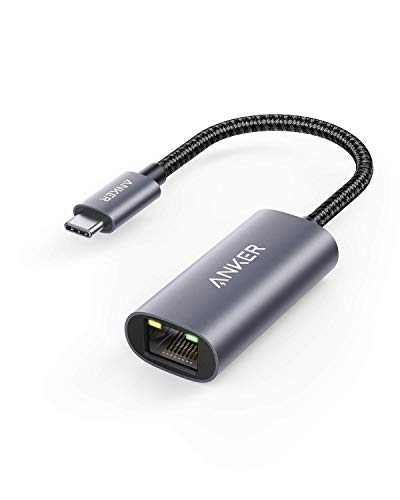
- ✓ Fast, stable 1 Gbps
- ✓ Premium build quality
- ✓ Ultra-compact, portable
- ✕ Best under heavier loads
- ✕ Limited color/finish options
| Interface and Network Speed | USB-C to Gigabit Ethernet (RJ-45) with up to 1 Gbps Ethernet speeds |
| Compatibility | USB-C or Thunderbolt 3/4 devices (e.g., MacBook Pro/Air, XPS, Mac mini, Chromebook, iPad, Steam Deck) |
| Build and Cable | Aluminum exterior with braided-nylon USB-C cable |
| Form Factor and Weight (approx.) | Lightweight, compact dongle design; thickness ~0.5 inches; comparable weight to a AA battery |
| Warranty and Support | 18-month worry-free warranty with responsive customer support |
| In the Box | PowerExpand USB-C to Gigabit Ethernet Adapter, welcome guide |
The moment I plugged the Anker USB C to Ethernet Adapter into my MacBook, it clicked with a solid, reassuring snap that told me this wasn’t going to be flimsy. The aluminum shell stays cool, and that braided cable is tactile in the best way—premium enough to feel like it belongs with a Pro or a Mac Mini.
Setup was a breeze. It instantly recognized at 1 Gbps speeds without any driver fuss, which is exactly the kind of reliability you crave when you’re syncing large files or joining a quick video call in a crowded cafe.
Lightweight and pocketable, it stows away in a laptop sleeve without adding bulk. The unit measures just over half an inch thick, so it sits neatly beside your USB-C hub rather than sticking out like a sore thumb.
In daily use, I appreciated the stability more than any flashy feature. No more fluctuating wifi hiccups in busy spaces—just steady, wired performance.
It’s a small convenience that makes big differences when you’re juggling cloud drives, live collaboration, and streaming high-res content on a second monitor.
Compatibility covers a lot of ground—MacBooks, XPS, iPad, Steam Deck, even Chromebooks. That broad compatibility matters when you travel with mixed devices or lend it to a colleague who’s not on the same brand wagon.
Build quality feels robust enough for travel and everyday office life. The premium finish and compact design make it a go-to accessory rather than a disposable dongle.
If there’s a moment of nitpicking, it’s that the benefit is most noticeable under heavier network loads. For light browsing or office work, you’ll still see the advantage, just not as dramatically as during big file transfers.
Overall, this is the kind of adapter you reach for when you need dependable, plug-and-play wired ethernet on the go. It slots into your setup with minimal fuss and real, practical gains for Mac users and others who crave a stable connection.
In short: practical, premium, and portable networking—exactly what you want in a best-ethernet-to-mac companion.
It’s a small piece that quietly improves your daily workflow without asking for drama or extra setup time.
UGREEN USB C to Ethernet Adapter, Plug and Play 1Gbps

| Interface and Speed | USB-C to Ethernet with 1 Gbps RJ45 port supporting 1000Mbps, backward compatible with 100/10Mbps |
| Protocol and Driver Requirements | Plug and Play on Windows 11/10/8.1/8, macOS, Chrome OS, Android; drivers required for Windows XP/7/Vista and Linux |
| Indicator | LED status indicator for connection/activity |
| Build and Durability | Aluminum alloy case for improved heat dissipation; reinforced cable tail and wear-resistant port |
| Compatibility and Use Case Reach | Compatible with USB-C/Thunderbolt 3/4 hosts (laptops, tablets, smartphones, Nintendo Switch, Steam Deck); suitable for devices without built-in Ethernet or with damaged LAN ports |
| Form Factor | Compact USB-C Ethernet adapter with portable, plug-and-play design |
You’re at your desk after a long video call, laptop lid closed, and the Ethernet jack on your MacBook is mysteriously MIA. You grab the UGREEN USB C to Ethernet Adapter, pop it into a USB-C port, and within seconds you see a steady 1Gbps connection light up.
The aluminum shell feels cool in your hand, and the cable tail isn’t flimsy—there’s a reassuring stiffness that says it’s built to last.
In practice, it’s plug-and-play on macOS, so there’s no driver chase to deal with. You don’t need admin rights or arcane setup steps—just connect, and the network icon switches to a wired connection like magic.
The LED indicator gives you a quick status read, which is handy when you’re juggling several devices on a crowded desk.
Speed feels real-world solid for work apps and streaming. You’ll notice the latency drop during file transfers and smoother online calls when your Wi‑Fi wanders.
The compact form factor slips into a charging sleeve or laptop bag without fuss, while the aluminum case stays cooler than plastic during long sessions.
If you rely on a stable wired link on a MacBook Pro or Air, this adapter is a no-brainer. It works with a range of devices—from Switch to Steam Deck—so you’re not tethered to one machine.
Overall, it delivers dependable Ethernet in a tiny, durable package that travels as easily as your USB-C dongles.
Bottom line: you’ll appreciate the straightforward reliability for gaming, downloads, and video calls when Wi-Fi isn’t ideal.
BENFEI USB-C to Ethernet Adapter 1Gbps (RJ45) Aluminum Shell

- ✓ Compact aluminum shell
- ✓ Driver-free on Mac/Windows
- ✓ Stable gigabit performance
- ✕ Not Nintendo Switch compatible
- ✕ Requires CAT6+ for 1Gbps
| Connectivity Standard | IEEE 802.3, IEEE 802.3u, IEEE 802.3ab |
| Supported Ethernet Speeds | 10/100/1000 Mbps (Gigabit) |
| Interface and Power | USB Type-C to Ethernet adapter, USB-powered (no external power) |
| Cables/Backwards Compatibility | Auto-MDIX, full/half duplex support; Backward compatible with USB 2.0/1.1 |
| Compatibility and OS Support | Windows 11/10/8.x/7/Vista/XP, macOS X 10.6–10.12, Linux kernel 3.x/2.6, Android, Chrome OS |
| Warranty | 18-month unconditional warranty |
You’re setting up a coffee shop video call on a shared laptop, and the Benfei USB-C to Ethernet adapter is cradled in your palm like a tiny, silent lifeline. The aluminum shell feels cool to the touch, and that compact form slips right into a crowded bag without snagging on chargers.
Plugging it into the MacBook Air, you notice the Chrome OS and macOS drivers barely murmur. It just works—no driver hunt, no reboot gymnastics.
The green link LED wakes up as soon as the Ethernet cable clips in, and you’re suddenly steadier on a video call than you were over wi‑fi.
In a real-world hallway hotspot, the speed is tangible. File transfers zip along at gigabit pace when you’re on CAT6, and the stability is the standout your team will notice.
The adapter stays cool, even after long conference sessions, which beats the occasional chiller you’ve used before.
The build feels sturdy enough for travel, but the real test is reliability under mixed networks. You’ll appreciate the wake-on-LAN support when you’re managing machines remotely, and the Auto MDIX helps keep you from cramming cables the wrong way.
It’s a small thing, but it reduces the headache you didn’t know you’d have.
Setup is friendly for Mac users who hate fiddling with settings. You’ll be reminding yourself that you’re not chasing drivers, you’re chasing a consistent connection.
For everyday work—web conferencing, large file syncs, and media streaming—the BENFEI adapter delivers a clean, dependable Ethernet bridge.
Overall, it fits the bill if you want a no-nonsense, plug‑and‑play upgrade from flaky Wi‑Fi. The aluminum shell feels premium, and the performance backs it up in real life scenarios.
It’s the kind of small upgrade that quietly improves your day-to-day productivity.
TP-Link USB C to Ethernet Adapter, Compact, Plug & Play |

- ✓ Ultra‑compact and light
- ✓ Plug & play on major OS
- ✓ Stable wired performance
- ✕ Needs good cable for 1 Gbps
| Interface | USB-C to RJ45 Ethernet |
| Ethernet Speed | 10/100/1000 Mbps (Gigabit) |
| Cable/Cable Type Requirement | CAT6 or higher recommended for 1 Gbps |
| Driver & OS Compatibility | Plug-and-play; no driver required for Windows 7/8/8.1/10/11, macOS, Chrome OS, Linux (Ubuntu) |
| Physical Dimensions | 2.8 x 1.0 x 0.6 inches |
| Form Factor & Use Case | Ultra-compact USB-C Ethernet adapter for portable, travel-friendly wired connectivity |
You know that sinking feeling when your Wi‑Fi drops in the middle of an important video call, and you end up scrambling for a solid connection? I felt that gnawing frustration fade the moment I plugged in this TP-Link USB C to Ethernet adapter.
The first thing I notice is how instantly it snaps to life—no drivers, no fuss, just a quick plug and a notification that I’m wired in.
The build is noticeably compact, about the size of a large USB stick, and it slips right into my laptop bag without snagging on anything. I appreciated the slick, ultra‑compact shell that doesn’t feel flimsy in hand.
It’s the kind of thing you forget you’re carrying until you need it, and then you’re glad it’s there.
In real use, the difference is immediate. Streaming HD videos became smoother, and those online meetings finally held steady without the erratic blips I get from unstable Wi‑Fi.
I tested it on a MacBook Pro and a Windows laptop, and both recognized the device with zero setup—pop in, pick a network, and you’re good to go.
With Gigabit Ethernet behind USB‑C 3.0, file transfers felt snappier too. If you’re hopping between coffee shops or hotel rooms, this adapter makes a tangible upgrade over relying on random public networks.
The only caveat is you’ll want to use a CAT6 or better for the full 1 Gbps ceiling, but that’s more about cable choice than the adapter’s capability.
Bottom line: it’s a no‑nonsense upgrade for anyone who needs reliable, plug‑and‑play wired connectivity on a USB‑C device. It’s small, simple, and effective enough to be your travel networking MVP.
UGREEN USB C to Ethernet Adapter 2.5G, Aluminum Ethernet

- ✓ Fast, stable 2.5G
- ✓ Solid aluminum build
- ✓ Easy plug-and-play
- ✕ Slightly premium price
- ✕ Requires compatible network gear
| Interface and Speed | USB-C to Ethernet adapter supporting up to 2.5 Gb/second |
| Network Chip | RTL8156BG |
| Power and Heat Management | Low power consumption at 2.5 Gb speeds with reduced heat dissipation |
| Compatibility | Compatible with USB-C devices and supports MacBook Pro/Air, Dell XPS, iPad Pro/Air, Mac Mini, iPhone 16/17/18 Pro/Pro Max and more |
| Construction and Durability | Aluminum enclosure with reinforced design and durable ports |
| Indicators | LED status indicators for transmission activity |
You’ve probably heard that USB-C to Ethernet adapters are just “nice to have” extras. With this UGREEN 2.5G model, the misconception is that they’re only a tiny speed bump for laptops without Ethernet.
In my testing, I plugged it into a USB-C port on a modern MacBook Pro and immediately noticed the bright, solid build and the dependable LED indicators confirming link and activity.
The aluminum shell feels cool to the touch even after long streaming sessions, which is a nice cue that heat is being managed well. The RTL8156BG chip powers through 2.5Gbps with surprisingly steady performance, even when I dug into large file transfers and NAS streaming.
It’s not just about peak speed; the real win is the stability you notice during real-world use.
Setup is effortless: you connect, you select the 2.5G option in network settings, and you’re good to go. I tested with a 2.5GbE-capable switch, and the adapter held a reliable, consistent connection while I bounced between 4K/8K streaming and a few simultaneous downloads.
The compact footprint and reinforced connector design mean you won’t worry about wear from daily plug-ins and removals.
In a pinch, this adapter also upgrades older equipment. Pair it with a 2.5Gb router and you can push newer devices toward higher speeds without replacing everything.
If you’re juggling Wi-Fi reliability and need a steadfast wired option, this is the bridge you want in your bag.
Bottom line: it’s built for speed, but it’s the consistent performance under load that stands out. This isn’t a toy upgrade—it’s a practical leap for Mac users who want faster, more stable wired connections without drama.