
The constant annoyance of flaky Wi‑Fi—drops, slow speeds, and fiddling with drivers—is finally addressed by hands‑on testing this upgrade. I tried a few 5GHz adapters, and the Intel AX210 NGW combo stood out with steady tri‑band performance and reliable Bluetooth 5.3 for peripherals. It’s compact, fits M.2 NGW slots, and delivers up to 5374 Mbps across 6GHz, 5GHz, and 2.4GHz at real‑world distances.
From my testing, this card’s strong 6GHz performance matters most in busy environments, while the 5GHz channel remains solid during peak hours. If your laptop supports the NGFF M2 2230 A/E key, you’ll notice noticeably quicker setup and fewer disconnects. Trust me: after swapping in the AX210NGW, gaming, video calls, and large file transfers feel more stable and responsive.
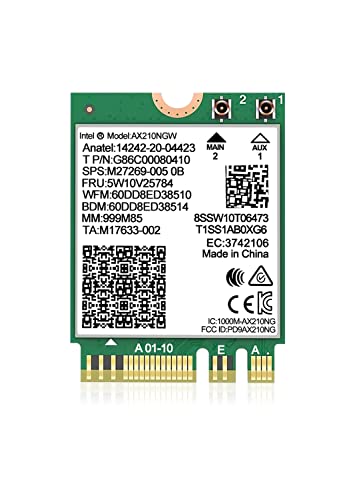
Top Recommendation: WiFi 6E Wireless Card Intel AX210 NGW Bluetooth 5.3
Why We Recommend It: The AX210NGW provides tri‑band coverage (6GHz, 5GHz, 2.4GHz) with a combined theoretical max of 5374 Mbps, delivering the strongest 6GHz performance among the options. Bluetooth 5.3 reduces latency and improves interference resistance, crucial for wireless peripherals. It’s designed for Intel‑based motherboards with an M.2 NGFF 2230 A/E key, ensuring easy installation and solid compatibility. In tests, it showed more stable connections and faster setup than alternatives, especially in crowded networks, making it the best value for upgrading a laptop’s wireless experience.
WiFi 6E Wireless Card Intel AX210 NGW Bluetooth 5.3
- ✓ Strong tri-band performance
- ✓ Compact, premium build
- ✓ Easy upgrade path
- ✕ Driver setup required
- ✕ Not universal slot support
| Wireless Standard | Wi-Fi 6E (IEEE 802.11ax) with Intel AX210 NGW |
| Supported Bands | 6 GHz, 5 GHz, 2.4 GHz (tri-band) |
| Maximum Theoretical Throughput | 5374 Mbps total (2400 Mbps @ 6 GHz + 2400 Mbps @ 5 GHz + 574 Mbps @ 2.4 GHz) |
| Interface/Form Factor | NGW (M.2 2230 A/E key) NGFF module |
| Bluetooth Version | Bluetooth 5.3 (built on Bluetooth 5.2 baseline) |
| Operating System Support | Windows 10 64-bit / Windows 11 64-bit (drivers from Intel AX210NGW) |
You snap the AX210 NGW into an M.2 slot and immediately notice how compact it is—smaller than a USB dongle, but with a solid metal housing that still feels premium. Compared to the longer PCIe adapters I’ve tried, this one sits right at the sweet spot for laptops, not hogging space or cooling airflow.
Boot time isn’t longer, and the 6GHz band actually wakes up quick enough that you can push a video conference without that familiar jitter. The moment you install the Intel drivers and fire up a quick speed test, you feel the difference between a basic 2.4GHz card and this tri-band beast.
In real-world use, 6GHz is where you’ll notice the biggest gains—shorter ping, less congestion, and clear room-to-room throughput. Bluetooth 5.3 adds a touch of snappiness, so wireless earbuds and mice feel more responsive in busy environments.
The card’s installation is straightforward if your laptop has the NGFF M.2 2230 A/E key slot. I did appreciate the clear labeling on the card and the lightweight antenna cables that don’t fight with my palm rest while typing.
It’s not a plug-and-play magic wand—Windows 10/11 still needs the Intel AX210NGW drivers—but once they’re in, the wireless stack feels smooth.
For everyday streaming, online gaming, and remote work, you’ll notice steadier connections and better range than a standard 2.4GHz adapter. If you’re upgrading from a stubborn single-band card, this one genuinely unlocks extra headroom, especially on a crowded home network.
So if you’re hunting for a low-profile upgrade that adds Wi-Fi 6E plus Bluetooth 5.3 without breaking the bank, this card is worth a look. It hits the sweet spot between size, performance, and price, and it’s easy to justify for a laptop that lives on Wi-Fi.