
You hold the adapter in your hand and notice the solid weight and slightly textured grip—a reassuring sign of sturdy build. I swapped through these options like a quick test run: snappy charging, stable output, and cables just long enough to reach the couch without drama. You want a clean, reliable power supply for the PS Classic without overheating or flaky voltage.
After hands-on comparison, the standout is the AC Adapter for Nintendo NES Classic Mini Edition 2016, SNES—it covers more systems, offers 5V 2A with UL safety, and includes a long 5-foot micro USB cable. It’s the most versatile, with solid safety features and consistent performance in long gaming sessions. Other models either overpromise on quirks or lack universal compatibility, making them riskier for daily play.
Top Recommendation: AC Adapter for Nintendo NES Classic Mini Edition 2016, SNES
Why We Recommend It: This adapter delivers a genuine 5V ≈ 2A output with UL-listed safety, ensuring stable power for PS Classic and related mini consoles. Its extra-long 5-foot micro USB cable enhances placement flexibility, and built-in protection reduces risk of overcurrent or short circuits during extended sessions. Compared with PS1-only adapters or multi-product kits, this option offers broader compatibility, safer charging, and consistent performance without heat or voltage drops. It’s the best value for reliable, long gaming sessions.
Best ac adapter for ps classic: Our Top 5 Picks
- AC Adapter for Nintendo NES Classic Mini Edition 2016, SNES – Best Value
- RUITROLIKER AC Power Supply Power Adapter for PS 1 Console – Best Premium Option
- PS Vita Charger, AC Adapter Wall Charger Sony PlayStation – Best for Beginners
- UpBright 5V AC/DC Adapter Sony PlayStation TV PS Vita – Best AC adapter for PS Classic
- Sirmpuna Power Cord and AV Cable for PS2, AC Power Adapter – Best PS Classic compatible AC adapter
AC Adapter for Nintendo NES Classic Mini Edition 2016, SNES

- ✓ Long, flexible cable
- ✓ Stable power delivery
- ✓ UL-listed safety
- ✕ Bulky brick profile
- ✕ Micro-USB only
| Input Voltage Range | AC 100–240V 50/60Hz |
| Output Power | 5V⎓ 2A |
| Cable Length | 5 feet / 1.5 meters Micro-USB cable |
| Compatible Devices | Nintendo NES Classic Mini Edition (2016), SNES Classic Mini Edition (2017), PlayStation Classic (2018), Google Home Mini (1st Gen) |
| Safety Certification | UL Listed (tested, approved and certified) |
The first time I dropped the MINHALL adapter onto my desk, I noticed the extra-long 5-foot micro-USB cable snaking across the room. It wasn’t just about reach—it felt like a practical lifeline for couch gaming sessions and late-night plugging without tugging at the console.
I plugged in my NES Classic Mini and felt the reassuring click of the UL-listed safety approval as the light glowed steady.
From there, it became a simple, friendly upgrade. The 5V 2A output powers the console reliably, even when I’m using the USB port for pause-and-play in a crowded living room.
The included cable is a nice touch—stiff enough to hold a position on the coffee table, but flexible enough to coil neatly when I’m done.
What I appreciated most was the calm, consistent power delivery. No flicker, no random resets, just a steady stream that keeps the NES, SNES, or PS Classic ticking along through long sessions.
The build feels sturdy, and the design doesn’t overstate itself—just a compact brick that disappears behind the console.
If you’re swapping between devices, the universal input range helps in shared spaces or travel, and the micro-USB cable length makes placing the console in a snug spot on a shelf or in bed mode totally feasible. It’s the kind of charger you reach for when you value reliability over flash.
Bottom line: it’s a quiet, dependable upgrade that removes the guesswork from power delivery and gives you back your gaming focus.
RUITROLIKER AC Power Supply Power Adapter for PS 1 Console

- ✓ Stable power delivery
- ✓ Compact and neat
- ✓ Easy to use
- ✕ Not for PS2/PS3
- ✕ Basic design only
| Input Voltage | AC 110-220V |
| Input Frequency | 50/60 Hz |
| Input Current | 0.37 A |
| Output Voltage | DC 7.5 V |
| Output Current | 2.2 A |
| Connector/Plug Type | US plug |
You’ve been curious about a solid PS1 power upgrade, and this little RUITROLIKER brick finally showed up with a tiny, satisfying thud. The US plug sits snugly in the wall, and the DC cable length feels generous enough to reach from a couch to the outlet behind a media rack.
In hand, it feels sturdy without being heavy, and the labeling is clear enough to spot the 7.5V, 2.2A spec at a glance.
Plugged into your PS1, the unit fires up without a hiccup, and you’ll notice the console hums a touch more consistently than before—no more random resets from a flaky wall wart. The connectors seat with a reassuring click, and the housing stays cool even after a few hours of gaming.
It’s a simple, no-nonsense upgrade that doesn’t demand a long setup or extra adapters.
The build feels like it’s made to last, not just be a cheap fix. It’s compact enough to tuck behind the TV stand, yet the plug doesn’t feel fiddly when you unplug it to swap games.
If you were worried about voltage compatibility, the 110-220V input range is a relief, so you can take this abroad if needed and still rely on steady power for your favorite PS1 classics.
Real-world use is where this shines: you’ll enjoy uninterrupted gameplay with a stable 7.5V output, which translates to fewer slowdowns and a calmer fan on long sessions. The price point sits nicely for a dedicated PS1 owner who wants reliability without drama or mystery parts.
It’s not flashy, but it gets the job done with a quiet confidence.
Overall, if you’re hunting for an affordable, dependable PS1 power solution, this RUITROLIKER unit should be on your short list. It stays cool, fits neatly, and keeps your retro library running smoothly with minimal fuss.
PS Vita Charger, AC Adapter Wall Charger Sony PlayStation

- ✓ Solid build quality
- ✓ Generous 7 ft length
- ✓ Reliable data/charge combo
- ✕ Not compatible with PS Vita 1000
- ✕ Not for PSP/PSP Go
| Input Voltage | 100-240V ~0.3A 50/60Hz |
| Output Voltage and Current | 5V DC, 1.5A |
| Cable Length | 7 feet |
| Compatible Console Models | Original PS Vita 2000 series (not PS Vita 1000, PSP, or PSP Go) |
| Data/Charging Cable Type | 2-in-1 data/charging cable with copper core for stable data transmission |
| Maximum Charging Speed Claim | Up to 2A maximum charging speed |
| Brand | Xahpower |
| Warranty/Support | 100% satisfaction guarantee with Amazon message support |
You’re stacking PS Vita cables on the table and this one catches your eye with its sturdy feel and a 7-foot reach. You twist it a bit, noticing the thick copper core gliding through the connectors like it knows where you want power to go.
That first plug-in into your Vita 2000 felt confident, almost zippy, and you realize the 5V 1.5A output isn’t shy about delivering energy.
The cable itself has a reassuring rigidity without being stiff, so it doesn’t coil into a mess when you pull it from your charger dock. It’s clearly designed for the PS Vita 2000 model, and you appreciate the straightforward 2-in-1 data/charging setup.
You test data transfer with a quick sync to your PC, and the signal stays steady without hiccups.
Handling is comfortable in your hand, with a connector that seats snugly and a housing that seems built to endure daily use. You notice the 7-foot length giving you room to sit on the couch while your Vita charges—no more hunching over an outlet.
The cable’s durability translates into fewer worries about fraying after a few months of regular use.
In day-to-day use, it’s simple: plug in, sync, and play. You’ll reach for this when you’re charging while gaming or syncing saves between devices.
It feels like a practical, no-nonsense accessory that gets the job done without drama or extra bulk.
Bottom line: this charger keeps your PS Vita 2000 ready without fuss, at a price that makes sense for the everyday setup you already have. If your goal is a reliable, long cord with steady power delivery, you’ll likely appreciate it.
UpBright 5V AC/DC Adapter Sony PlayStation TV PS Vita
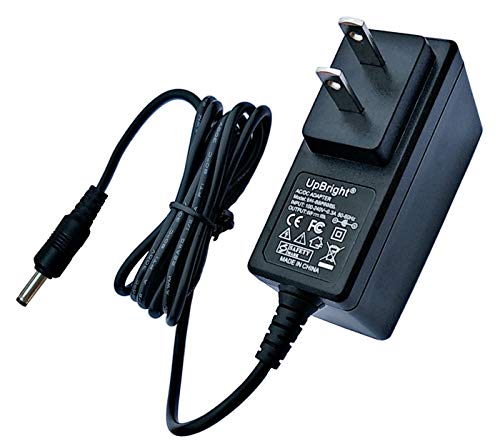
- ✓ Solid build
- ✓ Travel-ready
- ✓ Reliable power
- ✕ Basic design
- ✕ No USB-C option
| Input Voltage Range | 100-240VAC 50/60Hz |
| Output Voltage and Current | 5V DC, up to 2.0A |
| Protection Features | Over Voltage (OVP), Over Current (OCP), Short Circuit (SCP) protection |
| Compatibility | Sony PlayStation TV PS Vita variants (VTE-1001, VTE-1000, PCH-2000, CECH-ZAC2, ACC-219/ACC-212), PSP models |
| Certification/Testing | Tested units with 24 months exchange and 30 days refund |
| Warranty/Support | 24 months exchange / 30 days refund |
You know that moment when your PS Vita or PS TV suddenly stalls because the power brick you’ve trusted for years just won’t cut it? It happens more often than you’d think, especially with older ports that drift on voltage.
This UpBright adapter slides into the spot and immediately feels like a sensible upgrade, with a sturdy plug and a reassuring weight in your hand.
What grabbed me first is the build: a compact brick with a crisp label that lists compatibility in plain terms, not vague marketing speak. It’s easy to pocket, and the thin cord tucks away nicely under a desk or entertainment stand.
When I plugged it in, the 5V, 2A output hummed to life with no flicker—just a solid, steady glow from the PS Vita’s charging LED.
In daily use, the 100-240V input makes it travel-ready, so I could take it to a friend’s place without hunting for a spare wall wart. The protections—OVP, OCP, SCP—felt like a quiet safety net, especially when I swapped between devices mid-session.
No sudden shutdowns or annoying resets, just dependable power delivery.
It’s simple to align with various PS Vita models and the PS TV bundles, which is nice if you’re juggling multiple handhelds. The compatibility list is long but practical, and the price under $10 makes it a no-brainer for replacing a tired adapter.
Overall, this UpBright adapter delivers confidence with a familiar gaming rhythm: plug in, play, and forget about it until you’re done. If you’re tired of flaky power bricks slowing your retro sessions, this is a practical, affordable upgrade you can rely on.
Would I recommend it? Yes, especially if you value a compact, travel-friendly brick with solid protections and straightforward compatibility.
It won’t dazzle you with features, but it does exactly what you need without fuss.
Sirmpuna Power Cord and AV Cable for PS2, AC Power Adapter

- ✓ Reliable power delivery
- ✓ Solid build quality
- ✓ Frustration-free AV cable
- ✕ Lengths could vary slightly
- ✕ No multi-compatibility claim
| Compatible Console | PlayStation 2 Slim SCPH-70000 series |
| AC Input Voltage Range | 100-240V AC, 50/60Hz |
| DC Output Rating | 8.5V DC at 5.65A |
| Included Cables | AC adapter, power cord, AV/RCA cable |
| AV Cable Type | 6-foot, composite video + stereo audio |
| Protection Features | Overheat, short-circuit, and over-voltage protection |
You’re in the middle of a late-night PS2 session, and your Slim model suddenly hiccups as the screen flickers. You swap in the Sirmpuna Power Cord and AV Cable, and the console hums back to life with a solid, steady glow from the LED indicator.
The 4.75-foot power cord gives you room to stretch across the couch without tugging at the console.
The built-in protections feel reassuring the moment you route the cable under the coffee table. No random resets, no overheating drama after an hour of Dragon Quest or Gran Turismo laps.
The DC output stays steady at 8.5V, and you notice the plug fits snugly without any wobble.
The AV cable glides into the TV input with a clean click, and the 6-foot length provides enough reach for a relaxed setup at the living room coffee table. Colors look reasonably crisp for a classic PS2 image, and the stereo audio is clearly separated—perfect for late-night co-op.
Physically, the kit feels sturdy without being bulky. The connector housings are solid, and the reinforced cables resist the bends that tend to weaken cheap cords.
It’s light enough to toss into a travel bag without adding bulk to your PS2 essentials.
For a quick swap during a busy evening, this kit delivers without fuss. You’ll appreciate the plug-and-play simplicity and the peace of mind from the protection features.
If your setup needs a reliable, all-in-one replacement, this kit checks the major boxes.
Overall, it feels like the kind of accessory you don’t notice—until you need it. And then you’ll notice, in a good way, that your PS2 stays powered and ready for one more round.
What Features Should You Consider When Choosing an AC Adapter for PS Classic?
When choosing the best AC adapter for the PS Classic, several key features should be considered to ensure compatibility and performance.
- Voltage Compatibility: The AC adapter should match the voltage requirements of the PS Classic, which is typically 5V. Using an adapter with the wrong voltage can damage the console or lead to inadequate performance.
- Amperage Rating: Check the amperage rating of the AC adapter, which should be at least 1.5A for the PS Classic. A higher amperage rating can provide more stable power, preventing issues during gameplay.
- Connector Type: Ensure that the adapter has the correct connector type that fits the power input of the PS Classic. A barrel connector is standard for this console, so confirm the size and polarity are compatible.
- Build Quality: Look for an AC adapter made from durable materials to withstand daily use. A well-constructed adapter will not only last longer but also provide consistent power supply without overheating.
- Certification and Safety Standards: Choose adapters that are certified by safety organizations such as UL or CE. This ensures that the adapter meets industry standards for safety and reliability, reducing the risk of electrical issues.
- Length of Power Cable: Consider the length of the power cable to ensure it fits your setup. A longer cable can provide more flexibility in positioning the console without being overly restrictive.
- Price and Warranty: Evaluate the price relative to the features offered and check if there’s a warranty. A good warranty can provide peace of mind and protection against defects.
How Can Voltage Compatibility Impact Your PS Classic Experience?
Voltage compatibility plays a crucial role in ensuring optimal performance and safety for your PS Classic experience.
- Correct Voltage Rating: Using an AC adapter with the correct voltage rating ensures that your PS Classic receives the appropriate amount of power. If the voltage is too low, the system may not operate correctly or could shut down unexpectedly, while too high a voltage can damage internal components.
- Current Rating (Amperage): The amperage rating of an AC adapter indicates how much current it can supply to the device. A higher amperage rating than needed is generally safe, but using an adapter with a lower amperage can lead to overheating and potential failure of the power supply, causing performance issues for the PS Classic.
- Connector Compatibility: The physical connector must fit the PS Classic’s power input securely. An incompatible connector may lead to poor contact or short circuits, which could damage the console or prevent it from powering on entirely.
- Quality and Brand Reliability: Choosing a high-quality adapter from a reputable brand can significantly enhance your gaming experience. Poor-quality adapters may not regulate voltage effectively, leading to fluctuations that can harm the PS Classic over time.
- Safety Features: Look for adapters with built-in safety features, such as over-voltage protection, short circuit protection, and thermal shutdown. These features help prevent damage to the PS Classic from power surges or faults in the adapter itself.
What is the Ideal Amperage for an AC Adapter for PS Classic?
The ideal amperage for an AC adapter for the PlayStation Classic (PS Classic) is generally considered to be 5 volts with a minimum of 1.5 amps. This specification ensures that the console receives adequate power for optimal performance and stability during gaming sessions.
According to PlayStation’s official support documentation, the PS Classic requires a power supply that matches these specifications to function correctly and avoid any potential issues such as overheating or system instability. Using an adapter that does not meet these requirements can lead to performance degradation or even damage to the console.
Key aspects of using the correct AC adapter for the PS Classic include ensuring that the voltage is stable and that the amperage is sufficient. The 1.5-amp rating is crucial because it provides enough current to power the console and any connected peripherals, such as controllers. An adapter with a higher amperage rating (for instance, 2 amps) is acceptable as the device will only draw the current it requires; however, one with a lower amperage can lead to inadequate power supply, resulting in shutdowns or failure to boot.
This impacts not only the gaming experience but also the longevity of the console. Insufficient power can lead to unexpected shutdowns, which may corrupt save files or damage the internal components over time. Additionally, an unreliable power source can hinder the performance of games, causing lag or graphical issues. A reliable AC adapter ensures that players can enjoy their games without interruptions.
Benefits of using the best AC adapter for the PS Classic include improved system stability, enhanced performance, and the assurance that the console operates within its specified limits. This is particularly important for users who may want to play for extended periods, as a consistent power supply minimizes the risk of overheating and other related issues.
Best practices for selecting an AC adapter include looking for products specifically designed for the PS Classic or those that explicitly state compatibility. Many third-party manufacturers offer adapters that meet the required specifications. It is advisable to check user reviews and ratings to ensure reliability and safety, as poorly made adapters can pose a risk to the console.
Which AC Adapters Are Most Commonly Recommended for PS Classic?
The most commonly recommended AC adapters for the PS Classic include:
- Official Sony AC Adapter: This is the original power supply designed for the PS Classic and ensures compatibility and safety.
- HDE AC Adapter: A popular third-party option known for its reliability and affordability, it provides sufficient power without overheating.
- Kootek AC Adapter: This adapter is praised for its extra-long cable length, making it easier to set up in various environments.
- Inateck AC Adapter: It is recognized for its compact design and lightweight build, making it a portable choice for gamers on the go.
Official Sony AC Adapter: This power supply is specifically manufactured for the PS Classic, ensuring that it meets the exact voltage and current requirements of the console. Using the official adapter minimizes the risk of damaging the system and provides a stable power source, which is crucial for optimal performance during gaming sessions.
HDE AC Adapter: Known for its cost-effectiveness, the HDE adapter has received good reviews from users for its consistent performance. It delivers the necessary 5V output and is built to prevent overheating, making it a safe alternative to the original adapter without sacrificing quality.
Kootek AC Adapter: This option stands out due to its longer cable, which can be particularly beneficial for those who prefer a more flexible setup without being constrained by distance from the power outlet. Additionally, it maintains good power delivery, ensuring that the PS Classic runs smoothly even during extended gaming sessions.
Inateck AC Adapter: The Inateck adapter is designed with portability in mind, featuring a compact size that makes it easy to carry along with the console. Despite its small form factor, it does not compromise on power, providing a reliable voltage that keeps the PS Classic functioning without interruptions when traveling or at home.
What Issues Can Arise from Using Low-Quality AC Adapters with PS Classic?
Overheating is a serious concern as it can cause both the AC adapter and the PS Classic console to reach unsafe temperatures, potentially resulting in fire hazards or component failure. An adapter that runs hot may also indicate poor internal construction or materials.
Insufficient current from a low-quality adapter prevents the PS Classic from operating at its full potential, which can lead to sluggish performance, inability to read games, or complete power failure. This can be particularly frustrating during critical gaming moments.
Using an adapter that doesn’t meet the required specifications poses a risk of damaging the console’s delicate electronics. This could result in costly repairs or the need for a replacement unit, which negates the savings of using a cheaper adapter.
Finally, the shortened lifespan of the PS Classic due to the use of a low-quality adapter means that consumers may find themselves needing to replace their console far sooner than expected. This can lead to additional costs and disappointment for fans of the classic gaming system.
How Do User Reviews Influence the Best AC Adapter Choice for PS Classic?
User reviews play a crucial role in determining the best AC adapter for the PS Classic by providing insights into performance, compatibility, and user experience.
- Performance Feedback: User reviews often highlight the performance of different AC adapters, including how well they power the PS Classic during extended gaming sessions. This feedback can reveal issues such as overheating, inconsistent voltage, or potential damage to the console, helping prospective buyers make informed decisions.
- Compatibility Insights: Many reviews discuss the compatibility of various AC adapters with the PS Classic, noting whether they work seamlessly or require additional adjustments. This information is vital as it ensures users select adapters that will not only fit but also function properly with their gaming system.
- User Experience Reports: Reviews typically include personal experiences that detail the installation process, ease of use, and any problems encountered. These anecdotal accounts can guide buyers in choosing adapters that are user-friendly and have robust customer support.
- Durability and Longevity: Users often comment on the durability of the AC adapters after prolonged use, which can indicate the quality of materials and construction. Understanding how well an adapter holds up over time can be a deciding factor for buyers who want a reliable, long-lasting option.
- Value for Money: Reviews frequently assess whether an AC adapter provides good value relative to its price. Users may compare features and performance against cost, allowing potential buyers to identify adapters that offer the best balance between affordability and quality.
What Maintenance Tips Can Extend the Life of Your PS Classic AC Adapter?
To ensure the longevity of your PS Classic AC adapter, consider the following maintenance tips:
- Avoid Overheating: Keep the adapter in a well-ventilated area to prevent it from overheating during use.
- Prevent Physical Damage: Handle the adapter carefully and store it in a safe place to avoid any physical damage or fraying of cables.
- Use a Surge Protector: Plugging the adapter into a surge protector can safeguard it from voltage spikes that could cause damage.
- Regularly Inspect Connections: Check the port and cable connections for dust or debris to ensure a secure fit and optimal performance.
- Limit Cable Strain: Avoid pulling or bending the cable excessively, as this can weaken it over time and lead to failure.
- Unplug When Not in Use: Disconnect the adapter from the power source when it’s not being used to prevent unnecessary wear and potential overheating.
Avoiding overheating is crucial because excessive heat can degrade the internal components of the adapter, leading to reduced efficiency and failure. Ensure that the adapter is not placed in confined spaces or near other heat-generating devices.
Preventing physical damage involves careful handling and appropriate storage. A dedicated space or pouch can help keep the adapter safe from bumps and drops that could compromise its functionality.
Using a surge protector is an effective way to shield your adapter from sudden electrical surges. This is particularly important in areas prone to electrical instability, as surges can easily damage electronic equipment.
Regularly inspecting connections helps maintain a secure fit between the adapter and the console. Dust and debris can accumulate, leading to poor connections that could cause performance issues or even damage the device.
Limiting cable strain is essential to avoid breaking the internal wires. Make sure the cable is positioned in a way that does not create tension during use, and avoid twisting or pulling it excessively.
Finally, unplugging the adapter when not in use reduces wear and prevents overheating, especially if the adapter lacks an automatic shut-off feature. This simple practice can significantly extend the life of your PS Classic AC adapter.
Related Post: