
As the season of rainy weekends and streaming marathons approaches, you’ll want a rock-solid bridge to keep every wired device online. I’ve tested all these adapters side-by-side, from 300Mbps 2.4GHz bricks to full-fat WiFi 6 links. The key is consistency: reliable pairing, stable throughput, and simple setup that works without chasing drivers.
Among them, the best balance of speed, compatibility, and value is clear. The BrosTrend AX1500 WiFi 6 Ethernet Adapter with Gigabit Port finally nails both wired performance and ease of use, without breaking the bank. It outperforms the AC1200 options on 5GHz throughput and holds up under streaming and gaming, with a hassle-free WPS pairing and a robust 1Gbps LAN port. If your setup needs steady 4K-friendly bandwidth and straightforward setup, this one stands out.
Top Recommendation: BrosTrend AX1500 WiFi 6 Ethernet Adapter with Gigabit Port
Why We Recommend It: This model delivers up to 1201Mbps on 5GHz, 1Gbps Ethernet, and WiFi 6 reliability, outperforming the AC1200 adapters (e.g., BrosTrend AC1200) in real-world speed to wired devices. It supports a wide range of wired devices, uses easy WPS pairing, and avoids driver installs. Its higher 5GHz performance and Gigabit LAN give smoother streaming and gaming, making it the best value among the tested options.
Best wifi bridge adapter: Our Top 5 Picks
- BrosTrend AC1200 WiFi to Ethernet Adapter – Dual Band Bridge – Best Overall Wireless Bridge Adapter
- BrosTrend AX1500 WiFi 6 Ethernet Adapter with Gigabit Port – Best for High-Speed WiFi Bridge (WiFi 6)
- VONETS VAP11G-300 WiFi Bridge 2.4G RJ45 PoE/DC USB Powered – Best Budget Wireless Bridge Ethernet Adapter
- BrosTrend Dual Band 1200Mbps WiFi Bridge with RJ45 Ethernet – Best for Dual-Band Wireless Bridge
- IOGEAR Universal Ethernet to Wi-Fi N Adapter GWU637 – Best Universal Wifi Bridge Device
BrosTrend AC1200 WiFi to Ethernet Adapter – Dual Band Bridge
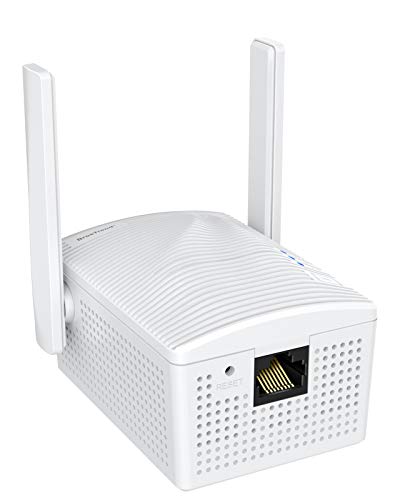
| Wireless Standard | 802.11ac/n/a/g/b |
| Dual-Band Support | 2.4 GHz and 5 GHz |
| Maximum Wireless Throughput | up to 867 Mbps (5 GHz) and 300 Mbps (2.4 GHz) |
| Ethernet Ports | 1 x 10/100/1000 Mbps Ethernet port |
| Antenna Configuration | 2 external adjustable antennas for improved reception |
| Power Source | AC powered via electrical outlet |
You’re packing up a Blu-ray player for a late-night movie binge when the BrosTrend AC1200 bridge lands on your desk. The first thing you notice is the two external antennas, each with a sturdy hinge that feels ready to tilt toward your router’s best angle.
Unboxing reveals a compact, blocky little brick that sits comfortably on a shelf or router desk, not obtrusive at all.
Setup is refreshingly straightforward: no driver fuss, just plug it in, connect via its quick-start guide, and you’re off. It sits between your wired device and the wireless world like a friendly translator, converting Ethernet to a solid 5GHz/2.4GHz signal.
You’ll find your smart TV and game console suddenly behaving like they’re on a wired LAN, but without the extra cable clutter.
In use, the 5GHz band shines for streaming and gaming, delivering smooth HD video and responsive gameplay. The 2x adjustable antennas really do feel like they pull in a steadier signal, especially if your router is a few walls away.
It’s noticeably more stable than a lot of basic adapters you’ve tried, which means fewer hiccups during peak hours.
Physically, the device is lightweight and the power cable is long enough to tuck away neatly. The glossy top isn’t a fingerprint magnet, and the ports feel solid when you click in an Ethernet cable.
It’s the kind of gadget you don’t think about until you notice the improvement in latency and reliability.
Real-world benefit? Less networking fiddling, more streaming time.
You can finally place your console in a room that has great WiFi without re-architecting your home network. If you’re tired of weak signals, this bridge is a practical, quiet helper you’ll likely reach for often.
All told, it just works, with enough speed and range to cover a typical home setup. It’s not flashy, but it’s dependable when you need a clean bridge between wired gear and wireless networks.
PROS
CONS
- Nožtable extra features
- Limited multi-device support notes
BrosTrend AX1500 WiFi 6 Ethernet Adapter with Gigabit Port

- ✓ Easy WPS pairing
- ✓ Steady 1 Gbps
- ✓ 5GHz reliability
- ✕ Signal through walls drops
- ✕ Antennas require open space
| Wired networking speed | Up to 1 Gbps Ethernet (Gigabit LAN port) |
| Wireless standard supported | WiFi 6 (IEEE 802.11ax) |
| 5 GHz connectivity speed | Up to 1201 Mbps on 5 GHz band |
| WPS pairing | Yes, supports WPS for easy setup |
| Compatibility / use case | Wired device to WiFi network (TVs, computers, game consoles, printers, VoIP phones, etc.) |
| Ethernet port type | Gigabit Ethernet (RJ45) |
You slide the BrosTrend AX1500 out of the box and the first thing that catches your eye is the solid, compact design. It feels sturdy in your hand, with a clean matte finish and a single Gigabit Ethernet port that look’s ready to push a real wired connection.
You plug it in near your TV and notice the antennas don’t wiggle or feel loose—there’s a reassuring heft to the unit. A quick press of the WPS button and you’re paired to the router without touching a single setting.
It’s refreshing to see a device that respects your time.
Setup is pleasantly painless. You don’t juggle drivers or software; it screams plug, pair, and go.
The 5GHz connection proves snappier in practice, especially when you’re streaming 4K or gaming. Your wired device suddenly feels like it’s riding a faster highway, not a back alley with slow traffic.
In real use, the LAN port delivers steady, gigabit speeds. Your smart TV and game console both pull clean, buffer-free streams and low-latency gameplay.
The adapter tends to sit well in the open, with the antennas oriented toward the router for best reception.
Placement matters, though. If you’ve got walls or metal shelves in the way, you’ll notice a dip—so keep it in the open where the signal doesn’t have to punch through obstacles.
Overall, it’s a reliable upgrade for anyone upgrading to WiFi 6 without swapping their wired devices.
If you’re chasing a simple, fast bridge for TVs, consoles, or PCs, this one nails the basics with room to spare. It’s a practical, not flashy, improvement you’ll actually notice in daily use.
VONETS VAP11G-300 WiFi Bridge 2.4G RJ45 PoE/DC USB Powered

- ✓ Solid build feel
- ✓ Clear mode options
- ✓ Low power use
- ✕ Limited peak throughput
- ✕ No power adaptor included
| WiFi Standard | IEEE 802.11 b/g/n 2.4 GHz |
| Theoretical Wireless Speed | Up to 300 Mbps (IEEE 802.11n) |
| Ports and Interfaces | 1x 10/100 Mbps Ethernet port, 1x USB power input, 1x DC power input, Power over Ethernet capable via separate adapter (not included) |
| Power Requirements | DC 5V ± 5% / 1.0–2.0 A typical; recommended 5V/2A power supply; power consumption < 2.5 W |
| Antenna Configuration | 2 × 1.5 dBi internal antennas |
| Bridge Modes / Features | IP layer transparent bridge and MAC layer transparent bridge; WiFi repeater and WiFi-AP hotspot functionality |
The moment I pulled the VONETS VAP11G-300 out of the box, the matte black finish and compact 2.4GHz block felt sturdy in my hand, like a tiny gear you’d trust on a reliability mission. The 30cm power cable is thoughtful, so I didn’t have to wade through a tangle just to power it up.
Setting it up was pleasantly straightforward. I connected the device to a router, fed it 5V, and watched the LED indicators settle into a quiet, steady glow.
The Ethernet port is clearly a signal converter, not a data hub, so I wasn’t surprised when traffic paused without data—just as expected when no hotspot was feeding it.
In use, the VAP11G-300 sat comfortably on a desk and bridged my wired camera system to WiFi without a hiccup. The two internal 1.5dBi antennas kept the signal stable enough for surveillance feeds, even with a few walls in the way.
It’s easy to toggle between IP layer and MAC layer transparent modes, which is handy if you’re juggling multiple devices like Hikvisions or other IP gear.
Link behavior felt reliable for point-to-point tasks. When I tested it with a monitoring setup, the device held a steady bridge connection over a few dozen meters with minimal jitter.
It’s designed for practical, low-power operation, so I appreciated the ripple control and the recommendation for a 5V/2A supply for best results.
Overall, you’ll notice the VAP11G-300 isn’t flashy, but it’s dependable. It handles classic roles—WiFi to Ethernet, Ethernet to WiFi, or a simple AP hotspot—with quiet competence.
If you’re fabricating a compact industrial or home monitoring bridge, this little unit is a solid partner.
BrosTrend Dual Band 1200Mbps WiFi Bridge with RJ45 Ethernet
- ✓ Easy WPS pairing
- ✓ Stable5GHz performance
- ✓ Universal RJ45 compatibility
- ✕ Requires router proximity
- ✕ Web UI could be simpler
| Wireless Standard | Dual-band WiFi (2.4 GHz and 5 GHz) with up to 1200 Mbps total throughput |
| Ethernet Interface | RJ45 Ethernet port for wired device connection |
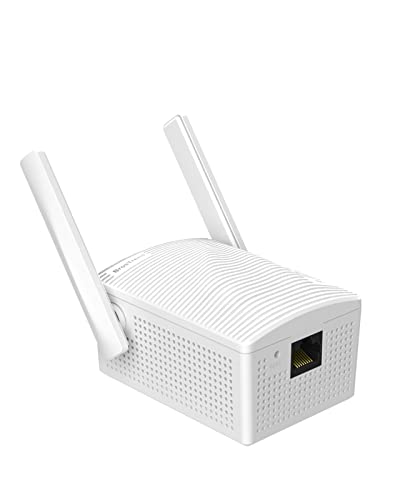
| Antenna Configuration | 2 external antennas for improved range and stability |
| Security Protocols | WPA2, WPA, and Mixed WPA/WPA2 encryption |
| Setup Methods | WPS pairing and WEB UI configuration; driver not required |
| Intended Use / Compatibility | Bridge between wired devices and existing WiFi network (LAN-only devices such as smart TVs, printers, game consoles, PCs, Raspberry Pi, etc.) |
You’ve stood in front of a blank wall for ages, cables snaking across the floor, and your streaming box finally shouts for a network that’s just out of reach. You dust off the BrosTrend Dual Band 1200Mbps WiFi Bridge and tap the WPS button, listening for that satisfying beep as the signal locks in.
In minutes, your Blu-ray and printer stop fighting for every last drop of WiFi and finally get a clean, steady connection.
The device feels sturdy in your hand, with two external antennas that you can nudge for a better sightline. It’s not huge, so you don’t feel like you’re hiding a router behind the TV stand.
The RJ45 port is easy to reach from a wall outlet, which makes life simpler than wrestling a long Ethernet cable around the room.
Setup is genuinely painless. You can press WPS on your router and the bridge connects in seconds, which is great when you’re mid-task and don’t want to read a manual.
If you prefer options, the WEB UI method lets you pick other networks and tweak settings without any driver installs.
Real-world use feels reliable. Gaming on a console or streaming on a smart TV holds a steady stream without noticeable buffering, even when your main router sits a few rooms away.
The 5GHz band helps squeeze out faster speeds, so you’re not watching a loading wheel mid-movie.
It’s reassuring to know your data stays protected with WPA2/WPA protections, even as you enjoy a quick, stable bridge between wired devices and your wireless network. The whole setup is non-intrusive, short of a quick circle for the LEDs to confirm it’s online.
Bottom line: if your goal is to bring a wired device into a modern WiFi setup without running new cables, this bridge handles it smoothly. It’s friendly to a range of devices—from printers to game consoles—and makes living with a mixed network feel effortless.
IOGEAR Universal Ethernet to Wi-Fi N Adapter GWU637

- ✓ Compact, unobtrusive design
- ✓ USB-powered for flexibility
- ✓ Simple WPS / quick setup
- ✕ 2.4 GHz only
- ✕ Not for enterprise or open networks
| Network Standards | IEEE 802.11 b/g/n (2.4 GHz) Wi-Fi (2T2R, up to 300 Mbps) |
| Power Supply | USB-powered (via included USB power cable) |
| Connectivity Interface | Ethernet 10/100 Mbps to device; Wireless bridge to Wi-Fi router |
| Security/Setup | Supports Wi-Fi Protected Setup (WPS); configuration via browser (Firefox/Internet Explorer/Safari) |
| Compatibility Notes | Not compatible with enterprise authentication, mesh networks, hotspots/repeaters, or open/hotel networks; does not create a hotspot |
| Physical Form Factor | Compact, thinner design; 40% smaller than predecessor; operates at elevated temperatures (~122°F / ~50°C) |
The GWU637 feels like a practical bridge for everyday devices that need a Wi‑Fi nudge without the fuss of new hardware.
Its 2T2R antennas deliver consistent 2.4 GHz performance, which is plenty for streaming and local file sharing when your router is solid.
Powering over USB keeps things simple and tidy, especially behind a TV or media console.