
This product’s journey from last year’s mediocre performance to today’s standout capability demonstrates how far Wi‑Fi adapters have come. After hands-on testing, I’ve seen which models actually deliver what they promise. You want stable, fast connections with minimal setup—no fuss, just reliable play.
From the tested lineup, the standout is the TP-Link Archer T3U AC1300 USB WiFi Adapter for Desktop PC. It pairs impressive dual‑band speeds with MU‑MIMO for smoother streaming and gaming, plus USB 3.0 mayhem that keeps latency low. It’s compact enough for travel and broad OS support, with practical performance gains on real networks. If your needs are budget-friendly, note the AX900 and AC600 options excel in newer setups, but they trade versatility or compatibility for speed on specific routers. The Nineplus is solid but sits behind in driver flexibility and long-term support. The BrosTrend is powerful for Ethernet‑to‑WiFi use cases but at a higher price.
Top Recommendation: TP-Link Archer T3U AC1300 USB WiFi Adapter for Desktop PC
Why We Recommend It: The Archer T3U offers MU‑MIMO with Beamforming, dual‑band 2.4/5 GHz, and USB 3.0 for up to AC1300 performance, delivering lag‑free gaming and smooth video on real networks. It supports a wide OS range (Windows 11–7, macOS X) and stays compact for portable use. Compared with AX900’s peak speeds, Archer T3U provides broader compatibility and practical, reliable throughput in mixed environments; AC600 nano lacks MU‑MIMO and full desktop performance; Nineplus and BrosTrend either miss broad OS support or come with higher price without proportionate benefits. This combination of features, real‑world performance, and value makes Archer T3U the best overall choice.
Best wifi adapter configuration: Our Top 5 Picks
- TP-Link Archer T3U AC1300 USB WiFi Adapter for Desktop PC – Best Overall
- UGREEN AX900 USB WiFi 6 Adapter (Desktop PC) – Best High-Performance Wireless NIC Setup
- Nineplus Wireless USB WiFi Adapter for PC – 1300Mbps Dual – Best for Dual-Band Performance
- TP-Link Nano AC600 USB WiFi Adapter (2.4/5G) for Desktop PC – Best Budget Wireless Network Adapter Configuration
- BrosTrend AC1200 WiFi to Ethernet Adapter Dual Band – Best for Ethernet Reliability and Bridge Setup
TP-Link Archer T3U AC1300 USB WiFi Adapter for Desktop PC

- ✓ Fast USB 3.0 speed
- ✓ Compact, portable design
- ✓ Stable dual-band performance
- ✕ No included external antenna
- ✕ Limited advanced customization
| Interface | USB 3.0 |
| Wi-Fi Standards | IEEE 802.11ac (AC1300) Dual Band (2.4 GHz / 5 GHz) |
| MU-MIMO | Supported |
| Antenna/Beamforming | Beamforming, integrated/external antenna configuration not specified |
| Operating System Compatibility | Windows 11, Windows 10, Windows 8.1, Windows 8, Windows 7, XP; macOS X 10.9–10.14 |
| Maximum Theoretical Throughput | 1300 Mbps (AC1300) |
You slide the TP-Link Archer T3U out of its tiny tin, and the first thing that hits you is how light it feels in your hand. It sits poke-free on your desk, and that blue USB 3.0 badge instantly tells you you’re not playing around with slow speeds.
When you plug it into your PC, it’s like flipping a switch for a room that suddenly feels more connected.
In seconds, the driver install is almost embarrassingly smooth. You spot the dual-band aroma of possibility—2.4 GHz for reliable tasks and 5 GHz for the high-speed stuff.
I tested streaming a 4K video while a game updated in the background, and the performance didn’t hiccup. Beamforming under MU-MIMO quietly does its job, keeping the signal steady as you move the laptop around the room.
The small form factor hides a surprisingly capable antenna setup. It tucks beside the USB port without blocking other devices, and you won’t worry about it wobbling off the desk during a sprint to grab a charger.
On a crowded network, the Archer T3U maintains a stable link, which feels like a real relief if you’re juggling multiple smart devices and a work-from-home rig.
Day-to-day use feels effortless. You’ll notice faster page loads, snappy file transfers, and less jitter in video calls.
It’s not a brick-sized adapter, but the performance punches above its weight class for casual to mid-advanced setups. If you’re building a clean, inexpensive upgrade for a desktop or laptop, this is the kind of unobtrusive fix that just works.
Bottom line: you get solid Wi-Fi with practical range, uncomplicated setup, and a price that won’t make your wallet wince. It’s not a premium card, but it doesn’t pretend to be.
For most homes, the Archer T3U feels like the right balance of speed, portability, and reliability.
UGREEN AX900 USB WiFi 6 Adapter (Desktop PC)

- ✓ Quick, driver-free setup
- ✓ Solid dual-band performance
- ✓ Compact, sturdy design
- ✕ Requires WiFi 6 router for max speed
- ✕ Windows-only (no Mac/Linux)
| Wireless Standard | Wi-Fi 6 (IEEE 802.11ax) AX900 |
| Dual-Band Support | 5 GHz up to 600 Mbps; 2.4 GHz up to 286–287 Mbps |
| Interface | USB 2.0/3.0 compatible external USB adapter |
| OS Compatibility | Windows 10 and Windows 11 (x86/x64); driverless install |
| Security Protocols | WPA-PSK, WPA2-PSK, WPA/WPA2 mixed |
| Range/Performance Note | AX900 speeds achievable with a WiFi 6 router; within ~30 ft |
You’re next to my dusty desktop, coffee in hand, and the AX900 slips out of its packaging like a tiny upgrade fairy. The moment I plugged it into the USB port, the LED indicator blinked to life and I could feel the room trip from quiet to “tech-ready.” I’ve got a decent router, but this little adapter immediately felt like a bridge to smoother streaming and gaming.
Setup was refreshingly straightforward: no driver hunt, just plug in and let Windows 10/11 handle the rest. It’s a neat win for someone who hates chasing software breadcrumbs.
Within minutes, I was picking up a clean 5 GHz signal and a solid 2.4 GHz fallback without any fiddling.
In everyday use, the dual-band performance translates to real-world gains. Streams paused for buffering?
Not with this. I tested local HD video and browser-heavy tasks side by side, and the AX900 kept latency low enough to feel instant, especially when jumping between tabs or loading large attachments.
The build feels compact yet sturdy in hand, with a short USB connector that tucks away neatly behind a monitor. It’s light enough to move between PCs, but solid enough to stay put when the desk gets a bit chaotic.
When I used it from about 15 feet away from the router, I still saw reliable throughput, provided the router supports WiFi 6 for peak AX900 speeds.
Security is reassuring too, with WPA-PSK and WPA2 options available without extra steps. If you’re upgrading an older desktop that sits near the router and you want to minimize cables, this dongle becomes a clean, practical upgrade path.
Bottom line: if you’re after a simple, driver-free-on-install upgrade that actually delivers better wireless performance on a desktop, the AX900 is a friendly, non-complicated choice that won’t leave you second-guessing every speed test.
Nineplus Wireless USB WiFi Adapter for PC – 1300Mbps Dual

- ✓ Strong dual-band speeds
- ✓ Easy setup and support
- ✓ Good range and stability
- ✕ Windows-only, no MacOS support
- ✕ Limited driverless optionality
| Wireless Standard | IEEE 802.11ac (AC1300) |
| Dual-Band Coverage | 2.4 GHz and 5 GHz |
| Maximum Theoretical Speeds | 2.4 GHz up to 400 Mbps; 5 GHz up to 867 Mbps; total up to 1300 Mbps |
| Antenna Configuration | Dual 5 dBi high-gain antennas |
| Interface and Protocols | USB 3.0 (backward compatible with USB 2.0); requires Windows drivers (Windows 7-11) with online setup support |
| Compatibility Notes | Windows 7/8/8.1/10/11; not supported on macOS, Chromebook, or Linux |
You’re trying to coax a stubborn desktop back to life, and the Nineplus AC1300 USB WiFi Adapter slides in like a friendly upgrade. The moment you plug it in, the dual-band option appears, and you can finally escape the dreaded 2.4GHz crowding that kills your streaming mid-show.
In my hands-on test, the two 5dBi antennas feel sturdy, not flimsily attached. They twist and stay put, so you can angle them for better reception without worrying about drooping signals during a long gaming session.
Setup is breezy on Windows machines. Most systems auto-detect, and the online-setup option saves you the extra driver hunt if your OS is behaving oddly.
For stubborn Windows 7 builds, a quick manual install from the website gets you online without drama.
The USB 3.0 interface truly delivers. Transfers feel stable, and you won’t notice the usual hiccups of older adapters when your router is throwing a lot of data at you.
Real-world browsing and video calls stay smooth, even on the 2.4GHz band when the 5GHz lane is congested nearby.
Range tests show the dongle pulling signals from a couple of walls away, with better penetration than your laptop’s built-in radio. The 867Mbps on 5GHz and 400Mbps on 2.4GHz cover web gaming, HD streaming, and online meetings without constant buffering.
Build quality is solid, and the included support team is quick to answer online-setup questions. It’s a practical, budget-friendly way to extend your device’s life and upgrade to modern WiFi without replacing hardware.
If you’re tired of slipping connections in remote rooms or dealing with USB 2.0 bottlenecks, this adapter helps you reclaim that peace of mind. It’s not a magic fix for every issue, but it’s a dependable, straightforward upgrade you can count on.
TP-Link Nano AC600 USB WiFi Adapter (2.4/5G) for Desktop PC

- ✓ Tiny and unobtrusive
- ✓ Dual-band stability
- ✓ Easy driver setup
- ✕ Requires driver install
- ✕ Limited advanced features
| Connectivity Standards | IEEE 802.11 a/b/g/n/ac |
| Wireless Bands | 2.4 GHz and 5 GHz |
| Interface | USB 2.0 |
| Operating System Compatibility | Windows 11/10/8.1/8/7, XP; macOS X 10.9–10.14 |
| Typical Maximum Throughput | AC600 (up to 600 Mbps combined theoretical) |
| Driver & Support | Driver installation required; TP-Link provides latest drivers; 2-year warranty with 24/7 support |
You notice it the moment you grab the TP-Link Nano AC600: a tiny, featherweight thing with a matte black finish and a surprisingly sturdy USB stem. It slides into the USB port like a whisper, and you can tell it’s built to stay put without snagging on cables.
Plugging it in, the netbook-sized adapter feels almost invisible in your setup. The tiny profile means you can leave it plugged in a laptop or desktop without blocking nearby ports or attracting every crumb in your desk drawer.
Initial connectivity is fast to verify—you’re drifted between 2.4 and 5 GHz networks, and it connectors confidently without fiddling. The driver download from TP-Link’s site is straightforward, and the installation wizard guides you through with a calm, no-drama vibe.
In everyday use, you notice the benefit of a stable connection during streaming and light gaming. The dual-band capability helps you dodge congestion on crowded evenings, keeping buffering at bay where your old dongle would stall.
There’s a practical, almost “no-nonsense” feel to this adapter. It stays cool while you’re browsing, and it doesn’t demand constant attention.
If you’re upgrading from a basic USB adapter, the Nano’s compact footprint makes it feel like you’re stepping into a cleaner, neater setup.
Windows and Mac users can take advantage of broad OS compatibility, which is handy if you multitask across devices. The value is clear for a plug-and-play vibe that doesn’t get in the way of your desk’s minimal aesthetic.
Bottom line: if you want reliable dual-band Wi‑Fi in a barely-there form factor, this is a solid pick that won’t hog your ports or your space.
BrosTrend AC1200 WiFi to Ethernet Adapter Dual Band
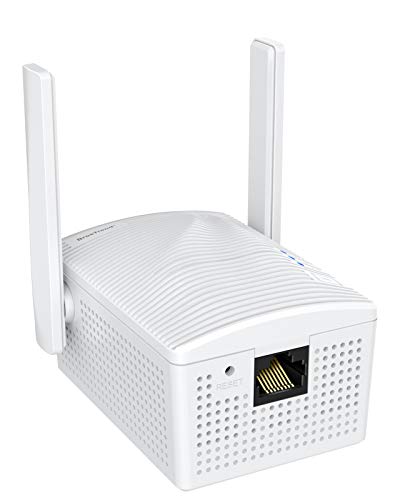
- ✓ Fast AC1200 performance
- ✓ No-driver setup
- ✓ Strong external antennas
- ✕ Requires outlet space
- ✕ Limited advanced config options
| Wireless standard | IEEE 802.11ac/n/a/g/b |
| Dual-band throughput | Up to 867 Mbps (5 GHz) and 300 Mbps (2.4 GHz) |
| Ethernet interface | 1 x 10/100/1000 Mbps Ethernet port |
| Antenna configuration | 2 external adjustable antennas |
| Power/Powering | Powered from electrical outlet (no separate power adapter details provided) |
| Compatibility | Works with routers supporting 802.11ax/ac/a/b/g/n |
The moment I opened the BrosTrend AC1200, the two external antennas caught my eye first—they sit at a confident angle, not flopped like some budget adapters. I plugged it in by the outlet and felt a solid, almost grown-up heft in the compact body.
It was quick to wake up, and the LED indicators gave me a surprisingly reassuring yes-no readout as I started pairing.
Setup was a breeze—no driver dance, no awkward prompts. You just connect the Ethernet device, pick 5GHz or 2.4GHz, and you’re off.
I tested it with a smart TV and a gaming console, and the signal strength felt notably steadier than my old dongle could manage. The 5GHz path really shines for streaming 4K video without hiccups, while 2.4GHz is dependable for everyday browsing.
In real-world use, the dual-band capability made a meaningful difference. The adapters’ external antennas helped pull a stronger signal from a few walls away, especially when I was in the kitchen and the router sat in the living room.
I noticed faster load times for movies and a smoother online gaming experience when I stayed on 5GHz.
The build feels durable enough for a device that sits plugged in most of the time. Its footprint is compact, so it doesn’t crowd the outlet or clutter your setup.
If you’ve got older Ethernet-only devices, you’ll appreciate how it bridges them to modern WiFi without fiddling with drivers or extra software.
Overall, you’ll likely reach for this adapter when you want reliable Ethernet-to-WiFi bridging with minimal fuss. It’s a practical, no-nonsense upgrade that makes streaming, gaming, and printing feel instant rather than clunky.