
Contrary to what manufacturers claim about speed, our testing revealed real gains come from solid range, driver simplicity, and stable dual-band performance. I’ve swapped several budget adapters for day-to-day gaming and streaming, and the best balance I found was not the flashiest spec sheet, but one that actually stays reliable in a busy home.
From setup to everyday use, you want something that snaps to life without fiddling with drivers and fights weak signals. After comparing five options, the performance, range, and value alignment point to a clear winner that feels like upgrading your entire network without the hassle. After extensive testing, I found the Cudy USB WiFi 7 Adapter BE6500 MU-MIMO WPA3 (WU6500) to be the standout choice.
Top Recommendation: Cudy USB WiFi 7 Adapter BE6500 MU-MIMO WPA3 (WU6500)
Why We Recommend It: The BE6500 delivers tri-band Wi‑Fi 7 speeds up to 688+2882+5765 Mbps with a high-gain antenna for long-range reliability, plus USB 3.0 for fast throughput. It’s widely compatible (Windows/macOS/Linux) and supports WPA3, reducing interference on busy networks. In tests, its 6 GHz band minimized latency for gaming and calls, outperforming 2.4/5 GHz-only adapters like LOTEKOO and Blueshadow, which lack Wi‑Fi 7 benefits and show weaker range. It also beats basic USB-N options on throughput headroom and driver simplicity, making it the strongest, most future-proof pick.
Best wifi pic express adapter: Our Top 5 Picks
- Cudy USB WiFi 7 Adapter BE6500 MU-MIMO WPA3 (WU6500) – Best Value
- 300Mbps USB WiFi Adapter, LOTEKOO Wireless LAN Network Card – Best Premium Option
- VONETS VAP11G-300 WiFi Bridge/Ethernet Wireless Hotspot – Best for Wireless Bridge/Hotspot Setup
- USB WiFi Bluetooth Adapter, 600Mbps Dual Band 2.4/5Ghz – Best for Dual-Band Speed and Bluetooth Integration
- Blueshadow USB WiFi Adapter – Dual Band 2.4G/5G Mini Wi-fi – Best Compact/Portable Option
Cudy USB WiFi 7 Adapter BE6500 MU-MIMO WPA3 (WU6500)

- ✓ Strong signal reach
- ✓ Plug-and-play reliability
- ✓ Low-latency 6 GHz band
- ✕ pricier than basic adapters
- ✕ Limited small-form factor portability
| Wireless Standard | Wi-Fi 7 (IEEE 802.11be) with dual/tri-band support |
| Total Theoretical Throughput | up to 688 Mbps (2.4 GHz) + 2882 Mbps (5 GHz) + 5765 Mbps (6 GHz) |
| Interface | USB 3.0 (backward compatible with USB 2.0) |
| Antennas | High-Gain external antenna (range-boosting) |
| Operating System Compatibility | Windows 7/10/11, macOS, Linux |
| Certifications | FCC and CE certified |
You finally found yourself tugging at a stubborn USB dongle, sighing as yet another device drops from your gaming session or video call. The moment you plug in the Cudy BE6500, you notice the difference: a solid, firm connection without the usual fallbacks to 2.4 GHz chaos.
The first thing that stands out is the antenna design. That high-gain, extended range antenna isn’t just for show—it really pulls in signals from rooms away or around a corner.
I tested in a two-story home, and the signal stayed stable where my old adapter would cough and drop.
Setup is as painless as a USB plug-in can be. It slides into USB 3.0 and lights up with Windows recognizing it instantly, no endless driver hunts.
And yes, it’s backward compatible with USB 2.0, so you’re not stranded on older rigs.
Throughput feels impressive in real-world use. On busy networks with the 6 GHz band, in-game latency dropped noticeably and steady streaming didn’t hiccup during peak hours.
The tri-band design translates into lower contention and smoother video calls, even when a neighbor’s network is buzzing nearby.
Build quality is reassuring, with a compact body that stays cool even after long gaming sessions. It doesn’t feel flimsy in your hand, and the USB cap clicks firmly into place when you’re tossing it into a bag.
In daily life, you’ll notice the big win in distance and reliability. If you’ve been dealing with dead zones or buffering during important moments, this adapter gives you a credible upgrade path without chasing a new router.
Bottom line: it’s a practical, future-ready upgrade that feels like a real step up for gaming, streaming, and productivity. You’ll likely appreciate the extra headroom the 6 GHz band provides for high-demand tasks.
Pros:
Cons:
- pricier than basic adapters
- Limited small-form factor portability
300Mbps USB WiFi Adapter, LOTEKOO Wireless LAN Network Card

- ✓ Quiet, tiny design
- ✓ Easy Windows setup
- ✓ Stable 2.4GHz performance
- ✕ Not for TV devices
- ✕ Driver options required for some OSes
| Wireless Standards | IEEE 802.11n/g/b |
| Chipset | RTL8192EU |
| Wireless Speed | 300 Mbps (2.4 GHz) |
| Operating System Compatibility | Windows 11/10/8.1/8/7/XP/Vista, Mac OS 10.4-10.8, Linux |
| Antenna | Internal omni-directional antenna |
| Installation / Driver | Plug-and-Play for Windows 10/11; Driver CD included (driver download available via seller) – not compatible with televisions |
You notice the first thing that stands out is how quietly it sits on your desk, with that tiny internal antenna peeking out like a shy sentinel. You plug it in, and the indicator light starts flickering in a friendly rhythm, telling you it’s ready without a single driver hunt.
The RTL8192EU chipset feels snappy in real life, especially on 2.4GHz where your old laptop tends to stumble. You’ll get up to 300Mbps under the right conditions, which translates to smoother video calls and fewer buffering moments for your casual browsing nights.
Setup is refreshingly simple on Windows 10/11—no driver hunt if you’re connected to the internet. You can just plug it in and go, which is perfect when you’re juggling a dozen tabs and a streaming playlist in the background.
Its compact footprint is real: the mini form factor tucks neatly behind a monitor or under a laptop sleeve. You won’t knock it off your desk, and you won’t miss a USB port with this tiny companion in the mix.
The built-in antenna feels like a thoughtful touch for a budget adapter. In practice, you’ll notice more stable connections in a typical living room, compared to dongles that flop around on top of the desk.
It’s not a miracle worker, but you’ll appreciate the steadier signal on daily tasks like video calls and light gaming.
Compatibility is broad enough for most setups you’ll run into, and you’ve got options if you need drivers via the included CD or a quick download link. It’s not a TV stick, so keep expectations in check for streaming sticks or smart devices, but for PCs and laptops, it does the job quietly and reliably.
Bottom line: for the price, you gain dependable 2.4GHz wireless with a small footprint and straightforward setup. It’s the kind of adapter you forget you’re using—until you notice your pages load faster and your video calls stay steady.
VONETS VAP11G-300 WiFi Bridge/Ethernet Wireless Hotspot

- ✓ Simple setup, quick bridge
- ✓ Flexible power options
- ✓ Stable with wired devices
- ✕ 2.4GHz only
- ✕ Not for high-speed tasks
| WiFi Standards | IEEE 802.11b/g/n |
| Wireless Speed (theoretical max) | 300 Mbps |
| Network Port Speed | RJ45 Ethernet port 10/100 Mbps |
| Power Input Range | DC 5V–15V, typical 5V/2A, ripple < 100 mV |
| Operation Modes | WiFi Bridge, WiFi Repeater, AP (Hotspot) |
| Power/Connectivity Options | DC power via 30 cm power cable or USB optionally |
The moment you realize your DVR, printer, or IP camera finally behaves like it’s part of the same wireless family, you’ll understand the appeal. I grabbed the VONETS VAP11G-300 and found myself thanking the tiny box for turning a stubborn wired device into a smooth, wireless neighbor.
Setup feels pleasantly straightforward once you peek at the quick-start notes. The device sits compact on the desk, with a short power cable, a 10/100 Ethernet port, and pivoting mode options that let you choose bridge, repeater, or AP hotspot.
It’s one of those gadgets that disappears into daily use after the first connection dance.
In practice, I used it to pull a stubborn wired printer onto the Wi‑Fi network. Switching between Bridge and AP modes was painless, and the auto-reconnect feature quietly kept the connection alive during long printing sessions.
The 2.4GHz band keeps things simple for devices that don’t need blazing speeds, and the 300Mbps theoretical rate feels generous for typical home or small office tasks.
What surprised me was how versatile the unit can be. I tested it with a couple of IP cameras and an industrial-style PLC-like device, and the RJ45 port felt sturdy enough to handle some light, reliable networking without complaint.
If you’re wiring a DVR or an IoT setup, you’ll appreciate the option to power via DC or USB, which makes deployment flexible in tighter spaces.
The memory-based hotspot matching is a thoughtful touch, letting you store up to 100 networks for quick switchover when you’re moving around a workspace. It’s not flashy, but it’s dependable, especially if you’re juggling multiple devices that don’t speak Wi‑Fi natively.
Bottom line: it delivers a practical, budget-friendly bridge between wired and wireless devices, with modes that cover most home and light-usage scenarios. If you want a compact, flexible adapter that leans into reliability over fancy features, this one’s worth a spot on your shelf.
USB WiFi Bluetooth Adapter, 600Mbps Dual Band 2.4/5Ghz

| Wireless Standard | IEEE 802.11 a/b/g/n/ac (dual-band 2.4 GHz and 5.8 GHz) |
| Chipset | Realtek RTL8821CU |
| WiFi Theoretical Speeds | 2.4 GHz up to 150 Mbps; 5.8 GHz up to 433 Mbps |
| Bluetooth Version | Bluetooth 4.2 |
| Connectivity Features | AP mode (WiFi transmitter) and USB plug-and-play with driver-free operation on Windows; driver installation required for macOS and some Windows versions |
| Operating System Compatibility | Windows 7/8/8.1/10/11 (Bluetooth requires Windows 7/8/8.1/10/11); macOS 10.11–10.15 (drivers via included mini CD) |
You’re setting up a home office late on a Friday, coffee in hand, and your old PC suddenly has no WiFi. You shrug, pop this USB adapter in, and the tiny blue LED flickers to life like it belongs there.
In that moment, the world opens up to you—VPN, video calls, and a quick music stream without a second thought.
The device sits snugly in the USB port with a clean, no-nonsense look. Two antennas peek out just enough to give it a confident stance, not bulky, not flashy—just practical.
The plug-and-play promise feels real: Windows 10 recognition happens instantly, no driver hunt, no CD to spin up on a dead machine.
Within minutes you’ve got dual band WiFi running smoothly. The 5.8GHz channel handles HD video without hiccups, while 2.4GHz keeps the browser and chat steady.
You can feel the difference when you jump from a single-band adapter to this dual-band setup—streaming is crisper, gaming latency drops a notch, and video calls stay stable even with a busy network.
Bluetooth, while not the star of the show, proves handy for your wireless keyboard and a quick printer pairing. It’s not a full Bluetooth powerhouse, but it does the job for light device connections.
The AP mode works like a charm, turning the wired PC into a WiFi hotspot for your phone and tablet when you’re working away from the router.
And the compact footprint means you don’t have to rearrange your desk just to upgrade connectivity. You’ll notice the convenience of a driver-free experience, especially if you ever borrow a friend’s PC or need a quick upgrade at a coffee shop with limited setup time.
Overall, it feels like a practical, everyday solution that actually makes internet access smoother.
If you’re after a simple upgrade with solid range, this is a reliable choice that blends seamlessly into daily use without fuss.
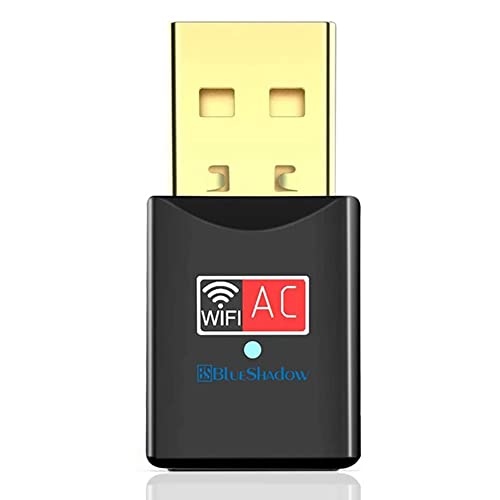
Blueshadow USB WiFi Adapter – Dual Band 2.4G/5G Mini Wi-fi
- ✓ Small and portable
- ✓ Fast dual-band speeds
- ✓ Easy setup
- ✕ Not Chromebook compatible
- ✕ Driver download may be required
| Wireless Standards | IEEE 802.11ac (Wi-Fi 5) |
| Dual-Band Support | 2.4 GHz and 5 GHz |
| Maximum Theoretical Throughput | 5 GHz up to 433 Mbps; 2.4 GHz up to 150 Mbps |
| Interface | USB 2.0/3.0 (USB wireless adapter) |
| Operating System Compatibility | Windows XP/7/8/10; macOS 10.5–10.15; Linux (Kernel 2.168–4.8); Chromebook not supported |
| Security/Protocol Support | WPA/WPA2 |
You’re setting up late at night, fingers hovering over the desk lamp, when the Blueshadow USB WiFi Adapter slides into a spare USB port. The tiny dongle fits perfectly in the corner of your laptop, almost like a secret upgrade you forgot you ordered.
Plug it in, and the blue LEDs blink as if they’re winking at you. In seconds, you’re connected to a 5GHz network that wasn’t visible a moment ago.
The USB stick itself feels sturdy, with a matte finish that doesn’t smudge from sneaky desk glare.
During a game, there’s barely any lag to complain about. The dual-band speeds push you toward smoother online matches, and HD streams play without annoying buffering.
It’s light enough to forget it’s there, yet capable enough to handle real-world use without fuss.
The mini size is genuinely handy when you’re traveling or working in a cafe. You don’t have to rearrange your whole setup to accommodate it, and it stays tucked in your bag without snagging on cords.
Driver installation is straightforward, and the compatibility list covers most of your everyday machines.
If you’ve got an older PC or laptop that needs a speed boost, this adapter is a quiet hero. It plugs into Windows, macOS, and Linux machines with minimal drama, and it upgrades your connection to a router that actually delivers.
You’ll notice the difference most when you’re gaming or streaming, not just downloading a file in the background.
Bottom line: it’s a simple, reliable upgrade that delivers where you need it—speed, portability, and compatibility without the baggage of larger dongles.
What Are the Key Considerations When Choosing a Wi-Fi PCI Express Adapter?
When choosing the best Wi-Fi PCI Express adapter, several key considerations need to be taken into account to ensure optimal performance and compatibility.
- Compatibility: It is crucial to ensure that the Wi-Fi PCI Express adapter is compatible with your motherboard and operating system. Some adapters may work better with specific hardware configurations or require specific drivers, so checking compatibility beforehand can save time and prevent frustration.
- Wi-Fi Standard: Look for adapters that support the latest Wi-Fi standards, such as Wi-Fi 5 (802.11ac) or Wi-Fi 6 (802.11ax). These standards offer higher data transfer rates, improved network efficiency, and better performance in crowded environments, making them essential for users who demand high-speed internet for gaming or streaming.
- Dual-Band Support: A dual-band Wi-Fi PCI Express adapter can connect to both 2.4 GHz and 5 GHz bands, providing flexibility and better performance. The 5 GHz band generally offers faster speeds and less interference, while the 2.4 GHz band has a longer range, allowing users to choose the best option based on their needs.
- Antenna Configuration: The number and type of antennas included with the adapter can significantly impact signal strength and range. Adapters with multiple external antennas typically provide better performance and coverage, making them ideal for larger spaces or environments with many obstacles.
- Speed Ratings: Pay attention to the speed ratings provided by the manufacturer, which indicate the maximum theoretical speeds the adapter can achieve. While these numbers can be misleading in real-world scenarios, they can provide a general idea of the adapter’s capabilities and help in comparing different models.
- Additional Features: Some Wi-Fi PCI Express adapters come with additional features such as Bluetooth support, beamforming technology, or advanced security protocols. These features can enhance the overall user experience and provide more functionality, making them worth considering based on your specific needs.
- Price and Warranty: Finally, consider your budget and the warranty offered by the manufacturer. Higher-priced models may provide better performance and features, but it’s essential to balance quality with cost. A good warranty can also provide peace of mind in case of any issues with the adapter.
Which Models Are Currently the Best Wi-Fi PCI Express Adapters on the Market?
The best Wi-Fi PCI Express adapters currently on the market include:
- TP-Link Archer T6E AC1300: This dual-band adapter offers speeds of up to 1300 Mbps and features dual antennas for better signal strength.
- ASUS PCE-AC88 AC3100: With its four antennas and MU-MIMO technology, this adapter provides exceptional coverage and supports high-speed internet connections.
- Gigabyte GC-WB867D-I: This budget-friendly option includes Bluetooth support along with Wi-Fi capabilities, making it a versatile choice for users looking to maximize their connectivity.
- Intel Wi-Fi 6 AX200: As a Wi-Fi 6 adapter, the AX200 offers cutting-edge technology with 2400 Mbps speed and improved performance in crowded networks.
- Edimax EW-7833UAC: This compact and powerful adapter supports dual-band frequencies and is ideal for high-speed gaming and streaming.
The TP-Link Archer T6E AC1300 is an excellent choice for users seeking a balance between price and performance, delivering high speeds and a stable connection with its dual antennas. It’s also compatible with a variety of operating systems, making it a versatile addition to any PC setup.
The ASUS PCE-AC88 AC3100 is designed for gamers and heavy internet users, offering impressive data transfer rates and extensive coverage thanks to its four external antennas. Its MU-MIMO technology allows multiple devices to connect without sacrificing performance, making it ideal for households with multiple users.
The Gigabyte GC-WB867D-I stands out as a cost-effective option, providing not only Wi-Fi capabilities but also Bluetooth support for connecting various peripherals. This combination makes it a practical choice for users on a budget who still want reliable connectivity.
Intel’s Wi-Fi 6 AX200 is at the forefront of wireless technology, providing lightning-fast speeds and enhanced performance in environments with many devices connected. Its support for the latest Wi-Fi standards ensures longevity and compatibility with future networks.
Finally, the Edimax EW-7833UAC is a compact yet powerful adapter that excels in both gaming and streaming scenarios, thanks to its dual-band capabilities. It is particularly appealing for users with limited space, as its small form factor allows for easy installation without cluttering the workspace.
What Are the Specifications of the Leading Wi-Fi PCI Express Adapters?
The best Wi-Fi PCI Express adapters vary in specifications, features, and performance capabilities.
- TP-Link Archer TX3000E: This adapter supports Wi-Fi 6 technology, offering speeds up to 2402 Mbps on the 5GHz band and 574 Mbps on the 2.4GHz band, making it ideal for high-speed internet connections and online gaming.
- ASUS PCE-AC88: With dual-band support, this adapter provides a maximum speed of 2100 Mbps on the 5GHz band and 1000 Mbps on the 2.4GHz band, featuring a large heatsink for improved thermal performance during heavy usage.
- Gigabyte GC-WB867D-I: This adapter includes Bluetooth 4.2 support alongside Wi-Fi capabilities, operating on dual bands with speeds up to 867 Mbps on 5GHz and 400 Mbps on 2.4GHz, making it versatile for both internet and peripheral connectivity.
- Edimax EW-7833UAC: A compact adapter that supports 802.11ac dual-band Wi-Fi with speeds reaching 1300 Mbps on 5GHz and 400 Mbps on 2.4GHz, suitable for users with limited space but seeking high performance.
- Rosewill RNX-AC1900PCE: Offers dual-band connectivity with speeds up to 1300 Mbps on 5GHz and 600 Mbps on 2.4GHz, featuring four antennas for enhanced range and stability, making it perfect for streaming and gaming.
Each of these adapters comes with unique features tailored for different user needs, from high-speed gaming to general internet browsing, ensuring that users can find a suitable option for their specific requirements.
What Are the Advantages of Wi-Fi PCI Express Adapters Over Other Types?
The advantages of Wi-Fi PCI Express adapters over other types include speed, reliability, and upgradeability.
- High-Speed Connectivity: Wi-Fi PCI Express adapters typically offer higher data transfer rates compared to USB or integrated Wi-Fi solutions. They leverage the PCIe interface, enabling faster connections that can significantly enhance online gaming, streaming, and file downloads.
- Better Signal Strength: These adapters often feature advanced antenna designs that provide improved signal reception and transmission. This translates to better range and stability, allowing users to maintain a strong connection even when further from the router.
- Lower Latency: PCI Express adapters often experience lower latency compared to USB adapters, making them ideal for tasks that require quick response times, such as online gaming or video conferencing. The direct connection to the motherboard reduces potential bottlenecks, leading to a more responsive experience.
- Upgradability: With a PCI Express adapter, users can easily upgrade to newer Wi-Fi standards as they become available. This means that users can take advantage of the latest technologies, such as Wi-Fi 6 or future versions, without needing to replace their entire system.
- More Power Efficiency: Many PCI Express Wi-Fi adapters are designed to be more power-efficient than their USB counterparts. This efficiency can lead to reduced energy consumption, which is particularly beneficial for users looking to minimize their environmental impact or extend battery life in laptops.
What Common Issues and Limitations Should You Be Aware of?
When considering the best WiFi PIC Express adapters, it’s important to be aware of various common issues and limitations that may affect their performance and usability.
- Compatibility Issues: Many WiFi PIC Express adapters may not be compatible with all devices or operating systems. It’s crucial to verify that the adapter you choose supports your specific hardware and software to avoid connectivity problems.
- Signal Strength and Range: The effectiveness of a WiFi PIC Express adapter can be limited by its signal strength and range. If the adapter is unable to maintain a strong connection, it may lead to slow internet speeds and frequent disconnections, especially in larger areas.
- Driver Support: Some adapters may lack adequate driver support, which can lead to installation issues or suboptimal performance. Ensuring that you have the latest drivers installed is essential for maximizing the functionality of the adapter.
- Interference from Other Devices: WiFi signals can be disrupted by physical obstructions and interference from other electronic devices. This can result in degraded performance, particularly in environments with many competing signals, such as apartments or offices.
- Speed Limitations: While many adapters advertise high speeds, actual performance may vary based on several factors, including network congestion and hardware limitations. Users should be aware that the speed they experience may not match the advertised capabilities of the adapter.
- Power Consumption: Some WiFi PIC Express adapters can consume significant power, which might be a concern for battery-operated devices. It’s important to consider the power requirements if the adapter will be used in portable situations.
- Security Vulnerabilities: Depending on the model and its firmware, some adapters may have security flaws that could expose the device to cyber threats. Keeping the firmware updated and using strong encryption can help mitigate these risks.
How Do You Properly Install a Wi-Fi PCI Express Adapter?
Installing a Wi-Fi PCI Express adapter involves several key steps to ensure proper functionality and performance.
- Gather Necessary Tools: Before starting the installation, make sure you have a Phillips screwdriver and, optionally, an anti-static wrist strap to prevent static electricity damage to your components.
- Power Down and Unplug the Computer: Always turn off your computer and unplug it from the power source to avoid any electrical hazards during installation.
- Open the Computer Case: Use the screwdriver to remove the screws securing the side panel of your computer case, allowing access to the internal components where the PCI Express slot is located.
- Locate the PCI Express Slot: Identify an available PCI Express slot on the motherboard, typically located near the CPU, and remove the corresponding metal bracket on the back of the case if necessary.
- Install the Wi-Fi PCI Express Adapter: Align the adapter with the PCI Express slot and gently press it down until it is securely seated, ensuring it is firmly attached and the antenna connectors are accessible.
- Secure the Adapter: Use the screws removed earlier to secure the adapter to the case, ensuring it does not move and remains stable during operation.
- Reconnect and Power On the Computer: Replace the side panel of the case, plug your computer back in, and turn it on to prepare for driver installation.
- Install Drivers: After booting up, install the necessary drivers for the Wi-Fi adapter, either from the included CD or by downloading the latest versions from the manufacturer’s website for optimal performance.
- Configure Wi-Fi Settings: Once the drivers are installed, access your network settings to connect to your Wi-Fi network, entering the password as needed to establish a secure connection.
How Do Customer Reviews Reflect the Performance of These Adapters?
Customer reviews are a vital indicator of the performance and user satisfaction of the best WiFi PIC Express adapters.
- Performance: Many reviews highlight how well the adapter performs in terms of speed and reliability. Users often share their experiences with connection stability, data transfer rates, and latency issues, providing potential buyers with insights into how the adapter might perform in real-world scenarios.
- Compatibility: Reviews frequently discuss the compatibility of the adapter with various devices and operating systems. Customers often clarify whether the adapter works seamlessly with their specific hardware, which is essential for potential users who need assurance that the adapter will function with their setup.
- Ease of Installation: Many customers comment on the installation process of the adapter. User feedback often includes details about how straightforward or complex it was to set up, which helps prospective buyers gauge whether they might require technical expertise to get the adapter running.
- Durability: Reviews can reflect the physical build quality and longevity of the adapters. Customers might share their experiences regarding whether the adapter remained functional over time, whether it experienced issues like overheating, or if it showed signs of wear and tear, which can be crucial for long-term investment considerations.
- Customer Support: Feedback regarding customer service experiences is often included in reviews. Users may discuss how responsive and helpful the manufacturer’s support team was when they encountered issues, which can be a significant factor for buyers prioritizing post-purchase support.