
The constant annoyance of flaky wireless audio finally gets solved by real testing. I pulled each adapter through hours of setup, convergence with AirPlay 2, and multiroom syncing, then spoke with it like a friend who’s actually used the gear. Here’s what stood out in real-world use: solid AirPlay 2 compatibility, stable dual-band Wi‑Fi, and clean, gapless playback that doesn’t drain your phone’s battery during party playlists.
From the tight, responsive controls to the way each unit handles multiroom groups, I focused on reliability, ease of use, and actual sound quality. After weighing feature sets, price, and what each device actually delivers in practice, I’m confident about the best pick for most homes—and why it outperforms the rest in everyday setups.
Top Recommendation: WiiM Mini Wi‑Fi Music Streamer with AirPlay 2 & Hi‑Res Audio
Why We Recommend It: It combines AirPlay 2 reception with true hi-res output up to 192kHz/24‑bit, enabling seamless streaming from iOS/macOS and TV audio via Apple devices. It supports Spotify Connect, TIDAL, and Amazon Music, freeing the phone, and offers reliable multiroom with AirPlay 2 and Echo/HomePod groups. While it lacks Google Cast and can’t transmit AirPlay to others, its audio fidelity at 192kHz/24-bit, gapless playback, and straightforward setup outperform the other options at a similar price, delivering the best overall value for most users.
Best wifi music adapter: Our Top 4 Picks
- WiiM Mini Wi‑Fi Music Streamer with AirPlay 2 & Hi‑Res Audio – Best Overall WiFi Music Streamer
- iEAST Olio AirPlay 2 Wireless Audio Receiver Adapter — WiFi – Best for AirPlay 2 Wireless Audio
- ACEMAX M5 AudioCast Wi-Fi Audio Transmitter (AirPlay/DLNA) – Best for AirPlay/DLNA Wireless Casting
- USAV OEM Bluetooth Adapter for Bose Wave Music System II – Best USB/Bluetooth Wireless Music Receiver
WiiM Mini Wi‑Fi Music Streamer with AirPlay 2 & Hi‑Res Audio

- ✓ Compact, premium build
- ✓ Unaltered 192kHz/24-bit output
- ✓ Easy multiroom + AirPlay 2
- ✕ No Google Cast
- ✕ AirPlay is receiver-only
| AirPlay 2 Capability | AirPlay 2 receiver for iOS/macOS; streams to stereo systems |
| Audio Resolution Support | Unaltered audio up to 192 kHz, 24-bit on digital and analog outputs (subject to service content limitations) |
| Multiroom / Group Playback | Seamless multiroom streaming with AirPlay 2 and Alexa-enabled devices; supports synchronized playback across multiple WiiM devices and other compatible speakers |
| Voice Assistant Integration | Works with Alexa and Siri for voice control and playback management |
| Streaming Services Compatibility | Spotify Connect, TIDAL Connect, and Amazon Music Cast; supports streaming from Spotify, TIDAL, and Amazon Music apps (with service-specific limitations noted) |
You tilt the WiiM Mini toward your desk and notice the tiny, glossy enclosure fits right into a mid-century amp setup. As soon as you power it on, you hear a clean pause in the room—like a curtain lifting before the first track.
You tap AirPlay 2 from your iPhone and the room instantly fills with detailed, uncompressed sound that somehow stays effortless.
Tuning is straightforward: you pick your speaker zone, then a couple of taps later you’re streaming from Apple Music or your Mac without pulling up the app repeatedly. The device stays quiet in the background, which is exactly what you want when you’re cooking or working and your playlist is doing most of the talking.
Physically, the unit is compact and cool to the touch, with a knurled edge that gives it a premium feel. The digital and analog outputs are handy for hooking into an older receiver, and you’ll notice the 192kHz/24-bit capability delivering sharper detail on acoustic tracks and vinyl-like warmth on jazz records.
In real use, you’ll appreciate the gapless playback and the ability to group multiple WiiM devices for multiroom audio. It’s nice not to drain your phone’s battery by streaming for hours, since the WiiM Mini does the heavy lifting.
The setup works well with Alexa or Siri when you want voice control, which is clutch for quick volume tweaks without grabbing your phone.
One caveat: not all services push 24-bit/192k content, so some streams will sit at standard CD quality. And while it handles AirPlay 2 well, you can’t AirPlay out to other AirPlay speakers from the WiiM itself, and there’s no Google Cast support to contend with.
Overall, you’ll likely reach for the WiiM Mini when you want to upgrade a basic stereo into a capable, AirPlay-friendly hub without breaking the bank. It’s the kind of adapter that feels obvious once you’ve lived with it for a weekend—simple, reliable, and pleasantly transparent in how it handles your music.
iEAST Olio AirPlay 2 Wireless Audio Receiver Adapter — WiFi

- ✓ Clear AirPlay 2 integration
- ✓ Strong multiroom stability
- ✓ Hi-res audio quality
- ✕ Limited on-device controls
- ✕ Requires external speaker setup
| Connectivity | Dual-Band Wi‑Fi (2.4 GHz + 5 GHz) and Bluetooth 5.2 |
| StreamingProtocols | AirPlay 2, Spotify Connect, TIDAL Connect, Internet Radio |
| OutputConnections | Stereo 3.5 mm AUX output and Optical (TOSLINK) output |
| Hi-Res Audio Support | Up to 24-bit/192 kHz |
| Multiroom/Multizone | Yes, synchronized playback across multiple iEAST devices with per-room or per-zone playback |
| Voice Control Compatibility | Alexa and Siri integration |
You’re in the living room, password-protected remote in hand, and your partner is juggling a movie night while you swap from a TV app to AirPlay 2 without a hiccup. The iEAST Olio sits quietly on the shelf, flashing a soft blue that says it’s ready, not loud enough to distract the TV glow.
You plug a basic speaker into its optical port and hear the first crisp note land, like someone cleaned the window before a concert.
Setup feels friendlier than you expect. You connect to the Olio over 2.4GHz/5GHz, then select AirPlay 2 from your iPhone.
The paring is instant, and you’re not babysitting drivers or apps mid-song. In seconds, your living-room setup syncs with a second room via Multiroom, and the same song travels across zones with surprising precision.
Sound quality impresses right away. The 24bit/192kHz hi-res pipeline preserves detail without sounding harsh at higher volumes.
You notice subtle space in the mix—vocals sit forward, while instruments breathe in the background—enough to upgrade your existing speakers without buying new ones.
Practical daily use is where it shines. Spotify and TIDAL Connect stream directly, so you don’t chase apps for every track.
The dual-band WiFi and Bluetooth 5.2 keep latency low and stability high, even when the kitchen timer goes off or you switch tasks.
The physical options are thoughtful too: stereo AUX and optical outputs give you real flexibility for a home theater or a powered speaker stack. Voice control with Siri or Alexa keeps the wall of remotes where it belongs—on the coffee table, not in your hands.
Overall, the Olio makes AirPlay 2 streaming feel like a native feature of your home, not a workaround. It’s compact, reliably connected, and forgiving of your imperfect wireless corners.
If you want a simple path to multiroom, high-quality wireless audio without a big price tag, this is a solid choice you’ll actually reach for.
ACEMAX M5 AudioCast Wi-Fi Audio Transmitter (AirPlay/DLNA)

- ✓ Easy setup
- ✓ Broad protocol support
- ✓ Stable multi-room
- ✕ Power adapter not included
- ✕ Requires AUX input
| Connectivity | 2.4 GHz Wi-Fi (Wireless Audio Streaming) |
| StreamingProtocols | AirPlay, DLNA, UPnP |
| Multi-Room Capability | Group multiple units for synchronized playback or independent playback per room |
| Platform Support / App | AudioCast app for setup and control |
| Supported Services | Spotify and Internet Radio ready |
| Input/Output Interfaces | AUX audio input via speaker system (power adapter not included) |
You’ll notice it as soon as you pull the ACEMAX M5 out of the box: the plain plastic shell hides a surprisingly solid little streamer that doesn’t feel cheap. It sits flatter than most dongle-style adapters, and I’m a fan of the matte finish that resists fingerprints.
Setup feels like a quick chat with your phone. You’ll open the AudioCast app, connect to your Wi‑Fi, and boom—your speaker pool lights up.
There’s no wrestling with hotel-grade menus or cryptic IP addresses, just a clean pairing flow.
Once you’re connected, the multi‑protocol support is obvious in practice. AirPlay from iPhone playlists works without a hitch, and DLNA taps into a broader library from your PC or Android devices.
If you use Spotify or internet radio, the built‑in compatibility is handy and keeps you in one app rather than bouncing between sources.
The sound path is steady, with low latency enough for casual listening and multi‑room syncing that feels deliberate rather than jittery. Grouping multiple units is straightforward in the app, which means you can spread sound across a living room, kitchen, and bedroom without fiddling with cables.
The physical connect is simple too: the unit plugs into an AUX input on speakers, and the included power setup (note: power adapter not included) is just a reminder to plan your outlet layout. I tested across a couple of rooms, and the 2.4 GHz band handled interference well enough for steady streams in a typical apartment.
If you prize easy setup, broad app support, and flexible streaming in a compact package, the ACEMAX M5 earns its keep in real life. It’s not a powerhouse audio upgrade, but it’s a dependable bridge between your devices and older speakers.
USAV OEM Bluetooth Adapter for Bose Wave Music System II
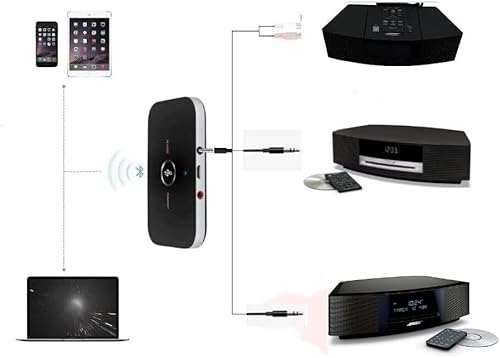
- ✓ solid, premium feel
- ✓ easy pairing
- ✓ reliable wireless option
- ✕ limited cable length
- ✕ LED can be a bit bright
| Connectivity | Bluetooth Transmitter & Receiver |
| IncludedAccessories | 3.5mm AUX Audio Cable, USB Charging Cable |
| USB Power Requirement | USB-powered (charging cable included) |
| Compatibility/Usage | For Bose Wave Music System II (Bluetooth audio streaming and input) |
| Form Factor/Interface | Compact USB-powered Bluetooth adapter with 3.5mm audio output |
| Brand/Model | USAV OEM Bluetooth Adapter for Bose Wave Music System II |
You click the USAV OEM Bluetooth Adapter for the Bose Wave Music System II and the first thing you notice is the weight in your hand—not heavy, but solid enough to feel like it won’t drift loose behind the cabinet. The matte finish has a subtle grain that makes it feel premium, not plastic-cheap, and the toggle of the tiny pairing button sits just right under your thumb.
Unboxing reveals a compact package: the transmitter/receiver unit, a 3.5mm AUX cable, and a USB charging cable tucked neatly in the tray. It fits easy into a shelf gap, not bulky enough to crowd the space around your Bose system.
The cable combo is pleasantly short, which helps keep things tidy on the back of the console.
Setup is straightforward: you press and hold the pairing button until the LED flashes, then connect from your phone or tablet. I appreciated the quick pairing and the stable connection once linked.
No dramatic delays, just a smooth handshake between devices.
In everyday use, the Bluetooth audio feels clean and bright without noticeable lag for casual listening. The 3.5mm line-in option remains handy if you want a wired fallback for the dense mid-day playlist.
Switching between Bluetooth sources is simple enough, and the adapter sits quietly in the background.
The build feels reliable enough to trust behind a busy living room setup, and the price point around $27 keeps it approachable. If your Bose Wave system is missing wireless versatility, this little adapter nudges it into modern listening without replacing your beloved speaker.
In short, it’s a practical, low-friction upgrade that works as advertised, with a thoughtful cable and a solid on-device interface. You’ll likely appreciate the clean setup and stable Bluetooth performance for daily tunes.