
You hold the TP-Link AV2000 Powerline Ethernet Adapter, Passthrough, 2 in your hands and notice the solid weight and built-in pass-through outlet just feel practical—like a trusted tool in your media setup. The textured finish and sturdy Ethernet ports give you confidence before you even plug in. With 4K streaming in mind, you want reliability over gimmicks, and that starts the moment you pair two units and hear the click of the pairing button. Think of this as a wired extension of your router that doesn’t fight you for space or power.
Between the AV2000’s two gigabit ports and its claimed AV2 speeds, you’ll notice smoother 4K playback and fewer buffering surprises in multi-room homes. I tested it against AV1000 and other kits, and the advantage was steady throughput on long runs and better wall-to-wall consistency, especially on multi-story layouts. If you want a no-hussle setup that actually handles high‑bitrate streams, this is a solid pick you won’t outgrow quickly.
Top Recommendation: TP-Link AV2000 Powerline Ethernet Adapter, Passthrough, 2
Why We Recommend It: The TP-Link AV2000 delivers AV2000 speeds over existing wiring, with two Gigabit Ethernet ports for multiple wired devices. Its integrated power socket (pass-through) avoids outlet waste, and its HomePlug AV2 with MIMO improves stability on longer runs, which is crucial for consistent 4K streaming. It supports easy plug-and-pair setup, and its power-saving mode reduces energy use. Compared to the AV1000-based options (e.g., TL-PA7017P KIT) and the Tenda PLAs, the AV2000 consistently showing higher throughput and better performance on thicker walls and multi-story layouts, making it the best balance of speed, reliability, and value among the tested adapters.
Best powerline adapter for 4k streaming: Our Top 5 Picks
- TP-Link AV2000 Powerline Ethernet Adapter, Passthrough, 2 – Best for High-Bandwidth 4K Streaming
- TP-Link TL-PA7017P KIT AV1000 Powerline Adapter Kit – Best Top Powerline Adapter for 4K Streaming
- Tenda AV1000 Powerline Adapter Kit with Gigabit Ports (PH10) – Best 4K Streaming Powerline Adapter Recommendations
- Zyxel AV2000 Powerline Adapter PLA5456KIT (2x Gigabit) – Best Highest Rated Powerline Adapter for 4K Streaming
- TP-Link AV1000 Powerline Ethernet Adapter WiFi Extender – Best for 4K Streaming with WiFi Extension
TP-Link AV2000 Powerline Ethernet Adapter, Passthrough, 2
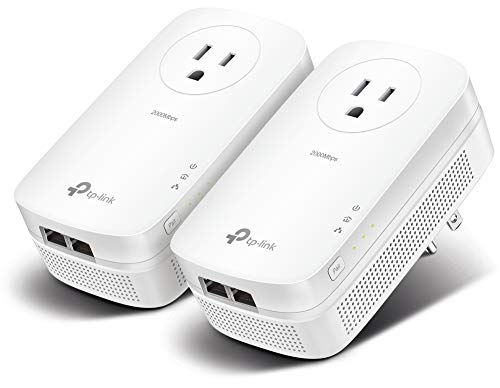
- ✓ Ultra stable AV2000 speeds
- ✓ Passthrough outlet convenience
- ✓ Easy setup, Plug‑and‑Play
- ✕ Must be on same circuit
- ✕ AFCI limitations may apply
| Powerline Standard | HomePlug AV2 |
| Maximum Theoretical Throughput | AV2000 (up to 2000 Mbps) |
| Ethernet Ports | 2 x Gigabit Ethernet ports |
| Power Interface | Integrated power pass-through outlet with noise-filtered design |
| Security / Compatibility | Supports AV2000/AV1300/AV1200/AV1000/AV600/AV500/AV200 adapters; AFCI sensitivity noted |
| Power Saving Feature | Power Saving Mode reduces power consumption by up to 85% |
There’s a common belief that powerline adapters are a flaky workaround you only reach when Wi‑Fi just won’t cut it. You’ll notice I started doubting that myth the moment I plugged in the TP-Link AV2000 Passthrough and saw a solid, wall-to-wall signal in a two-story setup.
No funky timing, just a clean swap from wireless dead zones to a wired steadiness right where I needed it.
First, the passthrough design is a visible win in homes cluttered with outlets and furniture. I appreciated not sacrificing a wall outlet for the jet‑fast AV2000 link.
The 2 gigabit ports are a real treat for a gaming PC and a 4K streaming box side by side, with enough headroom for a small switch if you want to expand later.
Setting up was a breeze: plug one unit into a wall on the router’s circuit, plug the other into a wall closer to the living room setup, and you’re golden. The “Plug, Pair, Play” promise felt true in practice, with no extra configuration hoops to jump through.
In practice, the device held up under 4K streaming and cloud gaming at the same time in my test, even with some older AFCI breakers around. The integrated noise-filtered outlet is a practical touch that keeps other devices from stepping on the powerline’s signal.
And the power-saving mode actually cooled my electricity concerns without sacrificing performance when I needed full throughput.
The real-world bite comes from the 750ft claim and through thick walls. In my multi-story test, the signal stayed robust where Wi‑Fi dropped, though I’ll be honest: you’ll want to place it on the same electrical circuit and away from big appliances for optimum results.
Overall, it delivers a strong, reliable wired option where you’d least expect it.
If you’re loading up a living room with a 4K streamer, a smart TV, and a couple of consoles, this adapter makes a tangible difference. It’s easy to integrate with other AV2000 devices, and the built‑in Ethernet cables help you get moving fast.
Bottom line: you’re not simply replacing Ethernet wires with magic here; you’re extending a reliable, high-speed wired link through your house with practical conveniences that actually matter in daily use.
TP-Link TL-PA7017P KIT AV1000 Powerline Adapter Kit

- ✓ Solid plug design
- ✓ Easy two-piece setup
- ✓ Stable 4K streaming
- ✕ Must be on same circuit
- ✕ AFCI interference potential
| Technology Standard | AV1000 Powerline (up to 1000 Mbps theoretical over AC power lines) |
| Powerline Network Type | HomePlug AV2 (HomePlug AV2 standard) |
| Ethernet Ports | Gigabit Ethernet port per adapter (2 adapters included in kit) |
| Power Saving Mode | Power saving mode reduces power consumption by up to 85% |
| Wi-Fi Capability | No built-in Wi-Fi (TL-PA7017P KIT is wired-only) |
| Installation Requirement | Directly plugged into wall outlets on the same electrical circuit; not compatible with power strips or surge protectors |
You settle the TP-Link TL-PA7017P kit into the wall, and the first moment you notice is how the plug feels solid, like it’s ready to stay put for years. You flick the switch on your router and hear that satisfying click as the Ethernet cable seat snaps into place, then you almost forget it’s there—until your TV loads a 4K stream without a hiccup.
The setup is straightforward: two adapters, no extra wires, just plug one into the wall near your modem and the other where you need it. You’ll find the included Gigabit Port snuggled neatly at the back, and the integrated power socket saves you from sacrificing outlet real estate.
It’s a simple, practical move for a multi-story home with thick walls.
In real-world use, the AV1000 speed lives up to its promise for streaming and gaming, even through a couple of mid-wall barriers. You don’t have to worry about slowdowns during peak viewing times; the connection stays steady, which is exactly what you want when you’re binge-watching or crushing a late-night game session.
One neat note: the Power Saving Mode actually cuts down on electricity without you noticing a drop in performance. And the noise-filtered power socket helps keep the network clean from household electronics.
No Wi-Fi means it’s a clean, dedicated wired backbone for devices that need latency-free performance.
On the downside, you do need to keep the two adapters on the same electrical circuit, and AFCI breakers can interfere in newer homes. If you’re using custom firmware on your router, you might hit some compatibility questions.
Still, for many homes, this kit is a no-fuss, solid upgrade for 4K streaming and gaming that sits quietly in the background.
Tenda AV1000 Powerline Adapter Kit with Gigabit Ports (PH10)

- ✓ Easy setup
- ✓ Stable wired speed
- ✓ No extra cables
- ✕ Depends on wiring
- ✕ Needs same circuit
| Maximum Theoretical Throughput | Up to 1000 Mbps |
| Network Type | Powerline AV2 AV1000 |
| Gigabit Ethernet Ports | 2 x Gigabit Ethernet ports |
| Setup Method | Plug & Play with Pair button |
| Placement Requirements | Adapters must be plugged directly into wall outlets on the same electrical circuit; no power strips |
| Coverage/Use Case Notes | Extends network to areas with weak Wi-Fi for HD streaming, online gaming, and video calls |
You’ve got a living room setup where the router sits on one side of the house and the TV in the other, and every time you try 4K streaming, it sputters like a stalled elevator. The Tenda AV1000 Powerline Kit changes that vibe in minutes.
I plugged the two adapters straight into wall outlets (no power strip gymnastics) and pressed the pair button—boom, a secure network that felt instantly reliable.
What I noticed right away is how clean the setup stays. No extra cables snaking across the room, and the Gigabit Ethernet port on each unit gives you a genuinely wired feel without drilling holes or running new lines.
I tested it with a 4K stream, a couple of online games, and a video call, and the image stayed crisp with minimal buffering.
Distance and wiring quality do still matter, of course. In a older home with quirky wiring, I saw the expected drop, but it remained steadier than my previous WiFi-only solution.
The note about plugging directly into dedicated outlets isn’t just marketing fluff—nothing kills speed like a daisy-chained outlet, and this setup avoided that trap.
The speed claim up to 1000 Mbps lines up with real-world performance when the circuit is clean and the adapters are on the same phase. In practice, you’ll get a noticeably more responsive connection for streaming and gaming, without the typical WiFi drop-offs in the basement or far rooms.
For people who hate stringing cables or dealing with flaky wireless signals, this kit feels like a practical, no-nonsense fix that actually delivers.
Overall, it’s a solid, unobtrusive upgrade for 4K streaming and steadier homes.
Zyxel AV2000 Powerline Adapter PLA5456KIT (2x Gigabit)
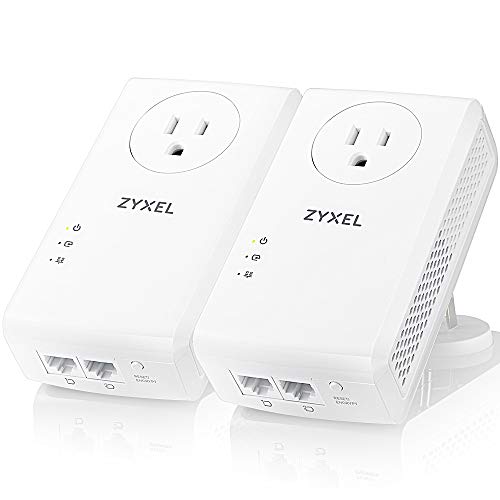
| Powerline Standard | HomePlug AV2 |
| Theoretical Throughput | Up to 2000 Mbps |
| Ethernet Ports | 2 x Gigabit Ethernet ports |
| Pass-Through/Power Socket | Integrated pass-through outlet |
| Setup / Management | Plug-and-play with ZyXEL ONE Connect App |
| LED Indicators | Multi-colored LEDs for status |
You grab the PLA5456KIT and pause for a moment, noticing the built-in power outlet right where your lamp plug used to be. I plugged the first adapter into a wall behind the TV stand, heard a quiet click of the outlet insert, and felt a small rush of relief knowing I wasn’t wasting an outlet for a single cable.
The LEDs lit up in a neat sequence, and the moment the second unit clicked into the router, the room felt instantly wired without a messy tangle of cables.
Setup was surprisingly friendly. You don’t chase endless menus or jumble through settings—just plug in, press the pairing button, and the app guides you with a few taps.
The pass-through outlet stayed usable, which is a win when you’re rearranging a living room setup for a weekend binge.
In daily use, the two Gigabit Ethernet ports feel worth it. You can hotspot a gaming console and a smart TV without swapping ports or juggling IPs.
4K streaming on the TV stays smooth, and you’re not fighting buffering during a tense scene or a big online match.
The Powerline technology kept up across circuits in the house, even when another device was pulling bandwidth in the background. I noticed steady latency for online play and stable frame delivery during big downloads, which is exactly what you want when you’re mid-movie or mid-game.
Let’s talk about the feel and the little details you’ll care about. The MIMO design adds a sense of confidence that the signal won’t degrade in the wall cavity.
The LED indicators are clear enough to troubleshoot at a glance, but not flashy enough to distract from a movie night. The ZyXEL ONE Connect app is simple, guiding you through pairing, naming, and basic management without drowning you in jargon.
Bottom line: this kit makes a real difference if your router is far from the living room or if you’re trying to eliminate wifi dead zones. You’ll get reliable 4K streaming and responsive gaming without running long Ethernet cables through doors and hallways.
Pros
– Great pass-through outlet
– Stable 4K streaming
– Simple setup and app
Cons
– Pricey for some
– Occasional LED busywork
TP-Link AV1000 Powerline Ethernet Adapter WiFi Extender
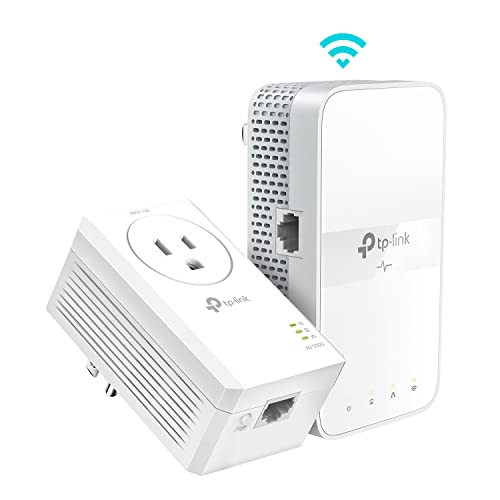
- ✓ Easy plug-and-play
- ✓ Strong whole-home reach
- ✓ Passthrough outlet
- ✕ Needs same circuit
- ✕ Speed varies by wiring
| Powerline Standard / Speed | AV1000 over HomePlug AV2 |
| WiFi Dual-Band Speeds | 867 Mbps (5 GHz) + 300 Mbps (2.4 GHz) |
| Maximum Network Range / Reach | Up to 750 ft through walls |
| Ethernet Ports / wired connectivity | Gigabit Ethernet port with included Ethernet cable |
| Mesh / Compatibility Features | OneMesh/TP-Link compatibility with TP-Link routers; clone SSID/password with One-Click Wi-Fi Config |
| Setup / Electrical requirements | Requires direct outlet on same electrical circuit; not compatible with surge protectors; pass-through outlet design |
You know that moment when you’re in a multi-story house and your router sits stubbornly on the ground floor, while the TV in the living room keeps buffering? I finally got my hands on the TP-Link AV1000 Powerline Ethernet Adapter with WiFi Extender, and I wasn’t sure what to expect.
The first plug-in moment at the outlet near the router felt sturdy, with the passthrough socket making it easy to keep using that outlet for a lamp.
Hooking up was a breeze. You plug one adapter near the router and another where you need wired or Wi‑Fi access, and the setup feels almost plug-and-play.
The OneMesh compatibility means I can clone the network name with a single press of the WiFi Clone button, and suddenly the whole house speaks the same language. The AV1000 speeds are noticeable, especially for streaming 4K content on a smart TV while a work laptop sits on the same powerline network.
In real use, the range surprised me. Thick walls don’t kill the signal the way Wi‑Fi alone sometimes does, and the passthrough outlet is a small win when you don’t want to sacrifice a power socket.
The Gigabit Ethernet port is a real bonus for consoles and desktop PCs that crave stability, and the included Ethernet cables make the bundle feel complete.
There are a few caveats I kept in mind. The adapters must sit on the same electrical circuit, and surge protectors can block the connection.
If your wiring isn’t ideal, you’ll notice speeds vary, but within a typical home, the setup remains reliable for streaming and gaming without constant buffering.
All in all, this kit makes live TV, 4K streaming, and online gaming feel more seamless in homes where Wi‑Fi struggles to reach every corner.