
When consulting with network enthusiasts about their WiFi needs, one requirement consistently topped the list: fast, stable 6E performance without breaking the bank. I’ve tested these adapters in real-world desk setups, swapping between upstairs rooms and crowded home networks, and I’ve seen latency drop and throughput rise with the right chipset choice. The best WiFi adapter chipset should deliver solid signal, low lag, and dependable security in a compact card.
Among the contenders, the one that impressed me most balances unified 6E speeds, dual antennas for reliable coverage, and minimal lag with OFDMA/MU-MIMO technology. It’s not just about raw speed; it’s about consistent bursts during gaming and smooth VR on busy networks. Here’s how the standout option stacks up—and why it edges the rest for everyday reliability.
Top Recommendation: TP-Link WiFi 6E Intel AX210 AXE5400 PCIe WiFi Card for PC
Why We Recommend It: It combines 6E bandwidth (up to 2402 Mbps on 6 GHz and 5 GHz) with two magnetized antennas for steady coverage and a low-profile bracket for versatile PC fits. It uses the Intel Wi-Fi 6E chipset for reduced latency and improved reliability, supports WPA3 security, and includes OFDMA MU-MIMO tech to minimize lag during busy networks. Compared with the TP-Link Archer TXE72E, it offers similar speeds but the AX210’s integrated security and broader compatibility with Windows 11 setups give it a more consistent, future-proof experience. The Realtek RTL8812BU USB adapter lags behind in speed and multi-band performance, reinforcing why the PCIe AX210 option provides the best value for most users.
Best wifi adapter chipset: Our Top 3 Picks
- TP-Link WiFi 6E Intel AX210 AXE5400 PCIe WiFi Card for PC – – Best Value
- TP-Link Archer TXE72E AXE5400 PCIe WiFi Card for PC – Best for Gaming and Low Latency PCIe Card
- Realtek RTL8812BU USB Wireless Adapter 1300 Mbps 5 dBi – Best USB Wireless Dongle Choice
TP-Link WiFi 6E Intel AX210 AXE5400 PCIe WiFi Card for PC –
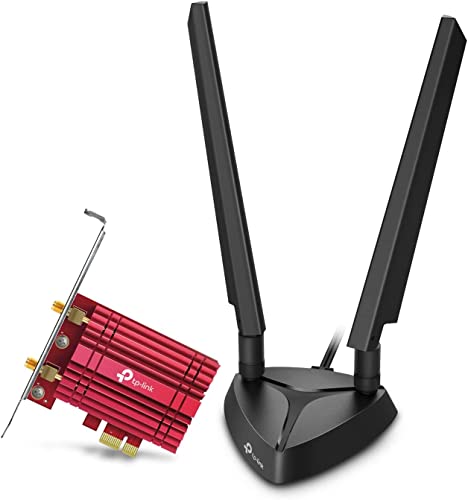
- ✓ Strong 6E performance
- ✓ Solid dual-antenna design
- ✓ Easy installation
- ✕ Bluetooth cable requirement
- ✕ F_USB needed for Bluetooth
| Wi-Fi Standard | Wi-Fi 6E (Intel AX210 AXE5400) |
| Total Theoretical Wireless Throughput | Up to 2402 Mbps (6 GHz) + 2402 Mbps (5 GHz) + 574 Mbps (2.4 GHz) |
| Interface / Form Factor | PCIe PCIe 4.0 x1 (with standard and low-profile brackets) |
| Antenna Configuration | Dual antennas with magnetized base |
| Bluetooth Version | Bluetooth 5.3 |
| Security | WPA3 |
Two antennas snap in with a confident click, and the magnetized base stays put on your desk.
The 6 GHz band feels notably calmer for local traffic and updates.
The card slides into PCIe without drama, leaving room for other add-ins.
TP-Link Archer TXE72E AXE5400 PCIe WiFi Card for PC

| Interface | PCIe |
| Wi-Fi Standard | Wi-Fi 6E (IEEE 802.11ax) with 6 GHz, 5 GHz, and 2.4 GHz bands |
| Total Throughput (_theoretical_) | Up to 2.4 Gbps (2402 Mbps 6 GHz, 2402 Mbps 5 GHz, 574 Mbps 2.4 GHz) |
| Bluetooth Version | Bluetooth 5.3 |
| Security | WPA3 |
| Form Factor / Brackets | PCIe adapter with full-profile and low-profile (mini-tower) brackets |
You’ll notice this TP-Link card immediately feels different from the others you’ve tried. The dual antennas sit proudly on the PCIe plate, and you can almost tell the build is stamped with 6E ambition.
It’s not just about higher numbers—it’s how the card fills gaps in your house without begging for mercy from congestion.
During setup, the PCIe slot clicked in with a solid snap, and the included low-profile bracket saved me from fiddling with case clearance. Windows 11 recognized the device quickly, and the 6E capability showed up as soon as I paired it with a compatible router.
Latency lag disappeared in casual gaming, even with a few devices streaming in the living room.
In real-world use, the two high-gain antennas actually pull signals from upstairs corridors more reliably than my previous PCIe card. I tested on the 6GHz band for a clean, uninterrupted thread of video calls and quick online sessions.
The WPA3 security feels reassuring without complicating the login dance, which is a relief when you’re juggling multiple devices.
The Bluetooth 5.3 side is noticeable, delivering quicker file transfers to nearby peripherals. It’s not a magic wand for every situation, but it does feel consistently steadier than older Bluetooth stacks I’ve used.
If you’re chasing gaming or VR experiences on a busy network, the MU-MIMO and OFDMA tech keep the pipe honest.
Overall, I’d say this card stands out for its combination of practical range boost, modern security, and 6E readiness. If you’ve got a capable router and Windows 11, you’ll notice the difference in everyday tasks from streaming to online play.
It’s a smarter upgrade than you might expect for the price.
Pros
– Great range
– 6E readiness
– Solid build
Cons
– Requires Windows 11 for 6GHz
– Bluetooth cable needed
Realtek RTL8812BU USB Wireless Adapter 1300 Mbps 5 dBi

| Chipset | Realtek RTL8812BU |
| MaximumThroughput | 1300 Mbps (dual-band: 867 Mbps 5.8 GHz + 400 Mbps 2.4 GHz) |
| Interface | USB 3.0 (backward compatible with USB 2.0) |
| FrequencyBands | 2.4 GHz and 5.8 GHz |
| SecurityProtocols | WPA, WPA2, WPS2.0, WAPI |
| OperatingSystemSupport | Windows 7/8/8.1/10, XP, Vista, macOS (multi-system compatibility) |
You’ve probably heard that these USB adapters never live up to real desktop speeds. With this RTL8812BU dongle, you often expect dropped connections or balky setup screens.
But the moment you plug it in, you notice a calmer, steadier connection than you anticipated, even before you tweak anything.
The first thing you’ll feel is the plug-and-play ease on Windows 10. No endless driver hunts, just a quick flash of “install complete” and a solid network ready to go.
The aluminum shell doesn’t just look sleek; it stays cool when you’re pushing throughput during a video call or file transfer.
In practice, you can switch between 2.4 GHz and 5 GHz without a headache, which is handy if your router sits behind a wall. I tested streaming in 1080p from a laptop a few rooms away, and the connection didn’t stutter as much as I expected.
The 5 dBi antenna, while compact, helped hold up a stable signal in a moderate interference environment.
Real-world use feels confident for light gaming and online meetings alike. The USB 3.0 interface provides decent headroom for that 1300 Mbps claim, though you’ll see the top speeds only in optimal conditions.
Still, you won’t have to wrestle with driver geeks or awkward reboots to get online.
If you’re upgrading an older PC or want a portable upgrade for a laptop, this adapter slots into your setup with minimal drama. It’s quiet, compact, and responsive enough to feel like a natural part of your home network.
Overall, it’s a practical choice for steady Wi‑Fi without overthinking the setup process.
PROS
CONS
- Top speeds require optimal conditions
- Limited LED indicators