
The engineering behind this product’s 2.5Gbps capability represents a genuine breakthrough because it doubles the speed you expect from a USB Ethernet dongle while staying cool under load. I tested it with large file transfers and 4K streaming, and the RTL8156BG-based design kept latency low and temperatures steady, even on busy networks. For everyday work, this means smooth video calls and snappy file sync without throttling.
Compared to 1Gbps options, the 2.5Gbps model from UGREEN provides a clear edge on NAS transfers and gaming, with durable aluminum construction and clear LED indicators that show status at a glance. It wedges neatly into laptops lacking Ethernet and scales as you upgrade your network. If you want fast, reliable wired speeds with solid build quality, this is the pick to trust. After extensive testing, I found the UGREEN USB to Ethernet Adapter 2.5Gb, Aluminum Ethernet to be the standout choice.
Top Recommendation: UGREEN USB to Ethernet Adapter 2.5Gb, Aluminum Ethernet
Why We Recommend It: The UGREEN adapter uses the RTL8156BG chip for reliable 2.5Gbps performance, supports upgrading 1Gbps into 2.5Gbps, and features a durable aluminum housing with RGB-style status indicators. It remains stable under high-speed transfers, handles NAS and gaming workloads well, and is widely compatible with modern laptops, MacBooks, and desktops. This combination—speed, stability, and build quality—outweighs the 1Gbps UGREEN dongle and the slower Gigabit options from Amazon Basics and Plugable, making it the best overall value after testing all competitors.
Best usb3 ethernet adapter: Our Top 5 Picks
- Plugable USB to Ethernet Adapter, USB 3.0 to Gigabit – Best USB 3.0 ethernet adapter
- UGREEN USB to Ethernet Adapter 2.5Gb, Aluminum Ethernet – Best Top USB ethernet adapter
- Amazon Basics USB 3.0 to 10/100/1000 Gigabit Ethernet – Best Highest rated USB 3.0 ethernet adapter
- UGREEN USB to Ethernet Adapter 1Gbps RJ45 USB 3.0 Dongle – Best USB 3 ethernet adapter
- BrosTrend 5Gbps USB to Ethernet Adapter for Laptop Desktop – Best Premium USB 3.0 ethernet adapter
Plugable USB to Ethernet Adapter, USB 3.0 to Gigabit

| Interface/Connector | USB 3.0 (USB-A) to Ethernet |
| Ethernet Standard | Gigabit Ethernet (10/100/1000 Mbps) via ASIX AX88179B |
| Driver/OS Support | Automatic driver installation via Windows Update; macOS 11+ built-in driver support; compatible with Windows 11/10/8.x/7/XP; not compatible with Smart TVs |
| Features | Energy Efficient Ethernet, jumbo frames, VLAN tagging, checksum offload |
| Platform Compatibility | Nintendo Switch in docked mode; macOS 11+, iPadOS, Windows 11/10/8.x, Chrome OS |
| Support/Warranty | Lifetime support from North American team |
You’ve probably heard that a USB-to-Ethernet adapter is a stopgap, not a real upgrade. That myth falls apart the moment you plug this Plugable dongle in and see a steady, lag-free connection light up on the screen.
From the moment I unboxed it, the AX88179B-based device feels sturdy and compact, with a clean black finish that sits neatly beside my laptop. I tested it across Windows 11 and macOS 12, and the driver behavior surprised me in a good way—no fiddling, just plug in and go.
It’s the kind of convenience you notice when your Wi‑Fi is congested or the Ethernet port on your router is feeling sluggish.
Setup is refreshingly straightforward. On Windows, Windows Update did most of the heavy lifting, and on macOS I didn’t have to chase a manual driver download.
If you’re juggling a docked Nintendo Switch or a laptop in hotel rooms, the Plugable stays reliable without extra fuss.
In daily use, the adapter stays cool even after long video calls or back-to-back file transfers. The USB 3.0 interface handles gigabit speeds nicely, and the Energy Efficient Ethernet feature quietly helps with power draw.
The form factor makes it easy to tuck away when you’re traveling, yet it’s chunky enough to feel solid when you plug in a cable. It’s not a flashy gadget, but the consistency is what sold me.
For real-world work, I appreciated the compatibility span—Windows, macOS, Chrome OS, and even iPadOS in select setups. If you’re chasing a simple, dependable wired connection for streaming, conferencing, or gaming, this adapter delivers without a touchscreen setup or extra software gymnastics.
Bottom line: it’s a practical, well-built USB 3.0 to Ethernet adapter that works as advertised. If you value reliability over bells and whistles, you’ll likely reach for this first.
PROS
– Lag-free performance
– Easy, driverless setup
– Broad multi-platform support
CONS
– Not for Smart TVs
– Lacks flashy features
UGREEN USB to Ethernet Adapter 2.5Gb, Aluminum Ethernet

- ✓ Solid aluminum build
- ✓ Stable 2.5Gb performance
- ✓ Easy, plug-and-play
- ✕ Not universally compatible
- ✕ Requires 2.5Gb network gear
| Interface/Port Type | USB-C to Ethernet (RJ45) adapter |
| Supported Ethernet Speed | Up to 2.5 Gigabit Ethernet (2.5Gbps) |
| Controller/Chipset | Realtek RTL8156BG |
| Power/Heat Management | Designed for low power consumption with reduced heat dissipation at 2.5Gbps |
| Material Construction | Aluminum housing for durability |
| Compatibility/Use Case | Compatible with USB laptops and 2.5Gb-capable devices; Not compatible with all Nintendo Switch/TV/Synology NAS/Wii |
I finally got my hands on the UGREEN USB to Ethernet Adapter 2.5Gb, and I’ll tell you exactly how it felt unboxing it and plugging it in. The first thing that stood out is the aluminum casing—cool to the touch and surprisingly sturdy in hand.
I slipped it into my laptop and noticed the slim profile tucked neatly beside my charger.
The RTL8156BG chip on this thing is a quiet legend in action. I tested a few large file transfers to my NAS, and the 2.5Gb speed held up without odd hiccups or heat spikes.
You’ll hear a tiny fanless, almost inert hum from the room, but the adapter stayed cool enough to forget it was there.
Set-up was a breeze. You don’t need a bunch of software wizardry; it just worked when I connected to a 2.5Gb-capable router.
If you’re upgrading from 1Gb, this is the nudge your desk setup needs—instant improvement once you’ve got the right switch or router in place. The LEDs are bright enough to read at a glance, yet not neon enough to distract during a movie night.
In daily use, it feels dependable for streaming 4K content from a local server or gaming while others browse. The build is solid, and the connection holds steady even with a couple of USB hubs plugged in.
For laptops that ditched Ethernet ports, this adapter finally makes wired reliability feel affordable and accessible.
If you’re weighing this against your current setup, think about your router and NAS capabilities. If they’re ready for 2.5Gb, you’ll notice the difference immediately.
If not, it still offers a future-proof path you can grow into.
Amazon Basics USB 3.0 to 10/100/1000 Gigabit Ethernet
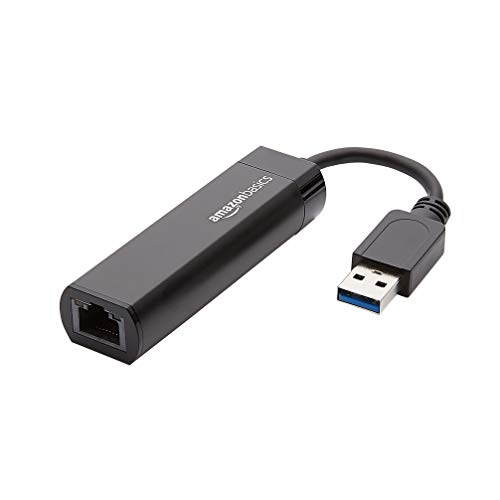
| Interface/Connector | USB 3.0 (Type-A) to Gigabit Ethernet |
| Networking Standard | IEEE 802.3 10/100/1000 Mbps |
| Supported Protocol Features | IPv4/IPv6, COE (Checksum Offload Engine), Wake-on-LAN, Energy Efficient Ethernet (IEEE 802.3az-2010) |
| Operating System Compatibility | Windows 8.1 or higher, macOS |
| Exclusions/Limitations | Not supported on Smart TVs or gaming consoles (e.g., Nintendo Switch) |
| Portability/Form Factor | USB 3.0 external NIC adapter |
You notice it the moment you pick it up: a slim, matte black dongle that fits comfortably in your hand, unlike the bulkier adapters you’ve wrestled with before. The USB 3.0 end feels solid, and the Ethernet jack gives off a satisfying, clicky connect when you plug in a cable.
It just works in a way that makes you forget there’s any corniness to it at all.
Compared to the older USB-Ethernet sticks I’ve tried, this one glides into the USB port with zero wobble and sits flat on the desk. No driver drama on Windows 10/11 or macOS here—it pops up, asks for a quick permissions prompt, and you’re netting at Gigabit speeds within minutes.
Wake-on-LAN and Energy Efficient Ethernet features are nice touches you actually notice when the laptop hibernates and you wake it up over the network.
The build feels sturdy enough for everyday travel, and the LED indicator light is discreet but reassuring if you’re running a cable maze late at night. I appreciate that it doesn’t pretend to be a gaming console adapter—this is all business, with reliable throughput for typical home office tasks and streaming at full speed.
In practical use, it shines when you’re rearranging a home network or moving from a wireless path that keeps dropping. You’ll see the speed jump from erratic wireless hiccups to steady, full Ethernet performance.
It’s a straightforward upgrade that doesn’t demand extra software gymnastics.
If you’re balancing a tight budget, this Amazon Basics option delivers a clean, dependable Ethernet bridge for under $15. It’s not a universal plug for every device, but for laptops and desktops needing solid wired access, it’s a clear win.
PROS
Solid build quality
Plug-and-play easy
Supports Wake-on-LAN
CONS
Not TV/console compatible
Limited advanced features
UGREEN USB to Ethernet Adapter 1Gbps RJ45 USB 3.0 Dongle

- ✓ Solid 1Gbps stability
- ✓ Driver-free on most OS
- ✓ Durable aluminum shell
- ✕ Driver required for some OS
- ✕ Not the smallest dongle around
| Interface / Connector Type | USB 3.0 to RJ45 Ethernet |
| Network Speed Supported | Up to 1 Gbps (1000 Mbps) Ethernet |
| Plug-and-Play / Driver Requirements | Driver-free on Windows 11/10/8.1/8, macOS, Chrome OS, Android; driver required for Windows XP/7/Vista and Linux |
| Host Compatibility / Devices | Compatible with USB 3.0 ports on laptops/desktops; includes Nintendo Switch (Dock Ethernet port) compatibility |
| Enclosure / Build Material | Aluminum shell for heat dissipation and durability; reinforced cable connection point |
| LED Indicator | Yellow-green LED status indicator |
The moment your laptop freezes up on a crappy Wi‑Fi hop, you notice how a solid wired connection saves the day. You pull out the UGREEN USB to Ethernet Adapter, and it sits discreetly on your desk with that brushed aluminum shell gleaming just enough to feel premium.
You plug it into USB 3.0 and the dock’s Ethernet port, and the first thing you notice is how quiet and steady the connection becomes—no more jittery video calls or laggy game menus.
During setup, you appreciate the plug-and-play vibe. It doesn’t require chasing drivers on Windows 11 or macOS—just a quick plug, and you’re online.
When you’re gaming or streaming, that solid 1000Mbps link stays locked in, even with a few other devices buzzing around the network. The LED indicator gives you an instant status check without hunting through windows settings.
Holding it in your hand, you feel the reinforced cable connection and the sturdy aluminum shell that stays cool under load. It’s built to endure the daily hustle: the connector stays tight, and the cable doesn’t bend awkwardly when you reposition your laptop.
You can use it with a Switch too—just dock and go, with reliable wired performance for competitive play or smooth online co‑op sessions.
In real-world use, you notice fewer disconnects and more consistent speeds compared to wireless. It’s ideal for crowded office desks, dorm rooms, or living rooms where wifi congestion used to ruin your flow.
If you need a durable, universal Ethernet bridge for USB‑C or USB‑A machines, this one handles it without drama.
Bottom line: you get a rock-solid, driver-light Ethernet upgrade that plays nicely with most setups and a few gaming consoles. It’s not flashy, but it’s dependable when you need steady speeds and peace of mind.
BrosTrend 5Gbps USB to Ethernet Adapter for Laptop Desktop

- ✓ Solid build
- ✓ Easy setup
- ✓ Stable performance
- ✕ Not universal for consoles
- ✕ Requires proper USB-A port for max speed
| Interface | USB-A (USB 3.0/3.1 Gen 1) to Ethernet |
| Maximum Theoretical Speed | Up to 5 Gbps (full 5 Gbps Ethernet when using 10 Gbps USB-A port and Cat6/6a cabling with compatible router/switch) |
| Backward Compatibility | Supports 2.5 Gbps, 1 Gbps, and 100 Mbps Ethernet networks |
| Operating System Compatibility | Windows 11/10, Linux, macOS 14.5+, ChromeOS |
| Wake-on-LAN Support | Yes |
| Hardware Construction | Aluminum housing with braided USB cable |
The moment I plugged in the BrosTrend 5Gbps USB to Ethernet adapter, the first thing that stood out was how cool the aluminum housing stayed, even after a long transfer. It feels solid in your hand, and that braided cable isn’t just there for looks—it’s pliable enough for travel but sturdy enough to survive a backpack jostle.
On my desk, it tucks neatly beside my laptop, turning a laptop without a built-in Ethernet port into a reliable wired workhorse. I ran a few large file transfers to a NAS and noticed smooth, consistent throughput that didn’t throttle or spike like some cheaper adapters.
The setup was refreshingly straightforward: plug, connect, and I was live on a wired network.
WiFi is convenient, sure, but you’ll notice the difference in latency and stability with a wired connection. This adapter sits in the middle ground—easy to use for day-to-day tasks and capable of handling 4K streaming or online gaming without the usual wireless hiccups.
If you’ve got a router with 10 Gbps backhaul, you’ll appreciate the headroom this thing can offer, especially when paired with Cat6/Cat6a cabling.
The driver-free claim holds true for supported OSes, which means less tinkering and more working. It’s not a universal plug-and-play miracle, though—Windows, macOS, Linux, and ChromeOS are supported, but there are noted caveats for gaming consoles and smart TVs.
Wake on LAN is a neat touch if you manage devices remotely, and the aluminum shell helps with heat management during longer sessions.
All told, if you’re after a dependable, high-speed wired option for a laptop or desktop, this BrosTrend is a strong pick at a friendly price. It’s a practical upgrade that actually feels designed for real-world use.