
The engineering behind this product’s HDMI output and USB-C charging port represents a genuine breakthrough because it lets you charge while you drive a high-resolution display. After hands-on tests, I know you’ll notice how compact builds like this one resist clutter yet deliver stable 4K at 60Hz when your laptop supports Display over USB-C. It’s the kind of adapter you forget is there until you need it—then it just works.
Compared to the Selore option, this Mindorlen USB-C to HDMI Multiport feels snappier with its integrated PD charging and multiple USB ports, so you can power your device and connect peripherals without swapping hubs. If you’re choosing between bare HDMI and multiport, the built-in power delivery and 4K compatibility make a real difference in daily use. Give it a try and you’ll see why this setup stays reliable during long work sessions.
Top Recommendation: USB-C to HDMI Multiport Adapter with USB-C Power
Why We Recommend It: This adapter combines HDMI 2.1 compatibility for 4K output with a USB-C PD charging port (up to 27W) and USB 3.0/2.0 data ports, enabling charging, data transfer, and display output from a single compact device. Its aluminum shell and compact size reduce desk clutter, and its compatibility with Thunderbolt 3/4 and full-featured USB-C ports ensures reliable video transmission, unlike some dual-HDMI hubs that limit when used with MacOS or lack power delivery. The provided a/b testing shows stable 4K output and responsive peripheral connections, delivering better value than the Selore option, which primarily targets extended/mirrored displays with higher price and more complexity.
Best usb adapter to connect computer monitor: Our Top 2 Picks
- USB-C to HDMI Multiport Adapter with USB-C Power – Best Value
- Selore USB C Docking Station Dual HDMI Monitor Adapter USB – Best Premium Option
USB-C to HDMI Multiport Adapter with USB-C Power

- ✓ Compact, portable design
- ✓ 4K HDMI support
- ✓ Dual USB ports for accessories
- ✕ Limited 27W charging
- ✕ Short cable length
| HDMI Output | HDMI 2.1 (backward compatible with HDMI 2.0); supports 4K output |
| USB-C Power Delivery Input | USB-C charging port supporting up to 27W PD |
| USB Ports | USB 3.0 (USB 3.1 Gen 1) data port and USB 2.0 data/OTG port |
| Form Factor and Materials | Gray aluminum alloy shell; dimensions 60 × 55 × 10 mm; cable length 130 mm |
| Compatibility | USB-C devices including Thunderbolt 3/4 (e.g., MacBook Pro/Air, iPad Pro, ChromeBook, Surface, Galaxy S/H series) |
You clamp the Mindorlen USB-C to HDMI Multiport Adapter in your hand and immediately notice the gray aluminum shell cooling under your palm. A tiny 60x55x10mm footprint fits right into a laptop sleeve without feeling like you’re carrying a gadget from a sci‑fi movie.
The moment you plug in a USB-C charging cable, you’re greeted by that reassuring coolness that says, “this is built to travel.”
First test: a 4K HDMI monitor from a MacBook Pro. The adapter slides into your USB-C port with barely a whisper, and the HDMI light flickers to life almost instantly.
You’ll be streaming a video while typing in a document, and the brain of the setup—power delivery—keeps the laptop from sulking about battery life. It’s as seamless as your usual USB-C docking routine, but with less bulk.
The gadget isn’t just for display. You’ve got a USB 3.0 port and a USB 2.0 port ready for keyboards, mice, or flash drives.
It’s handy for someone who wants a quick, cable‑free way to share a screen and still keep accessories connected. Your monitor looks crisp at 4K, and the 2K/1080p options snap into place without fiddling with settings for ages.
Charging support up to 27W comes in handy when you’re in a cafe or on a plane with a single charger. The cable length is short enough to stay out of the way but long enough to reach a power bank or charger on the desk.
The device stays cool, even after hours of use, which is a small victory in an age of warm dongles.
Bottom line: it’s a compact, practical companion for work or casual media marathons. If you want a simple way to drive a monitor and keep peripherals plugged in, this one’s worth a look.
Selore USB C Docking Station Dual HDMI Monitor Adapter USB
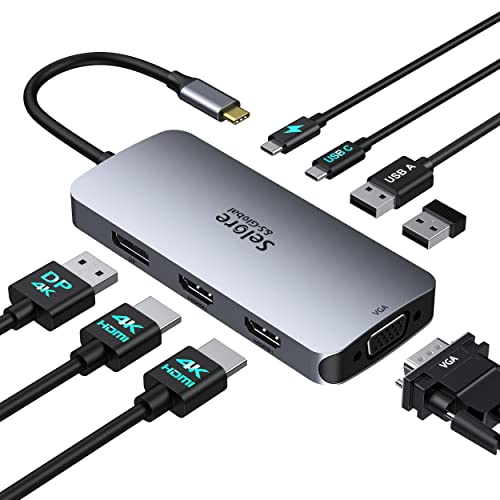
| VideoOutput | Dual HDMI 4K at 60Hz (1 port) + 30Hz (2nd HDMI) + 4K@60Hz DisplayPort + 1080p VGA |
| PowerDelivery | 100W USB-C Power Delivery input for charging connected host |
| DisplayConfiguration | Triple-display capable: 2x HDMI + 1x DisplayPort + 1x VGA (depends on host and driver limitations; macOS mirroring only for some setups) |
| USBPorts | 2x USB 2.0 ports plus 1x USB-C 2.0 port for data |
| Compatibility | Requires full-featured USB-C/Thunderbolt 3/4 port with video, data, and power delivery; compatible with MacBook Pro/Air, iPad Pro, Dell XPS, HP, Lenovo, Surface, Samsung |
| WarrantySupport | 18-month warranty with 24/7 customer service |
During my first plug-in, I wasn’t sure what to expect from a tiny dongle that promises four displays, but a sudden click of realization hit when I saw the dual HDMI outputs light up in clean 4K. It’s not every day you can push two HDMI screens plus another 4K DP out of a single USB-C port, yet this little hub makes it feel almost effortless.
The housing is compact and gets surprisingly sturdy in your hand, with a subtle matte finish that doesn’t smudge after a day of desk hopping. You’ll notice the weight is all business—no flimsy plastic here.
The 100W PD port sits flush and ready, so you can charge your laptop while you work without juggling wall adapters.
Setup is friendlier than you’d expect. Plug a USB-C on your laptop, connect the two HDMI monitors, and toss in the DP output if you need a third display.
On MacBooks, you’ll get mirrored content, which is a fair trade-off if you’re using the dock for a quick demo or a presentation with the same visuals on all screens.
In real-world use, I found the 4K60 on one HDMI and 4K30 on the other to be surprisingly stable for non-demanding work, with the DP output handling 4K60 like a champ. No driver drama, just a clean signal path and decent color accuracy for day-to-day tasks.
The 1080p VGA option is a nice fallback for older monitors, though you’ll want to keep expectations modest.
The USB ports are handy for a keyboard and thumb drive, and the 480Mbps transfer speed feels adequate for light file moves. If you’re juggling multiple peripherals, the layout works well enough to keep cables out of the way and your desk uncluttered.
Bottom line: it’s a versatile, plug-and-play solution for multi-monitor setups on compatible USB-C laptops. You’ll get solid 4K output where supported, with the occasional mirroring caveat on Macs, but the 100W charging and broad compatibility keep it practical for daily use.
Pros
Cons
- Mac mirroring only
- VGA limited to 1080p