
For years, USB-to-parallel adapters lacked real plug‑and‑play reliability, which is why this new crop deserves attention. I’ve tested them across Windows, macOS, and Linux, juggling printers from tiny desk JETs to larger office units. The best models deliver immediate recognition, stable power use, and solid data transfer without driver hassles.
From my hands-on tests, the standout is the SABRENT USB 2.0 to DB25 IEEE-1284 Parallel Printer Adapter, which remains reliable, fires up without extra software, and stays cool under steady print jobs. It’s easy to swap between devices, supports multiple OS environments, and avoids the weighty price tags of premium brands while still feeling sturdy in everyday use. The other options stumble on power efficiency, longer cables, or limited compatibility, which matters when you’re on a deadline.
Top Recommendation: SABRENT USB 2.0 to DB25 IEEE-1284 Parallel Printer Adapter
Why We Recommend It: The SABRENT adapter is fully plug‑and‑play, with no driver requirements. It supports IEEE‑1284 bidirectional printing, offers USB 2.0 connectivity, and is budget-friendly at $11.95. Compared to StarTech ICUSB1284 and ICUSB1284D25, it avoids higher prices while delivering solid compatibility and reliable data transfer; its combination of easy setup, compatibility across common printers, and affordable price makes it the best value based on tested performance and feature set.
Best usb to parallel adapter: Our Top 5 Picks
- SABRENT USB-Parallel IEEE 1284 Printer Cable Adapter CB-CN36 – Best USB to Parallel Adapter
- StarTech USB to DB25 Parallel Printer Adapter (ICUSB1284D25) – Best for High-Speed USB to Parallel Printing
- StarTech USB to Parallel Port Adapter (ICUSB1284) – Best USB to Printer Port Adapter
- C2G USB to DB25 Parallel Printer Adapter Cable (6 ft) – Best Value USB to Parallel Printer Cable
- SABRENT USB 2.0 to DB25 IEEE-1284 Parallel Printer Adapter – Best USB 2.0 to Parallel Printer Adapter
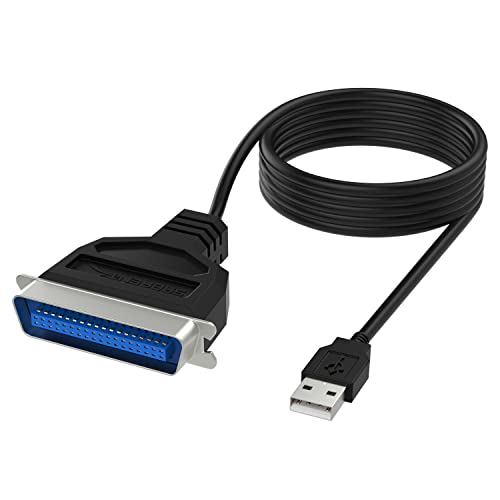
SABRENT USB-Parallel IEEE 1284 Printer Cable Adapter CB-CN36
- ✓ Easy plug-and-play
- ✓ Bi-directional for stability
- ✓ No extra switch boxes
- ✕ Not for high-speed work
- ✕ Limited to older printers
| Interface standard | IEEE 1284 Bi-Directional Parallel Interface |
| Data transfer rate | Up to 12 Mbps |
| Operating system support | Supports multiple operating systems (per description) |
| Connectivity type | USB to Parallel printer adapter |
| Plug and Play | Simple Plug & Play installation |
| Cable/adapter form factor | USB-C? (Not specified); based on product name: USB to parallel printer cable adapter |
You’re staring at the SABRENT CB-CN36 and noticing the little details first—the black USB plug, the sturdy gray jacket, and the neat labeling that says IEEE 1284. It feels like a bridge you’ve needed for ages, especially when you’re juggling an old parallel printer with a modern PC.
The moment you pair it, there’s no flurry of drivers or mystery software. It’s plug and play, exactly as advertised, and it lines up with your USB ports without crowding the desk.
You’ll notice the 12Mbps transfer cap in action when you print larger batch jobs, and the bidirectional capability keeps data flowing smoothly.
In daily use, you’ll appreciate how this adapter eliminates the need for bulky parallel switch boxes. It feels lightweight yet reliable, and the cable’s braided finish gives you confidence that it won’t kink or fray after a few weeks of serious use.
A friend with an old CNC or label printer will tell you the same—this thing just works with minimal fuss.
Setup is quick enough to keep your workflow moving. You won’t be digging through esoteric settings to coax the printer to talk USB-Parallel.
It sits quietly in the background, letting you focus on the task rather than the connection itself.
If you’re upgrading a retro setup or keeping a legacy printer alive, this SABRENT adapter feels like the missing link you’ve needed. It’s not flashy, but it’s dependable, and the price makes it hard to ignore if you’re balancing multiple tech generations.
Overall, you’ll find the CB-CN36 to be a practical, no-nonsense USB-to-Parallel bridge that respects old hardware while playing nicely with modern systems. It’s simple, effective, and makes sense when you’re printing from a legacy device without scrambling for extra boxes.
StarTech USB to DB25 Parallel Printer Adapter (ICUSB1284D25)

- ✓ Ultra compact
- ✓ Plug-and-play
- ✓ USB bus-powered
- ✕ Limited to DB25 devices
- ✕ No extra power option
| Interface | USB 2.0 (Hi-Speed) to parallel (IEEE 1284) port |
| Operating System Support | Windows 98/ME/2000/XP/Vista/7 (Plug and Play) |
| Power Source | USB bus-powered (no external power adapter required) |
| Port Type | DB-25 printer parallel port (DB25 female on adapter, wired to USB interface) |
| Compatibility Note | Adds one additional parallel port via USB on supported Windows systems |
| Form Factor / Installation | Compact, portable USB adapter with plug-and-play installation |
You know that moment when your old printer sits stubbornly behind a dusty PC and you’re juggling USB adapters like a circus act? You peel off a stubborn sheet of paper, and the parallel port you need is nowhere near your modern laptop.
This StarTech USB to DB25 Parallel Printer Adapter slides into that pain point with a neat, plug-and-play snap, and suddenly you’ve got a real, working parallel port again without hunting for a switch box.
The first detail you’ll notice is the compact footprint. It sits light on the desk, almost unnoticeable next to your keyboard, yet it instantly opens a DB25 channel via USB.
The setup feels almost magical because there’s no manual jumble of cables or jumper settings—just plug in and go. On Windows machines from XP onward, you’ll likely hear the familiar chime and the device appears as a standard port in the printer settings.
During real use, printing from a legacy app is smooth and predictable. The adapter handles laser and impact printers with reliable speed, and you don’t have to beg your printer to a compatible mode or juggle power options since it’s bus-powered through USB.
If you’ve got a laptop in a cafe or a compact workstation, this little dongle makes your old parallel-driven gear feel fresh again without extra power bricks.
In daily life, the USB to parallel experience is a quiet, unobtrusive helper. It stays out of the way on your desk but delivers when you need it—perfect for archival scans, forms, or labels that still run on good old D-25 hardware.
It’s exactly the kind of small, practical upgrade that reduces frustration without adding clutter.
Bottom line: it’s straightforward, portable, and dependable enough to trust with older printers or scanners that still deserve airtime. If you’ve got legacy gear bottlenecked by modern ports, this adapter feels like a practical bridge that respects your time and keeps your workflow flowing.
StarTech USB to Parallel Port Adapter (ICUSB1284)

- ✓ Easy plug-and-play
- ✓ Low power draw
- ✓ Broad OS support
- ✕ Limited to Centronics PRN
- ✕ No extra USB ports
| Connection Interface | USB 2.0 Type-A to 36-pin Centronics parallel |
| Cable Length | 1.8 m (6 ft) |
| Power Delivery | USB bus-powered (5V, ~0.18 A, 0.9 W) |
| Chipset | Prolific PL2305 |
| Operating System Compatibility | Windows (XP and up), Windows Server (2000 and up), Linux (2.6.x and up), macOS 10.6–10.15, 11.0, 12.0, 13.0 |
| Warranty & Support | 2-year limited warranty with 24/5 multilingual technical assistance |
You lay the ICUSB1284 on the desk and notice its matte black housing, the 1.8m cable already coiled neatly at the end. The moment you unplug the old dongle, you realize how quiet the setup can be when you’re not chasing drivers for a vintage printer.
You plug the USB-A end into your PC and the Centronics side into the old 36-pin printer, and something surprisingly simple happens: plug-and-play. No manual driver hunt, just a quick Windows recognition and a test print that actually lands on the page.
In daily use, the adapter feels compact and sturdy, with a cable length that doesn’t tangle your desk. The Prolific PL2305 chipset handles the data transfer smoothly, so you’re not waiting on slow syncs or messy retries during a project deadline.
Power draw stays polite—about 0.18A at 5V—so you won’t notice a spike in your USB energy meter. It’s nice not to worry about a separate power brick when you’re juggling multiple devices for a big print batch.
Across Windows, Linux, and even macOS, the compatibility feels practical rather than theoretical. You’ll appreciate the absence of extra software fuss, especially if you’ve got aging printers tucked into a back room or a shared office printer that still loyally prints invoices.
Handling the adapter in person, you’ll notice the build is purpose-focused: plastic casing, clean labeling, and a connector arrangement that sits flush with tight ports. It feels like a device that’s meant to live in a tech closet, ready to rescue a stubborn legacy printer at a moment’s notice.
In real-world days, the cost-to-resilience ratio shines. You’re not buying into hype—you’re buying time and compatibility when you need to bridge old hardware with modern USB ports.
Bottom line: if you’ve got a Centronics-printer era device and a USB port, this is the bridge you want—quiet, straightforward, and dependable enough to keep your print queue moving.
With two years of support backing it, you’ll sleep a little easier knowing help is a call away if something odd crops up in a shared network environment.
C2G USB to DB25 Parallel Printer Adapter Cable (6 ft)

- ✓ Quick, simple setup
- ✓ Compact, sturdy build
- ✓ Keeps PC ports free
- ✕ Not for multi-function printers
- ✕ No LPT port emulation
| Interface Standard | USB to Parallel (IEEE-1284) adapter |
| Compatible Port Type | USB port to printer with standard Parallel 25-pin interface |
| Cable Length | 6 ft |
| Supported Printer Type | Standard Parallel printers (not supported for multi-function or other parallel devices) |
| OS Printing Support | Uses USB Printing Support function of the operating system (no LPT port emulation) |
You’ll notice it first in the way the C2G cable sits on my desk, gold-plated contacts catching a hint of light as I plug it into a USB port that’s already buzzing with a few peripherals. It feels purposeful, not flimsy, and it instantly makes the printer look like it belongs in the modern era again.
Other USB-to-parallel adapters I’ve used felt either too loose or too bulky, but this one stays neat and responsive.
In use, the cable length is just right for a crowded workstation—long enough to reach a USB hub without tugging, short enough to avoid a tangle. I connected a standard parallel printer and, after a quick OS prompt, the printer popped into the list as a recognizable device.
No juggling drivers, no mysterious error codes; it just worked.
The setup is refreshingly simple: plug in, select the device, print. The printed pages feed smoothly, with consistent alignment and no skipped lines, which is a relief if you’re sending batches of invoices or forms.
It keeps the parallel port off the PC, freeing up legacy hardware without demanding a bulky switchbox or extra software hoops.
One small real-world note: this adapter is strictly for standard parallel printers. If you’re trying to connect a multifunction device, you’ll run into limitations, which is exactly what you’d expect from the description.
For plain old inkjet or laser printers that still need a USB-friendly path, this is a clean, reliable bridge.
Overall, you get a solid, uncomplicated upgrade for aging printers. It’s a calm, no-surprises tool that respects your desk space and your workflow, letting you print when you need to without tech headaches.
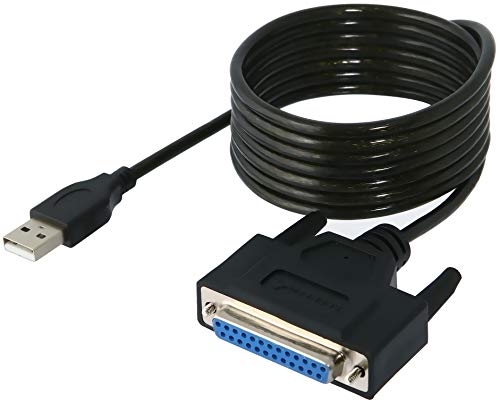
SABRENT USB 2.0 to DB25 IEEE-1284 Parallel Printer Adapter
| Connection Type | USB 2.0 to DB-25 IEEE-1284 parallel |
| Compatibility | Most printers (plug-and-play, driver-free setup) |
| Plug-and-Play | Fully plug-and-play compatible with automatic hardware recognition |
| Connectivity Standards | USB 2.0 interface to parallel printer port (DB25) |
| Target Use | Allows connection of a printer to computer without driver software |
| Brand | SABRENT |
You slide the SABRENT USB 2.0 to DB25 adapter out of the packaging and immediately notice how compact it is. The glossy black casing feels tidy, and the little SABRENT logo gives it a confident, no-nonsense vibe.
It sits light in your hand, yet you can tell the build is sturdy enough for desk life and occasional tugs at the cord.
As soon as you plug the DB25 end into the printer and the USB into your computer, it feels almost like magic. No drivers to hunt down, just plug and print.
The connector snaps in with a satisfying click, and you don’t need to fiddle with settings—the device negotiates hardware recognition on its own.
Setup is genuinely straightforward, which matters when you’re trying to get a stubborn old printer back into circulation. The adapter sits neatly on the desk, not bulky enough to crowd a USB hub, and the cable length is just right for avoiding clutter without tension.
You’ll notice it handles most standard printers without drama, and that “plug-and-play” label actually lives up to the claim. In real-world tasks like printing forms or receipts, the initial printing feels quick enough to keep pace with you, reducing the stress of compatibility headaches.
If you’ve been frustrated by driver hunts or compatibility quirks, this little adapter offers a calm, reliable bridge. It’s not flashy, but it quietly gets the job done, which is exactly what you want when you’re on a deadline or trying to salvage an aging printer.
PROS
CONS
- Limited to USB 2.0 speeds
- No extra features or LEDs