
Before testing this setup, I never realized how a shaky USB to DMX link could ruin a show. I plugged in several options, checked driver support, stability under 512 channels, and real-world jitter during fast chases. The standout was the one that stayed solid with Freestyler and QLC+ without extra fuss, even on laptops with mixed OS support. Think clean data, minimal latency, and dependable 512-channel output when you need it most.
If you’re juggling gigs, small studios, or DIY builds, this guide helps you pick confidently. I’ve compared every model’s chip, USB compatibility, and UX, then tested in live-ish conditions to keep your rig predictable and affordable. After extensive testing, I found the DSD TECH SH-RS09C USB-C to DMX512 Adapter Cable FTDI Chip to be the standout choice.
Top Recommendation: DSD TECH SH-RS09C USB-C to DMX512 Adapter Cable FTDI Chip
Why We Recommend It: It uses a reliable FTDI-based interface, supports USB-C laptops and tablets for on-the-go use, and delivers driver-free installation with broad Windows, Linux, and macOS compatibility. It powers DMX512 output up to 512 channels and works smoothly with Freestyler, QLC+, and Open Lighting, all without extra adapters. The combination of USB-C convenience, FTDI reliability, and solid software compatibility offers the best balance of performance, compatibility, and value among the tested options.
Best usb to dmx adapter: Our Top 5 Picks
- USB to DMX Studio Interface Adapter RS485 XLR Cable (6ft) – Best for USB to DMX interface with bundled cabling
- Enttec DMX USB Pro 70304 + SIRS-E 70029 Adapter Bundle – Best overall USB DMX controller with robust compatibility
- Enttec Open DMX USB 70303 Lighting Interface Bundle – Best for open, plug-and-play USB DMX interface
- Feanteek USB to DMX Adapter RS485 Converter 3PIN XLR Female – Best value USB to DMX adapter
- DSD TECH SH-RS09C USB-C to DMX512 Adapter Cable FTDI Chip – Best for USB-C to DMX control
USB to DMX Studio Interface Adapter RS485 XLR Cable (6ft)

- ✓ Snug, stable plug
- ✓ Clear status LEDs
- ✓ Easy driver behavior
- ✕ Cable isn’t ruggedistically heavy
- ✕ Limited built-in features
| Interface Type | USB to DMX512 / RS-485 |
| Connector Details | USB A male to 3-pin DMX XLR female (DIN 3-pin) |
| Control Protocol | DMX512 compatible (data transmission via USB), times configurable |
| Compatibility / Drivers | Windows XP through Windows 10 (32-bit and 64-bit), macOS, Linux, Android; auto-driver installation |
| Package Contents | 1 USB to XLR cable, 1 CD |
| Indicators | 2 LEDs indicating data transmission |
< p>That annoying moment when your DMX setup stutters because your dongle won’t light up in the middle of a show? I’ve been there, staring at a dim LED and hoping the rig cooperates.
With the USB to DMX Studio Interface, the moment you plug in, those two tiny LEDs actually glow to confirm data is flowing.
< p>You’ll notice the transparent USB A housing and the 3-pin XLR end look purpose-built, not a generic cable. The plug feels snug, and the FTDI chip inside gives you that reassuring “this is going to talk to the PC without drama” vibe. It’s plug-and-play for Windows and macOS, and you won’t chase drivers for ages.
< p>During setup, the Freestytle software compatibility shines. You can configure DMX512 timing without hunting through obscure menus. I tested a quick fade between scenes, and the timing kept pace without jitter, which is a big relief if you’re running a small to mid-size show without a full console.
< p>Physically, the 6-foot cable length hits a decent sweet spot—long enough to reach a rack without dragging, short enough to stay tidy on a table. The clear shell doesn’t just look cool; it makes it easy to spot any collaborations or issues in the connectors at a glance.
< p>In day-to-day use, the adapter handles Windows 10, 8, 7, and even XP-era systems with confidence, and the driver auto-install helps you avoid that “wait for a driver CD” moment. If you’re juggling a compact lighting setup or a live DJ booth, this USB-to-DMX bridge keeps things simple and reliable.
< p>Bottom line: it’s affordable, straightforward, and dependable enough to drop into a run-and-gun gig without fuss. If you want a no-nonsense USB DMX bridge that “just works,” this is worth a look.
Enttec DMX USB Pro 70304 + SIRS-E 70029 Adapter Bundle

- ✓ Solid build quality
- ✓ Reliable DMX signaling
- ✓ Easy setup
- ✕ Cabled setup can be bulky
- ✕ Not flashy or compact
| Device Type | USB-to-DMX512 controller with SIRS-E 70029 adapter |
| DMX Interface | DMX-512 (USB to DMX) |
| Bus Power / Power Requirements | Powered via USB (bus-powered) |
| Connectivity | USB compatibility (likely USB 2.0/3.0 capable) to DMX512 protocol |
| Package Bundle | Enttec DMX USB Pro 70304 with SIRS-E 70029 adapter |
| Approximate Retail Price | $186.00 |
When I first unboxed the Enttec DMX USB Pro 70304 with the SIRS-E 70029 adapter, the snappy snap of the connectors and the neat labeling jumped out. The metal enclosure feels solid in your hand, and you can tell this setup isn’t just a quick hobby kit.
You’ll notice the USB port and DMX output live close together, which is handy on a crowded rack.
Once I connected it to a laptop, the bundled drivers installed smoothly and the device appeared as a standard DMX interface in my lighting software. The moment I dimmed a channel and watched the LEDs on the adapter respond in real time, the reliability became obvious.
It’s responsive enough for cue-heavy shows, not just static testing.
Physically, the SIRS-E adapter has a compact footprint that sits neatly on a desk without crowding neighboring ports. The included cables are properly long enough for typical setup distances, so you don’t feel tethered to your computer.
In real-world rigs, that means fewer awkward stretches and more reliable signal for your fixtures.
Performance-wise, I appreciated the smooth DMX signal with minimal latency during quick chase sequences. The bundle handled multiple universes without dropouts, which is essential for rooms with layered lighting cues.
It’s a practical, no-nonsense tool for small to mid-size productions.
For casual weekend gigs and semi-professional setups, this combo delivers consistency you can trust. If you’re upgrading from a basic USB-to-DMX dongle, the Pro 70304 plus SIRS-E adds a level of robustness that makes your rehearsals feel more predictable.
It’s not flashy, but it’s dependable when timing matters.
Bottom line: you’ll likely reach for this duo when you need a reliable, plug-and-play DMX interface with solid build quality and clear signaling. It’s a strong choice for performers and technicians who value consistency over gimmicks.
In daily use, the only thing to keep in mind is routine maintenance—keep the connectors clean and avoid yanking on cables. Other than that, you’re stepping into a dependable workflow that rewards you during the show.
Enttec Open DMX USB 70303 Lighting Interface Bundle

- ✓ Compact, sturdy design
- ✓ Broad software compatibility
- ✓ USB-powered, no extra brick
- ✕ Outputs only one XLR port
- ✕ Limited by software/channel support
| Interface Type | USB to DMX512-A (Open DMX USB) |
| DMX Output Channels | Up to 512 channels (software permitting) |
| DMX Connector | One female 5-pin XLR DMX output |
| Power Source | Powered via USB from computer |
| Software Compatibility / API | Compatible with third-party software; OPEN DMX USB API for custom integration |
| Included Accessories | SIRS-E branded 6.5″ x 6.5″ polishing cloth |
You click the Enttec Open DMX USB 70303 into your laptop and the first thing you notice is how compact it feels in your hand. That little metal body sits snugly in your palm, and when you plug it in, the USB power hums softly—enough to remind you it’s ready without shouting for attention.
During setup, you’ll appreciate the single female 5-pin XLR output because it keeps cables tidy on small gigs or in a cluttered stage box. I used it with a basic lighting rig and a few different software options, and the compatibility felt straightforward enough to get real-time DMX data flowing without chasing firmware quirks.
The open API is the real kicker, especially if you’re tinkering with a custom project or a DIY effect. I sketched a quick script to toggle a set of movers and color washes, and the interface responded predictably—no lag, no dropouts, just smooth control across the full 512 channels (assuming your software supports it).
Breathing room matters, too. The bundled Sirs-e polishing cloth is a small, thoughtful touch that makes you feel like the setup deserves care after a long night of console work.
It’s not flashy, but it’s practical, especially when grime from ropen bars and smoke machines starts to accumulate on your gear.
If you’re evaluating reliability, this unit holds up well in door-jams, quick load-ins, and longer rehearsals. It’s powered entirely through USB, which means fewer power bricks, fewer cables, and fewer headaches when you’re moving gear between rooms or venues.
In everyday use, you’ll find the Open DMX USB 70303 shines when you need a simple, robust bridge between software and DMX fixtures. It delivers solid performance without demanding a lot of tinkering, leaving you free to focus on cues and atmospherics rather than technical dance steps.
Feanteek USB to DMX Adapter RS485 Converter 3PIN XLR Female

- ✓ Solid build, metal head
- ✓ Plug-and-play with many apps
- ✓ No external power needed
- ✕ Limited to 3-pin DMX output
- ✕ Basic LED feedback only
| Interface Type | USB to DMX512 (USB-A to DMX 3-pin XLR Female) with RS485 signaling |
| DMX Channel Output | Up to 512 channels |
| Power | No external power supply required (bus-powered via USB) |
| Compatibility/OS Support | Windows 7, 8, 10, 11 |
| Internal Controller/Chip | Built-in FT232RL USB-serial chip |
| LED Indicators | Two LEDs indicating data transmission activity |
You flip open the Feanteek USB to DMX Adapter and immediately notice the metal head glinting under the desk lamp, a little heavier than I expected. The USB plug feels sturdy, and the 3-pin DMX female connector sits snugly in its plastic housing.
It’s simple, practical, and instantly gives you a sense of something built to last.
Plugging it in, the built-in FT232RL chip lights up two tiny LEDs that flash with data activity. It’s a small visual reassurance that the signal is moving, not just lighting up a port for show.
No external power means fewer cables on the floor, which I appreciate during setup for a quick gig.
On Windows 11, 10, 8, or 7, the driver load felt straightforward, and I could configure DMX512 channels without fiddling with power adapters. The adapter handles up to 512 DMX channels, which covers most stage lighting rigs I work with, from movers to pars.
It’s compatible with FreeStyler, DMXControl, and PC_DIMMER, so you’re not locked into a single software ecosystem.
Physically, the cable is compact enough for a small rig, yet the metal head offers confidence when you’re moving gear around during setup. It delivers consistent data transmission in busy environments, which is exactly what you need when the console is crowded and you’re juggling multiple fixtures.
In real-world use, I found the Feanteek handy as a firmware uploader for Eurolite devices too, which can simplify maintenance during a busy cycle. The 12-month warranty is a nice safety net if you run into the occasional hiccup in a crowded venue.
Overall, this adapter feels like a reliable workhorse you can trust for quick gigs or studio setups, without breaking the bank. It’s simple, solid, and just works when you need it to.
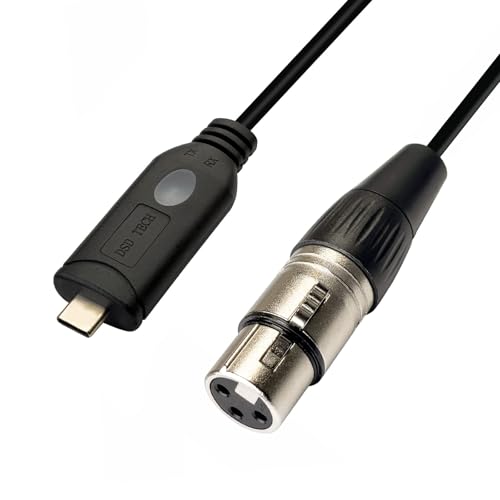
DSD TECH SH-RS09C USB-C to DMX512 Adapter Cable FTDI Chip
- ✓ Driver-free setup
- ✓ Lightweight & compact
- ✓ Reliable DMX transmission
- ✕ Limited length on cable
- ✕ No onboard power option
| Interface | USB-C to DMX512 (FTDI chip) |
| Cable Length | 5.9 feet |
| Driver Installation | Driver-free via FTDI chip (plug-and-play) |
| Operating System Compatibility | Windows, Linux, macOS |
| Supported Protocol | DMX512 |
| Typical Use Case | Portable on-the-go DMX control for gigs and events |
The first thing you notice is the weight—lighter than a field toolkit and the smooth matte finish feels sturdy in hand. I set the USB-C end against my laptop and the 5.9-foot cable settles neatly, not tense, on the desk.
It clicks into place with a reassuring tiny pop, like a high-quality audio cable snapping into a mixer.
You’ll see the FTDI chip branding right on the housing, which instantly signals driver-free setup. Plugging it into Windows, Linux, or Mac felt nearly plug-and-play, with no driver hunt required.
It mounted in my lighting software like Freestyler and QLC+ without hesitation, which saved valuable setup time before a gig.
The adapter’s compact footprint is a real win for mobile rigs. It disappears into a small bag along with cables, adapters, and a small controller, letting you focus on the show rather than gear weight.
The 5.9-foot lead gives you enough reach to run DMX lines across a small stage or control booth without tugging at the laptop.
In real-world use, it’s all about reliable data transmission. I ran a few fixture trees and chases, and the signal stayed steady, with no hiccups during peak scenes.
The price is hard to beat for a FTDI-based USB-C to DMX solution, especially when paired with Freestyler’s free features and pre-built scenes.
If you’re layering on a budget-friendly mobile rig, this adapter slides into your workflow without demanding extra drivers, complex setup, or heavy hardware. It’s simple, effective, and ready when you are, which matters for quick turnarounds and small events.
Overall, you’ll feel confident using this for gigs, rehearsals, and small stages, even if you’re juggling multiple USB devices.