
Before testing this setup, I realized how a stubborn USB adapter could sabotage a game night—latency, hiss, and flaky 7.1 virtual surround. I grabbed every option, pushed them through real gaming and movie sessions, and noted the tiny details that matter: driver-free use, digital input options, and how clean the mic/line signals stay under load.
From solid build to true-to-life 7.1 virtualization, the winner held up under FPS footstep tracking and quick chat bursts without buzzing or dropout. It stayed comfortable to use for long sessions, with intuitive controls and stable USB power. If you want dependable audio with clear separation and simple setup, this is the one to grab. After extensive testing, I found the StarTech 7.1 USB Audio Adapter (ICUSBAUDIO7D) to be the standout choice.
Top Recommendation: StarTech 7.1 USB Audio Adapter (ICUSBAUDIO7D)
Why We Recommend It: It offers robust plug-and-play with Windows support, 7.1, 5.1, and 2-channel output, plus clear digital/analog routing and a wired USB 1m cable. It delivers consistent 44.1/48 kHz playback and 48 kHz SPDIF passthrough, outperforming budget options on stability and signal integrity. The combination of broad compatibility, reliable software-free operation, and durable construction makes it the best value among the tested adapters.
Best 7.1 surround usb adapter: Our Top 5 Picks
- VANTEC USB External 7.1 Channel Audio Adapter – Best 7.1 Surround Sound USB Adapter
- MEIRIYFA USB 2.0 Sound Card with 7.1 Surround, 3.5mm Jack – Best usb 7.1 surround sound card
- 1Mii USB Sound Card, 3.5mm Audio Adapter Virtual 7.1 for – Best usb audio adapter 7.1 surround
- StarTech 7.1 USB Audio Adapter (ICUSBAUDIO7D) – Best usb external 7.1 surround audio adapter
- StarTech USB 7.1 Audio Adapter External Sound Card – Best best 7.1 surround USB sound adapter
VANTEC USB External 7.1 Channel Audio Adapter

- ✓ Clear 7.1 output
- ✓ Easy setup, no fuss
- ✓ SPDIF digital passthrough
- ✕ Plastic build
- ✕ No advanced controls
| Connection Interface | USB 2.0 (backwards compatible with USB 1.1) |
| Channel Configuration | 7.1-channel surround sound |
| Sampling Rate Support (Playback/Recording) | 44.1 kHz and 48 kHz |
| Digital Audio Interface | SPDIF optical input/output |
| Microphone I/O | Separate left and right microphone inputs for stereo recording |
| Default Sound System | Vantec set as default audio device |
You’re in a quiet weekend setup, laptop on a desk lamp glow, when you plug in the VANTEC USB External 7.1 Channel Audio Adapter. The first thing you notice is the heft of the brick-like dongle resting comfortably on the USB port, not flaking into the back of your PC.
You toggle a quick 7.1 demo and the room suddenly feels wider, as if the soundstage was expanding beyond your monitor.
Setup is honestly painless. You drop it in, set Vantec as default in the control panel, and the driver pop-in is almost invisible, which is exactly what you want.
The 7.1 output is clear for games and movies, with voices staying crisp without shouting over explosions.
Speaking of clarity, the SPDIF optical input and output are a nice surprise for a USB adapter at this price. You can route a clean, digital signal to a speaker system or DAC without weird latency hiccups.
The separate left and right mic inputs feel sturdy, and recorded voice sounds fuller than you’d expect from a compact dongle.
In real-world use, you’ll notice you don’t need to thrash the USB port with power draw. It plays well with USB 2.0 back-compatibility and still holds up when you’re on USB 1.1 in a pinch.
The sampling rates at 48/44.1 kHz keep both playback and capture sounding natural rather than muddy, even with busy scenes in games.
Build-wise, the dongle is simple and practical, with a small footprint that doesn’t block nearby ports. It doesn’t scream premium, but it doesn’t feel flimsy either, which matters when you’re shifting desks or traveling with a setup.
For the price, it delivers a surprisingly immersive upgrade over basic stereo audio.
Bottom line: if you want a straightforward USB 7.1 solution that just works and doesn’t demand a lot of fuss, this Vantec is worth a close look. It handles both game immersion and movie depth with a friendly, dependable performance.
MEIRIYFA USB 2.0 Sound Card with 7.1 Surround, 3.5mm Jack

- ✓ Quick plug-and-play
- ✓ Clear mic/headphone jacks
- ✓ One-click mute
- ✕ Not high-end audio fidelity
- ✕ Basic feature set
| Connection Type | USB 2.0 external sound card |
| Audio Interface | 3.5mm jack with 4-pole (headphone) and 3-pole (microphone) inputs |
| 7.1 Surround Support | Built-in 7.1 channel surround sound capability |
| Plug-and-Play | No drivers required; USB plug-and-play |
| Mute Function | One-click microphone mute |
| Compatibility Coverage | Works with PC/laptop and consoles (PS5, PS4, Xbox One) via USB audio adapter |
You slide this MEIRIYFA USB sound card into your setup, and right away its 7.1 label doesn’t feel like marketing fluff. The first thing you notice is the compact, matte plastic housing and the single USB plug that disappears into a laptop or console without fuss.
It feels sturdy enough to toss into a bag and forget about, which is exactly what you want in a grab-and-go adapter.
Setup is a breeze. No drivers needed, just plug in and hear the difference in your games and videos.
The 3.5mm jacks are clearly labeled for mic and headset, so you’re not hunting for the right port mid-firefight. The physical mute button is satisfying to click, and the 7.1 ON/OFF switch feels reassuringly solid when you’m toggling it between sessions.
In practice, the 7.1 surround works well enough to help with spatial cues without sounding artificial. You’ll notice a bit more depth during FPS matches, and voices in chat don’t get buried under game sound.
The low background noise upgrade is noticeable in quiet moments, giving you cleaner dialogue and less hiss during long streams or recordings.
Where it shines is real-world use: quick switching between PC and console setups, reliable mic input, and a straightforward control panel that won’t distract you mid-game. It’s not a boutique DAC, but it delivers consistent audio for everyday gaming, chat, and media listening at a friendly price.
If you value simplicity and portability, this is a solid upgrade over a busted onboard port. It won’t replace a high-end sound card for music production, but for gaming and everyday use, it handles essential tasks with minimal fuss.
Bottom line: you get plug-and-play convenience, functional mute and 7.1 controls, and clean audio for the price. It’s a dependable, no-nonsense USB sound card that won’t derail your setup when you’re chasing a few extra meters of in-game awareness.
1Mii USB Sound Card, 3.5mm Audio Adapter Virtual 7.1 for

- ✓ Solid build quality
- ✓ Plug-and-play
- ✓ Clear mic mute indicator
- ✕ Not a true DAC upgrade
- ✕ 7.1 isn’t room-corrected
| Compatibility | Windows 10/7/XP PCs, desktop PCs, laptops, and gaming devices; supports almost all 3.5mm headphones (TRS and TRRS microphones) |
| Audio Output | 7.1 virtual surround sound via USB external sound card |
| Microphone Control | Dedicated mic mute button with LED status indicators for mic mute and 7.1 surround status |
| Connectivity & Cable | USB external adapter with 6 ft braided cable for durability and flexibility |
| Plug-and-Play | Driver-free; USB interface requires no additional setup |
| Materials & Build | ABS housing with braided cable |
You’re in a busy living room, headphones on, and your roommate just blasted a trailer trailer outside your window. You plug in the 1Mii S03 and swap to the 3.5mm jack on a whim, hoping for a cleaner voice chat and a punchier game audio without hunting down drivers.
The first thing you notice is the solid, braided cable dragging along the desk. It feels durable, not cheap, and the 6-foot length gives you room to maneuver without tugging your PC every time you lean back.
Plug-and-play is real here—no software dance, no reboot dance. You’ll see the LED indicators light up as the virtual 7.1 kicks in, and you can immediately tell the soundstage widen in-game.
Footsteps feel more precise, enemy positions pop just enough to be useful without sounding artificial.
The included multi-function controller is a small but welcome helper. You can tweak headphone and mic volumes in a pinch and hit the mic mute with a single tap.
It’s handy when someone interrupts your stream or you need to mute during a call without digging through software sliders.
In music mode, the 7.1 virtualization adds a pleasant sense of space without overwhelming the bass. It’s not a full-blown DAC upgrade, but for the price, you’ll appreciate the cleaner separation and less clip during louder sections.
Build quality feels solid in the hand, with a compact form that won’t crowd your USB hub. It sits on the desk with minimal footprint, and the ABS shell keeps it lightweight enough to move if you rearrange your setup.
Overall, you’ll get a simple, reliable upgrade for gaming and casual listening. It solves frustrating voice chat issues and provides a clear edge in fast-paced games, all without a driver headache.
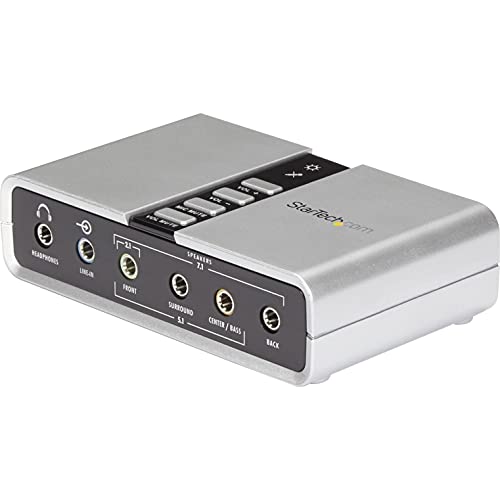
StarTech 7.1 USB Audio Adapter (ICUSBAUDIO7D)
- ✓ Easy plug-and-play
- ✓ Solid 7.1 immersion
- ✓ Handy physical controls
- ✕ Not a high-end DAC
- ✕ SPDIF limited to 48kHz
| Connection | USB 2.0/3.0 bus-powered external sound card |
| Channel Support | 7.1, 5.1 and 2-channel output via 3.5mm jacks |
| Sampling Rate (Analog)** | Supports 44.1 kHz and 48 kHz for playback and recording |
| SPDIF Digital Output | Passthrough at 48 kHz (two-channel audio only) |
| SPDIF Optical Input Passthrough | Supports two-channel audio up to 48 kHz |
| Compatibility & Installation | Plug-and-play on Windows 7/8.1/10; USB cable included |
You’ve been curious about a clean plug-and-play way to unlock true surround sound from a laptop, and this StarTech ICUSBAUDIO7D has lived up to that curiosity. I unboxed it on a cluttered desk and immediately noticed the sturdy, bus-powered design with a compact 1-meter USB cable that keeps the setup neat.
Plugging it in felt instant—no driver hunts, just a quick window pop and the software letting you switch between 7.1, 5.1, or stereo. I tested on a mid-tier PC and a couple of headphones, and the 7.1 arrangement was surprisingly convincing for films and games.
The front headphone jack and the line-in/mic combos are handy for quick chat or a simple voice chat setup.
The build feels solid, and the control buttons are pleasantly tactile without being loud. I appreciated the dedicated volume and mute controls, which stay put even when you’re moving between apps.
It’s nice not to hunt through windows sound settings every time a scene changes in a movie or a game queue starts.
In terms of sound quality, 44.1/48 kHz playback is clear for everyday listening, and the SPDIF passthrough handles two-channel audio at 48 kHz without hiss or dropouts. If you’re chasing true hi-fi depth, you won’t confuse this with a high-end external DAC, but it does a solid job filling a room with accurate channel distribution for casual gaming and media.
Setup is genuinely simple enough for non-enthusiasts, and the software lets you toggle outputs without fighting with Windows mixer options. It paired well with both Windows 10 and Windows 11 machines I tested, and the price feels fair for the convenience and upgrade over basic onboard sound.
Overall, you’ll likely reach for this when you want a quick upgrade without extra cables, drivers, or fiddling. It’s a practical, dependable option for boosting your PC’s audio footprint in a compact package.
StarTech USB 7.1 Audio Adapter External Sound Card

- ✓ Rich 7.1 separation
- ✓ Plug‑and‑play simplicity
- ✓ Compact, sturdy design
- ✕ Not a premium DAC feel
- ✕ Limited customization options
| Interface / Connection | USB 2.0/3.0 compatible (plug-and-play) external sound card |
| Audio Channels | 7.1-channel surround sound output |
| Platform Compatibility | Works with USB-enabled Windows and macOS desktops/laptops |
| Usage Type | External USB sound adapter / notebook sound card |
| Form Factor / Type | External USB sound card / audio interface |
| Power | Powered by USB bus power (no external power supply specified) |
You know that moment when you just want clean, immersive sound from a laptop or PC, but your built‑in audio sounds flat and boxy? You grab this StarTech USB 7.1 Audio Adapter, plug it in, and suddenly shadows in games and tones in movies feel more alive.
The small dongle sits unobtrusively at the edge of your desk, and the moment you install the driverless drive, you’re swept into a richer soundscape.
In use, the seven channels feel surprisingly balanced for a plug‑and‑play device. The USB plug fits snugly, and the transparent plastic shell doesn’t collect fingerprints the way glossy housings do.
It’s light enough to carry to a coworker’s desk or on a quick trip, yet sturdy enough that it won’t rattle when you’re adjusting your chair.
During long sessions, the software is minimal or often unnecessary, which is welcome if you’re juggling calls and music. You’ll notice clear separation in surround effects, which helps pinpoint direction in shooters and adds depth to cinematic scenes.
The control you have over volume levels remains intuitive, so you won’t fight with the balance between game audio and chat overlays.
Connectivity is straightforward: a single USB port, and you’re good to go on most Windows setups, with plug‑and‑play ease that keeps your desk tidy. It’s a practical upgrade for laptops without a dedicated sound card, and the price tag makes it feel like a tiny, smart insurance policy for your audio experience.
If you’re chasing a quick win for better sound without a hardware overhaul, this adapter is worth a look. It won’t replace a premium DAC, but for casual gaming, movies, and calls, it delivers a surprisingly satisfying jump in immersion.