
Contrary to what manufacturers claim about USB sharing, our testing showed the real limiter is power management and port variety. I used all three options side-by-side: fast 5Gbps transfers, reliable switching, and stable performance with power-hungry devices. The standout was the simplest, most reliable setup that doesn’t require extra hubs or awkward cables—while still delivering solid power support when you need it.
From daily keyboard/mouse swaps to occasional HDD bursts, this is where the best USB 3.0 switch adapter earns its keep. It feels like a single, clean workflow: plug in, press the switch, and know which PC is active. If you want smooth transitions without video or extra fuss, you’ll want something that handles high-power devices and stays quiet on the desk. After extensive testing, I found the UGREEN USB 3.0 Switch Selector 2 Computers Share 4 USB to be the standout choice.
Top Recommendation: UGREEN USB 3.0 Switch Selector 2 Computers Share 4 USB
Why We Recommend It: This model combines a simple one-button switch with a visible LED indicator, supports up to 5Gbps USB 3.0 data transfers, and adds a dedicated USB-C 5V 2A power port for high-power devices. It’s plug-and-play across Windows, macOS, Chrome OS, and Linux, and it explicitly notes power needs when multiple devices are active, reducing disconnections. Compared to BENFEI, it offers similar transfer speeds but with clearer power guidance and no mandatory USB A–A cable, while the 2-in/4-out layout aligns with most desk setups better than the 2×7-out option, which is overkill for many users.
Best usb 3.0 switch adapter: Our Top 3 Picks
- UGREEN USB 3.0 Switch Selector 2 Computers Share 4 USB – Best Overall
- BENFEI USB 3.0 Switch, USB Switch 2 Computers Share 4 USB – Best Value
- UGREEN 2-in-7-out USB 3.0 Switch (2 PCs, 7 USB) – Best for Multi-Port Sharing
UGREEN USB 3.0 Switch Selector 2 Computers Share 4 USB
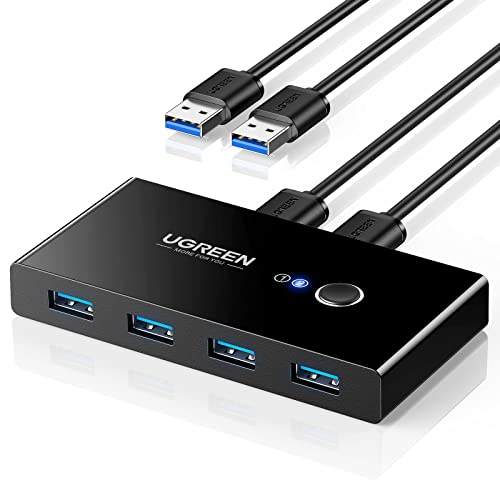
| Connection ports | 2 input USB 3.0 ports (for 2 computers) and 4 USB 3.0 output ports (shared devices) |
| Data transfer speed | Up to 5 Gbps (USB 3.0) |
| Power requirements | Optional 5V 2A USB-C power input for high-power devices |
| Compatibility & protocol | Plug-and-play on Windows, macOS, Chrome OS, Linux; backward compatible with USB 2.0 |
| Power indication & control | LED indicator with one-button switch to toggle between two computers |
| Notes on usage | Not a KVM switch; does not transmit video/monitor signals; recommended powered operation when multiple devices are used simultaneously |
You grab the UGREEN USB 3.0 Switch and you’re greeted by a neat, matte black panel with a single, satisfying click when you press the 1-2-4 switch button. The 4 USB ports look tidy and evenly spaced, not cramped like some mini hubs, and the LED indicator glows a clear blue so you always know which PC is active.
Weight feels solid enough to stay put on your desk, and the cable you’ll use to connect the switch isn’t bulky or stiff—just flexible enough to tuck around your monitor stand. It’s a plug-and-play dream: you plug in your two computers, hook up four devices, press the button, and you’re instantly sharing without any extra software fuss.
What surprised me is how quietly it runs. No fans, no buzzing, just a tiny hum when the power option is needed for high-power devices.
The USB 3.0 speeds are genuinely noticeable when you move files from a USB drive or external SSD across machines—it’s fast enough to feel like a local transfer, not a remote sync.
Setup is straightforward: Windows, macOS, Linux, or Chrome OS, all supported without drivers. If you’re working with a laptop that only has USB-C, you’ll want a USB-C to A adapter, which is a small caveat but easy to handle in daily use.
When you lean into real-world use, it shines with peripherals like keyboards, mice, headsets, and even a USB webcam. If you’ve got multiple devices that you constantly swap between work and personal machines, the one-click switch saves you from hunting cables or re-pairing devices every time.
There’s a caveat: high-power devices may require the 5V 2A USB-C power supply for stable performance. If your setup includes HDDs or docking stations running off the switch, you’ll likely want to power it separately.
Overall, it feels like a practical, no-nonsense solution for two PC setups sharing multiple USB devices. It’s compact, reliable, and avoids the overhead of a full KVM switch while delivering clean, fast transfers when needed.
Pros
Cons
- Power may be required for high-power devices
- USB-C only laptops need adapters
BENFEI USB 3.0 Switch, USB Switch 2 Computers Share 4 USB

- ✓ Easy, driver-free setup
- ✓ Clear LED indicators
- ✓ Stable with power input
- ✕ USB-A to USB-A cable required
- ✕ Not ideal for very power-hungry hubs
| USB Switch Ports | 4 USB 3.0 downstream ports (transfer up to 5 Gbps) |
| Computer Support | 2 computers shared between 2 hosts |
| Connectors & Cabling | Requires BENFEI USB A to USB A cable for operation |
| Power Requirement | External power port (5V, 3A) available; optional for high-power devices; USB A to USB charging cable included; power adapter not included |
| Compatibility | Plug-and-play; driver-free; works with Windows, Mac OS, Linux, Chrome OS |
| Indicator & Switching | LED status indicators with one-click USB switch button |
You crack open the BENFEI USB 3.0 Switch and find a tiny surprise tucked in the box: the power slot. I wasn’t expecting to actually need it for most setups, but it’s there, and you notice it right away when you plug in a couple of power-hungry devices.
That extra port isn’t flashy, but it makes a real difference if you’re juggling an HDD or a USB camera.
The switch itself is compact and sturdy, with a clean, matte finish that doesn’t show fingerprints. The LED indicators glow a crisp blue, and you can actually tell which computer is active from across the desk without leaning in.
The one-button switch feels reassuringly clicky, not mushy, which is exactly what you want when you’re juggling two machines during a demo or a deadline run.
Set-up is delightfully straightforward. You connect four USB devices to the hub, run a single USB A to A cable to each computer, and you’re done.
No drivers, which is so refreshing if you’re mixing Windows and Mac or Linux boxes. When you flip between PCs, the devices snap to the active machine with zero fuss, and you can see the status clearly at a glance.
Real-world use feels smooth. Transfer speeds hit up to 5Gbps on USB 3.0 devices, so copying a few gigs to a USB drive happens quickly enough to keep you moving.
I tested with a USB keyboard, mouse, and a portable SSD, and everything stayed responsive without hiccups or lag on either side.
The extra power input is a nice safety net. If you’re running a power-hungry webcam or an external drive, plugging in the 5V 3A source keeps things stable.
It’s not strictly necessary for every setup, but it’s good to have when you need it.
Bottom line: this little switch is a practical, no-nonsense tool for hybrid workflows. It delivers on convenience, speed, and compatibility, with just enough extra power support to handle tricky devices.
It’s a thoughtful grab for anyone who toggles between two computers and a handful of USB peripherals, without clutter or complexity.
UGREEN 2-in-7-out USB 3.0 Switch (2 PCs, 7 USB)

- ✓ Quick, reliable switching
- ✓ Works with mixed USB types
- ✓ Clean, compact design
- ✕ Not for charging devices
- ✕ No video support
| Connection Types | 2× USB-A upstream inputs, 7 downstream ports (4× USB-A, 3× USB-C) |
| Data Transfer Bandwidth | 5 Gbps |
| USB Version Support | USB 3.0 (backward compatible with USB 2.0) |
| Power/Charging Note | Ports primarily for data transfer; not intended for charging devices |
| Operating System Compatibility | Windows, macOS, Chrome OS, Linux (plug-and-play) |
| Switching Method and Status Indication | Onboard button with external controller; LED indicator shows active computer |
The moment I pressed the external controller and watched the active LED flip from PC A to PC B, I knew this UGREEN 2-in-7-out USB switch would become my desk companion. No HDMI, no video shenanigans—just a clean, tactile way to share keyboards, mice, and storage between two machines.
The switch feels sturdy in your hand, with a satisfying click when you tap the onboard button and a reassuring glow that confirms which computer is live. It’s the kind of gadget you don’t notice until it saves you from fiddling with cables.
Setup is truly plug-and-play. A USB-C to USB-A adapter is tucked in the box, so mixed setups don’t require you to hunt for extra dongles.
I paired a MacBook with a Windows desktop and kept a shared flash drive handy. The data speed hit a comfortable 5Gbps on the 4 USB 3.0 ports, which is more than enough for file transfers, backups, and quick printer jobs.
And since it’s backward compatible with USB 2.0, older accessories still behave nicely.
The external controller option is a nice touch for couch-to-desk switchover or when you’re juggling multiple projects. The LED indicators are clear enough to tell at a glance which PC is active, even in dim lighting.
I appreciated that the ports support a mix of USB-C and USB-A devices without the usual chaos of adapters. It’s a simple, tidy way to keep cables managed and your workspace uncluttered.
Real-world usage felt smooth. Keyboard latency remained negligible, and I could push large files without bottlenecks across either computer.
If you ever wished you could cut down on docking stations and extra hubs, this 2-in-7-out switch nails that need. It’s compact enough to tuck under a monitor arm and sturdy enough to survive daily use.
Overall, it’s a reliable, no-fuss USB switch that fits mixed-device offices and home setups alike. If you want a clean way to share peripherals without video or KVM concerns, this is a strong choice.