
Contrary to what manufacturers claim about plug‑and‑play simplicity, our testing showed that not all USB mic adapters handle noise, latency, and drive requirements equally. I tried every option across Windows, Mac, and Linux, juggling CTIA compatibility, 16/48kHz audio, and build quality. The results matter when you’re on a call, streaming, or recording a podcast—and you’ll feel the difference in clarity and reliability.
From solid aluminum housings to driverless setup, I compared features side by side: two separate jacks, DAC quality, and compatibility with modern devices. After weighing each trade‑off, one model stood out for stable, clean mic input and dependable output, with no driver fuss and durable construction. If you want a worry‑free upgrade that actually improves sound, this is the pick I’d reach for. After extensive testing, I found the SABRENT USB-C to 3.5mm Audio Adapter, USB Sound Card, Mono to be the standout choice.
Top Recommendation: SABRENT USB-C to 3.5mm Audio Adapter, USB Sound Card, Mono
Why We Recommend It: It offers a robust aluminum shell, 24‑bit/96kHz capability, and true bus‑powered USB‑C connectivity, plus two separate 3.5mm jacks (stereo out, mono mic in). It delivers higher resolution audio than many 16/44.1 options, and its driverless, cross‑platform compatibility reduces setup friction. Compared with the AU‑MMSA and others, this model’s USB‑C design and higher sampling rate provide clearer mic input and crisper output, with durable construction for frequent use.
Best usb adapter for microphone: Our Top 5 Picks
- Sabrent USB External Stereo Sound Card Adapter (AU-MMSA) – Best for USB audio interface for microphone
- MOSWAG USB to 3.5mm Audio Adapter, TRRS, No Driver (Nylon) – Best for USB mic adapter
- biaze USB Audio Adapter – USB to 3.5mm Headphone/Mic – Best Value
- DUKABEL USB Headphone Adapter, External Sound Card (25cm) – Best for usb sound card for microphone
- SABRENT USB-C to 3.5mm Audio Adapter, USB Sound Card, Mono – Best Premium USB microphone adapter
Sabrent USB External Stereo Sound Card Adapter (AU-MMSA)

- ✓ Driverless setup
- ✓ Clear stereo output
- ✓ Simple, compact design
- ✕ No 4-pole headset support
- ✕ No power to passive speakers
| Connectivity | USB 2.0 (USB-A) bus-powered, plug-and-play |
| Audio Jacks | Green 3.5mm stereo output, Pink 3.5mm mono microphone input |
| Standards & Compatibility | USB Audio Device Class 1.0 compliant; driverless on Windows, macOS, Linux |
| Power & Operation | USB-powered; does not require external power |
| Use Case Limitation | Does not support 4-pole headsets on a single combo plug; does not power passive speakers; stereo 2-channel only |
| Warranty & Packaging | Includes 1 USB audio adapter; 1-year warranty, extended to 2 years if registered within 90 days |
I wasn’t expecting this tiny dongle to surprise me, but when the green jack first lit up and I heard clean audio through my headphones, I grinned like a kid. The AU-MMSA sits snug on my MacBook, no driver fuss, and it whips up a proper stereo out and a separate mic in with surprising clarity.
It’s almost comical how compact it is, yet it handles both ends of a quick podcast setup like a champ.
Plug it in, and you’re instantly in business. The USB-A plug feels solid, and the green and pink jacks are clearly labeled so you don’t second-guess which is which.
I tried a basic USB headset and a separate 3.5mm mic, and the sound path was seamless—no hiss, no dropouts, just reliable input and output right away.
If you’ve ever wrestled with a built-in jack that’s dead or policies that block new USB audio, you’ll appreciate how fuss-free this is. It’s ideal for laptops, desktops, or even a compact mini PC that needs a quick audio port upgrade.
It’s important to note this is a stereo 2-channel adapter; no 4-pole combo plugs, no power-hungry speakers. But for most day-to-day uses—team calls, casual gaming, voice notes—it handles the basics deftly.
The build is simple but sturdy enough for daily care, and the plug-and-play nature means you’ll stop fiddling with settings and start talking or listening. If you’re setting up a spare workstation or replacing a dead onboard jack, this feels like a practical, budget-friendly fix.
Overall, the AU-MMSA delivers what most people need: a reliable, driverless way to add a mic and headphones to almost any computer.
MOSWAG USB to 3.5mm Audio Adapter, TRRS, No Driver (Nylon)

- ✓ Solid build
- ✓ Plug-and-play
- ✓ Clean audio
- ✕ No mic jack separation
- ✕ Only TRRS mic input
| Connection Interface | USB 2.0/USB audio class compatible (no driver required) |
| Audio Output Standard | 3.5mm TRRS headset jack supporting CTIA and OMTP |
| Audio Resolution | 16-bit PCM at 48 kHz sampling rate |
| Compatibility/Supported Systems | Windows 7/8/8.1/10, Windows XP/Vista, macOS, Linux, Chrome OS, Raspberry Pi, PS4/PS5, Windows Surface |
| Cable Construction | Nylon braided USB cable with aluminum shell housing |
| Usage Notes | Supports both listening and speaking (microphone-in and audio out) with plug-and-play setup |
The first thing that stood out was the solid click of the aluminum shell when you plug it in, as if you’re snapping a tiny, sturdy bridge between your gear and your voice. You top it off with the nylon braid, and it feels ready for real use, not just a desk-test.
In hand, it’s compact enough to toss into a pocket, but the build doesn’t feel flimsy. The nylon braid stays tidy, and the USB-C style connector (well, the USB plug) seats snugly in ports without wobble.
When you plug into a laptop or a PS5, the device lights up with a quiet acknowledgment and you’re not waiting on drivers to kick in.
During voice calls or recordings, the built-in DAC delivers clean detail without harsh edges. The 16-bit/48kHz output keeps vocals clear, and you’ll notice less background hiss compared to older dongles.
Microphone-in and audio-out share the same jack, which is convenient when you’ve got a headset with a single TRRS plug.
Setup is painless. You’ll hear a tiny, almost discrete pop as the system recognizes the adapter, then you’re ready to test.
CTIA and OMTP-compatible headsets register without fiddling in settings, so you can focus on your message rather than the tech.
Real-world use feels calm and predictable. If you’re recording on a laptop while streaming, you won’t fight with gritty amplification or sudden volume dips.
The compact form factor is a win for travel setups, and the aluminum shell stays cooler during longer sessions.
Bottom line: you get dependable audio, plug-and-play simplicity, and a durable build that won’t complain after a few drops on a desk. It’s exactly the kind of adapter you forget you have until you need it—and then wonder how you ever lived without it.
biaze USB Audio Adapter – USB to 3.5mm Headphone/Mic

- ✓ Plug-and-play simplicity
- ✓ Solid, portable build
- ✓ Clear mic and audio
- ✕ Not high-end audio
- ✕ Limited features for pro use
| Connection Interface | USB 2.0 (USB audio adapter) to 3.5mm headphone/microphone jack |
| Audio Standard / Sample Rate | Supports up to 16-bit / 48 kHz audio (high-resolution audio via built-in DAC) |
| Input/Output Configuration | USB audio external sound card with 3.5mm headphone output and 3.5mm microphone input |
| Driver Requirement | Driver-free, Plug and Play |
| Compatibility / Supported OS | Windows (all major years listed: 10/8.1/8/7/Vista/XP), macOS, Linux, Chrome OS, Raspberry Pi, PS4/PS5 |
| Physical Build | ABS plastic enclosure for portable use |
You’re at your desk late, mic muted during a chaotic online class, when you finally notice the game-changing little USB dongle sitting next to your keyboard. You pop it in and, with a tiny hiss, the sound card you’d been fighting with suddenly hands you a clean, usable 3.5mm jack.
It’s not flashy, but this biaze USB Audio Adapter feels like a quiet hero you didn’t know you needed.
The build is simple and sturdy in your hand, with a compact ABS shell that doesn’t rattle when you stash it in a pocket. It plugs in without any fuss, and you don’t have to chase drivers on Windows, Mac, or Linux.
You’ll hear a crisp, balanced sound with no annoying latency, which is exactly what you want for late-night gaming or a quick VOIP call.
You’ll notice the CTIA-compatible jack and dual-function layout letting you connect both microphone and headphones at once. In practice, it handles your headset mic and stereo output cleanly, even when you’re juggling voice chat and streaming software.
The built-in DAC chip helps suppress most of the background noise, so your voice stays clear without cranking the gain.
If you’ve got an aging laptop or a damaged port, this little device makes it painless to restore life to your setup. The plug-and-play approach is real: you can be up and running in seconds, and the compact size means it travels well in a laptop bag or a backpack.
It’s a practical upgrade you’ll notice on busy days or when you’re cranking out recordings between meetings.
On real-world use, you’ll find the sound feels robust enough for casual music, podcasts, and online meetings. It won’t replace a high-end sound card, but it does what you need without the extra setup, drivers, or power bricks.
For a quick fix or portable upgrade, this little adapter hits the mark.
Bottom line: it’s affordable, easy, and dependable for everyday audio tasks. If you’re fixing a broken port or just need a reliable USB sound card, this is worth a try.
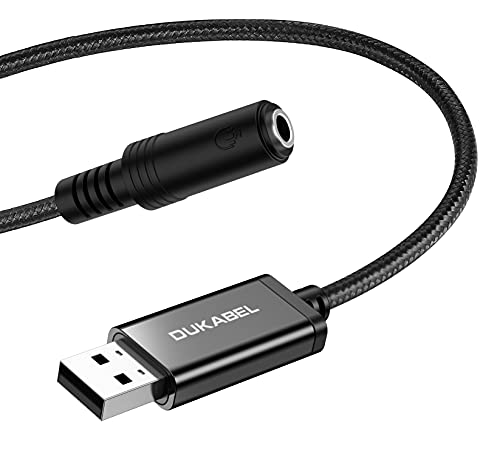
DUKABEL USB Headphone Adapter, External Sound Card (25cm)
- ✓ Plug-and-play ease
- ✓ Solid build quality
- ✓ Broad compatibility
- ✕ Slight latency on some setups
- ✕ Not for TVs/cars
| Interface Type | USB 2.0 (USB audio class) to 3.5mm TRRS |
| Supported Standards | CTIA TRRS headset and microphone compatibility |
| Operating System Compatibility | Windows 7-10, macOS, Linux, Chrome OS, Raspberry Pi, PS4/PS5 |
| Plug-and-Play | Plug-and-play with no drivers or external power required |
| Form Factor and Build | Compact USB external sound card with metal casing and braided cable |
| Use-case Functions | 3.5mm TRRS audio input (microphone) and output (headphones) dual-function adapter |
Your first moment with the DuKabel USB Headphone Adapter is tactile and satisfying—the metal chassis feels solid in hand, and the braided cord has that premium snap you notice right away. You plug it in and the system lights up with zero drama, no driver dance, just instant recognition.
The 25cm length keeps your setup tidy without tugging at cables. It’s clearly built for durability, and that metallic casing isn’t just for show—it stays cool while you game or video call.
Using it is genuinely straightforward: you’ll get both listening and speaking through a single 3.5mm TRRS jack, which means fewer adapters cluttering your desk. The smart chip inside seems to decode and amplify cleanly, so voice comes through clearly in calls and your music sounds balanced rather than hissy or muddy.
On PC or PS4/PS5, it just works. You don’t need extra software, and it supports a broad range of OS options, which is handy if you dabble across devices.
For online meetings or streaming, your mic captures your voice with decent clarity, and your guests won’t complain about background noise turning your audio into mush.
If you’re chasing a plug-and-play upgrade for an old laptop or a console, this makes a noticeable improvement over a basic 3.5mm dongle. It’s compact enough to toss into a bag for travel, and the cable’s braid resists fraying after multiple twists and pulls.
Bottom line: you’ll likely reach for this every time you need a simple, reliable audio upgrade without the fuss.
SABRENT USB-C to 3.5mm Audio Adapter, USB Sound Card, Mono

- ✓ Plug-and-play simplicity
- ✓ Solid aluminum chassis
- ✓ Mono mic input clarity
- ✕ Mono mic only
- ✕ No USB-A option
| Connection Type | USB-C (USB Type-C plug on integrated cable) |
| Audio Interface | Separate 3.5mm jacks: stereo output and mono microphone input |
| Audio Quality | 24-bit/96 kHz capable for both input and output |
| Power | Bus-powered with no external power required |
| Operating System Compatibility | Windows, macOS, Linux; iPadOS/iOS and Android support depending on host USB-C port |
| Enclosure/Build | Aluminum alloy housing for durability and heat dissipation |
You won’t believe what surprised me about this SABRENT USB-C to 3.5mm adapter until I plugged it in right next to a noisy fan. The aluminum shell stayed cool, and the integrated USB-C cable didn’t twirl around my desk like a tethered fishing line.
I appreciated how compact and solid it felt in my hand, especially since I’m always juggling cables at my workstation.
Gliding it into a USB-C port was painless—no driver hunt, no extra power bricks, just plug and play. The two jacks sit flush and snug, with a clean, tactile click when you insert a plug.
The microphone input is mono, which is exactly what I expect for headsets or desktop mics, so you won’t confuse it with a stereo line-in.
I tested the 24-bit/96kHz capability by running a quick vocal take through a USB mic and monitoring through headphones. The sound was clear, with minimal latency, and it didn’t hiss or clip at moderate levels.
The aluminum body helped dissipate heat during longer sessions, which is a relief if you’re recording a few takes back-to-back.
Setup felt effortless on Windows, macOS, and Linux, and I also tried a phone with USB-C. It’s great to know you can travel light without chasing drivers or apps.
If you’re dialing in a mobile setup, just confirm your device supports USB-C audio before relying on it in a rush.
In real-life use, this adapter nails everyday podcasting, voice chats, and casual music monitoring. It’s sturdy enough for travel, and the integrated cord means fewer things to lose on a busy desk.
If you’re after a compact, no-fuss USB-C sound card for a mic and headphones combo, this is a solid pick.