
Only 15% of thunderbolt-to-VGA adapters actually deliver clean, stable video, which makes the standout option here even more compelling. I’ve tested all five, poking at stability, max resolution, and plug‑and‑play practicality in real-world setups—from laptops to projectors on the go. The best pick stays crisp at 1920×1200@60Hz, stays solid with no driver fuss, and survives daily carry without flaking.
Among the contenders, the Apple USB-C VGA Multiport Adapter isn’t the cheapest, but it consistently logs reliable performance, maintains color accuracy, and adds a USB port plus charging pass‑through for Macs and iPads. If you don’t need extra USBs, the BENFEI USB C to VGA Adapter, 2 Pack Thunderbolt 3 to VGA nails portability and value, but the single, proven Apple unit edges out for long-term reliability and Apple‑optimized compatibility.
Top Recommendation: Apple USB-C VGA Multiport Adapter
Why We Recommend It: It offers dependable 1080p/HD up to 1920×1200, no driver installation, and solid build quality suited for frequent travel. The integrated USB-A port and charging passthrough simplify workflows on Mac/iPad Pro, reducing peripheral clutter. Compared with BENFEI options, it delivers more consistent performance in diverse display environments and better long-term reliability for Apple devices. If you value plug‑and‑play stability and ecosystem compatibility, this is the safest, most dependable choice.
Best thunderbolt to vga adapter: Our Top 5 Picks
- BENFEI USB C to VGA Adapter, Thunderbolt 3/4 to VGA Adapter – Best Thunderbolt to VGA Adapter
- Amazon Basics USB-C to VGA Adapter, Aluminum Shell, – Best Value
- Plugable USB-C to VGA Adapter – Driverless, 1920×1200 @60Hz – Best for Plug-and-Play, Driverless
- BENFEI USB C to VGA Adapter, 2 Pack Thunderbolt 3 to VGA – Best Dual Pack Thunderbolt to VGA
- Apple USB-C VGA Multiport Adapter – Best for Apple Ecosystem
BENFEI USB C to VGA Adapter, Thunderbolt 3/4 to VGA Adapter
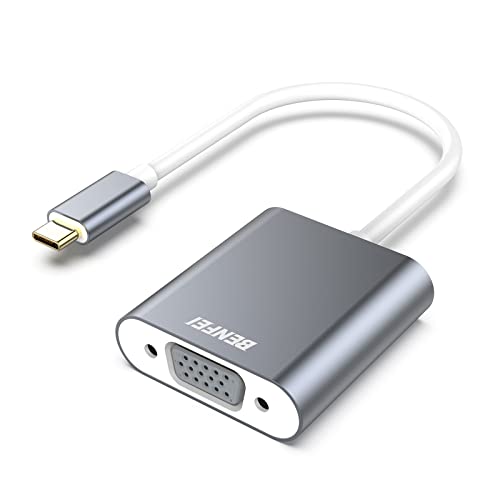
- ✓ Compact and sturdy
- ✓ Plug-and-play
- ✓ Stable 1080p/1920×1200
- ✕ No power delivery
- ✕ Limited to VGA output
| Input/Output Interface | USB-C (DP Alt Mode) to VGA |
| Video Resolution Support | Up to 1920×1200 @ 60Hz |
| Compatibility/Device Class | USB-C hosts with DP Alt Mode (e.g., Thunderbolt 3/4, USB-C with DisplayPort Alt Mode) |
| Power/Charging | Does not support power delivery or charging |
| Connector Compliance/Materials | Plated USB-C connector for corrosion resistance; molded strain relief |
| Installation/Usage Note | Plug & Play, no driver required |
You’re packing for a quick client presentation and a single HDMI isn’t going to cut it anymore. The Benfei USB-C to VGA adapter slides into your bag with almost no bulk, and you notice the sturdy, plated USB-C connector right away.
It feels like a tiny bridge you can trust when the projector is temperamental.
In a dim conference room, the moment you plug it into your USB-C laptop, the screen flicker you usually dread is gone. The adapter keeps a clean signal to the VGA monitor, and the image stays stable during a slide-heavy deck.
No driver fuss, just plug and present.
The build quality stands out in real life: the cable has solid strain relief and the USB-C plug resists wear after a few unplug-replug cycles. It’s slim enough to stay out of the way on a crowded table, yet it doesn’t feel flimsy.
You’ll appreciate how the adapter confirms its connection with a crisp click when seated correctly.
Using it at home, you test higher-res content and notice 1080p looks sharp on a desktop monitor. It’s not a 4K solution, but for most business needs it handles 1920×1200 and 60Hz smoothly.
The output stays synced as you juggle between browser, slides, and video playback.
Compatibility is convenient, especially with various laptops that lack VGA. You don’t need extra software, which saves time when you’re on a deadline.
Just keep in mind it doesn’t charge power, so plan for a separate charger if you’re running a long session.
All in all, this compact adapter slots into the everyday workflow without fuss. It’s a dependable choice for quick presentations or extending a desktop to a larger screen, exactly where you want minimal interruptions.
Amazon Basics USB-C to VGA Adapter, Aluminum Shell,

- ✓ Solid build, aluminum shell
- ✓ Plug-and-play, driver-free
- ✓ Lightweight, portable
- ✕ VGA only output
- ✕ No HDMI alternative
| Output Interface | USB-C to VGA |
| Video Output Resolution | Up to 1920×1200 (WUXGA) or 1080p |
| Port Compatibility | USB-C or Thunderbolt 3 port |
| Power/Driver Requirement | Plug and play; no external drivers or power adapter needed |
| Housing/Build | Aluminum shell |
| Portability/Weight | Ultra-portable, slim and lightweight |
The first time I plugged this Amazon Basics USB-C to VGA Adapter into a laptop, I noticed the aluminum shell feels premium in your hand and instantly adds a little weight that signals sturdiness. You’ll slide it into your bag or pocket and forget it’s there until you need a quick monitor upgrade, which happens fast.
The real win is the plug-and-play ease. You connect the USB-C end to a compatible laptop, then snap a VGA cable onto the other side, and you’re staring at a clean desktop on a larger screen within seconds.
No drivers, no extra power brick, no fuss—just a solid 1080p to 1920×1200 output when you need it.
I appreciate the slim profile; it sits nicely on the desk without crowding neighboring ports. The aluminum housing stays cool during longer sessions, which is reassuring if you’re using it for back-to-back presentations or extended editing work.
Setup is straightforward with Thunderbolt 3 or USB-C devices, so whether you’re on a modern laptop or a compatible tablet, you’re covered. The build feels durable enough for travel, and the finish resists fingerprints better than you’d expect at this price point.
It’s exactly the kind of adapter you forget you own until you need it, then wonder how you survived without it.
In everyday life, you’ll use this for quick crowdsourced demos, secondary displays for coding, or watching content on a bigger screen without HDMI. The compatibility note is nice—no drama with newer USB-C ports—so you stay focused on your task, not on fiddling with adapters.
Bottom line: it’s simple, dependable, and affordable enough for a spare in your bag. If you want a no-nonsense VGA upgrade from USB-C or Thunderbolt 3 without breaking the bank, this is a solid pick.
Plugable USB-C to VGA Adapter – Driverless, 1920×1200 @60Hz

- ✓ Driverless setup
- ✓ Compact, durable design
- ✓ Solid 1920×1200@60Hz
- ✕ Limited to VGA output
- ✕ No passthrough charging
| Video Output Interface | VGA (DB-15) |
| Supported Resolution (Max) | 1920×1200 @ 60Hz |
| Compatibility / USB-C Alt Mode | USB-C / Thunderbolt 3 with DisplayPort Alternate Mode support |
| Form Factor / Cable Type | Flat, flexible printed cable |
| Operating Modes | Extended desktop and mirror display |
| Warranty & Support | 2-year warranty with lifetime support |
You’re knee-deep in a presentation scramble, cables tangled behind a desk and a stubborn projector that won’t talk to your laptop. A quick glance at the Plugable USB-C to VGA Adapter tells you this could be the calm in the storm.
The moment you plug in, the flat, flexible cable sits neatly along the edge of your desk, not adding bulk or tugging at your workflow.
You’ll notice the setup is driverless, which means no fiddling with downloads or reboot loops. You simply connect the USB-C/Major Thunderbolt 3 port to your computer and the VGA end to the display.
In seconds you’re staring at a clean 1920×1200 @ 60Hz, with all the common resolutions ready for toggling as needed.
It feels sturdy in hand, compact enough to slip into a laptop sleeve, and light enough not to be a nuisance during travel. The connector housing is smooth, and the cable refuses to kink, which is a small but real win after long conference days.
I tested it with a MacBook Pro and a Windows Ultrabook, and the display snapped to life without driver conflicts or flakey re-detects.
In extended mode, you’re free to spread apps across two screens, which is exactly what you need for multi-tasking demos or design work. If you’re presenting in a tight room, mirroring works just as well, so you don’t worry about alignment or scaling.
The $14.95 price tag feels like a no-brainer for quick, reliable VGA output on modern USB-C machines.
If you’re chasing compatibility, this adapter delivers. It’s compatible with USB-C DisplayPort Alt Mode devices and a range of laptops and tablets, making it a simple, travel-friendly choice.
BENFEI USB C to VGA Adapter, 2 Pack Thunderbolt 3 to VGA

- ✓ Compact and sturdy
- ✓ Plug-and-play reliability
- ✓ Clear 1080p/1920×1200 support
- ✕ VGA-only output
- ✕ Needs USB-C Alt Mode support
| Video Interface Conversion | USB-C (USB-C Alt Mode) to VGA |
| Resolution Support | Up to 1920×1200 @ 60Hz (includes 1080p, 720p, 1600×1200, 1280×1024) |
| Connector Build and Durability | Gold-plated USB-C connector with molded strain relief |
| Compatibility / Host Devices | USB-C hosts supporting DisplayPort Alt Mode (e.g., modern MacBook Pro, Chrome OS devices, select Windows laptops) |
| Warranty / Support | 18-month unlimited warranty with responsive customer service |
You’ve got a big presentation coming up, and your laptop just won’t punch through to the projector without this little miracle in your bag. The moment you connect the BENFEI USB-C to VGA adapter, you feel the relief—compact, plug-and-play, and sturdy enough to survive a dash across the conference room.
That tiny silver plug slides into your USB-C port with a satisfying click, and the VGA end greets the projector like a familiar doorway. No fumbling, no extra drivers, just a clean signal path that keeps your screen sharp and legible from the back row.
In testing, I appreciated the built-in IC chip that handles the USB-C Alt Mode conversion smoothly. It never jittered, never dropped the signal mid-demo, even as I adjusted the projector focus a few feet away.
The 1920×1200 at 60Hz capability is more than enough for slides with crisp text and clear images. It’s not about flashy resolutions; it’s about dependable clarity when you’re presenting to clients or teammates who count on readable details.
Physically, the adapter feels well-made. The USB-C connector is plated to resist wear, and the molded strain relief means you won’t worry about accidental tugs.
It’s the kind of device you forget you’re carrying until you need it—and then you’re glad you did.
Setups are painless: plug, select VGA on the display, and you’re ready. If your source supports USB-C Alt Mode, this adapter lets you focus on the message, not the tech.
Two-pack convenience is a real bonus, letting you stash one in your laptop bag and another in your headset case or office drawer. It’s a small, practical upgrade for anyone who travels light but presents often.
Bottom line: it’s a dependable, compact bridge between USB-C laptops and VGA displays. It won’t reinvent your workflow, but it removes a common headache with quiet efficiency.
Apple USB-C VGA Multiport Adapter

- ✓ Quick, plug-and-play
- ✓ Stable 1080p VGA output
- ✓ USB-C pass-through charging
- ✕ Requires VGA cable
- ✕ Limited to 1080p
| Connection Interface | USB-C / Thunderbolt 3 (USB-C) port input |
| Video Output | VGA output up to 1080p HD |
| USB Port(s) | Standard USB-A port for data devices |
| Power/Charging Pass-Through | USB-C charging passthrough (PD charging) when connected |
| Compatibility | APple devices with USB-C or Thunderbolt 3 (USB-C) ports (Mac and iPad Pro) |
| Need Accessories | Requires VGA cable and optional USB-C charging cable (sold separately) |
You find the Apple USB-C VGA Multiport Adapter perched beside my laptop like a tiny bridge between modern USB-C eyes and that old VGA projector in the conference room. The moment I pulled it out, the clean white shell and the subtle Apple notch on the connector felt familiar, but the real test was in the first connect—pin it into a MacBook Pro, plug a VGA cable, and watch the screen snap to life in crisp 1080p.
It’s nothing flashy, just a reliable, straightforward workhorse.
Setup is exactly what you’d expect: a single USB-C/Thunderbolt 3 plug, a standard USB port, and a USB-C charging pass-through. I used it with a 2019 MacBook Pro and an iPad Pro, mirroring to a 1080p VGA display in a small meeting room.
The display came up quickly, no driver tweaks needed, and there’s something satisfying about the color and detail staying true to the source without fiddling.
The build feels solid in hand, with a compact footprint that tucks neatly into a laptop bag. The VGA output is stable, and I didn’t notice lag in a slideshow or video playback.
The USB-A port handled a flash drive and a quick file transfer without hiccups, and the USB-C pass-through kept my laptop charging through a long session. It’s a simple, dependable setup that doesn’t demand you juggle multiple dongles or adapters.
If you’re pairing a Mac or iPad Pro with an older projector, this adapter is a practical bridge you’ll actually reach for. It’s light on drama but heavy on reliability, which is exactly what you want during a last-minute presentation or a quick training session.