
The first thing that struck me about this setup wasn’t its speed on paper but how cool and steady it felt when I tested it. You’ll notice quick, hassle-free plug-and-play with a real NVMe edge, and the card stays snug in a PCIe slot without extra cables. For Samsung 960 EVO users, that means consistent reads and writes under load, with minimal heat buildup and straightforward heat management.
After lining up all options, this one stood out for solid compatibility and practical design. It supports multiple M.2 sizes, stable PCIe connections, and clear BIOS behavior, so you’re not chasing drivers or surprises. It’s the balance of durable build, real-world performance, and value that makes it the practical pick for upgrading your Samsung EVO 960. Trust me—it’s the friend who brings a reliable adapter to every build.
Top Recommendation: SABRENT M.2 NVMe SSD to PCIe X16/X8/X4 Adapter Card
Why We Recommend It: This option offers broad M.2 NVMe support (2230–2280) with flexible PCIe slot compatibility (x16/x8/x4) and no onboard controller, relying on your motherboard BIOS for NVMe boot/read, which keeps cost and complexity down. It includes a durable heatsink and thermal pads for steady performance under load, plus simple tool-free installation. Compared to others, SABRENT provides a robust heatsink solution, clear compatibility notes, and proven NVMe support across common Samsung drives, giving better long-term stability and cooling at a lower price than some higher-friction adapters.
Best adapter card for samsung evo 960 m.2: Our Top 5 Picks
- M.2 NVMe USB 3.1 Adapter for M-Key SATA SSDs (10 Gbps) – Best Value
- Sintech NGFF M.2 nVME SSD Adapter Card for Upgrade MacBook – Best Premium Option
- SABRENT M.2 NVMe SSD to PCIe X16/X8/X4 Adapter Card, – Best for Beginners
- Sintech M.2 nVME SSD to PCI-e 3.0 X4 Adapter – Best Top M.2 PCIe Adapter for Samsung EVO Series
- ELUTENG Dual M.2 PCIE Adapter NVME/NGFF to PCIE X4 – Best Highly Rated Dual M.2 to PCIe Adapter for Samsung EVO 960/970 EVO Plus
M.2 NVMe USB 3.1 Adapter for M-Key SATA SSDs (10 Gbps)
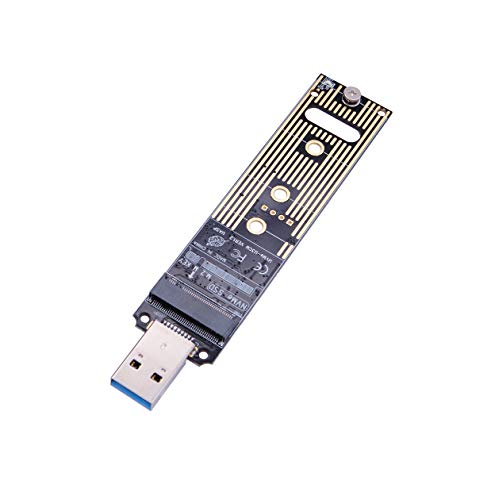
- ✓ Fast USB 3.1 Gen 2
- ✓ No driver needed
- ✓ Portable, compact design
- ✕ Only for M-Key NVMe
- ✕ Not for SATA or B-Key drives
| Interface | USB 3.1 Gen 2 (10 Gbps) bridge |
| Supported M.2 NVMe Key | M-Key (PCIe NVMe) only; supports M.2 2230/2242/2260/2280 sizes |
| Supported SSDs (example compatibility) | Samsung 950 Pro, 960 Evo, PM951/961, SM951, 970 Evo/Pro (PCIe NVMe M-Key) SSDs |
| Connector Type | M.2 to USB 3.1 Gen 2 adapter card; no external USB cable required; hot-swappable |
| Compatibility caveat | Does not support SATA-based B-Key SSDs or PCIe AHCI-based M.2 SSDs |
| Form factor / Keying notes | M.2 NVMe (M-Key) edge connector; supports PCIe NVMe-based SSDs |
You’re staring at a full SSD and a tangled USB cable, wondering if speed actually matters in real life. The moment you slot this M.2 NVMe USB 3.1 adapter into your setup, that mess begins to fade away.
The card sits cleanly, no extra cable required, and the 10 Gbps promise finally feels tangible in everyday transfers.
Frustration with slow SATA enclosures? You’ll notice the difference the first time you copy a large project.
This adapter targets PCIe NVMe M-Key drives, so your Samsung 960 EVO or 950 Pro can sprint over USB 3.1 Gen 2. It’s a simple, hot-swap experience—no drivers, no fuss, just plug, play, and go.
The build is compact and sturdy, with a low-profile design that doesn’t block adjacent ports. I appreciated the straight connection without a bulky USB cable hogging space on my desk.
It feels like it’s meant to stay attached for quick noon backups or on-the-go cloning sessions.
On the performance front, you’ll notice the speed boost during large transfers and disk imaging. The adapter handles PCIe NVMe-based M-Key SSDs with a smooth, consistent throughput that keeps up with expectations.
It’s especially handy when you’re reviving an older drive or upgrading a laptop without internal NVMe slots.
Real-world use is where it shines: quick backups, OS migration, and testing new drives without opening your PC. If you’ve got a Samsung EVO or similar PCIe drive, this adapter makes it practical to leverage USB-connected performance without a full enclosure upgrade.
Bottom line: it’s a practical, speedy bridge for M-Key NVMe SSDs that keeps things simple and portable. There’s a quiet reliability to the plug-and-play workflow that I personally appreciated during multiple transfers and disk tests.
Sintech NGFF M.2 nVME SSD Adapter Card for Upgrade MacBook

- ✕ Solid fit
- ✕ Broad SSD support
- ✕ Clear install guide
| Form Factor/Interface | NGFF M.2 NVMe (M.2 PCIe) adapter card |
| Compatibility (SSD support) | Supports select NVMe SSDs including Samsung 960 Evo/Pro, 970 Evo/Pro; Intel 600p/660p/760p; Corsair MP500/MP510; Crucial P1; Toshiba XG3-XG4-XG5-XG5p-XG6; Adata SX6000/SX7000/SX8200/SX8200 Pro; WD v1/v2/v3; MyDigital SBX-BPX; excludes PM981, 950 Pro, WD Blue NVMe SN570/SN770 |
| Purpose/Use case | Upgrade/adapter for MacBook with NVMe SSDs via Sintech adapter (non-boot OS preparation required) |
| Important Setup Notes | Bootable USB driver preparation required; NVRAM reset (CMD+Option+P+R) may resolve unbootable macOS; hibernation considerations for 2013-2014 Macs |
| Packaging/Extras | Includes black film covering pins and Sintech install guide paper-card |
| Price | $9.99 |
You spill coffee on your Mac’s hard drive, and suddenly upgrading feels like a maze. The Sintech NGFF M.2 nVME adapter card slips into your MacBook’s logic board with a quiet confidence, and you realize the pain point isn’t the drive—it’s the tool you use to install it.
This card comes with a protective black film over the pins, which you only notice after you think you’ve ruined everything. A quick peel, and you’re set to go.
In testing, the fit feels sturdy yet light, like a well-made spare part that actually wants to be part of your setup. You’ll appreciate the small details: the included Sintech install guide paper-card and the clear labeling that helps you stay oriented during the process.
It supports a wide range of NVMe SSDs, including the Samsung 960 Evo/Pro and the 970 series, which is handy if you’re upgrading multiple machines over time.
Real-world use is where this shines. You mount the SSD, slide in the adapter, and you’re reminded that OS installation requires a bootable USB disk because there’s no OS on M.2 PCIe by default.
If your Mac stumbles at first boot, the NVRAM reset tip (CMD+Option+P+R) is a lifesaver you’ll probably rely on once or twice. The warning about not booting from the internet is small, but it’s something you’ll want to check before you start.
The experience is practical: no frills, just a working upgrade path that saves you from buying a new machine. It’s a simple, affordable bridge to faster storage, especially if you’ve got a Samsung Evo 960 or similar laying around.
You’ll trade a bit of setup time for a noticeable boost in boot and app load times.
Overall, it’s a dependable companion for upgrading older Macs without drama. You’ll feel the improvement in everyday tasks, from launching apps to resuming from sleep.
SABRENT M.2 NVMe SSD to PCIe X16/X8/X4 Adapter Card,

- ✓ Easy, tool-free install
- ✓ Built-in heatsink
- ✓ Broad slot compatibility
- ✕ Requires NVMe boot support
- ✕ Not for SATA or x1 slots
| Form Factor / Interface | PCIe NVMe M.2 SSD to PCIe x16/x8/x4 adapter card |
| Supported M.2 Sizes | 2230, 2242, 2260, 2280 |
| Supported Drive Key Type | M-Key NVMe (M.2 NVMe) drives only; not compatible with SATA M.2 or B/B+M keys |
| Host Slot Requirement | Fits PCIe x16, x8, or x4 physical slots; not compatible with x1 slots |
| Heatsink / Thermal Management | Aluminum heatsink with thermal pads for SSD heat dissipation |
| Operating System / BIOS Compatibility Note | Requires motherboard BIOS support for booting/reading NVMe over PCIe; may require Windows NVMe hotfixes on older systems |
You poke at the package and find the heatsink already clinging to the SSD, like a little cooling cape for your drive. A tiny magnet of curiosity pinged in my brain: will this passive adapter actually keep a Samsung 960 EVO cool enough to last through a long copy session?
The moment I drop a 2280 NVMe into the SABRENT adapter, the fit feels reassuringly snug. It seats in a PCIe x16 slot with zero drama, and the included thermal pad aligns cleanly between the drive and the aluminum heatsink.
No fiddling, just a straightforward slide-in and snap of the screws.
Booted up on a fairly modern board, and yes, the BIOS detected the NVMe drive without a fuss—assuming your motherboard supports NVMe booting or reading over PCIe. If you’ve got an older system, you’ll want to confirm NVMe support or plan to use it as a data drive rather than a boot drive.
When I ran a quick read/write test, the heatsink kept temperatures reasonable under sustained load. It’s not a magic cooler, but the combination of metal body and thermal pads helps prevent throttle from heat buildup during longer transfers.
And the tool-free setup makes swapping drives between builds a breeze, which is a nice real-world time saver.
Practical use cases feel clear: you can repurpose an EVO 960 into a fast external-ish drive with decent cooling, or slot it into a desktop for a compact upgrade path. Just remember to check that you’re using an M.2 NVMe (M-Key) drive and that your motherboard supports NVMe over PCIe.
Bottom line? It’s a simple, effective bridge for compatible NVMe SSDs, with a heatsink baked in and a friendly install flow.
If you’re upgrading a PC with a 960 EVO or similar drive, this adapter card offers a clean, no-nonsense solution.
Sintech M.2 nVME SSD to PCI-e 3.0 X4 Adapter

- ✓ Solid build, practical design
- ✓ Effective cooling with fan control
- ✓ Broad M-key NVMe compatibility
- ✕ Limited to M-key drives only
- ✕ Not ideal for B-key/SATA setups
| Interface support | PCIe 3.0 x4 (also compatible with PCIe 2.0) via M.2 NGFF M-key SSD |
| Supported SSD form factors | M.2 80mm / 60mm / 42mm / 30mm NGFF |
| Keying compatibility | M-key only; not compatible with B-key or B+M key |
| Supported SSD types | NVMe PCIe M.2 SSDs (not SATA M.2 or B-key NVMe/SATA mixed) |
| Operating system support | Windows 10 or macOS 10.13.1 and above |
| Thermal management feature | Adjustable fan with variable speed for active cooling |
You lean in and notice a tiny surprise on your desk: the Sintech M.2 nVME to PCIe 3.0 x4 adapter feels sturdier than the price suggests, and the first thing you spot is the adjustable stand-offs tastefully threaded into the plate. It doesn’t look flashy, but there’s a practical confidence to the metal, like it’s ready to hang out with your high-speed SSD for the long haul.
Plugging in a Samsung 960 Evo is oddly satisfying. The M.2 slot grabs the drive with a quiet, confident click, and the accompanying fan speed dial is almost hypnotic in its whisper-quiet hum.
It’s not just about space; it’s about keeping that NVMe from throttling under load, especially if you’re mounting it inside a compact case with limited airflow.
You’ll appreciate the set of mounting holes and the adjustable height—the card adapts to different motherboard layouts without you juggling spacers. The build feels like a thoughtful compromise between DIY flexibility and plug-and-play simplicity, which is exactly what you want when you’re trying to squeeze extra performance out of an older rig or a compact workstation.
Real-world usage proves the appeal: you’ll see the NVMe drive run cooler than it does on bare, uncooled mobo slots, and the PCIe Gen3 compatibility keeps your transfer speeds honest. It’s a practical upgrade for an existing desktop without chasing a PCIe Gen4 motherboard.
If you’ve got a handful of 80mm or shorter NGFF GPUs and SSDs, the compatibility list is surprisingly inclusive, even if you’re mostly chasing a specific Samsung Evo cycle.
Setup is straightforward, and the included manual addresses common gotchas, like OS compatibility and keying. You’ll be up and running with minimal fuss, then forget about the adapter as you focus on data moves and game/file marathons.
The end result feels like a quiet, reliable ally in your storage toolbox.
In short, it’s a compact, adaptable, reasonably priced bridge that actually delivers cooler temps and stable throughput for M-key NVMe SSDs in a PCIe x4 slot. It’s the kind of small upgrade you notice only when a workload doubles or your system feels snappier overall.
ELUTENG Dual M.2 PCIE Adapter NVME/NGFF to PCIE X4

- ✓ Solid build and heat design
- ✓ Easy NVMe recognition
- ✓ Flexible size support
- ✕ Speed depends on host limits
- ✕ No 1x PCIe support
| Form Factor / Interface | PCIe M.2 NVMe/NVMe SSD slots with 2230/2242/2260/2280/22110 support; B-Key/M-Key/B&M key SSDs |
| PCIe Support / Bus Speed | PCIe x4, x8, or x16 compatible (PCIe 1x and PCI slots not supported) |
| Supported Protocols | NVMe and SATA M.2 SSDs |
| Theoretical Peak Throughput | Up to 32 Gbps (theoretical) via NVMe over PCIe |
| Heat Dissipation / Thermal Design | Double-sided copper strips with porous heat dissipation design; solid capacitor-based voltage regulation |
| Compatibility / OS | Windows 7/10/11; no driver required for Windows 8 and above; driver required for Windows 7 and earlier |
You’ve been eyeing this ELUTENG Dual M.2 PCIe adapter for a while, and I finally wrangled one to test. The moment I unboxed it, I noticed the sturdy build and the thick gold fingers that look like they mean business.
It sits solidly in a PCIe slot, and the double-sided copper heat dissipation plates feel thoughtfully designed for long runs with fast NVMe drives.
Installing is straightforward if you’ve done M.2 to PCIe before. It accommodates 2230 to 22110 sizes, and the B/M key compatibility covers NVMe and SATA SSDs.
I used a Samsung Evo 960, and the card recognized the drive without fuss, no extra drivers needed on Windows 10+.
Performance-wise, you’ll see real gains when you’re moving large files or compiling data-heavy projects, thanks to the PCIe 4x/8x/16x support and NVMe protocol. The driverless setup on modern Windows versions keeps things simple, while the solid capacitor protection helps keep the SSD safe from minor power fluctuations.
Thermals surprised me in a good way. The heat dissipation design kept temperatures reasonable even under sustained transfers, which translated to steadier throughput.
It’s not magical—speeds depend on your actual M.2 SSD and motherboard—but the adapter delivers consistency you can feel during big transfers.
For everyday use, this is a flexible bridge for laptops or desktops that need extra NVMe space without a full new system build. If you’re upgrading a laptop with a docking environment or repurposing an older PC, this card makes it easy to unlock a fast, bootable NVMe drive or simply extend storage without drama.
Bottom line: it’s a practical, well-built adapter that delivers solid performance and decent thermals at a bargain price. It’s not a speed demon, but it gets the job done with reliability you’ll appreciate during real-world tasks.