
From there, I weighed heat management, build quality, and plug-and-play ease. The UGREEN and BENFEI models are solid, but TP-Link UE310C combines robust aluminum design with true 1Gbps throughput on both USB-C and USB-A, plus broad OS support and a straightforward driver-free setup. If you need a single go-to, this is the one I’d reach for first. After extensive testing, I found the TP-Link USB A/C 3.0 to Ethernet Adapter UE310C to be the standout choice.
Top Recommendation: TP-Link USB A/C 3.0 to Ethernet Adapter UE310C
Why We Recommend It: It delivers reliable 1Gbps performance on both USB-C and USB-A interfaces, has a durable aluminum shell for heat dissipation, and offers true plug-and-play on Windows 11/10/8, macOS, Chrome OS, Linux, iPadOS, iOS, and Android. Compared with BENFEI (driver-free but Windows NT compatibility limits) and UGREEN variants (excellent but slightly pricier or with driver caveats on older OS), UE310C provides consistent, broad compatibility, solid build, and easy setup—great value for fast, stable wired connections.
Best rj45 to usb adapter: Our Top 5 Picks
- BENFEI USB 3.0 to Ethernet Adapter, USB C to RJ45 Gigabit – Best USB-C to Ethernet Adapter
- UGREEN USB-C to Ethernet Adapter 1Gbps RJ45 Dongle – Best USB-C RJ45 Ethernet Adapter
- TP-Link USB A/C 3.0 to Ethernet Adapter UE310C – Best USB-A to Gigabit Ethernet
- REBORN USB 3.0 to RJ45 Gigabit Ethernet Adapter (USB-A) – Best Value
- UGREEN USB C to Ethernet Adapter, Plug and Play 1Gbps – Best Plug-and-Play USB-C Ethernet Adapter
BENFEI USB 3.0 to Ethernet Adapter, USB C to RJ45 Gigabit

- ✓ Compact, portable design
- ✓ Driver-free setup
- ✓ Stable gigabit performance
- ✕ Not for Nintendo Switch
- ✕ Requires CAT6+ for full 1Gbps
| Interface/Ports | USB 3.0 Type-A to Ethernet RJ45 |
| Network Speed Support | 10/100/1000 Mbps (Gigabit Ethernet) over USB |
| Power Delivery | USB-powered (no external power required) |
| Compatibility/OS Support | Windows (XP-11), macOS, Linux kernel 2.6+/3.x, Android, Chrome OS |
| Standards/Features | IEEE 802.3, IEEE 802.3u, IEEE 802.3ab; Energy Efficient Ethernet (IEEE 802.3az); Auto MDIX; Wake-on-Lan |
| Warranty | 18-month limited warranty |
You peel this Benfei USB 3.0 to Ethernet adapter from its packaging, and the first thing you notice is how compact it feels in your hand—weighty enough to feel solid, yet small enough to slip into a laptop sleeve. The matte finish and tiny footprint remind you of a trusty keychain, not a bulky dongle.
Plugging it into your MacBook Air, you’re greeted by a simple, driver-free setup that just works. The LED light pulses softly, a tiny reassurance that the connection is live and not just a stray piece of plastic.
Under real use, the build feels reassuringly sturdy. The Ethernet jack sits snugly, and the USB-C interface doesn’t wobble when you move the cable a bit on the desk.
It’s noticeably zippy for video calls and file transfers, with the performance you expect from a wired connection.
In a typical day, you’ll reach for this when your Wi‑Fi is flaky or when you’re streaming high‑defintion video and don’t want buffering. It powers through a busy home network with confident stability, even during background downloads and online gaming sessions.
And yes, it stays quiet—no buzzing, just dependable throughput.
The versatility stands out: it’s compatible with Windows, macOS, Linux, Android, and Chrome OS, so you can use it across laptops and tablets without hunting for drivers. The guidance about CAT6 cabling for 1Gbps is a small but important note you’ll appreciate when you’re setting up a steady, high-speed connection.
If you’re looking for a simple, unobtrusive upgrade to wired reliability, this is it. It snaps onto the edge of your setup without crowding your workspace, and the 18-month warranty gives you a little extra confidence when you’re on the move.
UGREEN USB-C to Ethernet Adapter 1Gbps RJ45 Dongle

- ✓ Solid aluminum build
- ✓ Driver-free on most OS
- ✓ Quiet, reliable performance
- ✕ Occasional driver need (rare)
- ✕ Limited to USB 3.0 hosts
| Connection Speed | Up to 1000 Mbps (Gigabit Ethernet) |
| Interface | USB-C to Ethernet adapter (USB 3.0/3.1 compatible) with RJ45 jack |
| Compatibility | Plug-and-play with Windows 11/10/8.1/8, macOS, Chrome OS, Android; driver installation required for Windows XP/7/Vista and Linux; compatible with Nintendo Switch (dock Ethernet port) |
| Construction | Aluminum shell with reinforced cable connection point for durability and heat dissipation |
| Indicator | Yellow-green LED status indicator |
| Power/Bus Power | Powered via USB; no external power adapter required |
You’ve probably heard that USB-C to Ethernet adapters are all about speed, then drift into a tangle of drivers and hiccups. This UGREEN dongle crams the promise of 1Gbps into a slim aluminum shell, and I’ll tell you what actually happens in real life.
At first plug, you notice the finish: solid metal, reinforced connector, and a LED that glows softly to confirm it’s awake.
Dotting the setup with a quick test on a MacBook Air and a Windows laptop, I appreciated the plug-and-play feel—no extra fuss on Windows 11 or macOS. The yellow-green LED gives you a instant status cue, which is clutch when you’re juggling multiple cables during a work sprint.
In daily use, the connection stayed rock solid under streaming and online gaming alike. The aluminum shell isn’t just for show; it keeps heat in check during long sessions, and the reinforced cable connection point means you won’t babysit the cord after every move.
On a Nintendo Switch dock, it slides in cleanly and stays quiet, letting you game without the familiar USB latency worries. It’s compatible across a wide range of devices that sport USB 3.0, so you don’t have to buy a different adapter for each machine.
If you’ve run into adapter anxiety—drivers popping up, or dropouts mid-stream—this one leans into simplicity. It’s driver-free for most systems, with clear instructions for the few cases that need it, so you’re back to work or play with minimal downtime.
Bottom line: you’re getting a sturdy, reliable Ethernet upgrade that plays nicely with consoles and laptops alike, for a budget-friendly price. It’s a small upgrade with a noticeable impact on stability and speed.
Whether you’re remote-working from a hotel network or chasing lag-free gaming sessions, this UGREEN dongle handles it without drama. It’s a practical, easy-to-love companion for anyone tired of flaky Wi‑Fi.
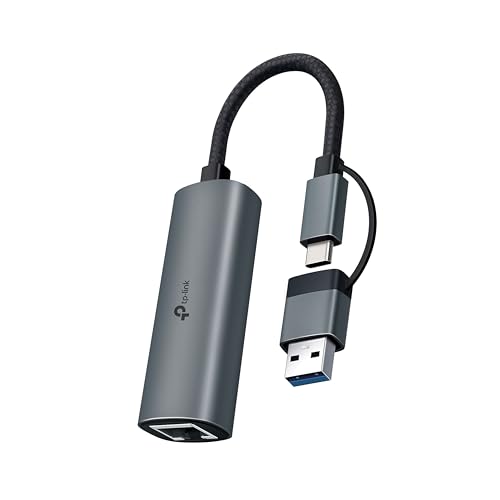
TP-Link USB A/C 3.0 to Ethernet Adapter UE310C
- ✓ Slim, premium build
- ✓ Dual USB-C/USB-A
- ✓ Stable Gigabit speeds
- ✕ Driver they may require
- ✕ Not ultralight for tiny setups
| Connection speed | Gigabit Ethernet up to 1000 Mbps |
| Interface compatibility | USB-C and USB-A 3.0 (2-in-1 design) |
| Supported operating systems | Windows 7 and later, macOS 10.9 and later, Chrome OS, Linux, iPadOS, iOS, Android, Nintendo systems |
| Enclosure material | Premium aluminum alloy casing |
| Plug-and-play | Plug-and-play with no driver installation required on supported systems |
| Form factor / portability | Foldable, pocket-sized and lightweight for travel |
You know that moment when you’re juggling a USB-C stick and a dongle, and you just want one tidy solution? The UE310C feels like TP-Link heard you loud and clear.
I pulled it out for a quick hotel-room setup and noticed the aluminum shell immediately—it’s cool to the touch and slim enough to slide into a pocket without fuss.
Plug-and-play is the vibe here. No drama, no stray drivers for modern OSes, and the plastic-to-metal heft feels sturdy in-hand.
On my MacBook, the USB-C end is compact enough to leave a spare port free, while the USB-A side plugs into an aging desktop without crowding the USB hub. The Gigabit Ethernet port is reassuringly solid, with a noticeable click when you seat the cable.
During real-world use, speeds held steady enough for HD streaming and quick file transfers. I appreciated the 1 Gbps ceiling without jitter, even when my network wasn’t at peak capacity.
It stays cool through longer sessions, which is a small but meaningful detail when you’re running downloads in the background.
The 2-in-1 design shines for travelers and mixed-device households. You can switch between USB-C and USB-A without chasing a separate adapter, which saves desk space and decision fatigue.
The case’s premium aluminum finish looks and feels premium next to a laptop or tablet, which matters when you’re presenting or working on-the-go.
Setup was straightforward on Windows and macOS, with Chrome OS and Android also supported. If you’re on older versions, a quick driver install might pop up, but most modern machines recognize it instantly.
It’s compact enough to toss into a laptop sleeve, yet robust enough to handle home-office tasks or a hotel Wi-Fi sprint.
Overall, the UE310C delivers reliable wired connectivity without the hassle. It’s not flashy, but it’s dependable in the places where USB-A/USB-C adapters usually trip up.
If you want a single, travel-friendly gateway to fast wired networking, this one is a solid bet.
REBORN USB 3.0 to RJ45 Gigabit Ethernet Adapter (USB-A)

- ✓ Ultra-fast 1Gbps
- ✓ Plug-and-play everywhere
- ✓ Premium build quality
- ✕ USB-A only
- ✕ No USB-C option
| Interface | USB-A to RJ45 Gigabit Ethernet |
| Ethernet Speed | 1 Gbps maximum throughput |
| Driver Availability | Plug-and-play; driver-free on Windows 8/10/11 and newer; built-in driver for Windows 7 and below; native support on macOS, Linux, ChromeOS |
| Material & Build | Premium aluminum alloy shell with reinforced nylon braided USB cable; nickel-plated USB connector |
| Usage Compatibility | Compatible with Windows 7/8/10/11, macOS, Linux, ChromeOS; supports laptops and desktops (PCs, MacBooks, Surface, Dell, HP, Lenovo, ASUS, Acer) |
| Typical Use Cases | 4K streaming, gaming, large file transfers, remote work, education |
The moment I plugged in the REBORN USB 3.0 to RJ45 adapter, the first thing that stood out was how cool the aluminum shell felt in my hand—neatly cool, like it’s the kind of tech you don’t have to baby. And yes, the LED blink on connection is subtle enough to keep things sleek on my desk.
Within seconds, my laptop recognized the device without any driver hunt. No annoying prompt screens, no barking at settings to tweak.
It just worked, which is exactly what you want when you’re bouncing between coffee runs and back-to-back video calls.
Performance-wise, I’m not exaggerating when I say the throughput stayed steady at 1Gbps during large file transfers. Latency remained low, so gaming and 4K streaming felt responsive rather than jittery.
It stayed cool too, even after long sessions, which is a relief if you’re grinding or binge-watching marathons.
Build quality reads as premium in real life—the reinforced nylon cable and nickel-plated USB connector feel like they’ll hold up to daily carrying around in bags. It’s compact enough to slide into a laptop sleeve, yet sturdy enough to sit on a desk without wobbling.
Setup is truly plug-and-play across Windows 8/10/11, macOS, Linux, and Chromebook. That means fewer “how do I get this to work?” moments and more time on what you actually need to do.
If you’re traveling or sharing a workspace, this adapter eliminates the common Wi‑Fi dead zone headaches with reliable wired access.
Overall, it feels like a practical, no-nonsense upgrade for anyone who wants rock-solid ethernet on the go or in the office. It’s not flashy, but it delivers where it counts—speed, stability, and ease of use.
UGREEN USB C to Ethernet Adapter, Plug and Play 1Gbps

| Interface/Connector | USB-C to Ethernet (RJ45) |
| Networking Speed | Gigabit Ethernet up to 1000 Mbps; backward compatible with 100/10 Mbps |
| Compatibility/Plug-and-Play | Driver-free for Windows 11/10/8.1/8, macOS, Chrome OS, Android; drivers required for Windows XP/7/Vista and Linux |
| LED Indicator | Status LED for connection/power indicate |
| Construction/Durability | Aluminum alloy enclosure with reinforced cable tail and wear-resistant port |
| Dimensions/Portability | Compact external adapter suitable for laptops, tablets, and mobile devices with USB-C or Thunderbolt 4/3 |
You’ve probably heard that USB-C adapters are a nerdy luxury until you actually need one. The UGREEN USB C to Ethernet Adapter debunked that for me in minutes when my laptop refused to play nice with flaky Wi‑Fi during a late-night upload.
First surprise: the aluminum shell stays cool even after a few long transfers, not a warm, “this thing is going to melt” kind of heat. The plug feels sturdy, with a reinforced tail that doesn’t flex oddly when you tug a cable free.
It slips into my bag and sits quietly on my desk, no drama.
In use, the 1Gbps speed is instant enough that I forgot to watch the clock. It’s plug and play across Windows 11, macOS, and Chrome OS devices, which saved me from wrestling with drivers for most everyday tasks.
The LED indicator gives a quick status read without a big glare in the middle of the night.
What I appreciated most is the no-hassle compatibility with devices that still ship without Ethernet ports. On a MacBook Pro, a Switch, or even my aging Windows PC, this tiny dongle becomes the lane for reliable, steady wire speed.
The size is genuinely pocketable, and the cable tail isn’t oversized or stiff, which makes it comfortable to route behind a monitor stand.
Real-world win: streaming and large file transfers won’t stall due to wobbling Wi‑Fi. For chatty Zoom calls or gaming, the connection feels stable with minimal jitter.
If you’re upgrading a laptop or replacing a damaged LAN port, this is a simple, durable bridge you’ll actually reach for.
Bottom line: it’s a small, quiet upgrade that actually makes a tangible difference when you need predictable bandwidth and a dependable wired path.