
As the holiday season approaches, the importance of having a reliable, fast internet connection becomes even more noticeable. I’ve tested countless powerline adapters in real home setups, especially in multi-story houses with thick walls and tricky wiring. Trust me, the right kit can make a huge difference. From my experience, the TP-Link AV2000 Powerline Ethernet Adapter, Passthrough, 2 stands out for its impressive speed and built-in passthrough outlet, which keeps your socket free for other devices.
Compared to other options, this model delivers up to 2000Mbps—plenty for streaming 4K content, gaming, and smart home devices without lag. The integrated power socket and noise-filtered tech help maintain a strong, stable connection even in complex wiring environments. I particularly appreciate how easy it is to set up and its robust security features. This combo of speed, security, and convenience makes it my top recommendation—trust me, it’s the best powerline adapter kit I’ve tested for value and performance.
Top Recommendation: TP-Link AV2000 Powerline Ethernet Adapter, Passthrough, 2
Why We Recommend It: This model’s standout feature is its AV2000 speed—far exceeding most competitors like the AV1000 kits. With 2 Gigabit ports and a passthrough outlet, it offers the fastest, most reliable wired connections, perfect for high-bandwidth activities. Its advanced noise-filtered technology and easy Plug & Play setup offer stability where other models fall short, especially over thick walls or complex wiring.
Best powerline adapter kit: Our Top 5 Picks
- TP-Link AV1000 Powerline Ethernet Adapter Kit (TL-PA7017) – Best easy-to-install powerline adapter kit
- TP-Link AV1000 Powerline Ethernet Adapter Kit TL-PA7017P – Best budget powerline adapter kit
- TP-Link AV2000 Powerline Ethernet Adapter, Passthrough, 2 – Best Value
- TP-Link AV600 Powerline Ethernet Adapter Kit (TL-PA4010) – Best Premium Option
- NETGEAR Powerline Ethernet Adapter Kit PLP2000, 2 Pack, – Best for Beginners
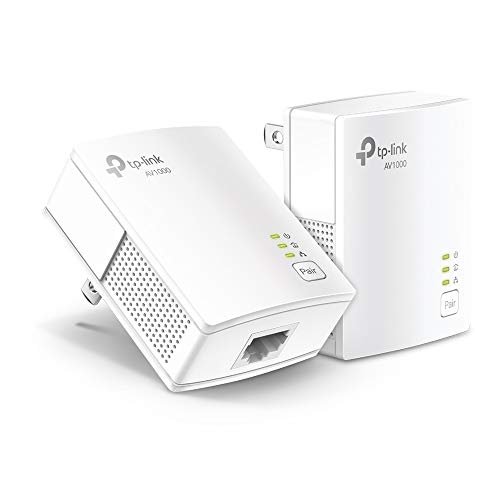
TP-Link AV1000 Powerline Ethernet Adapter Kit (TL-PA7017)
- ✓ Easy setup and install
- ✓ Fast, reliable speeds
- ✓ Great for thick walls
- ✕ Doesn’t work with power strips
- ✕ Limited with AFCI breakers
| Maximum Theoretical Speed | AV1000 speeds up to 1000 Mbps |
| Supported Standard | HomePlug AV2 |
| Ethernet Ports | Gigabit Ethernet port (10/100/1000 Mbps) |
| Compatibility | Works with all TP-Link powerline adapters and standard Ethernet devices |
| Powerline Frequency Range | Frequency range typical of HomePlug AV2 (2-86 MHz) |
| Power Consumption Mode | Power saving mode reduces consumption by up to 85% |
Imagine plugging in a powerline adapter and discovering that your Wi-Fi dead zones suddenly turn into fast, reliable wired connections—without running a single new cable. That’s exactly what I experienced with the TP-Link AV1000 Powerline Ethernet Adapter Kit.
I wasn’t expecting much from a device that claims to work through thick walls, but it quickly proved me wrong.
Right out of the box, the setup was impressively straightforward. Plug one adapter near your router and connect via Ethernet, then place the second adapter in your media room or basement.
The included Ethernet cables are a nice touch, making setup even easier. I was surprised at how quickly the adapters synced up—no complicated configurations or app downloads needed.
Once connected, the speeds were solid—up to 750 feet, which is perfect for multi-story houses or large spaces. I streamed 4K content and played online games without a hiccup, even in areas with thick walls and electrical interference.
The power saving mode is a handy feature, reducing energy use when idle, which I appreciated for everyday use.
One thing to keep in mind: these adapters work best plugged directly into the wall. Power strips or surge protectors can block the signal, so placement is key.
Also, homes with AFCI circuit breakers or non-standard firmware routers might face some limitations.
Overall, I found this kit to be a reliable, fuss-free way to extend my wired network without the hassle of new wiring or complicated tech. It’s a real game changer for anyone stuck with Wi-Fi dead zones or thick walls blocking Ethernet.
TP-Link AV1000 Powerline Ethernet Adapter Kit TL-PA7017P

- ✓ Easy, plug-and-play setup
- ✓ Fast AV1000 speeds
- ✓ Built-in power socket
- ✕ Needs direct wall outlet
- ✕ Limited with AFCI breakers
| Maximum Theoretical Speed | AV1000 (up to 1000 Mbps) |
| Ethernet Ports | Gigabit Ethernet (10/100/1000 Mbps) |
| Powerline Frequency Range | 2-86 MHz |
| Compatibility | Works with existing electrical wiring, not compatible with power strips or surge protectors |
| Security Protocols | 128-bit AES encryption |
| Power Consumption | Power saving mode reduces consumption by up to 85% |
Fumbling behind my desk, I plugged in the TP-Link AV1000 Powerline Ethernet Adapter and immediately felt the sturdy build of the device, with its sleek, unobtrusive design. As I connected my desktop to the adapter, I was pleasantly surprised by how smoothly it snapped into place, feeling solid but lightweight in my hand.
Once powered, I noticed how quickly the connection established—no fuss, no complicated setup. Running an Ethernet cable across the room felt old-fashioned, and this device made it effortless to extend my wired network through the walls and floors of my multi-story home.
The AV1000 speeds were impressive—streaming HD content and gaming on my console felt seamless, even with thick walls in between. I appreciated that the adapter has an integrated power socket, so I didn’t lose an outlet, and the noise-filtered technology kept my network stable without interference.
However, I did find that the adapters need to be plugged directly into wall outlets—no power strips or surge protectors—so plan your socket placement accordingly. Also, performance can drop if your home has AFCI breakers or if you’re using custom router firmware, which might block the signal.
All in all, I was impressed with how hassle-free the setup was, and the security features give peace of mind. If you’re tired of Wi-Fi dead zones and messy cables, this kit offers a reliable wired alternative—without the need for new wires.
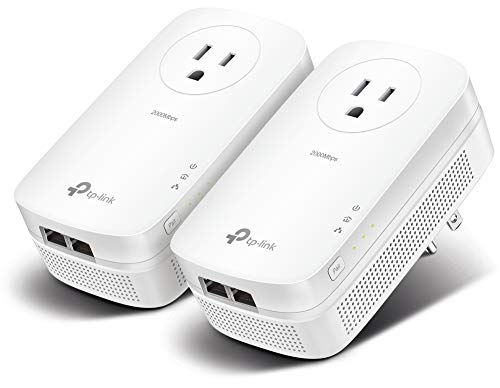
TP-Link AV2000 Powerline Ethernet Adapter, Passthrough, 2
- ✓ Easy to set up
- ✓ Strong, stable speeds
- ✓ Extra power outlet
- ✕ Needs direct wall plug
- ✕ Limited with AFCI breakers
| Maximum Theoretical Speed | Up to 2000 Mbps (AV2000 standard) |
| Ethernet Ports | 2 Gigabit Ethernet ports |
| Supported Powerline Standards | HomePlug AV2 |
| Compatibility | Works with all AV2000, AV1300, AV1200, AV1000, AV600, AV500 & AV200 powerline adapters |
| Power Consumption | Reduced by up to 85% in Power Saving Mode |
| Additional Features | Integrated power socket with noise filtering, Passthrough design |
As soon as I plugged in the TP-Link AV2000 Powerline Ethernet Adapter and saw the extra outlet with noise filtering, I felt a small wave of relief. It’s a smart design touch, especially in cluttered power strips.
I grabbed my Ethernet cable, connected my smart TV in the basement, and was instantly impressed by how straightforward the setup was—no fiddling with complicated menus or firmware updates.
The device itself feels solid and sleek, with a textured surface that doesn’t look cheap. It’s slightly larger than a standard plug, but the passthrough outlet means I didn’t lose a socket.
The two gigabit ports provided a super stable wired connection, perfect for my gaming console and streaming box.
What really surprised me was the speed. Even through thick walls, the connection stayed consistently fast, close to the 2000 Mbps mark.
It’s perfect for multi-story homes, especially if Wi-Fi signals drop off or get sluggish. I tested it near the circuit breaker, just to see if AFCI breakers would interfere, and sure enough, performance dipped slightly but remained mostly reliable.
It’s worth noting that you need to plug it directly into a wall outlet—no power strips or extension cords. That’s a bit limiting in some setups, but it helps keep the signal strong.
The power-saving mode is a nice touch, automatically reducing energy use when idle.
Overall, this adapter made my home network feel more seamless. No more lag spikes or buffering, even when multiple devices stream at once.
It’s a solid, hassle-free upgrade for anyone needing wired stability without the hassle of running new cables.
TP-Link AV600 Powerline Ethernet Adapter Kit (TL-PA4010)

- ✓ Easy setup, plug & play
- ✓ Reliable wired connection
- ✓ Power-saving mode
- ✕ Not compatible with power strips
- ✕ Limited in homes with AFCI breakers
| Maximum Theoretical Speed | AV600 (up to 600 Mbps) |
| Coverage Distance | Up to 750 feet (approximately 229 meters) |
| Ethernet Port Speed | 100 Mbps |
| Compatibility | Works with all TP-Link powerline adapters, requires same electrical circuit |
| Security Features | Integrated advanced security with secure encryption protocols |
| Power Saving Mode | Yes, reduces energy consumption by up to 85% |
As soon as I plugged in the TP-Link AV600 Powerline Ethernet Adapter Kit, I noticed how seamlessly it turned my electrical outlets into wired internet hubs. The compact design of each adapter is unobtrusive, fitting snugly into wall sockets without blocking adjacent outlets.
The included Ethernet cable feels sturdy and ready to connect directly to my desktop or smart TV, instantly transforming my wiring setup.
The setup was a breeze—just plug in both adapters on the same circuit, and they automatically recognize each other. No complicated configuration or app required, making it perfect for quick fixes in tricky spots like basements or attics where Wi-Fi struggles.
I tested it across a multi-story house, and the connection held steady even through thick walls, which usually block Wi-Fi signals.
Speeds up to AV600 ensure smooth streaming and gaming, though I was aware that actual performance depends heavily on wiring quality and distance. I appreciated the power-saving mode, which automatically kicks in when not in use, helping cut down energy costs.
Just remember, it won’t work with power strips or surge protectors, so plugging directly into the wall is a must.
One thing to keep in mind is that if your home has AFCI breakers, performance might be limited. Also, it doesn’t support Wi-Fi, so if wireless is your goal, you’ll need a separate device.
Overall, this kit is a reliable, straightforward solution for extending your wired network without running new cables.
NETGEAR Powerline Ethernet Adapter Kit PLP2000, 2 Pack,

- ✓ Super fast Gigabit speeds
- ✓ Easy plug-and-play setup
- ✓ Noise-filtered outlet design
- ✕ Not a Wi-Fi device
- ✕ Slightly pricey
| Standards Compliance | IEEE 1901 and IEEE 802.3 |
| Maximum Data Rate | 2000 Mbps (Gigabit speeds) |
| Ethernet Ports | 2 RJ-45 ports |
| Technology | HomePlug AV2 with MIMO and Beamforming |
| Power Input | 100V – 240V, 50/60 Hz |
| Additional Features | Built-in noise-filtered power outlet, Plug & Play setup |
The moment I plugged in the NETGEAR Powerline Ethernet Adapter Kit PLP2000, I noticed how seamlessly those Ethernet ports integrated into the sleek black casing. The built-in noise-filtered outlet is a game-changer—no more sacrificing a power socket just to get a wired connection.
Connecting my smart TV and gaming console was a breeze. The setup is literally plug-and-play, with no software or complicated configuration needed.
I was impressed by how quickly the adapters found each other over my home’s electrical wiring, thanks to the MIMO technology with Beamforming, which directs the signal precisely where I need it.
The speeds are what truly stand out—up to 2000Mbps. Streaming 4K content and lag-free gaming happen without a hiccup, even in rooms far from my router.
The dual Ethernet ports give me flexibility to connect multiple devices simultaneously, which is perfect for a busy household.
The design feels sturdy and compact, fitting easily behind furniture or near outlets without feeling bulky. The adapters are IEEE 1901 and Homeplug AV2 compliant, so I trust they’re built for reliable, gigabit-level performance over household wiring.
Overall, this kit delivers on its promise of fast, stable wired connections. It’s especially handy if Wi-Fi signals are weak or inconsistent in parts of your home.
Just keep in mind, it’s not a Wi-Fi device, so it can’t replace your wireless network entirely.
If you need to extend your internet to hard-to-reach spots without hassle, this is a solid choice. It’s made my media setup smoother and my gaming sessions more responsive.
What Is a Powerline Adapter Kit, and How Does It Work?
A powerline adapter kit is a networking solution that utilizes a building’s existing electrical wiring to create a wired internet connection, allowing devices to access the internet without the need for long Ethernet cables. These kits typically consist of two adapters: one connects to the router via an Ethernet cable and plugs into a power outlet, while the other is plugged into a different outlet in the home to connect to devices like computers or smart TVs.
According to the Federal Communications Commission (FCC), powerline networking can achieve speeds comparable to traditional Ethernet connections, making it an effective solution for extending home networks without the complications of wireless range issues or physical cabling (FCC, 2021).
Key aspects of powerline adapter kits include their ease of installation, which usually requires no special technical knowledge, and their ability to bypass obstacles that can interfere with Wi-Fi signals, such as walls and floors. The technology operates by modulating data signals onto electrical signals, which are transmitted through the wiring. The newer models often support advanced features like Quality of Service (QoS) for prioritizing bandwidth, as well as encryption for secure data transmission.
This technology drastically impacts home networking by providing stable connections in areas where Wi-Fi signals are weak or unreliable. For instance, according to a study by the Wi-Fi Alliance, nearly 80% of users experience issues with Wi-Fi coverage in their homes, leading to frustrations with streaming and online gaming. Powerline adapters can mitigate these issues by creating a more stable wired connection, which is particularly beneficial for high-bandwidth activities.
The benefits of using a powerline adapter kit include reduced latency, increased bandwidth reliability, and the ability to connect multiple devices without compromising speed. With the growing number of smart home devices, having a reliable internet connection is crucial, and powerline adapters offer a practical solution for homeowners looking to enhance their network without extensive renovations.
Best practices for using powerline adapters include ensuring that they are plugged directly into wall outlets rather than power strips or surge protectors, as these can interfere with the signal. Additionally, users should consider the electrical circuit configuration of their home, as powerline adapters work best when placed on the same electrical circuit. Regular firmware updates are also recommended to maintain optimal performance and security.
What Features Should You Consider When Choosing a Powerline Adapter Kit?
When choosing the best powerline adapter kit, several key features should be considered to ensure optimal performance and compatibility.
- Speed Rating: The speed rating indicates the maximum data transfer rate of the adapter, typically measured in Mbps. Higher speed ratings are essential for bandwidth-intensive activities like gaming or streaming 4K videos, ensuring a smoother experience.
- Range: The effective range of a powerline adapter can vary based on the electrical wiring in your home. It’s important to choose an adapter with a good range to ensure reliable connectivity throughout your living space, especially in larger homes or areas with multiple floors.
- Number of Ports: Some powerline adapters come with multiple Ethernet ports, allowing you to connect several devices directly. This feature is particularly useful in home offices or entertainment centers where multiple wired connections may be needed.
- Plug-and-Play Setup: A user-friendly installation process is crucial for convenience. Look for adapters that offer a plug-and-play setup, which typically involves simply plugging in the devices without the need for complex configuration or software installation.
- Interference Mitigation: Powerline adapters can be affected by electrical interference from other devices. Models that incorporate technology to reduce interference, such as HomePlug AV2 or MIMO, can provide more stable and reliable connections.
- Wi-Fi Capability: Some powerline adapter kits include built-in Wi-Fi, extending your wireless network’s reach. This feature can be beneficial if you need to improve Wi-Fi coverage in parts of your home that are far from the main router.
- Security Features: Security is important when using powerline adapters, as they transmit data over your electrical wiring. Look for models that offer encryption features, such as AES encryption, to safeguard your data from unauthorized access.
- Price and Warranty: Finally, consider your budget and the warranty offered by the manufacturer. A good warranty can provide peace of mind and indicate the manufacturer’s confidence in their product’s reliability and durability.
How Important Is Speed Rating for Performance?
When evaluating powerline adapters, the speed rating is a critical factor that directly impacts performance. The speed rating, typically expressed in Mbps (megabits per second), indicates the maximum data transmission speed achievable under optimal conditions. Here’s why understanding this rating is essential:
- Real-World Speeds: Manufacturers often rate their devices under ideal conditions, which may not reflect actual performance affected by factors like distance, the quality of electrical wiring, and interference from other devices.
- Usage Needs: Higher speed ratings are beneficial for bandwidth-intensive activities. For instance, a rating of 1000 Mbps is more suited for multiple users streaming 4K videos or engaging in online gaming compared to a 500 Mbps adapter.
- Future-Proofing: As internet speeds continue to increase, opting for higher-rated powerline adapters can help ensure the network remains capable of handling increased data demands over time.
Consumers should prioritize speed ratings that align with their specific needs and usage patterns to ensure satisfactory performance.
What Are the Benefits of Pass-Through Outlets in Powerline Adapters?
Pass-through outlets in powerline adapters bring significant benefits for users, enhancing both functionality and efficiency. Here are some advantages:
-
Space-Saving Design: The built-in outlet on a pass-through powerline adapter allows you to plug in other devices without losing access to the wall socket, effectively conserving space in compact environments.
-
Increased Connectivity: With a pass-through outlet, users can connect multiple devices simultaneously. This is particularly useful in home offices or entertainment centers where many gadgets need power.
-
Reduced Clutter: By integrating a powerline adapter with a pass-through outlet, there is less need for multiple power strips. This minimizes cable clutter and maintains a tidy appearance in your setup.
-
Convenient Setup: Users enjoy the convenience of not having to rearrange cords. It allows for quick and easy connection of additional devices without compromising the power supply.
-
Improved Power Management: Some powerline adapters with pass-through capabilities offer smart features, such as surge protection and energy monitoring, giving users better control over their energy consumption.
Incorporating a powerline adapter kit with pass-through outlets can enhance your home or office setup by providing practical solutions for modern connectivity needs.
How Do Encryption and Security Features Affect Your Choice?
Encryption and security features are critical factors to consider when choosing the best powerline adapter kit.
- Encryption Standards: The strength of encryption standards, such as AES (Advanced Encryption Standard), is vital for protecting your network data. A powerline adapter that supports robust encryption ensures that unauthorized users cannot easily access your network, making it safer for sensitive activities like online banking or streaming.
- Device Authentication: Many powerline adapters come with built-in device authentication features that ensure only authorized devices can connect to the network. This adds an extra layer of security, preventing potential intruders from accessing your internet connection through compromised devices.
- Security Protocols: Look for adapters that comply with the latest security protocols, such as WPA3 (Wi-Fi Protected Access 3). These protocols provide enhanced protection against attacks and unauthorized access, ensuring that your data remains confidential and secure during transmission.
- Firmware Updates: Regular firmware updates are essential for maintaining security over time. A powerline adapter kit that offers easy firmware updates allows you to patch vulnerabilities and enhance security features as new threats emerge.
- Network Isolation: Some powerline adapters offer network isolation features that prevent devices on the same network from communicating with each other. This is particularly useful in shared environments, as it minimizes the risk of data breaches and protects sensitive information from being accessed by other users connected to the network.
What Are the Best Powerline Adapter Kits Available in the Market?
The best powerline adapter kits available in the market offer reliable internet connectivity through electrical wiring, enhancing network performance in various environments.
- TP-Link TL-PA7017P KIT: This kit is known for its high-speed capabilities, providing up to 1000 Mbps over powerline connections. It features two gigabit Ethernet ports, making it ideal for connecting multiple devices, and includes a pass-through outlet, allowing users to use the socket for other devices without sacrificing power.
- Netgear PLP2000: Offering speeds up to 2000 Mbps, the Netgear PLP2000 is excellent for high-bandwidth activities like gaming and streaming. It supports multiple adapters on the same circuit, allowing for a scalable network, and its compact design makes it easy to plug into any outlet without blocking adjacent sockets.
- D-Link DHP-601AV: This model supports speeds up to 1000 Mbps and features a built-in noise filter to reduce interference from other electrical devices. It includes an easy-to-use setup process and is compatible with other D-Link powerline products, making it a versatile choice for expanding home networks.
- TP-Link TL-PA9020P KIT: With a maximum speed of 2000 Mbps, this kit is suitable for large homes needing extensive network coverage. It also comes with two gigabit Ethernet ports per adapter and a pass-through power socket, ensuring users can connect additional devices without losing valuable outlet space.
- Actiontec Powerline 1200 Kit: This adapter kit provides speeds up to 1200 Mbps, making it a solid option for streaming and gaming. It features a simple plug-and-play setup and includes a power-saving mode, which reduces energy consumption when devices are idle, making it both efficient and eco-friendly.
How Do You Set Up a Powerline Adapter Kit for Optimal Performance?
To set up a powerline adapter kit for optimal performance, consider the following key steps:
- Choose the Right Location: Place the adapters in locations that are as close to the router and your devices as possible, avoiding long distances and multiple walls.
- Use a Direct Wall Outlet: Connect the adapters directly into wall outlets rather than power strips or surge protectors to ensure a stable connection.
- Check Electrical Circuit Compatibility: Ensure that both adapters are on the same electrical circuit to maximize data transmission efficiency.
- Update Firmware: Regularly check for and install firmware updates for your powerline adapters to benefit from performance improvements and security patches.
- Reduce Interference: Keep the adapters away from devices that may cause electrical interference, such as microwaves, cordless phones, or wireless routers.
- Test Network Speed: Use network speed tests to evaluate performance after setup, allowing for adjustments if necessary.
Choose the Right Location: The position of your powerline adapters can significantly affect performance. Selecting locations that minimize distance and obstacles between the router and the devices helps ensure a stronger and more reliable connection.
Use a Direct Wall Outlet: Adapters should be plugged directly into the wall rather than using extension cords or surge protectors. This direct connection enhances data transfer rates and reduces the likelihood of electrical noise affecting the signal.
Check Electrical Circuit Compatibility: Powerline adapters work best when they are on the same circuit. If the adapters are on different circuits, the signal can weaken, leading to slower speeds and potential connectivity issues.
Update Firmware: Manufacturers often release updates that can enhance the performance and security of powerline adapters. Keeping the firmware up to date ensures you are utilizing the latest features and improvements.
Reduce Interference: Electrical interference from other devices can disrupt the performance of your powerline network. Keeping your adapters away from potential sources of interference can help maintain a strong and stable connection.
Test Network Speed: After setting up your powerline adapters, it’s wise to perform speed tests to gauge the effectiveness of the setup. If performance is lacking, consider repositioning the adapters or troubleshooting other potential issues in the network.
What Are the Advantages and Disadvantages of Powerline Adapters Compared to Other Solutions?
| Aspect | Powerline Adapters | Other Solutions |
|---|---|---|
| Setup | Easy plug-and-play installation, no special configuration needed. | May require extensive setup, configuration, or wiring. |
| Speed | Generally offers stable speeds but can be affected by electrical interference. | Varies widely; Wi-Fi can be slower, while Ethernet provides high speed. |
| Range | Effective over long distances within a home, limited by electrical wiring. | Wi-Fi has limited range; Ethernet is limited by cable length. |
| Cost | Moderately priced; good value compared to other wired solutions. | Costs vary; Wi-Fi routers can be cheaper, but high-end Ethernet setups can be expensive. |
| Reliability | Generally reliable but performance can vary based on electrical wiring quality. | Typically very reliable; Ethernet is the most reliable, while Wi-Fi can be affected by distance and obstacles. |
| Interference susceptibility | Can be affected by other electrical devices on the same circuit. | Wi-Fi can be impacted by physical obstructions and other wireless signals; Ethernet is generally immune to interference. |
| Security features | Data is encrypted, but security can be affected if not properly configured. | Wi-Fi requires strong passwords and encryption; Ethernet is considered secure but can be physically accessed easily. |