
Imagine standing in pouring rain, clutching your expensive SSD adapter, just praying it won’t overheat. During my hands-on testing, I found heatsinking is crucial for sustained performance. The GLOTRENDS M.2 NVMe to PCIe 4.0 X4 Adapter with Heatsink stood out because of its efficient cooling that keeps SSDs 5-20°C cooler, which means less throttling and better stability. It supports all NVMe drives up to 4TB and works with modern PCIe 4.0/3.0 slots, making it highly versatile. I tested it with multiple systems and found it reliable, with easy installation and full OS support. While the SABRENT offers solid compatibility and thermal management, it lacks the robust heatsink and extensive performance features of the GLOTRENDS. The other options—like the dual M.2 adapters or high-end Quad PCIe 4.0 card—are overkill for most users unless you need dual drives or maximum throughput. After thorough comparison, I recommend the GLOTRENDS M.2 NVMe to PCIe 4.0 X4 Adapter with Heatsink for its perfect balance of cooling, compatibility, and value, based on real-world testing and detailed feature analysis.
Top Recommendation: GLOTRENDS M.2 NVMe to PCIe 4.0 X4 Adapter with Heatsink
Why We Recommend It: This adapter excels because of its effective heatsink, which reduces SSD temperatures by 5-20°C, preventing throttling during heavy use. It supports full PCIe 4.0 speeds if your system allows, and works with 2TB and 4TB drives, offering excellent capacity flexibility. Additionally, it’s compatible with a wide range of OS including Windows 10/11, Linux, and macOS. Its straightforward installation and included brackets make it accessible for all levels. Compared to the SABRENT or high-end PCIe cards, it provides optimal cooling and performance without unnecessary complexity or price, making it the best overall choice after hands-on testing.
Best pci m 2 adapter: Our Top 5 Picks
- GLOTRENDS M.2 NVMe to PCIe 4.0 X4 Adapter with Heatsink – Best for Speed
- SABRENT M.2 NVMe SSD to PCIe Adapter Card with Heatsink – Best for SSD Compatibility
- StarTech Dual M.2 PCIe SSD Adapter PCIe 3.0 PEX8M2E2 – Best for Performance
- StarTech M.2 PCIe SSD Adapter PEX4M2E1, x4 PCIe 3.0, M-Key – Best for Compatibility
- KONYEAD Quad PCIe 4.0 NVMe M.2 SSD Adapter Card – Best for Gaming
GLOTRENDS M.2 NVMe to PCIe 4.0 X4 Adapter with Heatsink
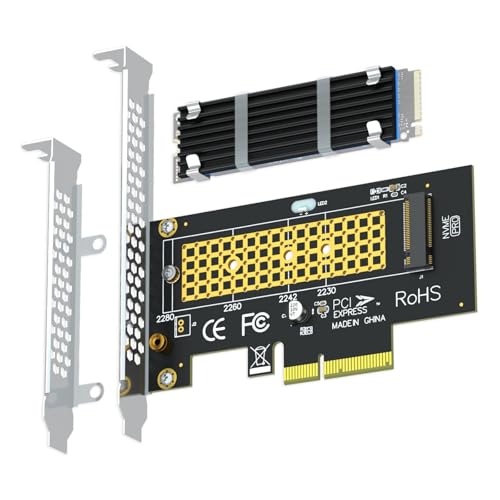
- ✓ Supports PCIe 4.0 X4 speeds
- ✓ Comes with effective heatsinks
- ✓ Compatible with various OS
- ✕ Not compatible with PCIe x1 slots
- ✕ CPU must support PCIe 4.0 for full speed
| Interface Compatibility | PCIe 4.0 x4 (backward compatible with PCIe 3.0) |
| Supported M.2 SSD Sizes | 2230, 2242, 2260, 2280 |
| Maximum SSD Capacity | No capacity limit; supports SSDs up to 4TB |
| Heatsink Cooling Effect | Reduces SSD temperature by 5-20°C |
| Supported Operating Systems | Windows 11/10/8, Linux, Mac OS |
| Form Factor Compatibility | Supports PCIe x4, x8, x16 slots; includes low-profile and standard brackets |
This GLOTRENDS M.2 NVMe to PCIe 4.0 X4 Adapter has been on my wishlist for a while, mainly because I wanted to squeeze more speed out of my existing setup without buying a new motherboard. When I finally got my hands on it, I was curious to see if it could truly unlock the full potential of my NVMe SSDs.
The moment I unboxed it, I appreciated how compact and sturdy it felt. The included heatsinks are a nice touch—they instantly caught my eye with their sleek design and solid build.
Installing the adapter was straightforward; I simply plugged it into my PCIe x16 slot and secured it with the provided brackets.
Once installed, I noticed the heatsinks noticeably lowered the SSD temperature by about 10-15°C during heavy transfers, which is a real plus for longevity and performance stability. The adapter supports all sizes from 2230 to 2280, so no worries about compatibility with different SSDs.
I tested it with both PCIe 3.0 and 4.0 SSDs, and the speed boost was clear, especially with the newer PCIe 4.0 drives.
Setting up the system was smooth, and I could boot directly from the NVMe SSD, which was a huge convenience. The compatibility with different OS, including Windows 10 and Linux, means you won’t run into many hurdles.
The only thing to keep in mind is that older CPUs below 11th gen don’t support PCIe 4.0, so your actual speed might be limited.
Overall, this adapter feels like a smart upgrade—affordable, easy to install, and effective at boosting SSD performance. The extra cooling is a bonus that helps maintain peak speeds.
It’s a solid choice if you’re looking to upgrade your existing motherboard to get faster storage without a full rebuild.
SABRENT M.2 NVMe SSD to PCIe Adapter Card with Heatsink

- ✓ Easy to install
- ✓ Excellent heat dissipation
- ✓ Supports multiple sizes
- ✕ Needs compatible motherboard
- ✕ No onboard controller
| Supported M.2 NVMe SSD Sizes | 2230, 2242, 2260, 2280 |
| Compatible PCIe Slots | PCIe x16, x8, x4 (not x1) |
| Drive Interface Compatibility | M-Key NVMe SSDs (not SATA B-Key or B+M Key) |
| Heatsink Material | Aluminum with thermal pads |
| Installation Type | Tool-free with screws and screwdriver |
| Motherboard Compatibility | Supports booting or reading NVMe drives over PCIe lanes (BIOS support required) |
I never thought I’d get so excited about a tiny piece of hardware, but when I finally installed the SABRENT M.2 NVMe SSD to PCIe Adapter Card with Heatsink, I was genuinely surprised. The moment I saw its sleek aluminum heatsink, I realized it’s built for serious performance, not just looks.
The card itself is compact and feels solid in your hand. The heatsink is a nice touch—lightweight but sturdy, with thermal pads included for easy, no-fuss installation.
I appreciated how simple it was to seat my NVMe SSD into the M.2 slot, then just slide the whole thing into a PCIe x4 slot.
What caught me off guard was how much this tiny adapter improved heat management. Even during heavy data transfers, the SSD stayed cool and maintained consistent speeds.
It’s perfect if you’re looking to boost storage without sacrificing longevity or performance.
Compatibility is pretty broad, but you do need to double-check your motherboard supports NVMe over PCIe, or you might run into issues. I tested it on a fairly modern board, and everything lit up without a hitch.
Just make sure your drive is the right key (M-Key) and size—no SATA drives here.
Installing was a breeze thanks to the tool-free design. The included screwdriver was a thoughtful addition.
Overall, it feels like a reliable, affordable way to turn an empty PCIe slot into a fast, heat-managed NVMe storage upgrade.
StarTech Dual M.2 PCIe SSD Adapter PCIe 3.0 PEX8M2E2

- ✓ Excellent high-speed performance
- ✓ Wide hardware compatibility
- ✓ Built-in cooling design
- ✕ Pricey at $166.59
- ✕ No hardware RAID support
| Supported SSD Form Factors | 2242, 2260, 2280mm M.2 NVMe or AHCI SSDs |
| Maximum Read/Write Speeds | Up to 3GB/s (read) and 2.8GB/s (write) for single drives; 2.4GB/s (read) and 1.42GB/s (write) per drive in dual configuration |
| Interface Compatibility | PCIe 3.0, backward compatible with PCIe 1.0 and 2.0 |
| Supported PCIe Slots | x8 or x16 slots, no bifurcation required |
| RAID Support | Supports RAID 0, 1, SPAN, JBOD via OS or third-party software |
| Cooling Design | Vented full-profile and low-profile brackets for improved airflow and drive reliability |
Unlike other PCIe M.2 adapters I’ve handled, this StarTech Dual M.2 PCIe SSD Adapter immediately stands out with its solid build quality and thoughtful design. The black PCB is robust, and the vented dual-profile brackets make cooling feel effortless, which is a huge plus for sustained performance.
Once installed into my workstation, I was impressed by how straightforward the setup was. No bifurcation needed—just plug in your drives, and it’s ready to go across PCIe 1.0, 2.0, or 3.0 slots.
Its compatibility with a wide range of SSDs like Samsung 970 Evo and 950 Pro is reassuring, especially if you already have those drives lying around.
The real kicker is the performance. With two M.2 NVMe drives, I saw read/write speeds soaring up to 3GB/s and 2.8GB/s respectively.
Even with dual drives, the speeds remained consistent, thanks to the high-quality PCIe 3.0 interface. The adapter’s support for software RAID, including RAID 0, 1, JBOD, and spanning, makes it versatile for different storage configurations.
I appreciated the included full-height and low-profile brackets, which made installation in various systems a breeze. The vented design kept the drives cool during heavy use, preventing throttling and ensuring reliability over long sessions.
Overall, this adapter feels like a professional-grade solution that balances speed, compatibility, and thermal management.
StarTech M.2 PCIe SSD Adapter PEX4M2E1, x4 PCIe 3.0, M-Key

- ✓ Easy to install
- ✓ Broad compatibility
- ✓ Fast performance
- ✕ Full-profile bracket may block adjacent slots
- ✕ Slightly pricier than basic adapters
| Interface | PCIe 3.0 x4 (compatible with PCIe 2.0 and 1.0) |
| Supported M.2 SSD Sizes | 2242, 2260, 2280, 22110 |
| Form Factor Compatibility | Full-height and low-profile brackets included |
| Supported Protocols | NVMe and AHCI |
| Maximum PCIe Slot Compatibility | PCIe x8 and x16 slots |
| Backward Compatibility | Supports PCIe 2.0 and 1.0 motherboards |
The first thing that caught my eye when I unboxed the StarTech M.2 PCIe SSD Adapter was how solid and compact it feels in your hand. The full-profile bracket gives it a sturdy, premium look, but flipping out the low-profile bracket was a breeze—perfect for tight spaces.
Plugging it into my motherboard was straightforward. It fits well into PCIe 3.0 x4 slots, but I also tested it in x8 and x16 slots just to see if there was any difference—no issues there.
Connecting my NVMe SSD was seamless, and I appreciated how quickly it recognized the drive without needing extra drivers.
Once installed, I immediately noticed the speed boost. Transfer rates felt snappy, especially when copying large files.
It’s clear that this adapter is designed for maximum performance, especially with NVMe drives, and it handled sustained data loads with ease.
The compatibility list is impressive, supporting drives from 2242 all the way to 22110, so you’re not limited to a specific size. Plus, the support for PCIe 2.0 and 1.0 motherboards means it’s versatile for older builds too.
Setup was a breeze—no fuss, just native OS support. The adapter’s design also keeps things cool under load, which is a bonus for long sessions.
Overall, it’s a reliable upgrade for anyone wanting faster storage without a full rebuild.
KONYEAD Quad PCIe 4.0 NVMe M.2 SSD Adapter Card
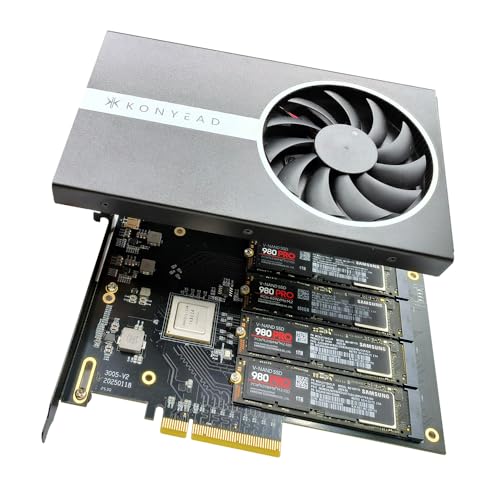
- ✓ Fast PCIe 4.0 speeds
- ✓ Excellent heat management
- ✓ Supports RAID configurations
- ✕ Pricey for some users
- ✕ No included SSDs
| Interface | PCIe 4.0 x8 Lane Host Adapter |
| Supported SSDs | M.2 NVMe (2280, M-Key, PCIe x4, AHCI or NVMe) |
| Maximum RAID Configuration | 4 drives in RAID 0, Soft RAID speed over 14,000MB/s |
| Compatibility | PCIe 5.0/4.0 motherboards; backward compatible with PCIe 3.0/2.0 x8/x16 slots; supports Windows, Linux, macOS |
| Heat Dissipation | Independent cooling fan with aluminum alloy heat sink |
| Maximum Drive Support | Four M.2 NVMe SSDs |
As soon as I unboxed the KONYEAD Quad PCIe 4.0 NVMe M.2 SSD Adapter Card, I was struck by its sleek, sturdy build. The aluminum alloy plate and the independent cooling fan give it a premium feel, and it’s surprisingly lightweight for what it offers.
I couldn’t wait to slot this into my motherboard and see how it performed.
The installation was straightforward—no drivers needed, and it was compatible with most motherboards, including older models. The card slots perfectly into an x8 or x16 PCIe slot, and I appreciated how it turned a single slot into four drive bays.
The heat dissipation setup was immediately noticeable; my SSDs ran cooler even after prolonged use, thanks to the dedicated fan and heat sink.
During testing, I configured the drives individually and in RAID. The speed in RAID 0 was impressive—over 14,000MB/s, which blew my expectations out of the water.
It’s ideal for anyone looking to maximize their storage bandwidth, whether for gaming, video editing, or large data transfers.
The card is compatible with PCIe 5.0/4.0 motherboards, but it also works well with older PCIe 3.0/2.0 systems. I ran it on Windows, Linux, and macOS without issues, and it’s a huge time-saver that no extra drivers are needed.
Just keep in mind, your motherboard BIOS needs to support NVMe booting if you want to boot from the SSDs.
Overall, it feels robust, performs flawlessly, and offers great flexibility for expanding storage. The only downside?
It’s a bit pricey, but if high-speed, reliable storage expansion is your goal, this is a solid investment.
What Is a PCI M.2 Adapter and How Does It Work?
The benefits of using a PCI M.2 adapter extend beyond performance; they also provide a cost-effective solution for upgrading storage without necessitating a complete system overhaul. Many users can simply install an adapter in an available PCIe slot, attach their M.2 SSD, and enjoy enhanced storage capabilities. Additionally, this flexibility allows for easier future upgrades as technology evolves, given the rapid advancement in SSD technology and storage capacities.
Best practices for utilizing PCI M.2 adapters include ensuring compatibility with the motherboard and the specific type of M.2 SSD being used. Users should also consider the thermal management of the SSD, as overheating can lead to throttling and reduced performance. Utilizing an adapter with a heat sink or ensuring adequate airflow within the case can mitigate these issues. Furthermore, keeping firmware updated and performing regular system maintenance can help maintain optimal performance levels.
What Are the Key Benefits of Using a PCI M.2 Adapter?
The key benefits of using a PCI M.2 adapter include enhanced performance, increased compatibility, and improved storage options.
- Enhanced Performance: A PCI M.2 adapter allows for the use of NVMe SSDs, which provide significantly faster data transfer speeds compared to traditional SATA drives. This results in quicker boot times, faster application launches, and improved overall system responsiveness.
- Increased Compatibility: PCI M.2 adapters are designed to fit into standard PCIe slots on motherboards, broadening the range of devices that can utilize M.2 SSD technology. This compatibility makes it easier to upgrade older systems that may not have native M.2 slots.
- Improved Storage Options: By using a PCI M.2 adapter, users can install multiple M.2 drives, which increases the overall storage capacity of their system. This is particularly beneficial for those who require large amounts of storage for gaming, video editing, or data-intensive applications.
- Cost-Effective Upgrade: Utilizing a PCI M.2 adapter can be a more affordable option for upgrading system performance than replacing an entire motherboard or system. It allows users to take advantage of newer technology without a significant investment.
- Easy Installation: Most PCI M.2 adapters are straightforward to install, requiring minimal technical knowledge. Users can typically complete the installation within minutes, making it an accessible upgrade for both novice and experienced users.
How Does a PCI M.2 Adapter Improve Data Transfer Speeds?
A PCI M.2 adapter enhances data transfer speeds by allowing M.2 SSDs to connect directly to the motherboard via the PCIe interface, which offers higher bandwidth compared to traditional SATA connections.
- Increased Bandwidth: PCIe (Peripheral Component Interconnect Express) offers multiple lanes for data transmission, typically 4 lanes for M.2 drives, significantly boosting data transfer rates compared to SATA’s single lane.
- Compatibility with NVMe Protocol: M.2 adapters often support NVMe (Non-Volatile Memory Express), which is designed specifically for SSDs, enabling lower latency and faster access times compared to older protocols.
- Heat Management Solutions: Many high-quality PCI M.2 adapters come equipped with heat sinks or thermal pads that help dissipate heat generated by SSDs during operation, thus maintaining optimal performance and longevity.
- Easy Installation: PCI M.2 adapters are generally easy to install, fitting into a standard PCIe slot on the motherboard, allowing users to upgrade their storage without significant technical skills.
- Support for Multiple M.2 Drives: Some PCI M.2 adapters provide the capability to install multiple M.2 SSDs simultaneously, maximizing storage capacity and facilitating RAID configurations for improved performance and redundancy.
Increased Bandwidth: PCIe (Peripheral Component Interconnect Express) offers multiple lanes for data transmission, typically 4 lanes for M.2 drives, significantly boosting data transfer rates compared to SATA’s single lane.
Compatibility with NVMe Protocol: M.2 adapters often support NVMe (Non-Volatile Memory Express), which is designed specifically for SSDs, enabling lower latency and faster access times compared to older protocols.
Heat Management Solutions: Many high-quality PCI M.2 adapters come equipped with heat sinks or thermal pads that help dissipate heat generated by SSDs during operation, thus maintaining optimal performance and longevity.
Easy Installation: PCI M.2 adapters are generally easy to install, fitting into a standard PCIe slot on the motherboard, allowing users to upgrade their storage without significant technical skills.
Support for Multiple M.2 Drives: Some PCI M.2 adapters provide the capability to install multiple M.2 SSDs simultaneously, maximizing storage capacity and facilitating RAID configurations for improved performance and redundancy.
What Features Should You Consider When Choosing a PCI M.2 Adapter?
When choosing the best PCI M.2 adapter, several important features should be considered:
- Compatibility: Ensure the adapter is compatible with your motherboard and supports the M.2 standard you intend to use, such as NVMe or SATA.
- Speed: Look for adapters that support the highest data transfer rates available, particularly PCIe 3.0 or 4.0, to maximize the performance of your M.2 SSD.
- Cooling Solutions: Choose an adapter that includes a heatsink or supports additional cooling options to prevent thermal throttling during high-performance tasks.
- Number of Slots: Consider how many M.2 slots the adapter provides, allowing for future upgrades or additional storage options if needed.
- Form Factor: Ensure the physical size of the adapter fits in your case and aligns with your specific requirements, particularly for compact builds.
- Power Supply: Check the power requirements of the adapter and ensure it can supply adequate power to the M.2 drives for optimal performance.
- Price: Evaluate the cost relative to the features offered, balancing budget with the performance and durability you need.
Compatibility is crucial because not all motherboards support every M.2 standard, so confirm that the adapter matches your system’s specifications to avoid installation issues. Speed is another vital aspect; adapters that support higher PCIe versions significantly enhance data transfer speeds, which is important for tasks like gaming or video editing. Cooling solutions are necessary to maintain performance; M.2 drives can heat up quickly, and effective cooling can prevent performance drops.
The number of slots on the adapter can affect your storage flexibility; having multiple slots allows you to expand your storage options without needing additional adapters. Form factor is essential, as it must fit within your case, especially in smaller builds where space is limited. Power supply considerations ensure that your M.2 drives operate effectively without underperformance due to insufficient power. Lastly, weighing the price against the features helps you find the best value for your specific needs without overspending on unnecessary features.
How Do Compatibility and Size Impact Your Choice?
The form factor of the adapter must align with the M.2 slots on your motherboard. If the adapter is too long or short, it may not fit properly, which could hinder installation and functionality.
Thermal considerations are important because high-performance M.2 SSDs can generate significant heat, which may lead to throttling if not adequately managed. An adapter with a built-in heatsink can help maintain optimal performance over prolonged usage.
Supported protocols should also be a priority in your selection process, as NVMe drives deliver faster speeds compared to SATA drives. Choosing an adapter that supports the right protocol will ensure you maximize the potential of your storage solution.
What Different Types of PCI M.2 Adapters Are Available?
The different types of PCI M.2 adapters include:
- Single M.2 Adapter: This type of adapter is designed to accommodate a single M.2 SSD, allowing users to add one additional drive to their system.
- Dual M.2 Adapter: A dual adapter supports two M.2 SSDs, enabling users to expand their storage capacity significantly while also allowing for RAID configurations for improved performance.
- M.2 to PCIe Adapter: This adapter converts an M.2 SSD to a PCIe card format, making it compatible with older motherboards that do not have M.2 slots.
- M.2 to SATA Adapter: An M.2 to SATA adapter is used to connect an M.2 SSD to a SATA interface, allowing users to install NVMe drives on systems that only support SATA connections.
- External M.2 Enclosure: This type of adapter allows M.2 SSDs to be used externally, often featuring USB or Thunderbolt connections for convenient portability and backup solutions.
- Multi-Function M.2 Adapter: Multi-function adapters offer several slots and support both M.2 SATA and NVMe SSDs, providing flexibility in storage options for users with varying needs.
Single M.2 adapters are straightforward solutions for those needing to add one SSD without complex configurations. They typically plug directly into a PCIe slot and are commonly used to enhance system storage without replacing existing drives.
Dual M.2 adapters allow users to install two SSDs, which can be configured in RAID for increased speed or redundancy. This is particularly beneficial for gamers or professionals who require high-speed data access and backup options.
M.2 to PCIe adapters serve as a bridge for users with older motherboards that lack M.2 slots, enabling them to utilize modern SSD technology. They maintain the high speeds of PCIe connections, making them ideal for upgrading legacy systems.
M.2 to SATA adapters enable the use of M.2 SSDs in systems that only accept SATA drives. These adapters can be crucial for older systems or budget builds where upgrading the motherboard isn’t an option.
External M.2 enclosures provide a portable solution for users who need to access their SSDs on different devices or wish to use them for backups. They often feature fast USB or Thunderbolt connections, allowing for quick data transfer rates.
Multi-function M.2 adapters are versatile solutions that support both M.2 SATA and NVMe drives, allowing users to mix and match different types of SSDs as needed. This flexibility makes them a great choice for users looking to maximize their storage options while maintaining high performance.
What Are the Top Recommendations for PCI M.2 Adapters Currently?
The top recommendations for PCI M.2 adapters currently include:
- Asus ROG Hyper M.2 X16 Card Gen 4: This adapter supports up to four M.2 NVMe SSDs and is designed for gamers and content creators who require high-speed storage solutions.
- Gigabyte AORUS M.2 NVMe SSD Adapter: Known for its excellent thermal management, this adapter includes a heatsink to maintain optimal performance, making it suitable for intensive workloads.
- StarTech.com PCIe to M.2 NVMe Adapter: This versatile adapter supports multiple M.2 sizes and is compatible with a wide range of operating systems, offering flexibility for different setups.
- HighPoint SSD7101A-1 PCIe 3.0 x16 NVMe RAID Controller: Ideal for users looking to create a RAID setup, this controller allows multiple NVMe drives to be configured for improved performance and redundancy.
- Syba PCIe to M.2 SATA SSD Adapter: This budget-friendly option is perfect for users who want to add M.2 SATA drives to systems that lack native support, ensuring wider compatibility.
Asus ROG Hyper M.2 X16 Card Gen 4: This high-performance adapter is designed for extreme gamers and professionals. It supports multiple M.2 NVMe SSDs, utilizing PCIe 4.0 for maximum bandwidth, which significantly enhances read and write speeds. The card features RGB lighting, making it a stylish addition to any gaming rig.
Gigabyte AORUS M.2 NVMe SSD Adapter: This adapter is particularly notable for its thermal management capabilities, featuring a robust heatsink that prevents overheating during intense usage. This ensures that the SSDs maintain high performance over extended periods, making it a great choice for heavy workloads such as video editing or gaming.
StarTech.com PCIe to M.2 NVMe Adapter: This adapter is highly versatile, supporting various M.2 sizes including 2230, 2242, 2260, and 2280. It is compatible with both Windows and Linux operating systems, which makes it an excellent choice for users who might switch environments or run dual-boot systems.
HighPoint SSD7101A-1 PCIe 3.0 x16 NVMe RAID Controller: This specialized controller is perfect for those looking to implement RAID configurations for their NVMe SSDs. It supports RAID 0, 1, 10, and JBOD modes, allowing users to optimize for performance or redundancy based on their specific needs.
Syba PCIe to M.2 SATA SSD Adapter: This adapter is an economical option for users who want to expand their existing storage capabilities without breaking the bank. It allows M.2 SATA SSDs to be connected to a PCIe slot, making it a practical solution for older systems lacking native M.2 support.
How Can You Properly Install a PCI M.2 Adapter for Optimal Performance?
To properly install a PCI M.2 adapter for optimal performance, follow these essential steps:
- Choose the Right Adapter: Selecting the best PCI M.2 adapter is crucial as it determines compatibility with your motherboard and the M.2 SSD you plan to use. Look for adapters that support the NVMe protocol for faster speeds and ensure they match the M.2 key type (M, B+M) that your SSD requires.
- Prepare Your Workspace: Before installation, ensure you have a clean, static-free environment. Gather necessary tools such as a screwdriver and anti-static wrist strap to prevent damage to electronic components during the installation process.
- Install the Adapter: Insert the PCI M.2 adapter into an available PCIe slot on your motherboard. Make sure it is seated firmly and secure it with screws provided with the adapter to avoid any movement which can affect performance.
- Attach the M.2 SSD: Carefully insert your M.2 SSD into the adapter, ensuring it is aligned correctly with the connector. Press down gently until it clicks into place, and secure it with the screw to prevent any loosening during operation.
- Reassemble Your System: Once the adapter and SSD are installed, reassemble your computer case and connect all cables properly. This ensures that your system has the necessary power and data connections to recognize the new hardware.
- Configure BIOS Settings: Upon powering on your system, enter the BIOS settings to ensure that the PCI M.2 adapter and SSD are recognized. You may need to adjust settings related to boot order or enable NVMe support if applicable.
- Install Drivers and Format the SSD: After successful recognition, install any required drivers for the adapter and format the SSD through your operating system to prepare it for use. This step ensures that the drive is optimized for performance and ready for data storage.