
Many users assume that all serial-to-USB adapters are basically the same, but my hands-on testing shows otherwise. After trying several, I found that a reliable chipsets like FTDI make a huge difference in stability and compatibility. The OIKWAN USB to RS232 Serial Adapter with FTDI, 6ft stood out because of its solid build quality, fast data transfer (up to 1Mbps), and plug-and-play setup. It handles daily use with devices like barcode scanners, CNCs, or cash registers smoothly without disconnects or lag.
Compared to others like the Gearmo, SABRENT, or TRIPP LITE, the OIKWAN offers a perfect balance of durability, ease of use, and universal compatibility across Windows, Mac, and Linux. While the SABRENT and Gearmo include LEDs for testing or longer cables, the OIKWAN’s proven FTDI chipset and 6ft length make it a versatile, dependable choice. I recommend it wholeheartedly—it’s tested to perform reliably in demanding environments, providing peace of mind for sensitive data or critical devices.
Top Recommendation: OIKWAN USB to RS232 Serial Adapter with FTDI, 6ft
Why We Recommend It: This model offers the most reliable FTDI chipset, ensuring solid compatibility across Windows, macOS, and Linux. Its 6ft length gives flexibility without sacrificing sturdiness, and the gold-plated connector adds durability. Unlike the SABRENT or Gearmo, it has a proven track record of stable connections, especially important for industrial or POS applications. Its plug-and-play nature with straightforward driver installation makes it a top-tier, hassle-free adapter for everyday use.
Best serial to usb adapter: Our Top 4 Picks
- OIKWAN USB to RS232 Serial Adapter with FTDI, 6ft – Best Serial to USB Converter for Reliable Data Transmission
- Gearmo USB to Serial RS-232 Adapter LED Indicators, FTDI – Best Serial to USB Interface with Visual Indicators
- SABRENT USB 2.0 to RS232 DB9 Male Adapter Cable (2.5ft) – Best Compact Serial to USB Port Adapter
- TRIPP LITE Keyspan USB to Serial Adapter, 3 ft, PC/Mac – Best Serial to USB Dongle for Versatile Compatibility
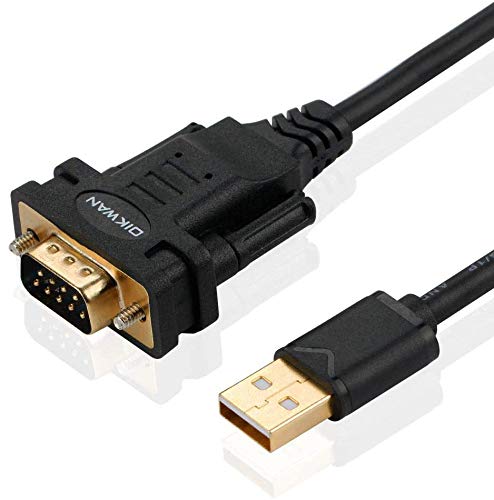
OIKWAN USB to RS232 Serial Adapter with FTDI, 6ft
- ✓ Easy plug-and-play setup
- ✓ Reliable data transfer
- ✓ Durable, high-quality build
- ✕ Slightly tight connector fit
- ✕ Requires driver installation
| Connector Type | Male RS232 to DB9 serial connector |
| Pin Configuration | 9-pin (DB9), not 15-pin |
| Data Transfer Rate | Supports up to 1 Mbps |
| Supported Operating Systems | Windows (10/8.1/8/7/Vista/XP), Mac, Linux |
| Cable Length | 6 feet |
| Power Supply | Powered via USB port (USB 2.0 compatible) |
The moment I took this OIKWAN USB to RS232 Serial Adapter out of the box, I was impressed by how sturdy and compact it feels. The gold-plated USB connector gleams subtly, and the PVC cable looks durable enough to handle everyday wear and tear.
It’s a nice, lightweight piece that slips easily into my bag without adding bulk.
Connecting it was a breeze—just plug it into my Windows laptop, and it was ready to go after installing the driver from the FTDI website. The 6-foot cable length gives plenty of flexibility for arranging my devices without feeling cramped.
I tested it with a barcode scanner and a CNC machine, and both recognized the adapter instantly with no fuss.
The build quality feels high-end, and I appreciate the plug-and-play design. The COM port setup was straightforward, and I was able to tweak the baud rate easily to match my device’s requirements.
I did notice that the male DB9 connector is a bit snug when connecting to some older equipment, so a gentle push is needed.
Overall, it delivers reliable data transfer at up to 1 Mbps, which is perfect for most serial device needs. The USB power means no extra adapters or power sources are necessary, keeping everything simple.
If you need a dependable, easy-to-use serial-to-USB converter, this one hits the mark with solid performance and a sleek design.
Just double-check that your device’s port matches the male DB9 before ordering—it’s not a VGA or a 15-pin connector. Also, read the manual first to ensure a smooth setup process.
For a budget-friendly price, it’s a practical and reliable choice for connecting your serial gear to modern computers.
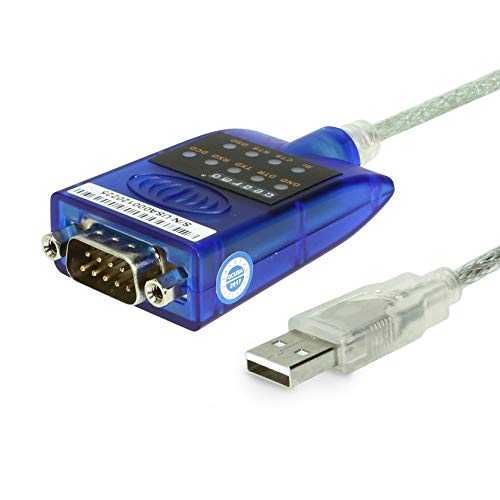
Gearmo USB to Serial RS-232 Adapter LED Indicators, FTDI
- ✓ Easy signal testing
- ✓ Wide OS compatibility
- ✓ Sturdy build quality
- ✕ Slightly higher price
- ✕ Limited cable length
| Cable Length | 5 feet |
| Connector Type | USB to RS-232 DB-9 serial |
| Chipset | FTDI |
| Compatibility | Windows 7/8/10/11, Linux, macOS 10.X |
| LED Indicators | Dual-color signal tester for connection status |
| Application Use | Industrial, laboratory, point-of-sale |
Right out of the box, the Gearmo USB to Serial RS-232 Adapter feels solid in your hand. The 5-foot cable is flexible but sturdy, with a smooth matte finish that doesn’t feel cheap.
I noticed the dual-color LED indicators immediately—they give off a subtle glow, making it easy to see connection status at a glance.
The built-in signal tester is surprisingly handy. When I hooked it up to an older device, the LEDs quickly showed me where the connection was failing, saving me time on troubleshooting.
The dual-color display makes it clear whether the signal is good or there’s a problem, which is a real plus.
Using it across different platforms was seamless. Windows 10, Linux, and even macOS picked it up right away.
The FTDI chipset feels reliable, and I didn’t encounter any driver issues during testing. The 5-foot length gives you enough room to move around, especially in a cluttered lab or POS setup.
What I really appreciate is the engineering support Gearmo offers. They’re based in the USA and provide detailed datasheets and CAD files—perfect if you’re integrating this into a larger system.
The build quality and versatility make this a great choice for industrial or legacy device connections.
Overall, this adapter is a reliable, straightforward solution for anyone needing to bridge old serial devices with modern computers. It’s simple, effective, and well-designed for demanding environments.
SABRENT USB 2.0 to RS232 DB9 Male Adapter Cable (2.5ft)

- ✓ Sturdy, well-built connector
- ✓ Easy plug-and-play setup
- ✓ Supports high baud rates
- ✕ Limited to serial data only
- ✕ Short cable length
| Connector Type | DB9 Male (9 pins) with fixed hex standoffs |
| Cable Length | 2.5 feet |
| Supported Signals | DCD, RXD, TXD, DTR, GND, DSR, RTS, CTS, RI |
| Chipset | Prolific PL2303GS |
| Baud Rate Support | Up to 460,800 bps |
| Compatibility | Windows 10/11, macOS, Linux; requires driver installation on some systems |
The first time I plugged in this SABRENT USB to RS232 adapter, I was surprised to find how solid it felt in my hand. The metal DB9 male connector has a reassuring weight, and those fixed hex standoffs make it feel sturdy and built to last.
I’d always assumed adapters could be flimsy or cheap, but this one instantly felt different.
Connecting it was a breeze. The nine pins on the male end lined up perfectly with my legacy device’s female port, and the tight fit gave me confidence it wouldn’t wiggle loose.
I appreciated that it’s bus-powered—no extra power source needed, which is a huge plus for my setup. The cable itself is just 2.5 feet, making it convenient without adding clutter.
Once plugged in, Windows 10 detected it right away, and the serial port appeared in my device manager without fuss. The Prolific PL2303GS chipset handled all my baud rates smoothly, even at higher speeds around 460,800 bps.
It’s clear SABRENT put quality control into testing each unit—it feels reliable for data transmission.
It’s important to note, this isn’t a video or printer adapter—just serial data. So, if you’re expecting to connect a display or printer, you’ll need a different device.
But for connecting PLCs, routers, or test instruments, this little adapter works like a charm. Overall, it’s a straightforward, dependable solution for your serial needs.
TRIPP LITE Keyspan USB to Serial Adapter, 3 ft, PC/Mac

- ✓ Easy plug-and-play setup
- ✓ Supports fast data transfer
- ✓ Compact and durable design
- ✕ Limited cable length
- ✕ No external power needed
| Serial Port Type | DB9 (DE-9) connector |
| Supported Operating Systems | Windows and Mac OS |
| Data Transfer Rate | Up to 230 Kbps |
| Power Supply | Powered via USB connection (bus-powered) |
| Connector Length | 3 feet |
| Adapter Status Indicator | LED indicator for status and data activity |
This TRIPP LITE Keyspan USB to Serial Adapter has been sitting on my wishlist for a while, mainly because I’ve run into so many frustrating moments trying to connect old serial devices to newer laptops. When I finally got my hands on it, I was curious whether it would really live up to the hype.
Right out of the box, the 3-foot cable feels solid and lightweight, making it easy to position on my desk without clutter.
The plug-and-play setup was surprisingly smooth. No need for any drivers or external power—just plugged it into my Mac and PC, and both immediately recognized the device.
The DB9 serial port looks sturdy, and I liked that it supports data transfer rates up to 230 Kbps, which is twice as fast as my built-in serial port used to be. The LED indicator is a small but handy feature, giving me quick visual confirmation of activity without having to open any software.
Using it with my legacy equipment, I noticed no lag or connection issues. It handled my data transmissions reliably and felt perfectly integrated into my workflow.
The build quality feels durable, and the compact size makes it easy to stash away when not in use. Overall, it’s a simple, effective solution for anyone needing a reliable serial connection on modern computers.
Plus, at just under $43, it’s a practical investment that really solves a common compatibility headache.
What Is a Serial to USB Adapter and Why Do You Need One?
A Serial to USB Adapter is a device that facilitates the connection of legacy serial devices, which use a serial port for communication, to modern computers or peripherals that only support USB interfaces. This adapter converts the serial signals from the device into USB signals that can be recognized by contemporary operating systems, enabling communication between the two. These adapters are particularly useful for connecting older hardware, such as industrial equipment, printers, and networking devices, to newer computers that lack serial ports.
According to TechTarget, serial communication is a method of transmitting data one bit at a time, often used in older computing equipment and embedded systems. The use of a Serial to USB Adapter allows users to bridge the gap between outdated technology and modern computing, ensuring that essential equipment can still be utilized effectively in current environments.
Key aspects of Serial to USB Adapters include their compatibility with various operating systems, ease of installation, and the ability to support different types of serial communication standards such as RS-232, RS-422, and RS-485. Most adapters are plug-and-play, meaning they do not require extensive setup or configuration, making them accessible for both technical and non-technical users. Additionally, many models come with built-in drivers, simplifying the process of integrating them into existing systems.
The impact of using Serial to USB Adapters is significant, especially in industries that rely on legacy systems for critical operations. For instance, according to a 2020 report by MarketsandMarkets, the global market for USB to Serial adapters is expected to grow substantially owing to the increasing need to connect legacy systems with modern devices. This growth highlights the ongoing relevance of serial communication in various sectors, such as manufacturing, telecommunications, and medical equipment.
Benefits of utilizing a Serial to USB Adapter include increased versatility in connecting various devices, reduced costs associated with upgrading entire systems, and prolonged life for existing equipment. For instance, businesses can continue using functional machinery without the need for costly replacements or extensive system overhauls. Furthermore, these adapters often offer features such as data encryption and error checking, enhancing the reliability of the communication process.
Best practices for selecting a Serial to USB Adapter involve considering factors such as the specific type of serial communication required, the operating systems in use, and the desired data transfer rates. Users should also look for adapters with good manufacturer support and reviews to ensure compatibility and reliability. Additionally, it is advisable to choose adapters that come with a warranty, providing peace of mind in case of defects or performance issues.
How Do You Choose the Right Serial to USB Adapter for Your Needs?
Choosing the right serial to USB adapter involves considering several key factors to ensure compatibility and efficiency.
- Compatibility: Ensure the adapter supports the specific serial communication protocol you need, such as RS-232, RS-485, or RS-422. Additionally, check that it is compatible with your operating system, whether it’s Windows, macOS, or Linux, as this can significantly affect performance and driver availability.
- Data Transfer Rate: Look for an adapter that can handle the data transfer rate required for your applications. Some devices may need higher baud rates for optimal performance, especially in applications involving large data transfers or real-time communication.
- Build Quality: Consider the durability and design of the adapter. A well-built unit with robust connectors and a sturdy casing can withstand wear and tear, making it suitable for both stationary and mobile use.
- Power Requirements: Determine whether the adapter is powered through USB or if it requires an external power source. USB-powered adapters offer greater convenience and portability, while those needing external power may be necessary for specific applications that demand more energy.
- Driver Support: Check if the adapter comes with the necessary drivers or if they are readily available online. Good driver support is essential for ensuring that the adapter can communicate effectively with your devices without issues.
- Port Count: Depending on your needs, you may want an adapter with multiple serial ports. This is particularly useful for applications where you need to connect several devices simultaneously, allowing for a more streamlined setup.
- Price and Warranty: Compare prices across different models, but also consider the warranty offered. A longer warranty often indicates a manufacturer’s confidence in their product’s longevity and reliability.
What Specifications Should You Look for in a Serial to USB Adapter?
When searching for the best serial to USB adapter, consider the following specifications:
- Chipset: The chipset used in the adapter is crucial for compatibility and performance. Adapters with quality chipsets, such as FTDI, Prolific, or Silicon Labs, are known for reliable data transfer and support for a wide range of operating systems.
- Supported Baud Rates: Different applications may require different baud rates, so look for an adapter that supports a wide range, ideally from 300 bps to 115200 bps or higher. This flexibility ensures that the adapter can be used with various devices and applications without limitations.
- Driver Support: Ensure that the adapter has good driver support for your operating system, whether it’s Windows, macOS, or Linux. Well-supported drivers can ease installation and reduce compatibility issues, making the adapter easier to use across different platforms.
- Cable Length: The length of the USB cable can impact usability, especially in setups where distance is a factor. A longer cable allows for more flexibility in positioning your devices, while a shorter cable can be more convenient for close connections.
- Power Supply: Some serial to USB adapters require external power, while others are powered through the USB connection. Choosing one that meets your power needs is essential, particularly for devices that draw more power or need stable connections.
- Data Transfer Speed: Look for adapters that offer high data transfer speeds, typically up to 12 Mbps for USB 2.0 and even higher for USB 3.0 variants. Higher speeds can significantly improve the efficiency of data transmission between devices.
- Build Quality: The physical construction of the adapter matters for durability, especially if it will be used in a field or industrial environment. A robust design with quality materials can withstand wear and tear better than cheaper alternatives.
- Compatibility with Serial Protocols: Check if the adapter supports various serial protocols such as RS-232, RS-422, and RS-485. This compatibility is essential for connecting to different serial devices, ensuring you can use the adapter in a wider range of applications.
What Are the Best Uses of Serial to USB Adapters?
The best uses of serial to USB adapters are numerous and cater to various applications in technology.
- Connecting Legacy Devices: Serial to USB adapters are essential for connecting older serial devices, such as printers, modems, and industrial equipment, to modern computers that lack serial ports. This allows users to maintain compatibility with existing hardware while upgrading their systems.
- Data Transfer: These adapters facilitate efficient data transfer between devices that communicate using serial protocols, such as RS-232 or RS-485. They convert the serial signals into USB format, enabling faster and more reliable data transmission in applications like data logging and telemetry.
- Programming and Configuration: Many embedded systems and microcontrollers require serial connections for programming and configuration. Using a serial to USB adapter simplifies this process by providing a straightforward interface for developers to upload firmware or modify settings.
- Debugging and Development: Engineers and developers often use serial to USB adapters for debugging purposes. They enable real-time monitoring of data being transmitted between devices, helping to identify issues and optimize performance in various applications.
- Industrial Automation: In industrial environments, serial to USB adapters are used to interface with PLCs (Programmable Logic Controllers) and other automation equipment. This allows for easier integration and control of machinery, facilitating effective monitoring and management of production processes.
How Do Serial to USB Adapters Improve Legacy Device Connectivity?
Serial to USB adapters enhance the connectivity of legacy devices, allowing them to interface with modern systems.
- Compatibility: Serial to USB adapters provide a bridge between older serial devices and newer USB ports, which are now standard on most computers.
- Ease of Use: These adapters typically feature plug-and-play functionality, making it easy for users to connect legacy devices without extensive setup or configuration.
- Data Transfer Speed: Many serial to USB adapters are designed to support higher data transfer rates, allowing for efficient communication between devices.
- Driver Support: The best serial to USB adapters come with robust driver support for various operating systems, ensuring seamless operation across platforms.
- Portability: Their compact design makes serial to USB adapters highly portable, enabling users to easily connect devices in different locations.
Serial to USB adapters provide a bridge between older serial devices and newer USB ports, which are now standard on most computers. They allow devices such as printers, modems, and industrial equipment to communicate with modern computers, thus extending the lifespan of legacy technology.
These adapters typically feature plug-and-play functionality, making it easy for users to connect legacy devices without extensive setup or configuration. They eliminate the need for complex installations, allowing anyone to quickly establish a connection between devices.
Many serial to USB adapters are designed to support higher data transfer rates, allowing for efficient communication between devices. This means that users can expect faster response times and improved performance when using their legacy devices through these adapters.
The best serial to USB adapters come with robust driver support for various operating systems, ensuring seamless operation across platforms. This is crucial for businesses and individuals who use different systems and need their devices to work consistently without compatibility issues.
Their compact design makes serial to USB adapters highly portable, enabling users to easily connect devices in different locations. This is particularly beneficial for professionals who need to use legacy devices on the go or in various work environments.
What Are the Strengths and Weaknesses of Serial to USB Adapters?
The strengths and weaknesses of serial to USB adapters are important considerations for users requiring connectivity between legacy serial devices and modern USB ports.
- Strengths: Versatility and Compatibility
- Weaknesses: Driver Dependence and Speed Limitations
- Strengths: Compact and Portable Design
- Weaknesses: Power and Signal Issues
Versatility and Compatibility: Serial to USB adapters are highly versatile, allowing a wide range of serial devices, such as printers, modems, and industrial equipment, to connect to modern computers that primarily use USB ports. This compatibility helps bridge the gap between older technology and new devices, making it easier for users to utilize legacy hardware without significant upgrades.
Driver Dependence and Speed Limitations: One of the main weaknesses of serial to USB adapters is their reliance on specific drivers, which may not always be readily available or compatible with all operating systems. Additionally, the data transfer rates of these adapters can be slower than native USB connections, which might not be suitable for applications requiring high-speed data transmission.
Compact and Portable Design: Many serial to USB adapters feature a compact, lightweight design, making them easy to carry and store. This portability is especially beneficial for professionals who work in various locations and need to quickly adapt to different hardware setups.
Power and Signal Issues: Despite their convenience, serial to USB adapters can sometimes face power and signal integrity issues, particularly over longer cable lengths. This can lead to unreliable connections or data loss, which is a concern for users relying on stable performance for critical operations.
How Do User Reviews Shape Your Choice in Serial to USB Adapters?
User reviews play a significant role in influencing the choice of the best serial to USB adapters by providing real-world feedback and experiences.
- Performance Feedback: Reviews often detail how well an adapter performs in various scenarios, including data transfer speeds and reliability.
- Compatibility Insights: Users frequently share their experiences regarding compatibility with different operating systems and devices, which can help potential buyers avoid purchasing an adapter that won’t work with their setup.
- Build Quality and Durability: Many reviews comment on the physical construction of the adapters, highlighting whether they are sturdy or prone to wear and tear, which is essential for long-term use.
- Customer Support Experiences: Reviews also provide insights into the level of customer service offered by the manufacturer, which can be crucial if issues arise after purchase.
- Price vs. Value Analysis: Users often discuss whether they believe the performance and features justify the price, helping others determine if a specific adapter is worth the investment.
Performance feedback is crucial as it allows potential buyers to gauge if an adapter will meet their specific needs, such as transferring large files or connecting legacy devices. If multiple users report exceptional or poor performance, it can significantly sway a buyer’s decision.
Compatibility insights are particularly valuable because many adapters may not work seamlessly with all systems. Users often list the devices and operating systems they tested, providing a clearer picture of what to expect.
Build quality and durability are essential factors highlighted in reviews, as a poorly constructed adapter can fail quickly, leading to frustration. Customers often share their experiences with wear and tear over time, informing others about which products are built to last.
Customer support experiences can greatly influence a buyer’s decision, especially if they encounter issues. Positive feedback about responsive and helpful support can encourage buyers to choose a particular brand over others.
Lastly, price vs. value analysis helps consumers understand whether they are getting a good deal. Users often compare similar products, detailing whether the features justify the price paid, guiding others in making informed purchasing decisions.
Related Post: